• Administrator
  •  
    Support Ukraine
    If you experience any problems with the forum (it is not visible, there is no way to post messages, or some functionality does not work), please let us know. If you have problems with registration or you did not receive confirmation letter, let us know and we will activate your account manually.
    If you get an "The submitted form was invalid. Try submitting again" error, delete cookies, then try again.
     

AmazFit WatchFace editor 2 for Windows

This forum is designed to discuss and develop tools creating watch faces.

Moderators: asoo, lvpokka, Internal error, Watchmens

Forum rules
All communication in this branch should only be in English.
To discuss tools that are not in this section, use the “Watchfaces tools (discussion)” forum.
User avatar
SashaCX75
Posts: 820
Joined: 26 Oct 2019, 15:18
Location: Ukraine
Has thanked: 13 times
Been thanked: 1029 times
Contact:

AmazFit WatchFace editor 2 for Windows

Post by SashaCX75 »

Graphics editor for working with dials Amazfit
The editor supports watch faces from GTR 2(e), GTS 2 (GTS 2e / Zepp E Square), T-Rex Pro, Zepp E Circle.
Screenshot
Screenshot
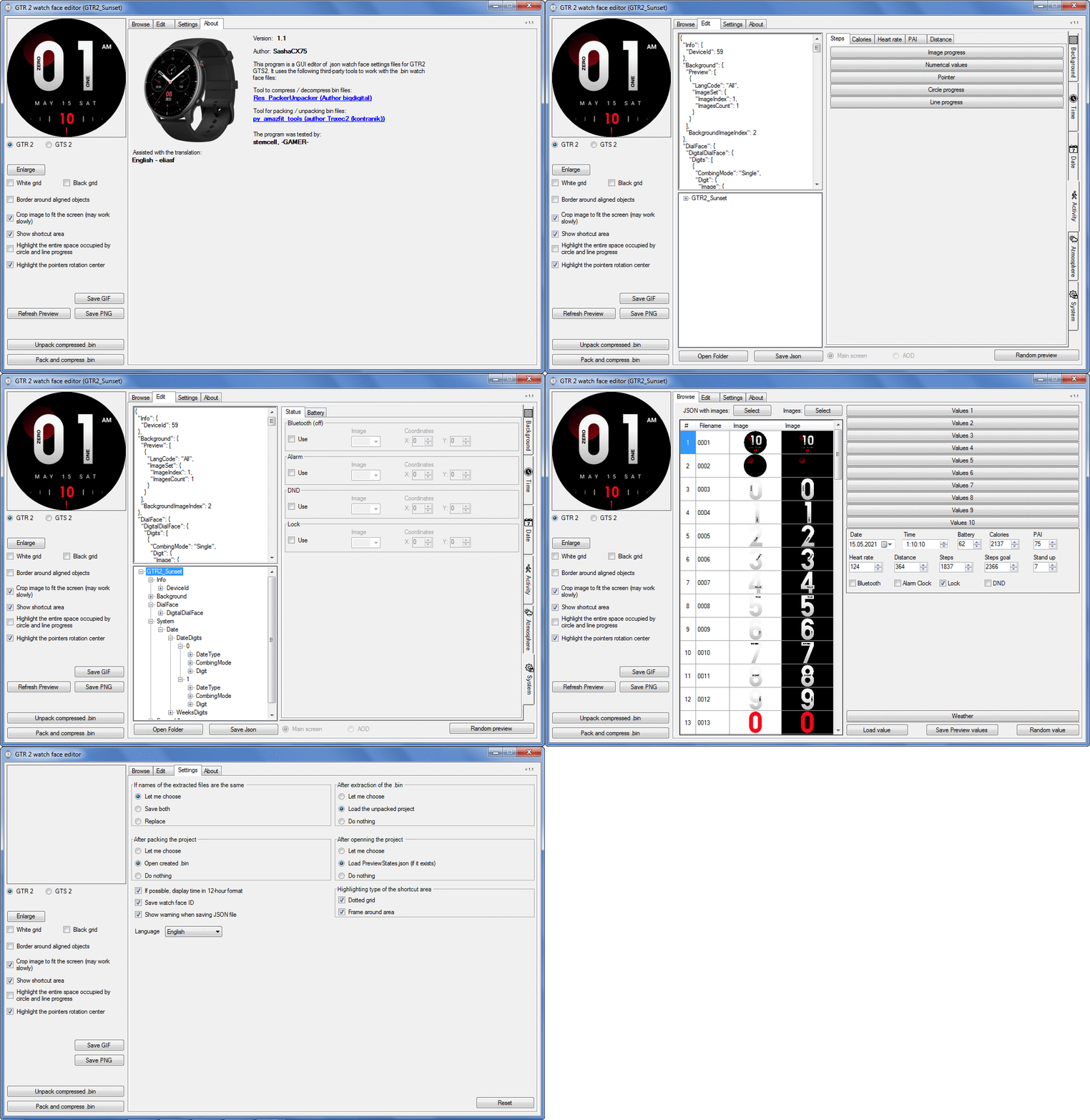
Image
Note: It is advisable to unpack the program to the root of the disk.
Not all dials can be unpacked.

The drawing order of elements cannot be changed. The only exception is if you move the second hand from the center, it will be drawn under the hour and minute hands.

If the .bin file is not created, then you need to look for errors in the .log file. Most often this happens when images have the wrong format.

Version 7.3
List of changes
Fixed known display bugs.
v 7.2
Fixed date display errors in editable zones.
Added support for the Hungarian language.
v 7.1
For distance added support for separate images for miles and kilometers.
v 7.0
Added support for independent coordinates for a set of pictures (segments).
v 6.0
Added support for Zepp E Circle
Added the ability to convert watch faces between different models (GTR 2 (e), Zepp E Circle, T-Rex Pro)
v 5.1
Added the ability to create and update preview images of editable zones.
v 5.0
Added support for editable zones.
v 4.1
Added the ability to display the time in the system font.
Added the ability to display the date in the system font.
Added the ability to change the order of layers.
Added the ability to overlay the clock image on the saved png and gif files (enabled in the settings).
v 4.0
Added support for the system font (inscription at an angle and in a circle).
Added support for the Sunrise parameter (not working correctly for all cities).
Added support for ActivityGoal parameter.
Added the ability to display the goal of steps.
Added support for the Icon parameter.
Added the ability to display circular and linear progress at the same time.
v 3.1
Fixed errors when displaying the distance.
Fixed errors when displaying temperature.
Added French.
Added Italian language.
v 3.0
Added support for T-Rex Pro.
Added support for new elements (StandUp, fat burning, UV index, humidity, wind, pressure).
Found bugs fixed.
v 2.1
Fixed bugs in display AOD.
Fixed bug when using pictures for circular progress.
v 2.0
Added support for AOD.
Added Chinese translation.
v 1
It can work with elements: time, date, statuses, weather, battery, steps, calories, heart rate, PAI, path.
Added English translation.
v 1.2 Added Spanish language
Old versions
Pictures created when unpacking and unpacking bin files are created by the parser and may differ from the images created in the editor. I have nothing to do with these files and am not responsible for their content.

When you turn on the "Follow ..." radio button, the right alignment and center alignment in the editor is displayed incorrectly.
The preview in the editor may differ from the image on the watch. I advise you to check the dial on a real device.

Editable zones do not work on the T-Rex Pro.

The editor does not work with GTS 2 mini (GTS U) watch faces and I do not know how to make such watch faces.

Until the Zepp app has an official watch face with animations or shortcuts, these features cannot be added to the editor.
Shortcuts work on dials converted from GTR (GTS) to GTR 2 (GTS 2). But with this method of creating dials, not all functions work correctly.

GTR (GTS, T-Rex) to GTR2 (GTS 2, T-Rex Pro) converter
GTR (GTS, T-Rex) to GTR2 (GTS 2, T-Rex Pro) Converter & Editor

Because I bought a GTR 3, the program will no longer be updated.

Donate to the author - PayPal: [email protected].

Last edited by SashaCX75 on 01 Jun 2022, 07:19, edited 32 times in total.
User avatar
FeRu
Posts: 39
Joined: 06 May 2021, 11:46
Location: Poland
Has thanked: 14 times
Been thanked: 8 times
Contact:

Post by FeRu »

asoo wrote: 24 Sep 2021, 14:56
I made it for real format GTR2 ready , you can modify from this
https://amazfitwatchfaces.com/gtr/view/17999
Thank you very much bro ;) Today I will post modded version and few other your converted watchfaces
with some mods.
mario_j_costa
Posts: 1
Joined: 25 Jul 2021, 19:31
Location: Lisboa
Been thanked: 1 time
Contact:

Post by mario_j_costa »

And the editor for stratos 3?
fash99
Posts: 1
Joined: 02 Oct 2021, 02:34
Location: Mexico
Contact:

Post by fash99 »

Hi.

Is it possible to port a watchface from GTS to GTS 2e with this tool?

I would like to port a good one from my old GTS.
JPinTX
Posts: 4
Joined: 19 Jun 2020, 01:20
Location: Houston
Has thanked: 2 times
Been thanked: 2 times
Contact:

Post by JPinTX »

First, thank you SashaCX75 for an amazing tool. I have a GTS2, and am having an issue with the AOD face. Specifically, the Activity Goal/Pointer always points to 50%, no matter what the Steps/Steps Goal values are. I've copied from the Main Screen, and double checked all entries. The tool shows the correct pointer position on both the Main and AOD screens, but when I sync to my watch, the Main screen shows the correct pointer position but when it changes to the AOD screen, it always points to 50%. Apologies if this has been addressed in previous comments (I tried to read through them). Thanks for the help in advance.
Julien
Posts: 20
Joined: 27 Aug 2021, 16:50
Location: FR
Has thanked: 1 time
Contact:

Post by Julien »

Dear SashaCX75 do you think it would now be possible to integrate the GTS 2 Mini in your editor. I think kontranik and I have covered 95% of the parameters, some of us have unpacked and repacked some complex watchface and it has proven to work.
Currently Huami editor is broken in several ways (digital aod, animation) and amazfit_tool is the only way to generate a working watchface.
Thanks in advance for considering this request!
User avatar
SashaCX75
Posts: 820
Joined: 26 Oct 2019, 15:18
Location: Ukraine
Has thanked: 13 times
Been thanked: 1029 times
Contact:

Post by SashaCX75 »

neFAST
No. You yourself know how much the dials of the GTS 2 Mini differ from the GTS 2 and how many new parameters you had to add. Therefore, for the GTS 2 Mini you need to make a new editor.
Some of the parameters for GTS 2 Mini are similar to those in GTS 2. But some parameters have no analogues and for them you will need to rewrite the entire code. I'm not interested in this anyway. If someone starts creating an editor for the GTS 2 Mini and decides to make it based on my editor, and not make a completely new editor, then I can answer questions about the existing code.
User avatar
SashaCX75
Posts: 820
Joined: 26 Oct 2019, 15:18
Location: Ukraine
Has thanked: 13 times
Been thanked: 1029 times
Contact:

Post by SashaCX75 »

JPinTX
I have not heard that anyone had problems displaying steps. Perhaps it will be clearer if you give a specific dial on which there are such problems.
JPinTX
Posts: 4
Joined: 19 Jun 2020, 01:20
Location: Houston
Has thanked: 2 times
Been thanked: 2 times
Contact:

Post by JPinTX »

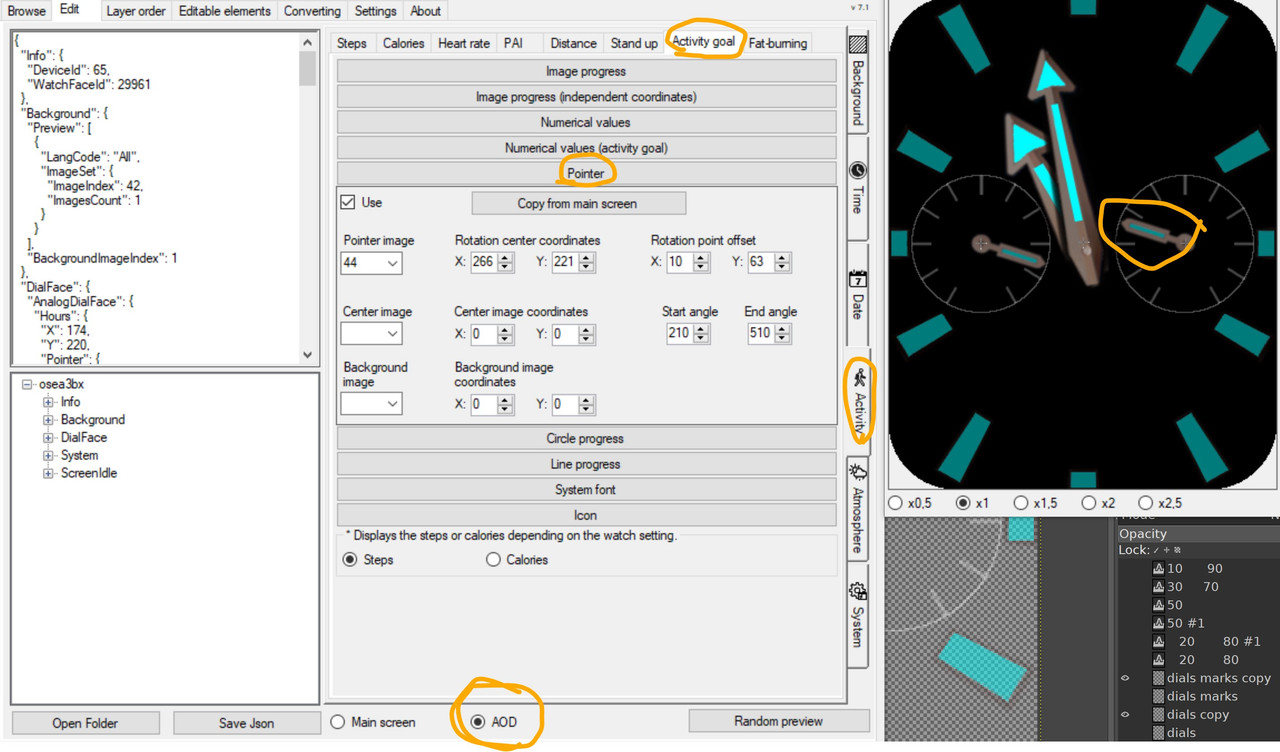
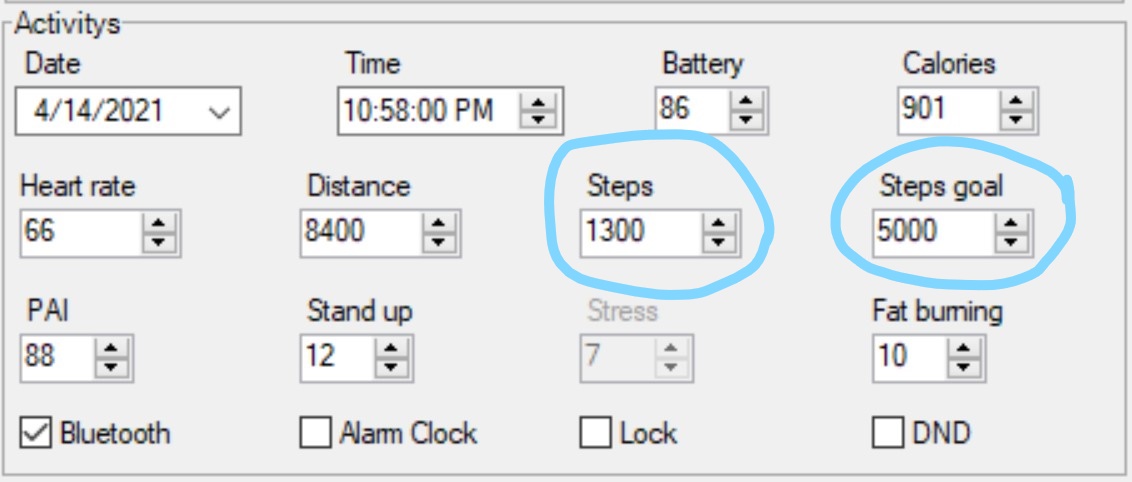
@SashaCX75 I'm not having an issue with absolute STEPS (the specific number of steps I've walked today)... the issue I'm having is displaying % of STEPS GOAL using a Pointer (i.e. I want to have a dial with a pointer that shows from 0% to 100% of Steps Goal, not the number of Steps... If my Steps Goal is 5000 steps, and I've walked 1300 steps,
Image
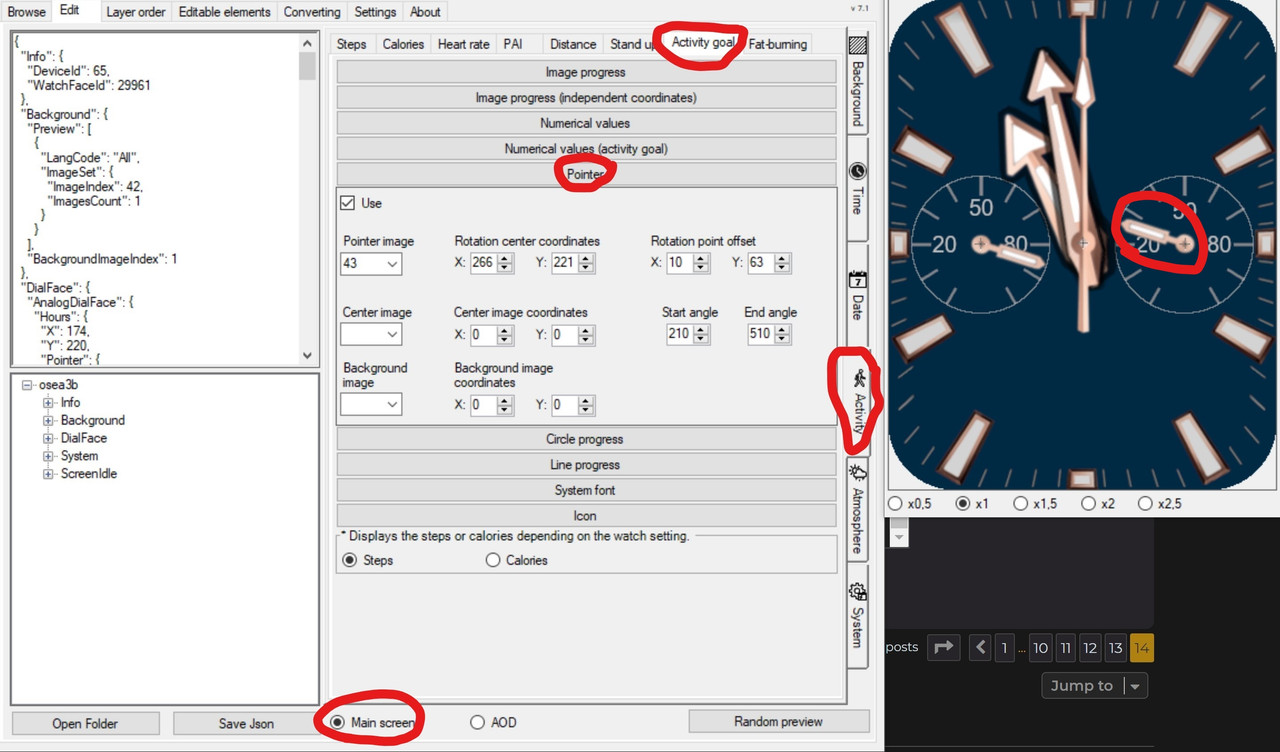
the pointer should point to 26%, if I've walked 4500 steps, the pointer should point to 90%). I'm setting this up under ACTIVITY tab, ACTIVITY GOAL subtab, POINTER.

When I change the test values in the tool, it shows correctly on both the Main screen
Image

and AOD screen.
Image

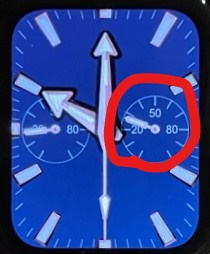
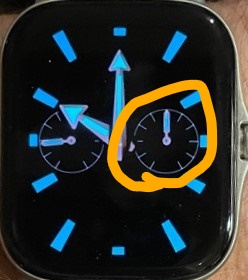
However, when I sync watchface to watch, the Pointer is correct on Main screen,
Image

but incorrect on AOD screen (it always points to 50% no matter how many steps I've taken).
Image

I've simplified my watchface for testing in case there is a memory/size issue, but it still has a problem on the AOD screen. FYI, the dial on the left shows the Battery %, and is correct on both the Main and AOD screens.

Thanks for the help!
Last edited by JPinTX on 05 Oct 2021, 03:12, edited 1 time in total.
User avatar
SashaCX75
Posts: 820
Joined: 26 Oct 2019, 15:18
Location: Ukraine
Has thanked: 13 times
Been thanked: 1029 times
Contact:

Post by SashaCX75 »

JPinTX
Indeed, the ACTIVITY GOAL option on the AOD screen does not work. This is a firmware error.
In your case, I advise you to use the STEPS parameter, the pointer will show the progress towards the goal of the steps.
JPinTX
Posts: 4
Joined: 19 Jun 2020, 01:20
Location: Houston
Has thanked: 2 times
Been thanked: 2 times
Contact:

Post by JPinTX »

SashaCX75 That works! Thanks so much for the quick reply and again for a great tool. I see more options in v2 of the tool and just have to try them out. I thought I had figured out most of the ACTIVITY GOAL subtab, but couldn't understand why the Pointer didn't work only on the AOD screen.
adixxxxxx
Posts: 1
Joined: 09 Oct 2021, 07:48
Location: mumbai
Has thanked: 1 time
Contact:

Post by adixxxxxx »

i would really appreciate if something can be done regarding GTS2 mini.
ig its the best watch, and considering the price, probably the most sold.
please add a provision to make watch faces for the mini. TIA
qd1985
Posts: 3
Joined: 07 Oct 2021, 14:27
Location: 山西
Has thanked: 1 time
Contact:

Post by qd1985 »

谢谢楼主分享
User avatar
SashaCX75
Posts: 820
Joined: 26 Oct 2019, 15:18
Location: Ukraine
Has thanked: 13 times
Been thanked: 1029 times
Contact:

Post by SashaCX75 »

If you have any questions about the GTS 2 mini, it is better to contact the neFAST user. As far as I know, he has made a lot of progress in terms of working with these dials. Maybe he wants to create a separate thread on this forum.

Those who have problems installing python can use this utility. It is based on this project, but should work without installing python. I can’t check its performance, I don’t have a GTS 2 mini.
Attachments
AmazFit_PackUnpack-GTS2mini.zip
(8.7 MiB) Downloaded 417 times
Pal57
WF maker
Posts: 4
Joined: 09 Feb 2021, 21:10
Location: San Marino
Contact:

Post by Pal57 »

Hi,
where can I find new Wf for GTR 2 with "Layer Order" and the "Editable Elements".

Thanks
Pal57
User avatar
SashaCX75
Posts: 820
Joined: 26 Oct 2019, 15:18
Location: Ukraine
Has thanked: 13 times
Been thanked: 1029 times
Contact:

Post by SashaCX75 »

Pal57 You can search the forum for watch faces with the tag "editable zones"
https://amazfitwatchfaces.com/search/gt ... le%20zones
soxnbaur
WF maker
Posts: 1
Joined: 06 Oct 2021, 12:14
Location: Germany
Contact:

Post by soxnbaur »

SashaCX75 : I just wanted to say thank you for your great work on this project. I am not a freak and I enjoyed much using your program to modify watchfaces.
So I have much more fun with my GTR 2e.
Again: Thanks!!!
carolef
WF maker
Posts: 1
Joined: 08 Jul 2018, 09:21
Contact:

Post by carolef »

How to add things to idle screen? Or can anyone edit my watchface to name of weekday and date will be shown on idle?
Andrei_Richea
Posts: 5
Joined: 30 Sep 2021, 06:21
Location: Lérida
Has thanked: 1 time
Contact:

Post by Andrei_Richea »

Hi Sasha , y have a problem after convert the watchface with you program from gtr to Trex-Pro everything goes ok ,y`m installing the watchface to the watch but The ¨¨ year ¨¨disappear from watchface and y cannot find the reason . Can you help me ? Thanks your are the best.
User avatar
SashaCX75
Posts: 820
Joined: 26 Oct 2019, 15:18
Location: Ukraine
Has thanked: 13 times
Been thanked: 1029 times
Contact:

Post by SashaCX75 »

carolef
There is a toggle switch on the edit tab at the bottom. You can select the items on which screen to edit.
User avatar
SashaCX75
Posts: 820
Joined: 26 Oct 2019, 15:18
Location: Ukraine
Has thanked: 13 times
Been thanked: 1029 times
Contact:

Post by SashaCX75 »

Andrei_Richea
If you converted dials from GTR using a converter, then not all elements work on such dials. The display of the year does not seem to work either.

If you converted GTR 2 dials using an editor, then I do not know why the year display does not work. This may not work on the Trex-Pro. I can only check on GTR 2.
Andrei_Richea
Posts: 5
Joined: 30 Sep 2021, 06:21
Location: Lérida
Has thanked: 1 time
Contact:

Post by Andrei_Richea »

Thnak you very much for the advise !!!
domenicopardo
WF maker
Posts: 38
Joined: 04 Sep 2021, 18:09
Location: Bologna
Contact:

Post by domenicopardo »

Per SashaCX75 .... innanzi tutto gran bel programma.. Complimenti.
Nel programma c'è una cartella \Tools con all'interno tre eseguibili : GTR2_Packer.exe - main.exe - SplashScreen.exe ............ a cosa servono ???? , grazie ancora
User avatar
SashaCX75
Posts: 820
Joined: 26 Oct 2019, 15:18
Location: Ukraine
Has thanked: 13 times
Been thanked: 1029 times
Contact:

Post by SashaCX75 »

domenicopardo
GTR 2 Packer.exe - for bin file compression and decompression. Dials don't work without compression.
main.exe - for packing and unpacking the bin file (bin> json).
SplashScreen.exe - startup splash screen.
domenicopardo
WF maker
Posts: 38
Joined: 04 Sep 2021, 18:09
Location: Bologna
Contact:

Post by domenicopardo »

Ok!, Grazie
shamanteras
Posts: 2
Joined: 30 Aug 2020, 01:49
Location: kuala terengganu
Contact:

Post by shamanteras »

Thank you SashaCX75 for this great tool!
Post Reply

Return to “Watchfaces tools”

Who is online

Users browsing this forum: No registered users and 1 guest