• Administrador
  •  
    Support Ukraine
    If you experience any problems with the forum (it is not visible, there is no way to post messages, or some functionality does not work), please let us know. If you have problems with registration or you did not receive confirmation letter, let us know and we will activate your account manually.
    If you get an "The submitted form was invalid. Try submitting again" error, delete cookies, then try again.
     

Watch face editor for Amazfit watch on ZeppOS

This forum is designed to discuss and develop tools creating watch faces.

Moderadores: asoo, lvpokka, Internal error, Watchmens

Regras do fórum
All communication in this branch should only be in English.
To discuss tools that are not in this section, use the “Watchfaces tools (discussion)” forum.
Avatar do usuário
SashaCX75
Mensagens: 812
Registrado em: 26 Out 2019, 15:18
Localização: Ukraine
Has thanked: 13 times
Been thanked: 1006 times
Contato:

Watch face editor for Amazfit watch on ZeppOS

Mensagem por SashaCX75 »

Alternative watch face editor for Amazfit watch on ZeppOS.
Supported watch models
- Amazfit Active
- Amazfit Active 2
- Amazfit Active 2 (Square)
- Amazfit Active Edge
- Amazfit Active Max
- Amazfit Band 7
- Amazfit Balance
- Amazfit Balance 2
- Amazfit Bip 5
- Amazfit Bip 5 Unity
- Amazfit Bip 6
- Amazfit Cheetah
- Amazfit Cheetah Pro
- Amazfit Cheetah (Square)
- Amazfit Cheetah 2 Pro
- Amazfit Falcon
- Amazfit GTR 3
- Amazfit GTR 3 Pro
- Amazfit GTR 4
- Amazfit GTR mini
- Amazfit GTS 3
- Amazfit GTS 4
- Amazfit GTS 4 mini
- Amazfit T-Rex 2
- Amazfit T-Rex 3
- Amazfit T-Rex 3 Pro
- Amazfit T-Rex Ultra
- Amazfit T-Rex Ultra 2
When unpacking the watch faces, it is advisable to immediately select the correct watch model, otherwise the colors may be distorted.

It is desirable to create a new project in a separate folder. Image names do not have to consist only of numbers, you can add short prefixes (for example, date_01, time_01).
Watch faces created in the editor and on Huami's website should unpack normally. Watch faces from Zepp and those created based on them will not be unpacked.
In a set of images for displaying one parameter (for example, images for displaying the day of the week), all images should preferably be the same size. If the size of the images is different, then the first image in the set should be the largest.

All new features in this and next release will be tested on the GTR4 and may not work on other models.
List of changes
v17.1
Fixed the bugs that were found.
Added support for Cheetah 2 Pro.
v17.0
Added the ability to create a ZAB file for publication in the store (button in settings)
Added wind speed in km/h
Added atmospheric pressure in mm Hg
Added support for T-Rex Ultra 2.
v16.1
The ability to invert time circles has been added.
Active Max support has been added.
Image file name verification has been added.
The behavior of application shortcuts in editable elements has been fixed.
v16.0
Added sleep widget.
Added text widgets.
v15.1
Added support for new watch models.
Added BioCharge widget.
Added buttons to launch new applications.
v15.0
Time circles added.
Added world time (time, city, time zone, time offset).
Added text display around the circle.
Added the ability to create watch faces in developer mode (for experienced users, allows logs to be displayed in watch faces).
v14.0
Added support for widgets: ALARM_CLOCK, TRAINING_LOAD, VO2MAX, AQI, BODY_TEMP, FLOOR, READINESS, HRV.
Added support for Balance 2.
Changed the structure of the Preview.States file.
When creating an animated preview, frames with a switchable background have been added.
Added the ability to display the city name in uppercase letters in the weather forecast.
Added links to lessons.
v13.2
Added support for Bip 6.
Fixed the progress display using the image set for most widgets. It should now be more similar to how it is displayed on the watch.
Reworked the code for displaying heart rate with a circular scale. It now uses the standard widget in place of the sensor.
Fixed PAI progress display. Note that the maximum value for the PAI pointer is 525, not 100. This is a feature of the watch, not the editor.
Added warning if files in watch face are in *.bin format.
v13.1
Added ability to make a shortcut to any application in editable items.
Added support for Active 2.
Fixed display of buttons and shortcuts when creating a GIF file.
v13.0
Added autosave (enabled in settings).
Added ability to switch background image by tap.
Added ability to switch background colour by tap.
v12.1
Added transparency for some widgets. Does not work on all models.
Added support for Amazfit T-Rex 3.
v11.2
Fixing the smooth second hand on the GTR4.
v11.1
Updated the digital time widget.
Updated shortcuts widget.
Added new application launch commands for buttons.
v11.0
Completely redesigned the weather widget.
Added weather widget for several days (forecast).
Added support for Bip 5 Unity.
v10.4
Added ability to display month names in a font.
Added Compass widget (works on ZeppOS 2 or later).
Added ability to create *.zpk file (enabled in settings).
v10.3
Added display of hours:minutes:seconds in a single line font.
Added display of date/month/year in one line font (order depends on the watch setting).
Added display of the day of the week in font.
Added new presets for button functions.
v10.2
Added ability to copy widget properties (context menu on the properties field).
v10.1
Added display of time and date in font.
Added widget for adding scripts to watch face.
Fixed bugs in sunrise/sunset operation on circle and at an angle.
Fixed bugs in digital time alignment.
v10.0
]Added support of fonts for data display (after installing such watch faces it is better to restart the watch).
Added possibility to display altitude (in barometer).
Completely redesigned the moon widget.
The arrow pointer for sun and moon should now not be displayed after sunset.
All images are now copied to the watch face, even if they are in folders.
v9.1
Fixed working with Amazfit Balance.
Added support for Amazfit Active.
Added support for Amazfit Active Edge.
Fixed display of distance on a circle.
Fixed displaying sunrise and sunset at an angle.
Added ability to convert images to ARGB format in settings.
Fixed continuous vibration in notifications.
v9.0
Added ability to create shortcuts for a set of images (IMG_LEVEL).
Added support for buttons and presets to launch inbuilt apps.
Added support for Amazfit Balance (not tested).
v8.2
Added ability to display angled or circumferential data for sunrise/sunset, maximum and minimum temperatures (for weather, separate units of Celsius and Fahrenheit only work on newer models).
Added support for Cheetah / Cheetah Pro.
Added support for Bip 5.
Theoretically it is now possible to add support for new models by editing the file in the model_config folder.
v8.1
Added ability to display data at an angle or in a circle for date and time.
Fixed found errors when unpacking dials.
Fixed found errors when working with UHD monitors.
v8.0
Added support for T-Rex Ultra
Added support for GTR Mini
Added the ability to display data at an angle or in a circle (battery, steps, distance, calories, heart rate, PAI, SpO2, stand)
v7.3
Fixed problems with icons in editable items.
Fixed problems with circular progress in editable items.
Added ability to set data rotation angle for some models (ZeppOS 2).
Improved algorithm for unpacking dials that contain additional features. Increased probability of partial dial recognition.
v7.2
Added the ability to change the type of line ending for linear and circular progress.
Added the ability to create shortcuts without using an image.
v7.1
Added independent element with image and top image.
For editable items on the clock, an additional selection in the form of a list is included.
Changed the function of creating an editable element for fat burning.
Fixed motion animation and rotation animation for GTR4 and GTS4.
Added wind direction.
Updated watch face file format.
v7.0
Added smooth second hand (several types)
Added alert every hour
Added the ability to change the direction of rotation of the hour hands
Added the ability to set the sector in which the hour hands work
v6.4
Improved the stability of the bluetooth connection loss notification function
Updated German and Spanish translation
v6.3
Added the possibility of notifications when the connection is broken and restored
Fixed work progress for fat burning
Fixed work progress for the pulse
Fixed bugs in temperature display
Fixed display of shortcuts in AOD mode
v6.1
Added Falcon support.
Changed the algorithm of shortcuts to eliminate conflicts with editable elements.
The configuration of created watch faces has been updated to version 2.
v6.0
Added support for editable background.
Added support for editable arrows.
Added support for editable elements.
Added German translation.
v5.0
Added support for GTR 4
Added support for GTS 4 Mini
Added support for Amazfit Band 7 (not to be confused with Mi Band 7)
v4.1
Fixed bugs when creating and unpacking GTR 3 Pro watch faces
v4.0
Added animation support.
Added Ukrainian language.
Added a tab with some tips on working with the editor.
Added the ability to display the distance in miles.
v 3.0
Added sunrise / sunset
Added barometer
Added stress
Wind added
Added fat burning
Added moon phases
v 2.0
Added weather.
Added workout (stand).
Added oxygen (SpO2).
Added humidity.
Added UV index.
Added the ability to highlight shortcuts when saving gif files (enabled in the settings).
Updated the display of shortcuts in connection with the firmware update on the watch.
Added Italian language.
Added Spanish language.
v 1.1
Fixed loss of error symbol for pulse.
Fixed errors when unpacking dials.
Fixed bug with incorrect model definition for GTS 3.
Version 17.1
Fixed the bugs that were found.
Added support for Cheetah 2 Pro.
Old versions
PS. The interface was translated using an online translator. If someone wants to improve the translation, then write to the PM.

PS2. Many people ask how to install watch faces. For starters, I advise you to read this topic. Personally, I prefer to use this program to install the created watch faces on the GTR 3 (for the GTS 3)

Сollection of code examples for use in watch faces.

Donate to the author - PayPal: [email protected].
Buy me a coffee
Editado pela última vez por SashaCX75 em 10 Mai 2026, 15:38, em um total de 52 vezes.
Avatar do usuário
SashaCX75
Mensagens: 812
Registrado em: 26 Out 2019, 15:18
Localização: Ukraine
Has thanked: 13 times
Been thanked: 1006 times
Contato:

Mensagem por SashaCX75 »

sxtywzc0408 escreveu: 09 Jan 2026, 04:25
"Hey Master, could you please add the Chinese Lunar Calendar?"
I have no such plans.
Avatar do usuário
rush2112
Mensagens: 91
Registrado em: 02 Abr 2022, 10:53
Localização: Montreal, QC, Canada
Has thanked: 116 times
Been thanked: 10 times

Mensagem por rush2112 »

@SashaCX75

Hello,

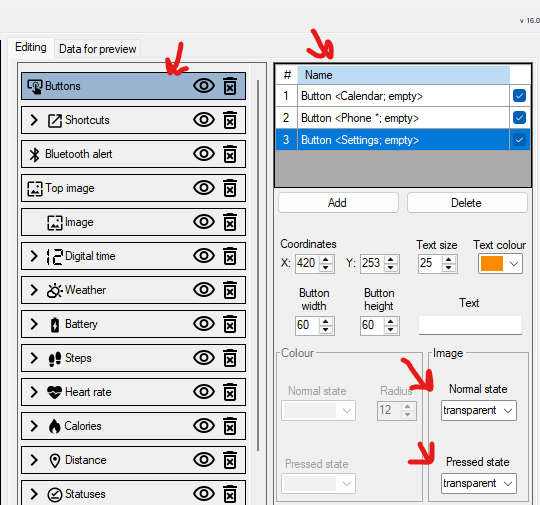
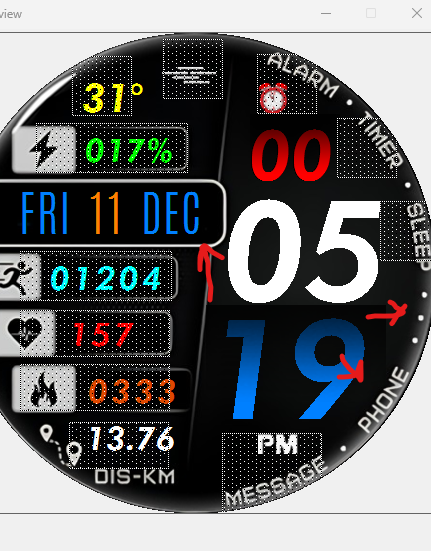
I wanted to let you know that in Portal Editor version 16, the button images (normal state) are not displaying correctly. I use transparent icons, but nothing shows up. I prefer this version of Portal over installing an .exe on my PC.

Could you please look into this when you have a chance? I’ve attached a screenshot for reference.

Thank you,
Marc

* Watch_Face_Editor_(ZeppOS)_v16.0zip
https://www.dropbox.com/scl/fi/5ndg815x ... we2ym&dl=0
Spoiler
Imagem

Imagem

Imagem
Avatar do usuário
asoo
Mensagens: 2103
Registrado em: 03 Jan 2019, 01:48
Localização: ͼͽ Thailand ͼͽ
Has thanked: 404 times
Been thanked: 2018 times

Mensagem por asoo »

rush2112 escreveu: 12 Jan 2026, 10:58
@SashaCX75

Hello,

I wanted to let you know that in Portal Editor version 16, the button images (normal state) are not displaying correctly. I use transparent icons, but nothing shows up. I prefer this version of Portal over installing an .exe on my PC.

Could you please look into this when you have a chance? I’ve attached a screenshot for reference.

Thank you,
Marc

* Watch_Face_Editor_(ZeppOS)_v16.0zip
https://www.dropbox.com/scl/fi/5ndg815x ... we2ym&dl=0
Spoiler
Imagem

Imagem

Imagem
I'm not sure I understand your explanation correct or not .
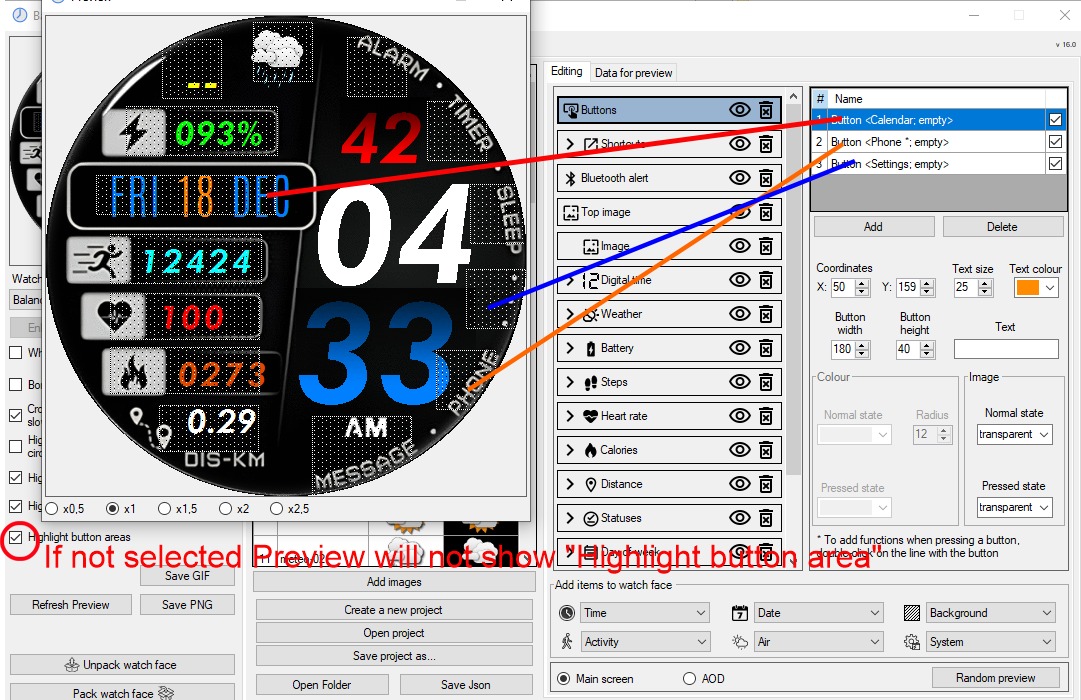
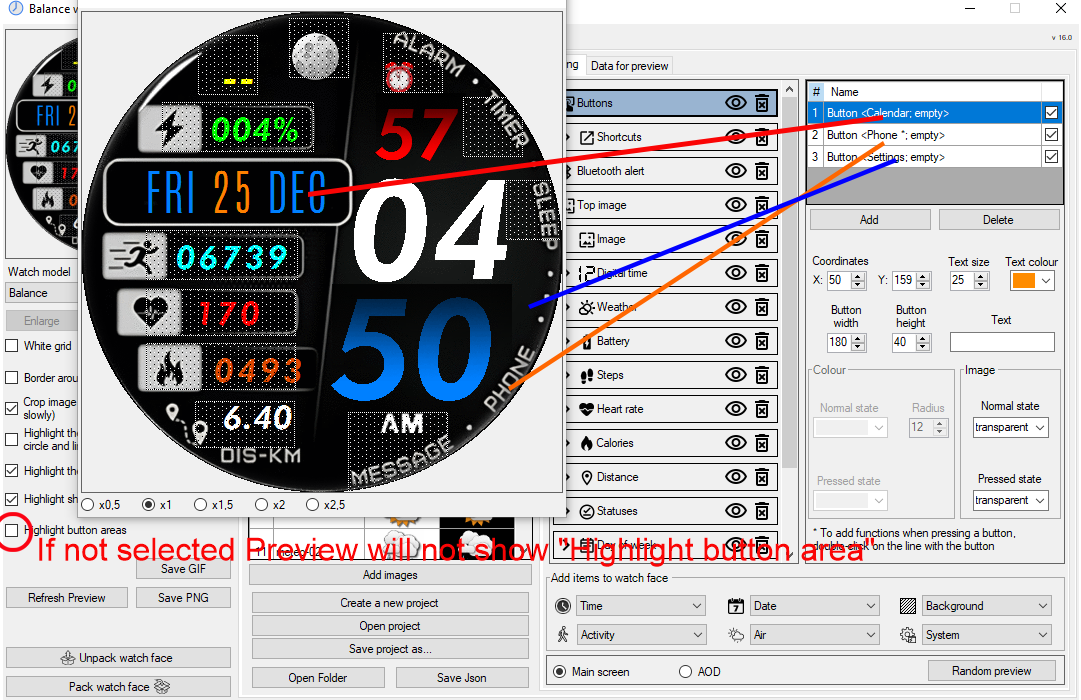
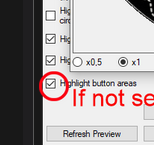
If you mean "highlight button areas,"
I've tested the version you attached.
It displays "highlight button areas" correctly.

I'm not sure if you've enabled "highlight button areas".
If you haven't enabled it, it won't display "highlight button areas."

Preview
Imagem
Imagem
ͼͽ To request please use the interrelated forum in action ͼͽ
Please do not PM to me for requests ported watchface.
Avatar do usuário
rush2112
Mensagens: 91
Registrado em: 02 Abr 2022, 10:53
Localização: Montreal, QC, Canada
Has thanked: 116 times
Been thanked: 10 times

Mensagem por rush2112 »

Thanks 😊
Avatar do usuário
rush2112
Mensagens: 91
Registrado em: 02 Abr 2022, 10:53
Localização: Montreal, QC, Canada
Has thanked: 116 times
Been thanked: 10 times

Mensagem por rush2112 »

asoo escreveu: 12 Jan 2026, 11:51
rush2112 escreveu: 12 Jan 2026, 10:58
@SashaCX75

Hello,

I wanted to let you know that in Portal Editor version 16, the button images (normal state) are not displaying correctly. I use transparent icons, but nothing shows up. I prefer this version of Portal over installing an .exe on my PC.

Could you please look into this when you have a chance? I’ve attached a screenshot for reference.

Thank you,
Marc

* Watch_Face_Editor_(ZeppOS)_v16.0zip
https://www.dropbox.com/scl/fi/5ndg815x ... we2ym&dl=0
Spoiler
Imagem

Imagem

Imagem
I'm not sure I understand your explanation correct or not .
If you mean "highlight button areas,"
I've tested the version you attached.
It displays "highlight button areas" correctly.

I'm not sure if you've enabled "highlight button areas".
If you haven't enabled it, it won't display "highlight button areas."

Preview
Imagem
Imagem
That was the issue, its was uncheck!

Thanks


Imagem
nMonty_
Mensagens: 2
Registrado em: 15 Jan 2026, 02:31
Localização: Vermont
Contato:

Mensagem por nMonty_ »

I'm trying to set the time with font but having an issue when I pack the watch face and install. I set the border width/height to just barely larger than the size, and alignment to center, yet once I install it, the time looks like it's bottom aligned or something. I also notice it seems like the top and bottom alignment for vertical is inverted?
Avatar do usuário
SashaCX75
Mensagens: 812
Registrado em: 26 Out 2019, 15:18
Localização: Ukraine
Has thanked: 13 times
Been thanked: 1006 times
Contato:

Mensagem por SashaCX75 »

No, it's not inverted.
But if an external (non-system) font is used, the editor sometimes incorrectly determines the vertical margins for the font.
nMonty_
Mensagens: 2
Registrado em: 15 Jan 2026, 02:31
Localização: Vermont
Contato:

Mensagem por nMonty_ »

Ok interesting. It also seems size dependent? I use the same font for other smaller things. Like size 40 or 80 for example and its fine. But for hour/minute at 148 it seems to have issues. I also tried downloading someone else's watch face, edit the font, then put it back to their font and the margins are messed up. Even though its fine if I was to never edit it
Avatar do usuário
SashaCX75
Mensagens: 812
Registrado em: 26 Out 2019, 15:18
Localização: Ukraine
Has thanked: 13 times
Been thanked: 1006 times
Contato:

Mensagem por SashaCX75 »

First of all, make sure that the field size is sufficient to display the inscription. It is better to make the field size with a margin.

In addition, large font sizes are not always displayed on watches. This depends on the font used (and probably on the watch model), but problems usually arise if the font size is greater than 150. There is a warning about this in the editor. This does not affect alignment, but large fonts may not be displayed.
[email protected]
Mensagens: 1
Registrado em: 21 Dez 2025, 05:01
Localização: taiwan
Contato:

Mensagem por [email protected] »

I want to click to perform strength training.
Which keyword should be used to replace "SportScreen"?
hmApp.startApp({url: 'SportScreen', native: true });
My watch is balance2.
BravoC
Mensagens: 1
Registrado em: 26 Nov 2025, 23:38
Localização: Canada
Contato:

Mensagem por BravoC »

Sorry if this has been asked before...I searched keywords in this forum but didn't find anything.

I'd like to be able to tap on an element (like seconds display in digital clock) and have it cycle through elements like altitude, baro pressure and back to seconds. I tried the "element switching" example on SashaCX75 github linked above but couldn't make it work...either cuz it's 3 years old and the JS no longer works for current Balance 2 running Zepp 3.35.2.2, or I was doing something wrong (entirely possible).

Any suggestions would be appreciated.
Avatar do usuário
frankh93
Mensagens: 35
Registrado em: 20 Jun 2025, 00:32
Localização: CDMX
Has thanked: 19 times
Been thanked: 3 times
Contato:

Mensagem por frankh93 »

BravoC escreveu: 01 Fev 2026, 22:34
Sorry if this has been asked before...I searched keywords in this forum but didn't find anything.

I'd like to be able to tap on an element (like seconds display in digital clock) and have it cycle through elements like altitude, baro pressure and back to seconds. I tried the "element switching" example on SashaCX75 github linked above but couldn't make it work...either cuz it's 3 years old and the JS no longer works for current Balance 2 running Zepp 3.35.2.2, or I was doing something wrong (entirely possible).

Any suggestions would be appreciated.
Basically you gotta "play" with visibility of these elements based on a cycle... you can check in others watchfaces with this feature how it's done, or if you share your current code it's gonna be better to help you (even more if you open a topic in the proper section)
you should be doing something productive instead of reading this caption :lol:
OneManArmy1
Mensagens: 1
Registrado em: 12 Fev 2026, 12:29
Localização: Europe
Contato:

Mensagem por OneManArmy1 »

Can anyone tell me how i pick a font for anything, im specifically trying to change the font of the digital time widget to a custom one OTF file type but the button to add a font is grayed out and nothing I do makes it clickable
Avatar do usuário
Guydu91
Mensagens: 58
Registrado em: 06 Out 2019, 18:49
Localização: Bretagne / France
Has thanked: 53 times
Been thanked: 9 times
Contato:

Mensagem por Guydu91 »

OneManArmy1 escreveu: 12 Fev 2026, 12:32
Can anyone tell me how i pick a font for anything, im specifically trying to change the font of the digital time widget to a custom one OTF file type but the button to add a font is grayed out and nothing I do makes it clickable
Your question requires some clarification: At what level do you want to integrate a specific font? City name? Numbers? Days of the week? Something else?
I assume you're referring to SashaCX75's watch face editor...
For which watch model do you want to use a particular font?
Also, you can't integrate OTF fonts, only TTF ones.
Avatar do usuário
JAGGER
Mensagens: 9
Registrado em: 12 Jan 2026, 10:46
Localização: Schweinfurt in Germany
Has thanked: 11 times
Contato:

Mensagem por JAGGER »

OneManArmy1 escreveu: 12 Fev 2026, 12:32
Can anyone tell me how i pick a font for anything, im specifically trying to change the font of the digital time widget to a custom one OTF file type but the button to add a font is grayed out and nothing I do makes it clickable
You need to add TTF fonts to the project/directory of the watch you're creating (fonts) directory in your Project! Only TTF fonts will work, and not all of them! You'll then have to test whether they're displayed in the editor. You can convert OTF fonts; there are plenty of tools and websites for that.

I'm currently working with this, but I'm having problems with some menus in the watch face editor. According to the grid display during creation, the text or numbers should be in the center, on the left, or on the right. After loading the watch face onto the watch, this isn't the case. For example, when viewing the left side, if I want the text to start at the edge of the screen, I have to set the value to -2. At 0, the numbers aren't at the edge. I don't know if this is a bug; I'll have to contact the developer.

It would also be nice if they could implement an option for calendar weeks.

This refers to the program: SashaCX75's watch face editor

Best regards from Germany
Avatar do usuário
SashaCX75
Mensagens: 812
Registrado em: 26 Out 2019, 15:18
Localização: Ukraine
Has thanked: 13 times
Been thanked: 1006 times
Contato:

Mensagem por SashaCX75 »

@JAGGER Fonts may have internal margins that are not always handled consistently in the editor and on the watch. This is especially true for vertical margins.
Avatar do usuário
JAGGER
Mensagens: 9
Registrado em: 12 Jan 2026, 10:46
Localização: Schweinfurt in Germany
Has thanked: 11 times
Contato:

Mensagem por JAGGER »

SashaCX75 escreveu: 16 Fev 2026, 14:23
@JAGGER Fonts may have internal margins that are not always handled consistently in the editor and on the watch. This is especially true for vertical margins.
Ok, thanks for the information, SashaCX75. You’re right — what you told me is correct. I experimented for many hours, and there really is a difference! My English is unfortunately not very good, but I’ll try to explain.

On the left I have the hours, in the middle an animation or a small image, and next to that the minutes — without a colon in between, because I placed a small image there. That’s the layout.

Menu: 12 Digital Time
Submenu: 00 Seconds, 00 Minutes, 00 Hours

Example in the hours submenu with font (Xolonium-Bold.ttf):
Spacing setting -8, size 98, height 70, width 134.
Vertical alignment: center.

I had massive problems with horizontal alignment. According to your program, the spacing for the hours was perfect (set to “right”), but once I installed it on the BIP 6, it no longer matched. Either it was too close to the image/animation between the hours and minutes, or when I set it to center, it was again too close. Even when I set the X coordinate to 0, it didn’t match after testing on the BIP 6. According to the software preview I was definitely right at the image edge (0), but on the watch display there was always some space — so not actually at 0.

To the right of the small middle image are the minutes. I didn’t have this problem there. When I go to the edge (as shown in your software preview), the spacing is correct after testing on the BIP 6 display.

The icons behave similarly. If I move them to the far right edge in the software preview, a tiny part gets cut off after uploading it to the watch.

So either my watch display is slightly shifted a few pixels to the left (production tolerance), since I have to move everything a few points to the left in the software — or it’s due to the preview in the program. It’s not much, but it matters when you want to use the full display edge…

I’ll test this with PNG numbers and letters. There must be a reason.

Your software is SUPER AWESOME — THANK YOU for that! I’ll send you some support soon. I know how much work goes into this. It’s really cool that you make something like this for everyone!!! I take my hat off to you!

Suggestions:

Calendar week numbers would be great — I didn’t find them in the software.

The random preview is cool, but if you want to test specific things — for example Monday through Sunday, or view the 29 weather symbols one after another — you end up clicking endlessly. Often my finger is faster than my brain can stop it, and I skip the symbol right after seeing it briefly… then I have to click 120 times again until it appears 😉
Maybe an option to view things sequentially instead of randomly would be helpful. Just a suggestion!

What else did I notice? Hmm… well, some kind of manual would be nice. I’ve actually come quite far so far. After downloading the smartwatch face “big-lr_bip6”, I studied how everything is connected in the Watch Face Editor. Then I started making more and more changes and additions, and that helped me understand a large part of how the process works.

However, there are still settings where I have absolutely no idea what they do. For example, how Java works exactly is still a mystery to me. Also, a written list of the 29 weather icons would be very helpful — how am I supposed to know what symbol number 5 or number 19 should look like? Maybe 18 means storm and I put sunshine instead!

Is there a list of the 29 weather symbols, so I know which symbol corresponds to which number?

(My first smartwatch faces that I uploaded to the website are still very similar to big-lr_bip6 — I’m still practicing.)

And is there any kind of manual for the program? If yes, where can I find it?

Many thanks for your help and best regards from Germany!!!

PS: Sorry, I couldn’t make this any shorter. I hope people can understand my not-so-good English.
Avatar do usuário
asoo
Mensagens: 2103
Registrado em: 03 Jan 2019, 01:48
Localização: ͼͽ Thailand ͼͽ
Has thanked: 404 times
Been thanked: 2018 times

Mensagem por asoo »

JAGGER escreveu: 16 Fev 2026, 23:23


The random preview is cool, but if you want to test specific things — for example Monday through Sunday, or view the 29 weather symbols one after another — you end up clicking endlessly. Often my finger is faster than my brain can stop it, and I skip the symbol right after seeing it briefly… then I have to click 120 times again until it appears 😉
Maybe an option to view things sequentially instead of randomly would be helpful. Just a suggestion!


Is there a list of the 29 weather symbols, so I know which symbol corresponds to which number?


And is there any kind of manual for the program? If yes, where can I find it?

As a program tester, I'd like to present something you need, which is already built into the program but you may not have noticed it.

1. Viewing previews as you desire may not have a dedicated button for sequential viewing, but you can manage this using "Data for preview." You can create your own custom previews.
Spoiler
previewlist.png
previewlist.png (37.38 KiB) Exibido 2526 vezes
2. In the weather icon description section, simply hovering your mouse over an "image" will display a pop-up list of weather icons showing their order.
Spoiler
weahterlist.png
weahterlist.png (49.85 KiB) Exibido 2526 vezes
3. In the manual section, you can find basic instructions and a beginner's guide on how to use the program on the About page.
Spoiler
guides.png
guides.png (64.22 KiB) Exibido 2526 vezes
Hopefully this information will be useful to you.
ͼͽ To request please use the interrelated forum in action ͼͽ
Please do not PM to me for requests ported watchface.
Avatar do usuário
JAGGER
Mensagens: 9
Registrado em: 12 Jan 2026, 10:46
Localização: Schweinfurt in Germany
Has thanked: 11 times
Contato:

Mensagem por JAGGER »

asoo escreveu: 17 Fev 2026, 00:51
JAGGER escreveu: 16 Fev 2026, 23:23

The random preview is cool, but...
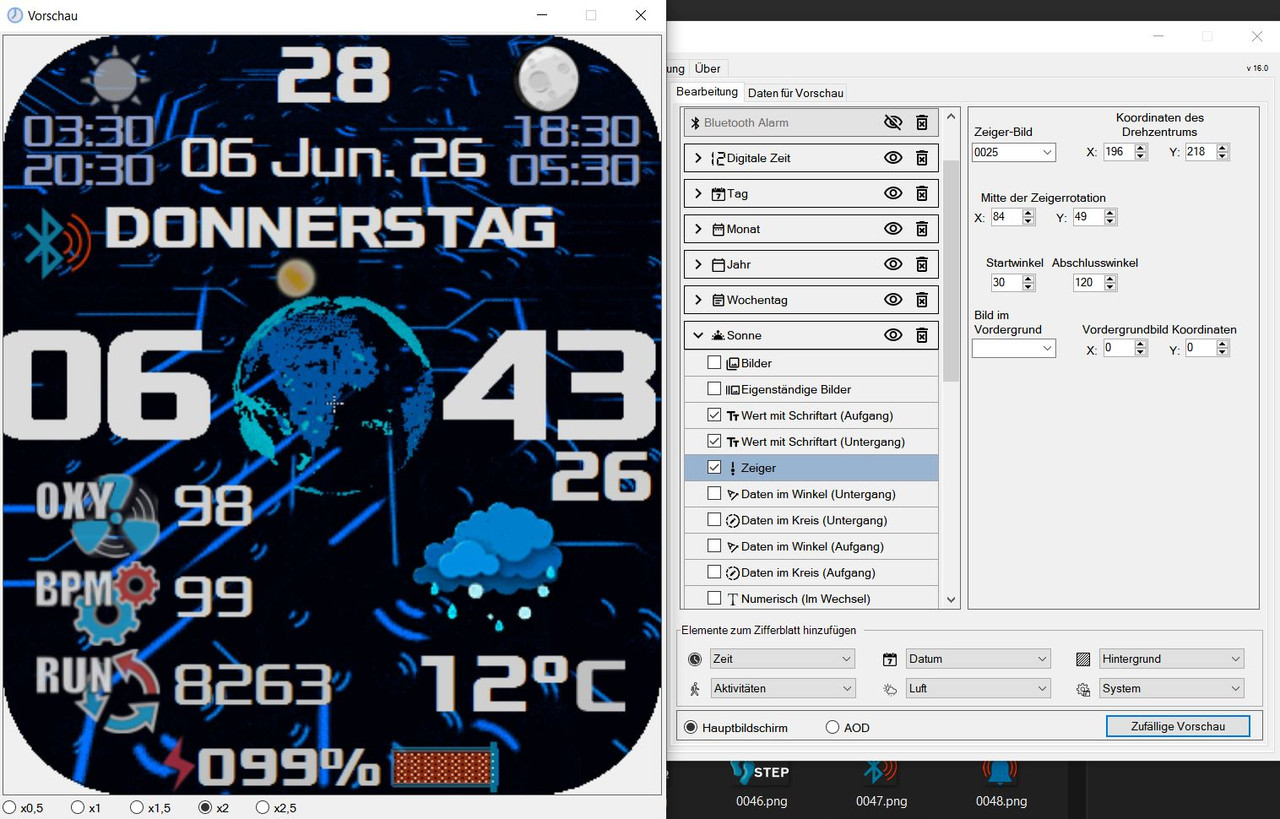
Hi Asso, that helps me a lot, thank you so much!!! Do you think I didn't see the folder? Unbelievable. I'm blind, I just realized... I'm currently creating a clock face, with the planet Earth in the center. Under Edit, Sun, Hands option, I added a small sun symbol. After a lot of trial and error, I finally found a position. (Setting it up is a bit complicated.) The sun should move just above the globe, but only about 15% to the left for sunrise. In the center, it should be at noon, and when it reaches the right, it should be sunset. (So it definitely shouldn't move completely around the Earth.) I've got it sort of right; it works perfectly in the preview. However, after loading it onto the BIP 6, the sun wasn't in the center above the Earth at noon today, but rather at 11 a.m. on the clock. If I adjust the angle, it circles the Earth too far in the evening, exceeding the 15% visibility I need. The problem is that the preview progress doesn't match the uploaded file on the UIhr (BIP 6). If I adjust it so that the clock is set to 1 PM in the preview, it would later be correct on the BIP 6, but you can only ever estimate the position in the program's preview. I hope you understand what I mean! Is there any way to more accurately align the position with the preview so that it's displayed on the BIP 6 exactly as it appears in the program's preview?

Greetings from Germany
Spoiler
Preview Sun Position 12 Uhr false.gif
Preview Sun Position 12 Uhr false.gif (2.79 MiB) Exibido 2503 vezes
Avatar do usuário
SashaCX75
Mensagens: 812
Registrado em: 26 Out 2019, 15:18
Localização: Ukraine
Has thanked: 13 times
Been thanked: 1006 times
Contato:

Mensagem por SashaCX75 »

@JAGGER
1. It is better to attach screenshots to the description. Due to translation, the meaning of phrases can sometimes be distorted. Screenshots show the problem more clearly.

2. Most likely, the watch and the computer take font spacing into account differently. I have already done everything I could to fix this. I am aware of this issue, which is why there is a note at the bottom stating that fonts should be checked on the watch. If precise positioning is required, you can take a screenshot (not a photograph) on the watch and on the computer in any graphics editor, measure how much the font is offset, and make corrections.

3. When opening a project, the preview data is generated so that the data sets contain all months and all days of the week. If you save the gif file for preview, this will be visible. Or you can switch between data sets one by one. The rest has already been answered.

4. I will check the alignment of the icons on the right edge. I admit that there may be an inaccuracy of 1 pixel. But here you need to check not on the edge of the screen. Draw a line on the background and see how the icon is displayed relative to this line.

5. I do not plan to add week numbers to the editor.

6. As the author of the editor, I think everything in it is clear. Therefore, I don't know what to write in the instructions. And I'm too lazy. I added links to the instructions I know. If someone else makes detailed instructions, I will add a link to them.
Avatar do usuário
JAGGER
Mensagens: 9
Registrado em: 12 Jan 2026, 10:46
Localização: Schweinfurt in Germany
Has thanked: 11 times
Contato:

Mensagem por JAGGER »

SashaCX75 escreveu: 17 Fev 2026, 15:05
@JAGGER
1. It is better to attach ...
Ok, thank you very much!

1. In the future, I will take a screenshot.
2. I can imagine how frustrating it is when you’re trying to find a solution and it just doesn’t work—especially when you’ve invested a lot of time that ends up being wasted.
3. Ok.
4. I will create a small square that fits exactly to the edge and load it onto the watch to compare and find out how much I need to move some of the symbols. Maybe it was also caused by the empty spacing between the symbols—I need to check that first. If there is an offset, I can compensate for it. As I wrote, I need to take a closer look at it.
5. Ok, thanks for the information—then I don’t have to worry about that anymore ;-)
6. Yes, you can never know everything if you didn’t create the program yourself. Asso told me about some options that I hadn’t noticed, even though I’ve been working with it very often lately. Afterwards you ask yourself—was I blind? *LOL*

I want to emphasize again that it’s really great that this program exists at all. I truly appreciate people who make things like this happen, because I also know how much hard work goes into it and how much free time—or life time—it takes. I work a lot with photos and videos myself, and sometimes you spend hours working on a graphic until it’s right, or at least until you’re satisfied with it. No one can ever give you that time back.

Maybe in the future it would be possible to improve the coordinate alignment under the Sun / Hands menu. It’s really very difficult to find reasonable positions there, especially for the start and end points—particularly if you want the sun to be exactly in the center at 12 noon.
Spoiler
Imagem
Many greetings to you and thank you very much!

PS: I want the sun to rise above the rightmost number, to be exactly centered over the Earth at noon, and to set in the evening, or rather, disappear before reaching the rightmost numbers/minutes. However, after loading on BIP 6, it's always misaligned. The problem is that it always looks different on the clock over time compared to the editor. Sorry, but I'm just asking if there's anything that can be done about this for the future.
Avatar do usuário
SashaCX75
Mensagens: 812
Registrado em: 26 Out 2019, 15:18
Localização: Ukraine
Has thanked: 13 times
Been thanked: 1006 times
Contato:

Mensagem por SashaCX75 »

I don't see any problems with creating a hand for the sun. It works on the same principle as the hands on a clock. The difference is that on a clock, you can see where the center of rotation is, but with the sun, you can't. Here is a description of how to determine the center of rotation of the hand.
https://docs.zepp.com/docs/guides/faq/w ... hface-mean
Judging by the screenshot, your center of rotation is shifted down relative to the image of the Earth.
Avatar do usuário
SashaCX75
Mensagens: 812
Registrado em: 26 Out 2019, 15:18
Localização: Ukraine
Has thanked: 13 times
Been thanked: 1006 times
Contato:

Mensagem por SashaCX75 »

Version 16.1
https://apps.microsoft.com/store/detail/XP89MR7PJVT9Q9
The ability to invert time circles has been added.
Active Max support has been added.
Image file name verification has been added.
The behavior of application shortcuts in editable elements has been fixed.

I will post the archive here on the forum later.
Avatar do usuário
JAGGER
Mensagens: 9
Registrado em: 12 Jan 2026, 10:46
Localização: Schweinfurt in Germany
Has thanked: 11 times
Contato:

Mensagem por JAGGER »

SashaCX75 escreveu: 26 Fev 2026, 17:46
Version 16.1
...
Great, thank you so much and best regards to you!

André
Avatar do usuário
JAGGER
Mensagens: 9
Registrado em: 12 Jan 2026, 10:46
Localização: Schweinfurt in Germany
Has thanked: 11 times
Contato:

Mensagem por JAGGER »

SashaCX75 escreveu: 26 Fev 2026, 17:46
Version 16.1
...
Hello Sasha,
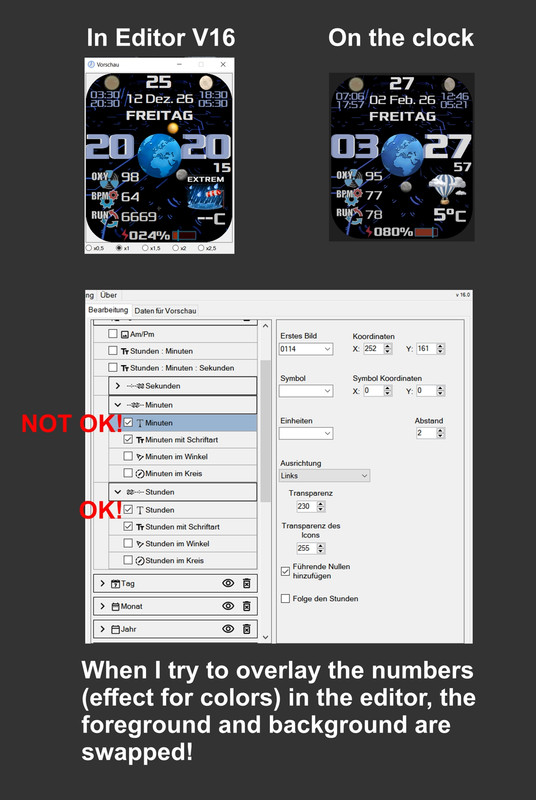
When I try to overlay the numbers (effect for colors) in the editor, the foreground and background are swapped!

The hourly value matches BIP 6 in the editor. However, the foreground and background are reversed in the minutely value. See photo.

Best regards, JAGGER
Spoiler
Imagem
Responder

Voltar para “Watchfaces tools”

Quem está online

Usuários navegando neste fórum: Nenhum usuário registrado e 3 visitantes