• Administrator
  •  
    Support Ukraine
    If you experience any problems with the forum (it is not visible, there is no way to post messages, or some functionality does not work), please let us know. If you have problems with registration or you did not receive confirmation letter, let us know and we will activate your account manually.
    If you get an "The submitted form was invalid. Try submitting again" error, delete cookies, then try again.
     

AmazFit WatchFace editor 2 for Windows

This forum is designed to discuss and develop tools creating watch faces.

Moderators: asoo, lvpokka, Internal error, Watchmens

Forum rules
All communication in this branch should only be in English.
To discuss tools that are not in this section, use the “Watchfaces tools (discussion)” forum.
Post Reply
User avatar
SashaCX75
Posts: 813
Joined: 26 Oct 2019, 15:18
Location: Ukraine
Has thanked: 13 times
Been thanked: 1007 times
Contact:

AmazFit WatchFace editor 2 for Windows

Post by SashaCX75 »

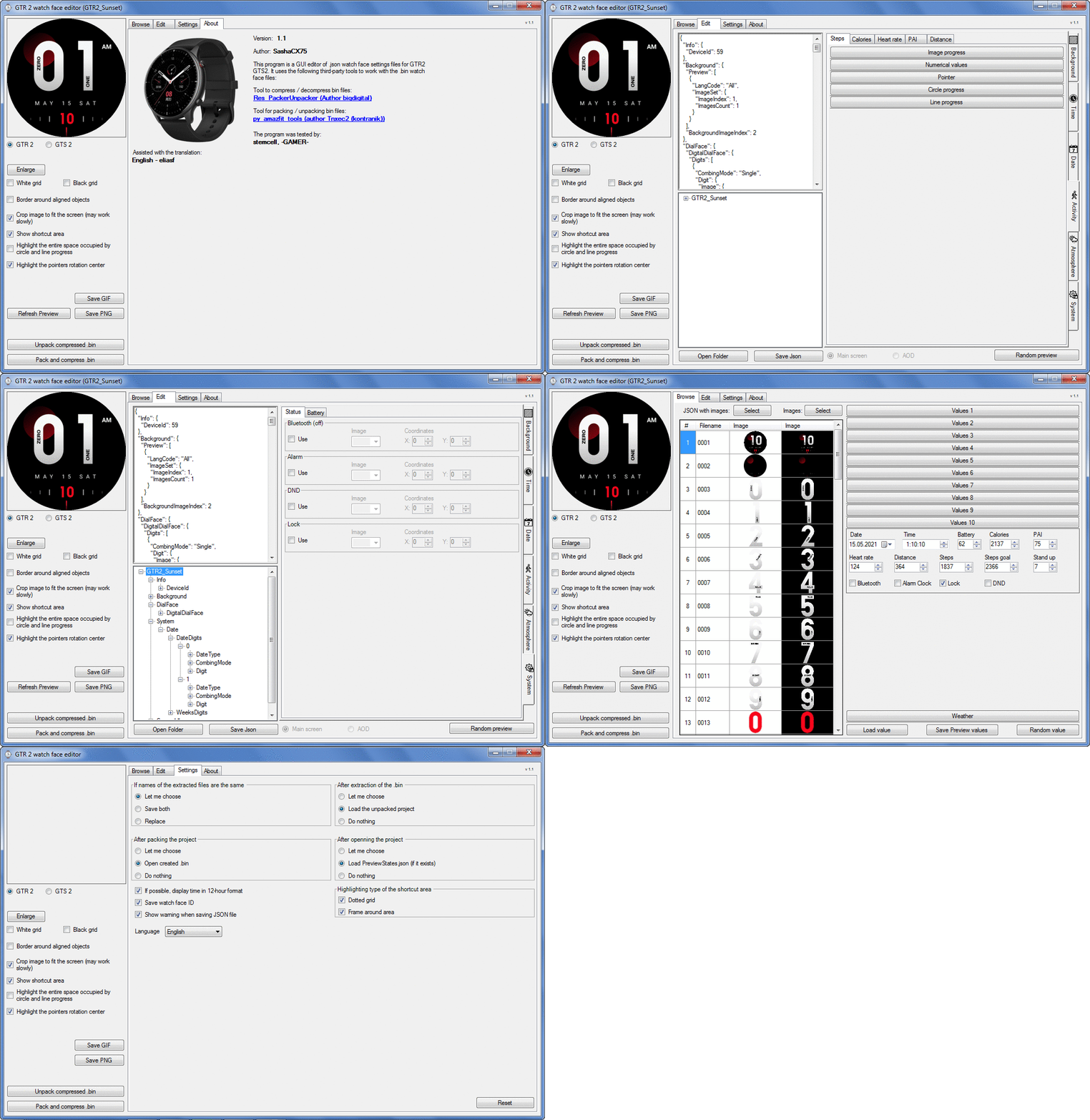
Graphics editor for working with dials Amazfit
The editor supports watch faces from GTR 2(e), GTS 2 (GTS 2e / Zepp E Square), T-Rex Pro, Zepp E Circle.
Screenshot
Screenshot
Image
Note: It is advisable to unpack the program to the root of the disk.
Not all dials can be unpacked.

The drawing order of elements cannot be changed. The only exception is if you move the second hand from the center, it will be drawn under the hour and minute hands.

If the .bin file is not created, then you need to look for errors in the .log file. Most often this happens when images have the wrong format.

Version 7.3
List of changes
Fixed known display bugs.
v 7.2
Fixed date display errors in editable zones.
Added support for the Hungarian language.
v 7.1
For distance added support for separate images for miles and kilometers.
v 7.0
Added support for independent coordinates for a set of pictures (segments).
v 6.0
Added support for Zepp E Circle
Added the ability to convert watch faces between different models (GTR 2 (e), Zepp E Circle, T-Rex Pro)
v 5.1
Added the ability to create and update preview images of editable zones.
v 5.0
Added support for editable zones.
v 4.1
Added the ability to display the time in the system font.
Added the ability to display the date in the system font.
Added the ability to change the order of layers.
Added the ability to overlay the clock image on the saved png and gif files (enabled in the settings).
v 4.0
Added support for the system font (inscription at an angle and in a circle).
Added support for the Sunrise parameter (not working correctly for all cities).
Added support for ActivityGoal parameter.
Added the ability to display the goal of steps.
Added support for the Icon parameter.
Added the ability to display circular and linear progress at the same time.
v 3.1
Fixed errors when displaying the distance.
Fixed errors when displaying temperature.
Added French.
Added Italian language.
v 3.0
Added support for T-Rex Pro.
Added support for new elements (StandUp, fat burning, UV index, humidity, wind, pressure).
Found bugs fixed.
v 2.1
Fixed bugs in display AOD.
Fixed bug when using pictures for circular progress.
v 2.0
Added support for AOD.
Added Chinese translation.
v 1
It can work with elements: time, date, statuses, weather, battery, steps, calories, heart rate, PAI, path.
Added English translation.
v 1.2 Added Spanish language
Old versions
Pictures created when unpacking and unpacking bin files are created by the parser and may differ from the images created in the editor. I have nothing to do with these files and am not responsible for their content.

When you turn on the "Follow ..." radio button, the right alignment and center alignment in the editor is displayed incorrectly.
The preview in the editor may differ from the image on the watch. I advise you to check the dial on a real device.

Editable zones do not work on the T-Rex Pro.

The editor does not work with GTS 2 mini (GTS U) watch faces and I do not know how to make such watch faces.

Until the Zepp app has an official watch face with animations or shortcuts, these features cannot be added to the editor.
Shortcuts work on dials converted from GTR (GTS) to GTR 2 (GTS 2). But with this method of creating dials, not all functions work correctly.

GTR (GTS, T-Rex) to GTR2 (GTS 2, T-Rex Pro) converter
GTR (GTS, T-Rex) to GTR2 (GTS 2, T-Rex Pro) Converter & Editor

Because I bought a GTR 3, the program will no longer be updated.

Donate to the author - PayPal: [email protected].
Last edited by SashaCX75 on 01 Jun 2022, 07:19, edited 32 times in total.
User avatar
asoo
Posts: 2109
Joined: 03 Jan 2019, 01:48
Location: ͼͽ Thailand ͼͽ
Has thanked: 404 times
Been thanked: 2024 times

Post by asoo »

NuttyS wrote: 28 Apr 2021, 12:01
SashaCX75 wrote: 12 Apr 2021, 07:55
Converter watch face from GTR47 / GTS / T-Rex in GTR2 / GTS2 / T-Rex Pro watch face format.
Not all elements work after conversion. Of the advantages of such dials, I consider only working labels and the ability to set different fonts and independent coordinates for tens and units in time.

https://www.dropbox.com/s/7ouokjm8qjkag ... 2.zip?dl=0

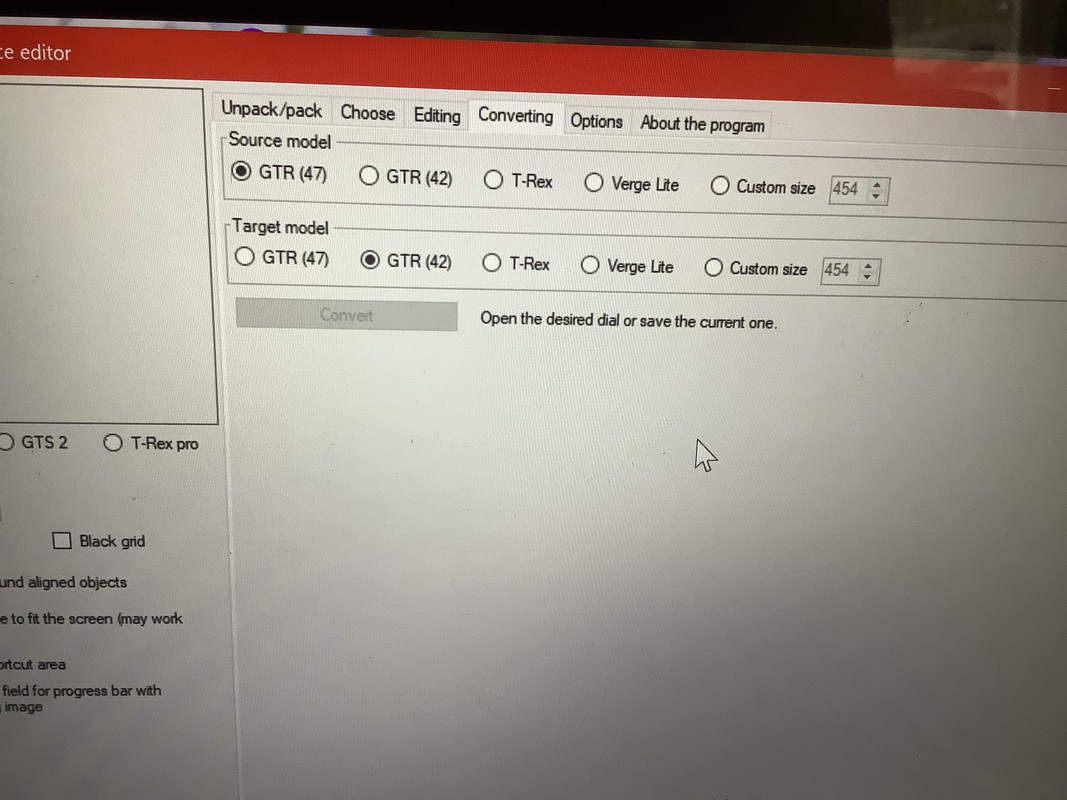
I’m so sorry to be a pest, but I’m new to this bit, I can’t work out how to convert a gtr face to work on a gtr 2e. That’s what this is for right? But I can’t figure it out.

I assumed it would be the convert bit, but there’s no gtr 2e.
Spoiler
Image
Your Picture is not program GTRtoGTR2

Your Picture is "AmazFit_Watchface_Editor_(GTR47ToGTR2)"
viewtopic.php?p=8844#p8844

Image
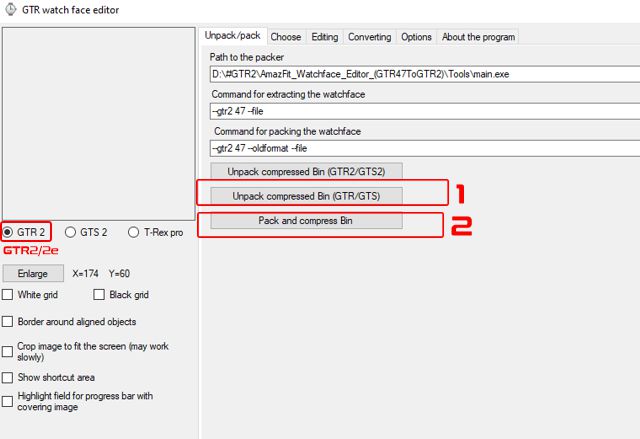
If you want to use this program to convert GTR to GTR2/2e You can do by this step
Use button No.1 to open .BIN GTR47mm that you want to edit or convert
when finish edit use button No.2 Pack to BIN GTR2/2e
ͼͽ To request please use the interrelated forum in action ͼͽ
Please do not PM to me for requests ported watchface.
pory
WF maker
Posts: 5
Joined: 18 Apr 2021, 15:48
Location: Italy
Contact:

Post by pory »

Sorry but i'm confused,,, which tool should i use to convert wachface from t rex in to t rex pro?
User avatar
SashaCX75
Posts: 813
Joined: 26 Oct 2019, 15:18
Location: Ukraine
Has thanked: 13 times
Been thanked: 1007 times
Contact:

Post by SashaCX75 »

pory
If you only need to convert, then you can use the GTRtoGTR2 or AmazFit_Watchface_Editor_ (GTR47ToGTR2) program.

But the converted watch faces may not work properly. I recommend disassembling the dial using AmazFit_Watchface_Editor_ (GTR47ToGTR2) and re-making it with the program from the first post in this thread.
User avatar
SashaCX75
Posts: 813
Joined: 26 Oct 2019, 15:18
Location: Ukraine
Has thanked: 13 times
Been thanked: 1007 times
Contact:

Post by SashaCX75 »

Updated watch faces editor
Fixed errors when displaying the distance.
Fixed errors when displaying temperature.
Added French.
Added Italian language.
[email protected]
WF maker
Posts: 7
Joined: 15 Sep 2019, 14:38
Location: Poland
Has thanked: 3 times
Contact:

Post by [email protected] »

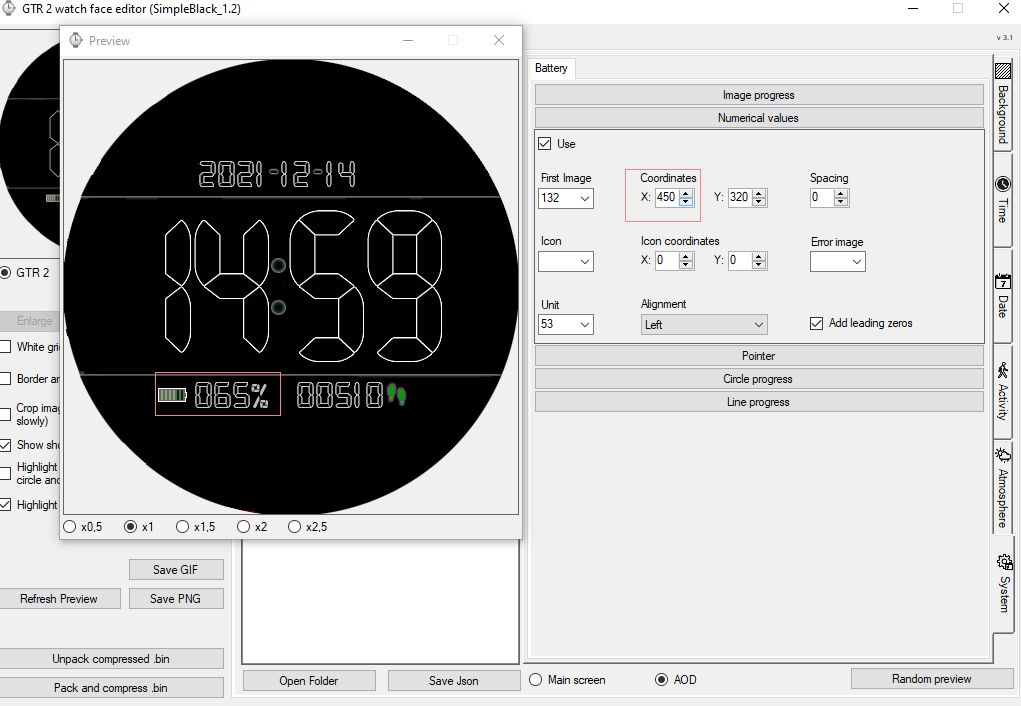
I guess nobody has reported it yet? - in the AoD edit mode, the position change preview for the numerical battery value and for the battery icon does not work.
Only after using the Random preview button is the battery position updated. The problem persists in the latest version.
Image
zyfish
WF maker
Posts: 11
Joined: 24 Aug 2020, 10:55
Location: china
Has thanked: 1 time
Contact:

Post by zyfish »

SashaCX75 wrote: 30 Apr 2021, 14:08
Updated watch faces editor
Fixed errors when displaying the distance.
Fixed errors when displaying temperature.
Added French.
Added Italian language.
gtr2e
There is still a problem with the temperature display in the middle
User avatar
SashaCX75
Posts: 813
Joined: 26 Oct 2019, 15:18
Location: Ukraine
Has thanked: 13 times
Been thanked: 1007 times
Contact:

Post by SashaCX75 »

zyfish wrote: 30 Apr 2021, 20:29
gtr2e
There is still a problem with the temperature display in the middle
On which watch face is the problem and what is your watch firmware?
User avatar
JuniorPassos
WF maker
Posts: 2
Joined: 11 Jul 2019, 22:21
Location: Brasil
Has thanked: 5 times
Contact:

Post by JuniorPassos »

SashaCX75 wrote: 30 Apr 2021, 14:08
Updated watch faces editor
Fixed errors when displaying the distance.
Fixed errors when displaying temperature.
Added French.
Added Italian language.
Thank you very much for the program.
If you need someone to translate into Portuguese, I'm available to help you. ;)
brain65
Posts: 1
Joined: 25 Mar 2021, 13:01
Location: Germany
Has thanked: 1 time
Contact:

Post by brain65 »

Hello,

I had made a Watchface for the GTR2 with the editor2. I use for the weather indicator only the "Image progress" and the "current temperature". The coordinates (x and y) of both are different, but on the watch the current temperature is displayed over the Image Icon on the xy-place of the ImageIcon.

If I deactive the current temperature, the ImageIcon ist displayed on his x,y-coordinate. Reversed, the current temperature is displayed on his xy-place. But together, both is displayed on the same place.

What have i done wrong?

Brain
pory
WF maker
Posts: 5
Joined: 18 Apr 2021, 15:48
Location: Italy
Contact:

Post by pory »

hi guys i'm trying to convert this wachface:

https://amazfitwatchfaces.com/t-rex/view/1816


for t rex pro, but when i try to load it on the watch it says it's incompatible.

can you help me?

this in my bin file and log:

http://www.filedropper.com/md205

thank you!
User avatar
SashaCX75
Posts: 813
Joined: 26 Oct 2019, 15:18
Location: Ukraine
Has thanked: 13 times
Been thanked: 1007 times
Contact:

Post by SashaCX75 »

pory
This dial works for me. Perhaps you should try to remove unnecessary dials from the watch or try another installation method.
pory
WF maker
Posts: 5
Joined: 18 Apr 2021, 15:48
Location: Italy
Contact:

Post by pory »

it still does not work. I tried install manually and with amaz tools but nothing, the staran thing is that the file for trex weighs 1mb while my 250 kb,

thank you

EDIT:

Solved!
Last edited by pory on 15 May 2021, 17:12, edited 1 time in total.
pavan9100
Posts: 1
Joined: 24 Apr 2021, 17:23
Location: hyderabad
Has thanked: 1 time
Contact:

Post by pavan9100 »

can we make animated watch faces for gts 2?
Jtkz
WF maker
Posts: 5
Joined: 11 May 2021, 15:56
Location: Malaysia
Contact:

Post by Jtkz »

Hi Sasha,

I'm trying to make a watchface that displays the date with a different image for each day of the month (1-31).

This editor doesnt support this at the moment but is there a way to edit the JSON code such that it display a different image for each day of the month instead of combining images?

I tried changing the ImagesCount from 10 to 31 but it still combines images 1 to 10 only.

Thanks in advance!
Last edited by Jtkz on 15 May 2021, 11:48, edited 1 time in total.
User avatar
SashaCX75
Posts: 813
Joined: 26 Oct 2019, 15:18
Location: Ukraine
Has thanked: 13 times
Been thanked: 1007 times
Contact:

Post by SashaCX75 »

Jtkz
As far as I know, there is no such possibility. Therefore, I did not add it to the editor, unlike the ability to set a separate picture for each month.
Fulvio_61
WF maker
Posts: 9
Joined: 21 Mar 2021, 13:59
Location: Novara
Has thanked: 1 time
Been thanked: 1 time
Contact:

Post by Fulvio_61 »

SashaCX75

Hello Sasha, one question: will it be possible in the future that through the editor the seconds can also be displayed in AOD?
User avatar
SashaCX75
Posts: 813
Joined: 26 Oct 2019, 15:18
Location: Ukraine
Has thanked: 13 times
Been thanked: 1007 times
Contact:

Post by SashaCX75 »

Fulvio_61
Not. The watch cannot display seconds in AOD mode. More precisely, the seconds can be displayed, but they will be updated once a minute or less.
Jtkz
WF maker
Posts: 5
Joined: 11 May 2021, 15:56
Location: Malaysia
Contact:

Post by Jtkz »

SashaCX75

What about displaying different images each hour? Is that possible?
User avatar
SashaCX75
Posts: 813
Joined: 26 Oct 2019, 15:18
Location: Ukraine
Has thanked: 13 times
Been thanked: 1007 times
Contact:

Post by SashaCX75 »

Jtkz
You can try to do this by converting the dial from GTR 47
Jtkz
WF maker
Posts: 5
Joined: 11 May 2021, 15:56
Location: Malaysia
Contact:

Post by Jtkz »

SashaCX75

I have managed to do this by changing the ImagesCount and DisplayFormAnalog to true. However, the image is appearing in the AOD although I did not select it to display in AOD.

You may refer to attached BIN file if you wish to do so.
Attachments
iwc_dark_tourbillon_test4.bin
(2.08 MiB) Downloaded 130 times
User avatar
SashaCX75
Posts: 813
Joined: 26 Oct 2019, 15:18
Location: Ukraine
Has thanked: 13 times
Been thanked: 1007 times
Contact:

Post by SashaCX75 »

Jtkz
Create AOD and add only the elements you need.
ham.kasturi
WF maker
Posts: 1
Joined: 10 May 2021, 19:03
Location: Klang
Contact:

Post by ham.kasturi »

Hi.
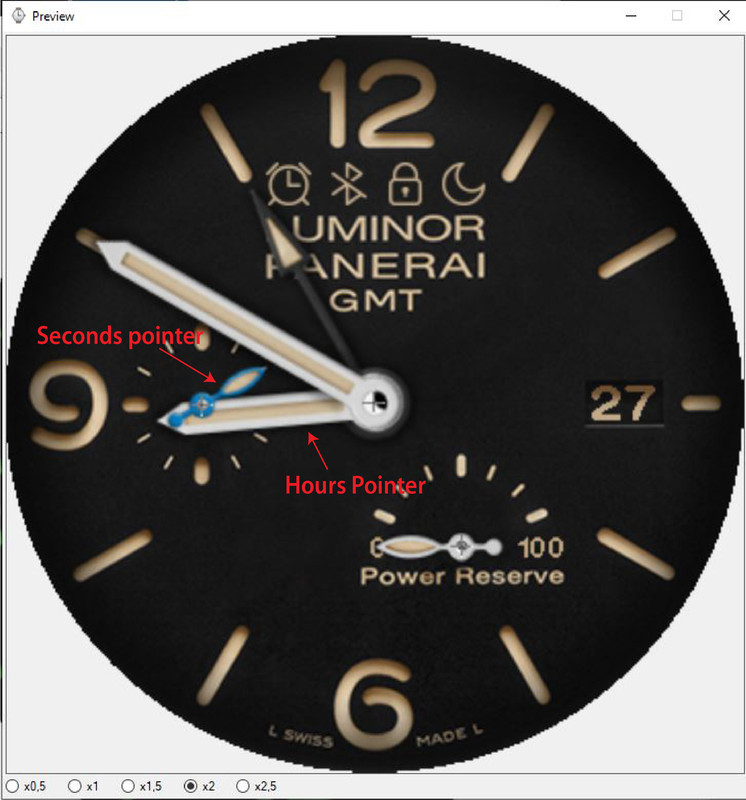
how to move seconds pointer behind hours pointer?

Image
[email protected]
WF maker
Posts: 7
Joined: 15 Sep 2019, 14:38
Location: Poland
Has thanked: 3 times
Contact:

Post by [email protected] »

Are there any components that affect battery consumption? I noticed that my watchfaces, even without AoD, take about 12-15% a day, and those from the store take 12-15% but with AoD on (mine with AoD is about 18-20% a day).
Does the amount of graphics affect the battery consumption of the dial? Or some other factor?
User avatar
SashaCX75
Posts: 813
Joined: 26 Oct 2019, 15:18
Location: Ukraine
Has thanked: 13 times
Been thanked: 1007 times
Contact:

Post by SashaCX75 »

ham.kasturi
Set the hour and minute hands in the center (coordinates for GTR2 227 / 227)

[email protected]
I have no verified information that some elements in the dial affect the autonomy of the watch.
But in some forums I saw the opinion that the presence of an analog clock and a large number of elements (when the size of the dial is more than 1 MB) affects autonomy.
[email protected]
WF maker
Posts: 7
Joined: 15 Sep 2019, 14:38
Location: Poland
Has thanked: 3 times
Contact:

Post by [email protected] »

All my dials were well over 5MB;)
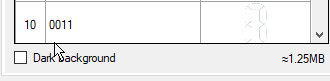
Now I made one without a background which is 1.25MB. She sees how she can handle it.
Would it be possible to add the same size numerator as the editor has for the first GTR for the new editor?

Image
Post Reply

Return to “Watchfaces tools”

Who is online

Users browsing this forum: No registered users and 1 guest