Fenix Neon

T-Rex 3 Pro 48mm Click here for details.
multilingual, de, en, es, fr, it, ja, pl, pt, ru, th, zh
Si prega di notare che tutti i quadranti orologio disponibili su questo sito sono opere creative dei nostri utenti e non sono affiliati con marchi ufficiali o marchi registrati. Sono creati da fan per fan, ispirati da fenomeni culturali popolari, giochi, film o serie.
Il nostro obiettivo è fornire una piattaforma per la creatività e lo scambio, ma ci impegniamo anche a rispettare i diritti intellettuali. Se detiene i diritti d'autore su qualsiasi contenuto che ritiene infranga i suoi diritti su questo sito, contattaci per un'azione appropriata.

Descrizione
Visit My Website: watch.homecmf.com
Core Features (Free):
12 Auto-Languages: Seamlessly auto-switches between 12 system languages (English, Español, Русский, Português, Italiano, Deutsch, Polski, Français, ภาษาไทย, 日本語, 简体中文/繁體中文) without manual setup.
Massive Customization: Features 6 dynamic data blocks and a Top ARC progress bar. The Top ARC supports 11 metrics, and the mutually exclusive Side ARCs support 10 metrics. Choose from 20 basic metrics: Sunrise, Sunset, Humidity, UV, AQI, Alarm, Heart Rate, Battery, PAI, Training Load, Calories, Steps, Distance, SpO2, Sleep, Stress, Stand Count, Weather, Air Pressure, and Altitude.
Smart Tap Shortcuts: Tap any data block to directly open its corresponding App. Tap the center "Hour" or "Minute" area to launch custom shortcuts (Choose from Calendar, Alarm, Compass, Schedule, To-do, Stopwatch, Timer, and Pomodoro).
Long-Press Gestures & Battery Saver: Long-press any data block to quickly cycle its displayed metric. Long-press the "Seconds" area to hide the active compass/seconds hand, which automatically pauses sensors for extreme battery saving. Long-press the "Month" area to toggle Lunar/Solar calendars (Chinese UI only).
On-Watch Settings (How to Access): Long-press the lower-right "DATE" area to enter the settings page. From here, the One-tap Theme System switches between Neon, Sand Cyan, or Custom, automatically linking the ARC colors and background lines. Customize 2 global text colors (Cyan / Sand Gold), 3 time digit colors (Sand Gold / Neon / Sand Cyan), 3 physical seconds hands, 3 compass styles, plus Metal Gradient and Side Panel toggles. Tap an already active style again to completely hide elements like progress bars or bezels.
Seamless Time Gradient: The hour and minute digits use mirrored gradients that flow into one another, so the whole time block reads as a single continuous color transition instead of two separate rows.
Save & Load Profiles: A built-in memory system provides 3 save slots to easily save and load your favorite layout combinations directly on your watch.
Seamless AOD & Status Toggles: Offers 2 AOD styles featuring moon phase, smoothly transitioning to live seconds upon waking up. Includes handy toggles for City Name and Vibration (replaces vibration with a subtle screen flash for quiet environments), and a thoughtful top-left Bluetooth disconnect warning.
PRO Features & Unlock (30% Exclusive):
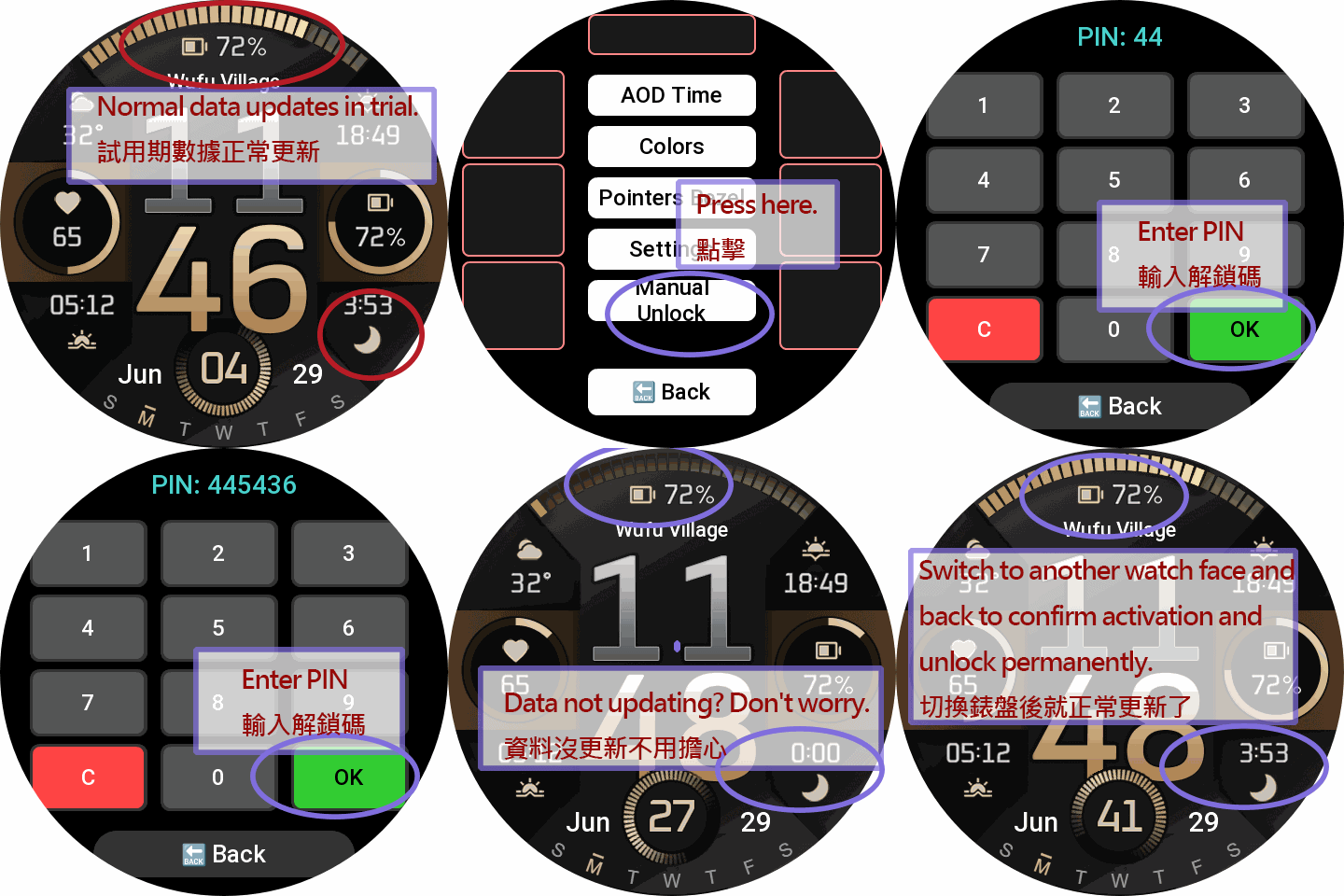
1-Day PRO Trial: Enjoy a full 1-day free trial of basic layouts and all settings.
Exclusive PRO Metrics: Unlocks 7 advanced data metrics for your blocks and ARCs: Next Sun (R/S), BioCharge, VO2 Max, Recovery Time, Fat Burn, Floors, and Wind.
How to Unlock: Scan the QR Code in the watch settings menu (or visit my website) to read the full User Manual. To keep the PRO features after the trial, visit the sponsor page to make a small donation. Once done, contact me with your Device ID, and I will send you a unique 6-digit Unlock PIN to permanently unlock all features!
Enter the PIN on your watch to permanently unlock all features!
Tag
Condividi questo quadrante
Commenti
Per rispondere ai commenti devi essere loggato .
Discussioni recenti della comunità
T-Rex 3 pro 48mm
Yes 🙂 Thanks 😉...
Request watchface for T-Rex 3 pro 44mm
It does work very well on my device, the shortcuts work, also the size of some numbers are bit out of the box, it's not much noticeable. I've already mentioned that "This ...
T Rex 3 Watch face request PLEASE! [T-REX 3]
Hey, i just moved over from a huawei. i had this watch face there which i cannot find here at all. i got it from a huawei watch group on telegram. I have the HWT file of it a...
T-Rex 3 pro
Ok 😃 AOD 👍...
Incoming Call Alert does not display answer button [Trex 3 pro]
Wunderbar!! Thank you so much! I must have ignorantly switched it from Bluetooth to incoming calls. I should have read the "fine print" which clearly states only Bluetooth gives you answer and hangup....
Help with recreating Epix watchface [Trex 3 pro 44mm]
This took far more time than I care to admit but I've tried to adjust the watchface to my liking but some parameters I just ...
system text labels of watchface data (like 'steps') disappear [T-Rex 3 Pro]
OK. I did mean the display in preview box in the app editor. Got it. Thanks very much. I had never looked at the settings page before....





Nessun commento. Commenta per primo.