My watch face, rjdprkns_simple_v1_5, has data labels created using the system, text watch face item. So the data for step count is labeled 'steps', battery charge is labeled 'pwr', and so on. After packing the watch face, the resulting zip file is uploaded, and I use the QR code to install it on my watch.
But, when I download the zip file and unpack it into the editor, all the labels are not on the watch face preview; and the text data item has been stripped out. Re-creating the labels is the only way I know to put them back in order to add data or move things around.
Does anyone know why the text labels are stripped out when I want to edit the watch face?
If you experience any problems with the forum (it is not visible, there is no way to post messages, or some functionality does not work), please let us know.
If you have problems with registration or you did not receive confirmation letter, let us know and we will activate your account manually.
If you get an "The submitted form was invalid. Try submitting again" error, delete cookies, then try again.
If you have problems with registration or you did not receive confirmation letter, let us know and we will activate your account manually.
If you get an "The submitted form was invalid. Try submitting again" error, delete cookies, then try again.
system text labels of watchface data (like 'steps') disappear [T-Rex 3 Pro]
Forum rules
When adding a new topic, use the template: Topic title [device name]
For example: How to create watch face [T-Rex Pro]
All communication in this branch should only be in English.
When adding a new topic, use the template: Topic title [device name]
For example: How to create watch face [T-Rex Pro]
All communication in this branch should only be in English.
-
asoo
- Posts: 2227
- Joined: 03 Jan 2019, 01:48
- Location: ͼͽ Thailand ͼͽ
- Has thanked: 441 times
- Been thanked: 2142 times
- Contact:

Which version of Sasha editor are you using?rjdprkns wrote: 08 May 2026, 20:13My watch face, rjdprkns_simple_v1_5, has data labels created using the system, text watch face item. So the data for step count is labeled 'steps', battery charge is labeled 'pwr', and so on. After packing the watch face, the resulting zip file is uploaded, and I use the QR code to install it on my watch.
But, when I download the zip file and unpack it into the editor, all the labels are not on the watch face preview; and the text data item has been stripped out. Re-creating the labels is the only way I know to put them back in order to add data or move things around.
Does anyone know why the text labels are stripped out when I want to edit the watch face?
From my testing, version 16.1 has the issues you mentioned.
I recommend version 17.0. I've tested it and it unpacks correctly.
Link Version 17.0 :
viewtopic.php?p=11643#p11643
viewtopic.php?p=22148#p22148
Tested Preview

ͼͽ To request please use the interrelated forum in action ͼͽ
Please do not PM to me for requests ported watchface.
Please do not PM to me for requests ported watchface.
Ah so! I am using 16.1. I'll get 17.0 and try that. Thank you!!
Yeah. Labels are back. However, the digital time gives a 12 hour clock, not 24. I don't see any place to adjust that...yet. It can be switched, yes?
Thank you very much.
Thank you very much.
-
asoo
- Posts: 2227
- Joined: 03 Jan 2019, 01:48
- Location: ͼͽ Thailand ͼͽ
- Has thanked: 441 times
- Been thanked: 2142 times
- Contact:
I'm not sure if you mean the display on the clock or in the app's preview box.rjdprkns wrote: 13 May 2026, 00:19Yeah. Labels are back. However, the digital time gives a 12 hour clock, not 24. I don't see any place to adjust that...yet. It can be switched, yes?
Thank you very much.
If you mean on the regular clock, it will depend on your phone's time setting, whether you choose 12-hour or 24-hour format.
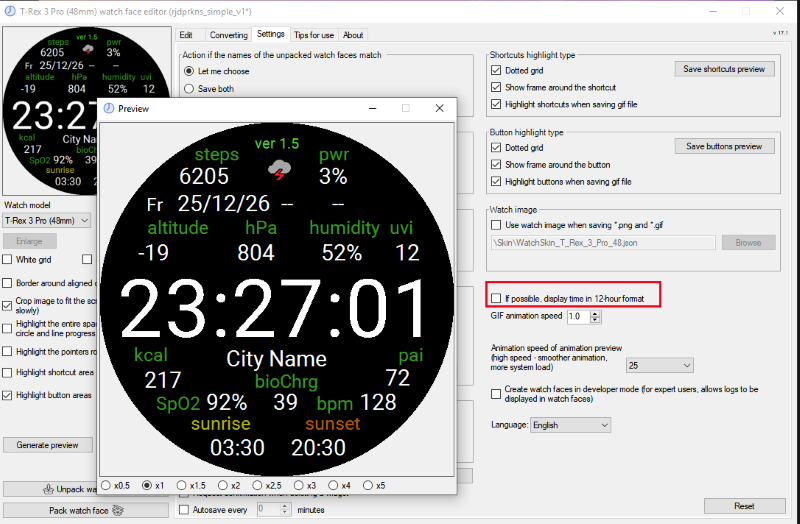
But if you mean the display in the app editor, in the preview box, you can set the display in settings: "[] if possible, display time in 12-hour format".
If you select this, the preview will show in 12-hour format; if you remove it, it will show in 24-hour format.
Preview
ͼͽ To request please use the interrelated forum in action ͼͽ
Please do not PM to me for requests ported watchface.
Please do not PM to me for requests ported watchface.
OK. I did mean the display in preview box in the app editor. Got it. Thanks very much. I had never looked at the settings page before.
Who is online
Users browsing this forum: No registered users and 1 guest