BigTime

T-Rex 3 Натисніть тут, щоб дізнатися більше.
multilingual, de, en, es, fr, it, ja, pl, pt, ru, th, zh
Зверніть увагу, що всі циферблати, доступні на цьому сайті, є творчими роботами наших користувачів і не пов'язані з офіційними брендами або торговими марками. Вони створюються шанувальниками для шанувальників, надихаються популярними культурними феноменами, іграми, фільмами, або серіалами.
Наша мета - надати платформу для творчості та обміну, але ми також прагнемо поважати інтелектуальні права. Якщо ви володієте авторськими правами на будь-який контент, який, на вашу думку, порушує ваші права на цьому сайті, будь ласка, зв'яжіться з нами для вжиття відповідних заходів.

Опис
BigTime | Massive Fonts & Ultimate Customization
Welcome to the BigTime watchface! Experience an extremely legible, large-font design. Enjoy the core features completely for FREE during your 24-hour trial!
Visit My Website: watch.homecmf.com
Highlights & Smart Features
• 12 Auto-Languages: Automatically syncs with your system language without any manual setup.
• Smart Dual Time and Alarm Switch: Displays your secondary time zone and city abbreviation. In AOD mode, this area automatically switches to display your System Alarm time to maximize screen space.
• Massive Data: 4 dynamic corner blocks supporting up to 28 metrics.
• Gestures and Shortcuts: Tap any of the 4 corners to open its app. Tap the Hour or Minute zones to open custom shortcuts. Long-press any corner to swap metrics instantly. Long-press the bottom-right edge to open the Main Settings.
• Sensor Control and Power Saving: Long-press the bottom Seconds area to hide the seconds and compass tracking, replacing it with a Moon Phase display to massively save battery. Long-press the bottom-left area to toggle the background compass.
• On-Watch Profiles: Save and load up to 3 of your favorite layout combinations directly on the watch.
Deep Customization & 28 Full Metrics
• 28 Full Data Metrics: Track everything you need! Choose from a massive library of 28 metrics including Heart Rate, Battery, Steps, Weather, SpO2, Sleep, Altitude, Air Pressure, BioCharge, VO2 Max, Recovery Time, Floors, Wind, Sun R/S, Dual Time Zone, and much more.
• Deep On-Watch Settings: Features 5 1-Tap Themes (White, Red, Green, Orange, Blue) that sync backgrounds and visual styles instantly. Further customize with 5 progress bar colors, 6 time digit colors, and 12 dark-themed date backgrounds to create your unique style. Includes a vibration toggle (uses screen flash when off for silent mode).
Trial Rules (1-Day Free Trial)
• During Trial: The settings menu is fully accessible for 24 hours. Corner blocks can swap between base metrics.
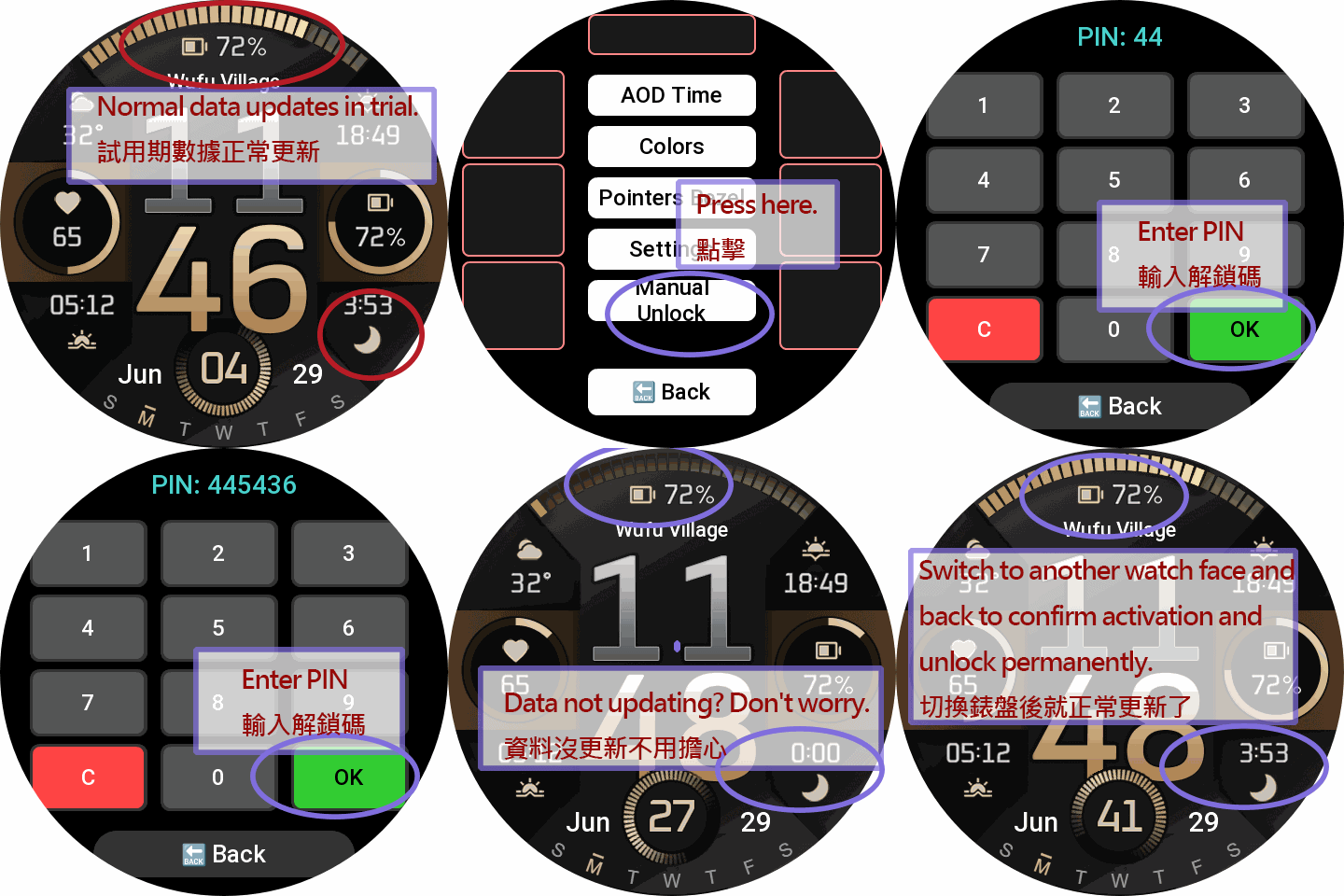
• Post-Trial Lock: After 24 hours, customization is strictly disabled. The watchface locks down, stopping background sensors and displaying only basic time to ensure extreme battery saving. Any touch will trigger the unlock prompt.
PRO Unlock (Permanent Full Access)
Sponsoring permanently unlocks the ultimate experience:
• All 28 Metrics Unlocked: Gain full access to the base and advanced PRO metrics.
• Full Area Swapping: Unrestricted 28-metric swapping is permanently unlocked for ALL 4 corner blocks.
• Complete Settings Access: Permanently restore all trial features, layouts, and customizations.
How to Unlock Permanently:
Visit watch.homecmf.com (or scan the QR Code in the watch settings menu).
Make a small coffee donation to support the development.
Check your email! Follow the instructions provided to retrieve your unique 6-digit Unlock PIN.
Enter the PIN on your watch to permanently unlock all features!
Теги
Поділиться цим циферблатом
Коментарі
Вам необхідно увійти, щоб залишати коментарі або відповідати на них.
Недавні обговорення в спільноті
T-Rex 3 pro 48mm
Yes 🙂 Thanks 😉...
Request watchface for T-Rex 3 pro 44mm
It does work very well on my device, the shortcuts work, also the size of some numbers are bit out of the box, it's not much noticeable. I've already mentioned that "This ...
T Rex 3 Watch face request PLEASE! [T-REX 3]
Hey, i just moved over from a huawei. i had this watch face there which i cannot find here at all. i got it from a huawei watch group on telegram. I have the HWT file of it a...
T-Rex 3 pro
Ok 😃 AOD 👍...
Incoming Call Alert does not display answer button [Trex 3 pro]
Wunderbar!! Thank you so much! I must have ignorantly switched it from Bluetooth to incoming calls. I should have read the "fine print" which clearly states only Bluetooth gives you answer and hangup....
Help with recreating Epix watchface [Trex 3 pro 44mm]
This took far more time than I care to admit but I've tried to adjust the watchface to my liking but some parameters I just ...
system text labels of watchface data (like 'steps') disappear [T-Rex 3 Pro]
OK. I did mean the display in preview box in the app editor. Got it. Thanks very much. I had never looked at the settings page before....





Немає коментарів. Залиште перший коментар.