Live Sky & Weather_T-Rex2 / 实时天空和天气_T-Rex2

T-Rex 2 en, ms, pt, ru, uk, zh
Por favor, note que todos os mostradores de relógio disponíveis neste site são obras criativas dos nossos usuários e não estão afiliados com marcas oficiais ou marcas registradas. São criados por fãs para fãs, inspirados em fenômenos culturais populares, jogos, filmes ou séries.
Nosso objetivo é fornecer uma plataforma para criatividade e troca, mas também nos esforçamos para respeitar os direitos intelectuais. Se você detém direitos autorais sobre qualquer conteúdo que acredita infringir seus direitos neste site, por favor, entre em contato conosco para ações apropriadas.

Descrição
*** 如果你的 T-Rex 2 已经升级到 Zepp OS2.0, 您可以到下面的链接安装专为Zepp OS2.0设计,具有更多功能的表盘. ***
/t-rex/view/12437
________________________________________________________________________________
15-07-2023
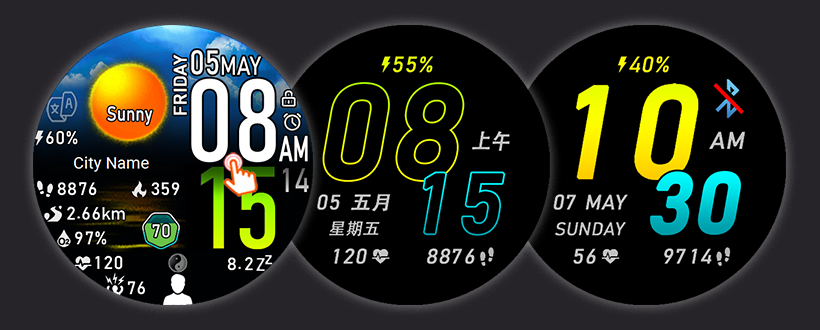
- Add Watch Face special for Malaysia user that include English, Chinese & Malay language, Festival is special set follow Malaysia Festival.
- All Watch Face update to Version 2 with below changer...
i) Selectable font style at AOD display : Hollow Font for battery saving purpose & Solid Font that easy to read under sunlight.
ii) Shortcut for Battery change from "Battery Saver screen" to "Battery Manager" that is more useful for user.
iii) Swap between Temperature & Battery to solve text overlapping with weather description when battery is 100%
02-07-2023
- Add language Portuguese as request.
- Combine Russian and Ukrainian language into same Watch Face.
25-06-2023
- Add language Russian and Ukrainian Watch Face as request.
*** WF en-ru-uk & en-pt is version without Lunar date and Festival. ***
________________________________________________________________________________________________________________________________
This watch face is designed with beautiful sky background and weather, and almost all shortcut keys are available.
这款表盘采用美丽的天空背景和天气设计,几乎所有快捷键都可用。
Special features for this Watch Face.
此表盘的特殊功能。
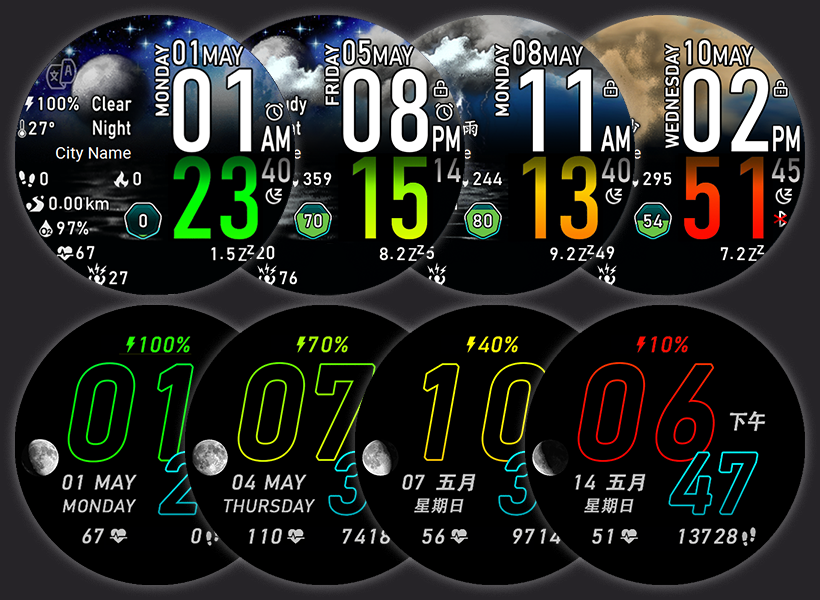
1) Hour / Minute text as battery indicator.
Minutes text in normal mode and hours text in AOD mod will change color from green to red according to battery level. You can easily know the status of your battery without read the battery level text, when those "minutes/hours" text turns red, it's time to charge your watch.
1)小时/分钟字体作为电池指示器。
正常模式下的分钟字体和 息屏模式下的小时字体将根据电池电量从绿色变为红色。 您无需阅读电池电量字体即可轻松了解电池状态,当“分钟/小时”字体变为红色时,就该为手表充电了
2) This watch face was made in a custom scripts to implement some functions that didn't support in Zepp OS1.0 & Zepp OS2.0 versions, as we know...
a) Night weather icons only support for Zepp OS2.1 and above....
- With this watch face, you are able to see the night weather icons & weather description if your device is OS1.0 or OS2.0.
b) Lunar calendar, solar terms & festivals.
- Not support for the original firmware of the Zepp OS1.0 international version watch.
- Zepp OS2.0 and above, unable to display lunar date and festivals if watch language is not set in Chinese.
- With this watch face, you can on/off Lunar Date & Festival anytime for all firmware & Zepp OS version.
c) Custom scripts to link to un-support shortcut .
- The original firmware doesn't support certain shortcut like Calendar, Choose Workout, Workout History, World Clock...
- With this watch face, almost all page is possible to go.
2)此表盘是用自定义代码制作的,以实现一些在Zepp OS1.0和Zepp OS2.0版本中不支持的功能,正如我们所知.....
a) 夜间天气图标只支持Zepp OS2.1及以上版本....
- 使用此表盘,即使您的设备是 OS1.0 或 OS2.0,您都可以看到夜间天气图标和夜间天气描述。
b)农历、节气和节日。
- Zepp OS1.0国际版手表原装固件不支持此功能。
- Zepp OS2.0及以上版本,如果手表语言未设置为中文,则无法显示阴历和节日。
- 有了这个表盘,无论您的手表固件属于哪个版本,您都可以随时打开/关闭农历日期和节日。
c)链接到不支持快捷方式的自定义代码
- 原生固件不支持某些快捷方式,例如日历、选择运动、运动记录、世界时钟等等...
- 有了这个表盘,几乎所有页面都可通过快捷键到访。
3) Changeable Weather Description and Watch Face language.
This watch face supports English, Chinese Simplified & Chinese Traditional text.
- Tap on “文/A” icon to on/off or switch the weather description & also Watch Face language (Not the watch language setting).
- The Weekday, Month & AM/PM only change follow watch language setting.
- Select English or None will hide Lunar date
3)可选择性的天气描述和表盘语言。
此表盘支持英文、简体中文和繁体中文
- 点击“文/A” 图标打开/关闭或切换天气描述和表盘语言(不是手表语言设置)
- 星期、月份和上午/下午仅根据手表语言设置更改。
- 选择English或None将隐藏农历。
4) Changeable Sky background and cloud on sky.
- Sky background will change according to the time of day, sunrise sky, sunny sky, sunset sky and night sky.
(The sunrise sky will change EXACTLY ON TIME follow watch sunrise time, the original firmware will only change 30~40 minute later after sunrise time)
- Cloud on sky change according to weather.
4)多变的天空背景和天空中的云彩。
- 天空背景会根据一天中的时间、日出、中午、日落和夜晚而变化。
(日出天空会随着手表日出时间准时更换,原来的固件只能在日出时间后30~40分钟后更换)
- 天空中的云朵将根据天气变化而更换。
5) Support Units in Metric & Imperial display in all language, set your watch UNITS to...
- "Metric" will display Distance in km.
- "Imperial" will display Distance in miles.
5)支持所有语言的公制和英制单位显示,将您的手表单位设置为
- “公制” 将显示以公里为距离的单位。
- “英制” 将显示以英里为距离的单位。
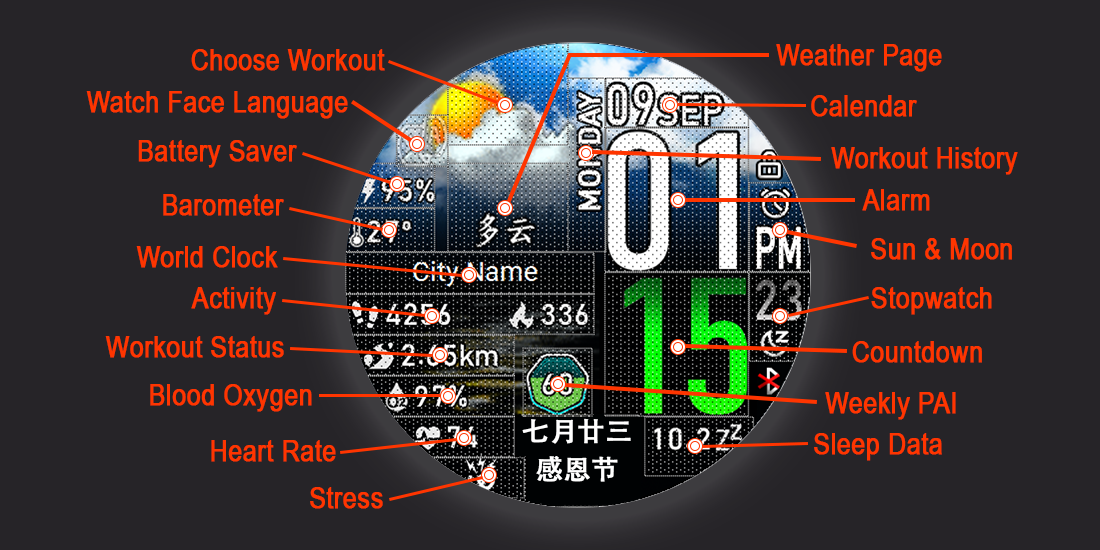
6) Description Shortcuts:
- Tap on Battery -> Battery saver mode
- Tap on Temperature -> Barometer
- Tap on Sky above Weather text -> Choose Workout
- Tap on Weekday -> Workout History
- Tap on City -> World Clock
- Tap on Step & Calories -> Activity (Step Today, Fat-Burn Time & Stand Today)
- Tap on Distance -> Workout Status
- Tap on O² -> Blood Oxygen
- Tap on Heart rate -> Heart Rate
- Tap on Stress icon -> Stress
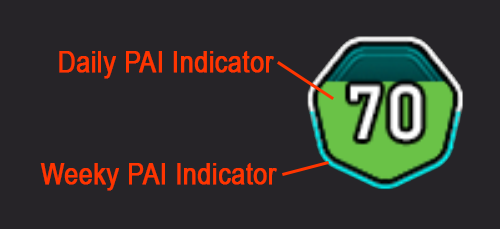
- Tap on Pai -> Weekly PAI
- Tap on Date -> Calendar
- Tap on Hour -> Alarm
- Tap on Minute -> Countdown
- Tap on Second -> Stopwatch
- Tap on AM/PM -> Sun & Moon
- Tap on Sleep -> Sleep data
6)描述快捷键:
- 点击电量 -> 省电模式
- 点击温度-> 气压高度计
- 点击天气文字上方的天空 -> 选择运动
- 点击天气文字上方的天空 -> 天气
- 点击星期 -> 运动记录
- 点击城市 -> 世界时钟
- 点击步数和卡路里 -> 活动(今日步数、燃脂时间和今日站立)
- 点击距离 -> 运动状态
- 点击 O² -> 血氧
- 点击心率 -> 心率
- 点击压力图标 -> 压力
- 点击 PAI -> PAI
- 点击日期 -> 日历
- 点击小时 -> 闹钟
- 点击分钟 -> 倒计时
- 点击秒 -> 秒表
- 点击上午/下午 -> 太阳和月亮
- 点击睡眠 -> 睡眠数据
Vibration & Message when Bluetooth Connection lost/restored (for this feature to work, AOD must be enabled on the watch).
蓝牙连接丢失/恢复时的振动和消息(要使用此功能,必须在手表上启用息屏显示)
Special thanks...
1) @SashaCX75 - For Watch Face Editor Tool.
2) @chen1092 - For Lunar script sharing.
3) @mirda69 - For night weather icon script sharing.
4) Amazfit Zepp Community team help to solve some script issue.
特别感谢...
1) @SashaCX75 - 于表盘编辑器工具。
2) @chen1092 - 于 Lunar 代码共享。
3) @mirda69 - 于夜间天气图标代码共享。
4) Amazfit Zepp 团队帮助解决了部分代码问题。
This watch face just tested on GTR3 and GTR4.
这个表盘只在 GTR3 和 GTR4 上测试过。
Please do not copy or edit this WF without my permission.
未经我的许可,请勿复制或编辑此表盘
If you want more language, please let me know and give me the translate in your language. I will try my best to add in more language.
Tags
Compatilhar este watch face
Comentários
Você precisa estar logado para postar ou responder aos comentários.
Discussões recentes na comunidade
T-Rex 3 pro 48mm
Yes 🙂 Thanks 😉...
Request watchface for T-Rex 3 pro 44mm
It does work very well on my device, the shortcuts work, also the size of some numbers are bit out of the box, it's not much noticeable. I've already mentioned that "This ...
T Rex 3 Watch face request PLEASE! [T-REX 3]
Hey, i just moved over from a huawei. i had this watch face there which i cannot find here at all. i got it from a huawei watch group on telegram. I have the HWT file of it a...
T-Rex 3 pro
Ok 😃 AOD 👍...
Incoming Call Alert does not display answer button [Trex 3 pro]
Wunderbar!! Thank you so much! I must have ignorantly switched it from Bluetooth to incoming calls. I should have read the "fine print" which clearly states only Bluetooth gives you answer and hangup....
Help with recreating Epix watchface [Trex 3 pro 44mm]
This took far more time than I care to admit but I've tried to adjust the watchface to my liking but some parameters I just ...
system text labels of watchface data (like 'steps') disappear [T-Rex 3 Pro]
OK. I did mean the display in preview box in the app editor. Got it. Thanks very much. I had never looked at the settings page before....





/t-rex/view/12272
For my watch face file, I have make some change on the script, I'm not sure it will confuse you or not. 20.06.2023 13:17:36 Reclamar
ПНД
ВТР
СРД
ЧТВ
ПТН
СБТ
ВСК
ЕЩЁ РАЗ СПАСИБО! 20.06.2023 12:10:46 Reclamar
ЯНВ
ФЕВ
МАРТ
АПР
МАЙ
ИЮНЬ
ИЮЛЬ
АВГ
СЕН
ОКТ
НОЯ
ДЕК
ЭТО СОКРАЩЁННО МЕСЯЦА,ЕСЛИ БУДЕТ МАЛО МЕСТА. СПАСИБО! 20.06.2023 12:49:35 Reclamar
The Zepp OS 2.0 upgrade for the T-Rex2 will take a little while to come. We plan to start upgrading to 2.0 at Falcon at the end of July or early August, and then the T-Rex2 will be upgraded to 2.0 within August. 20.06.2023 19:09:22 Reclamar
Спасибо! 24.06.2023 16:04:38 Reclamar
Есть скрин, как сюда прикрепить не знаю. 26.06.2023 19:21:37 Reclamar
Но спасибо. 27.06.2023 22:33:51 Reclamar
Thanks for your remind. 15.07.2023 19:02:55 Reclamar