I've been all over the forum looking for help so I'm sorry if this has already been addressed.
Not sure what I'm doing wrong but when I double click on Watch_Face_Editor_(ZeppOS).exe it does nothing. I put in in programs, c: on my desktop.
Any suggestions would be appreciated!
-
- 管理员
-
-
Support Ukraine
If you experience any problems with the forum (it is not visible, there is no way to post messages, or some functionality does not work), please let us know. If you have problems with registration or you did not receive confirmation letter, let us know and we will activate your account manually.
If you get an "The submitted form was invalid. Try submitting again" error, delete cookies, then try again.
Why can't I open Watch_Face_Editor_(ZeppOS).exe?
版主: asoo, lvpokka, Internal error, Watchmens
版面规则
All communication in this branch should only be in English.
To discuss tools that are not in this section, use the “Watchfaces tools (discussion)” forum.
All communication in this branch should only be in English.
To discuss tools that are not in this section, use the “Watchfaces tools (discussion)” forum.
-
Wetodd1024
- 帖子: 4
- 注册时间: 16 8月 2025, 06:32
- 来自: TEXAS
- 联系:
-
asoo
- 帖子: 2203
- 注册时间: 03 1月 2019, 01:48
- 来自: ͼͽ Thailand ͼͽ
- Has thanked: 420 time
- Been thanked: 2125 time

I'm not sure what issue you're experiencing, but if you're using Windows 11, I recommend trying this thread.Wetodd1024 写了: 21 8月 2025, 01:37I've been all over the forum looking for help so I'm sorry if this has already been addressed.
Not sure what I'm doing wrong but when I double click on Watch_Face_Editor_(ZeppOS).exe it does nothing. I put in in programs, c: on my desktop.
Any suggestions would be appreciated!
viewtopic.php?p=20820#p20820
ͼͽ To request please use the interrelated forum in action ͼͽ
Please do not PM to me for requests ported watchface.
Please do not PM to me for requests ported watchface.
-
Wetodd1024
- 帖子: 4
- 注册时间: 16 8月 2025, 06:32
- 来自: TEXAS
- 联系:
-
Wetodd1024
- 帖子: 4
- 注册时间: 16 8月 2025, 06:32
- 来自: TEXAS
- 联系:
Spoiler
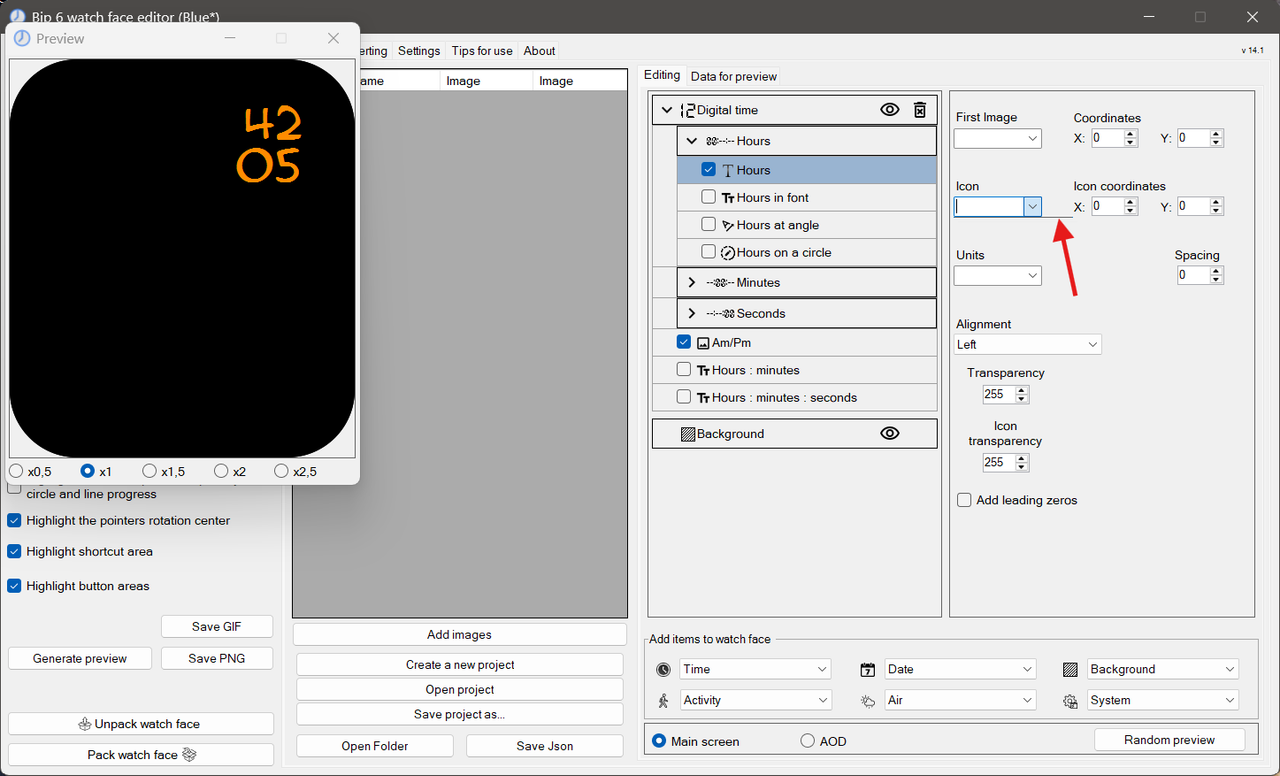
When I go to select an image to use all I get is a line...
Thanks again for all the help!
-
asoo
- 帖子: 2203
- 注册时间: 03 1月 2019, 01:48
- 来自: ͼͽ Thailand ͼͽ
- Has thanked: 420 time
- Been thanked: 2125 time
From the image you sent, it seems like you don't have any images in the "assets" folder. When you selected an image, the problem occurred as you described.Wetodd1024 写了: 21 8月 2025, 11:04Now that it's working...Spoiler
When I go to select an image to use all I get is a line...
Thanks again for all the help!
However, I'm curious as to why your preview displayed that way. Where did the numbers in the preview come from?
Next time, if you want to ask a new question that is not related to the original topic, I suggest you open a new topic.
ͼͽ To request please use the interrelated forum in action ͼͽ
Please do not PM to me for requests ported watchface.
Please do not PM to me for requests ported watchface.
-
Wetodd1024
- 帖子: 4
- 注册时间: 16 8月 2025, 06:32
- 来自: TEXAS
- 联系:
Sorry about that. Will do. Thanks again for the help.
The numbers are 'Hours in Font'.
The numbers are 'Hours in Font'.
在线用户
正浏览此版面之用户: 没有注册用户 和 2 访客