Hi All,
New here but created a 176x176 image to create a new watch face. After I run the process through the on-line tools and create a json record i then drag the json record onto watchface.exe it creates the .bin file. I then drag the .bin file onto watchface.exe to uncompress the file and it makes the directory with all the files in it. I noticed the png file I created get really pixelated and looks bad. It looked A LOT CLEARER before running it through the watchface.exe. Ideas for me to keep the quality of the original?
-
- Administrator
-
-
Support Ukraine
If you experience any problems with the forum (it is not visible, there is no way to post messages, or some functionality does not work), please let us know. If you have problems with registration or you did not receive confirmation letter, let us know and we will activate your account manually.
If you get an "The submitted form was invalid. Try submitting again" error, delete cookies, then try again.
Design Watch face degrades image
Moderators: Internal error, Watchmens
-
Baseballtechguy
Design Watch face degrades image
- Attachments
-
- after conversion?!
- 0000.png (6.44 KiB) Viewed 2490 times
-
- Original
- 0000.png (23.04 KiB) Viewed 2490 times
-
PeaZzz
Wild guess: The Bip's color palette is smaller. It'll convert your 16.7M color image to 16 collors?
-
cloud12077
- WF maker
- Posts: 8
- Joined: 24 Nov 2018, 03:08
- Contact:
I ran into that issue when I started making faces too. As PeaZzz said, it's due to the limited 16 bit color limit.
The Amazfit Bip supports only 8 colors. Before editing watchfaces it is worth to take a look at Watchface Reference on AmazfitCentral:cloud12077 wrote: 26 Jan 2019, 10:54I ran into that issue when I started making faces too. As PeaZzz said, it's due to the limited 16 bit color limit.
http://amazfitcentral.com/2018/02/05/am ... son-docs/
-
cloud12077
- WF maker
- Posts: 8
- Joined: 24 Nov 2018, 03:08
- Contact:
Mike76 wrote: 26 Jan 2019, 15:48The Amazfit Bip supports only 8 colors. Before editing watchfaces it is worth to take a look at Watchface Reference on AmazfitCentral:cloud12077 wrote: 26 Jan 2019, 10:54I ran into that issue when I started making faces too. As PeaZzz said, it's due to the limited 16 bit color limit.
http://amazfitcentral.com/2018/02/05/am ... son-docs/
I stand corrected. Thank you Mike76, btw love your work.
I am a new watch face designer. I use Windows paint application to color watch face objects. However, color warnings appear when a watch face is being compiled. I am not sure whether 8 or 16 bit color should be used. For example how to apply 8 bit red color with windows paint? Any suggestion is appreciated. Thanks.
-
TXK

- Posts: 299
- Joined: 10 Apr 2018, 05:15
- Location: china
- Has thanked: 149 times
- Been thanked: 97 times
- Contact:
The position and style of the tool icon in the 【Windows paint application】 are the same.asadulhuq wrote: 15 Feb 2019, 16:11I am a new watch face designer. I use Windows paint application to color watch face objects. However, color warnings appear when a watch face is being compiled. I am not sure whether 8 or 16 bit color should be used. For example how to apply 8 bit red color with windows paint? Any suggestion is appreciated. Thanks.
- 无标题.png (29.11 KiB) Viewed 2193 times
- 无标题.png (25.48 KiB) Viewed 2194 times
Last edited by TXK on 17 Feb 2019, 08:08, edited 1 time in total.
Thanks for hints. But Chinese characters in the application is a problem for me.
-
TXK
- Posts: 299
- Joined: 10 Apr 2018, 05:15
- Location: china
- Has thanked: 149 times
- Been thanked: 97 times
- Contact:
asadulhuq wrote: 16 Feb 2019, 11:59Thanks for hints. But Chinese characters in the application is a problem for me.
The position and style of the tool icon in the 【Windows paint application】 are the same.
I get following error/warning and hence compilation of the watch face cannot be completed. You may please notice the watch face image below which I am trying to compile.
********
Debug|Reading config...
Debug|Reading referenced images from 'C:\Users\Asadul Huq\Desktop\MyBIPFace\NEWFace\1528565345112'
Trace|Loading images for 2 'Background'
Trace|Loading images for 2.1 'Image'
Trace|Loading image 0...
Trace|Image was loaded from file C:\Users\Asadul Huq\Desktop\MyBIPFace\NEWFace\1528565345112\0000.png
Warn|Dithering applied for an image. Resource in watch face will u
se only supported colors. You can't get back original image by unpacking watch face.
Trace|Loading images for 3 'Time'
*******
I cannot figure out exactly how to choose an acceptable color. I am using windows Paint application.
Any information regarding this problem is appreciated.
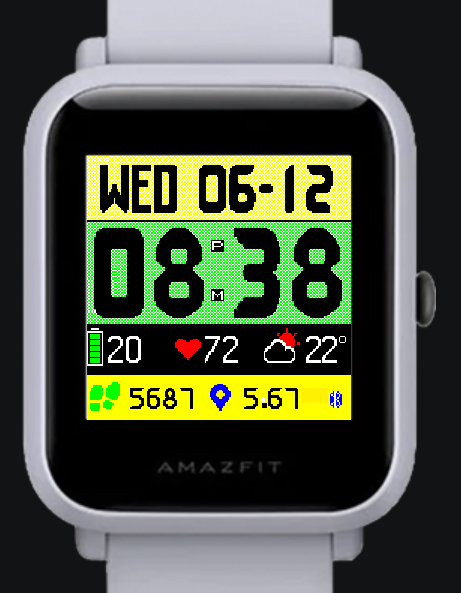
********
Debug|Reading config...
Debug|Reading referenced images from 'C:\Users\Asadul Huq\Desktop\MyBIPFace\NEWFace\1528565345112'
Trace|Loading images for 2 'Background'
Trace|Loading images for 2.1 'Image'
Trace|Loading image 0...
Trace|Image was loaded from file C:\Users\Asadul Huq\Desktop\MyBIPFace\NEWFace\1528565345112\0000.png
Warn|Dithering applied for an image. Resource in watch face will u
se only supported colors. You can't get back original image by unpacking watch face.
Trace|Loading images for 3 'Time'
*******
I cannot figure out exactly how to choose an acceptable color. I am using windows Paint application.
Any information regarding this problem is appreciated.
Who is online
Users browsing this forum: No registered users and 1 guest