-
- Administrator
-
-
Support Ukraine
If you experience any problems with the forum (it is not visible, there is no way to post messages, or some functionality does not work), please let us know. If you have problems with registration or you did not receive confirmation letter, let us know and we will activate your account manually.
If you get an "The submitted form was invalid. Try submitting again" error, delete cookies, then try again.
Need opinions for my new application
Moderators: asoo, lvpokka, Internal error, Watchmens
Forum rules
All communication in this branch should only be in English.
-
tostr
- Posts: 28
- Joined: 17 Jun 2023, 08:41
- Location: Australia
- Has thanked: 3 times
- Been thanked: 14 times
- Contact:
Need opinions for my new application
Mi Create is a simple to use watchface designer made for non Huami manufactured Xiaomi wearables (Xiaomi watch series, any Xiaomi band newer than the Band 7 & Redmi Watch series)
It's made to be as easy to use as possible, no pitfalls or nasty caveats, no sluggish UI and no fancy excessive features that can be confusing. Simply an application that arranges, designs and makes watchfaces for your watch. Plus, its free and open source.
Currently its in heavy development, so expect major changes before I'm fully happy with it and published on the main topic.
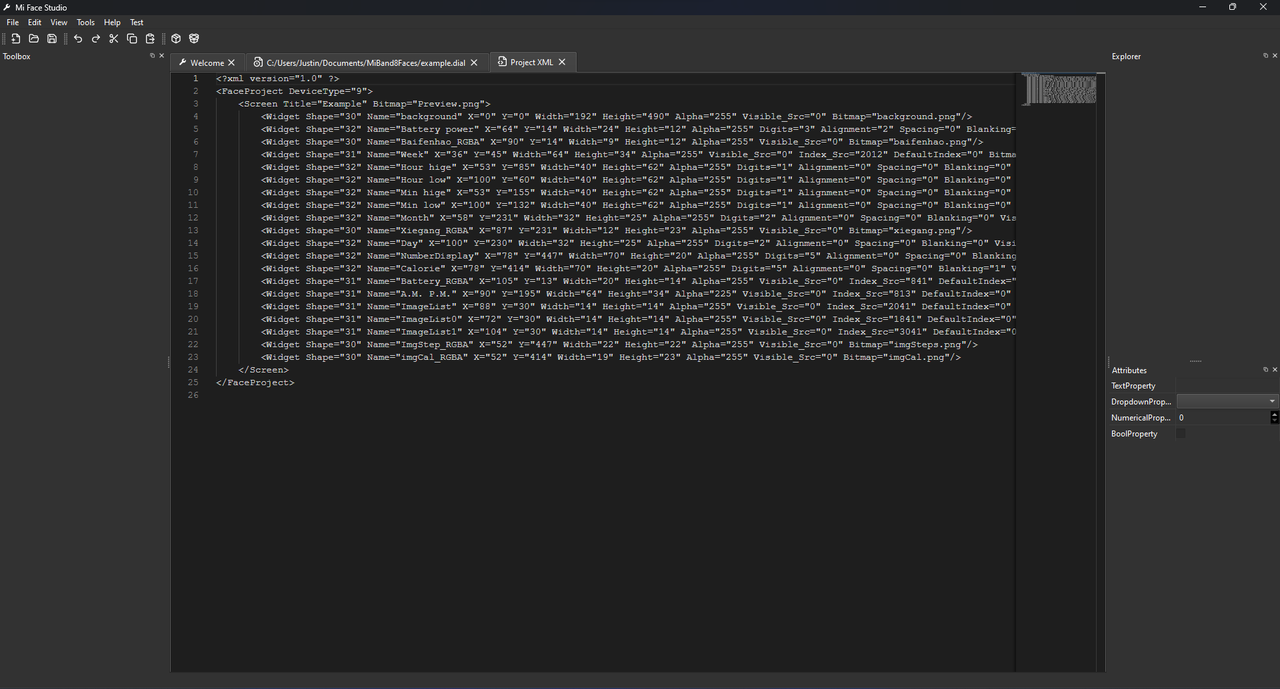
The app is made to replace EasyFace so project files are in the .fprj standard (basically an XML file). Support for other project files like json based ones compatible with BandBBS's GMF compiler is planned.
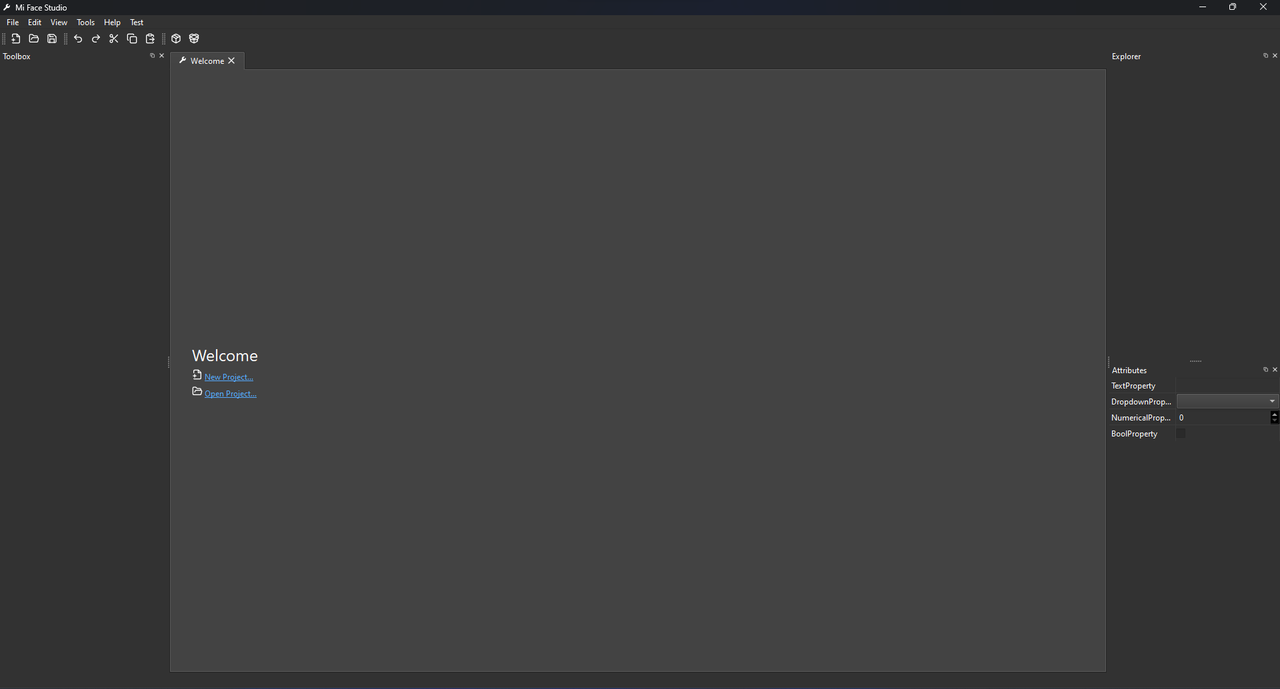
Screenshots attached to the post were from way back when, but is similar to 0.3. I will update them once 1.0 releases which has a massive UI update.
If you want to see how to use the application, you can view the Mi Create documentation (currently has some things that aren't quite finished yet) at https://ooflet.github.io/docs
You can download the latest release at https://github.com/ooflet/Mi-Create/releases
It's made to be as easy to use as possible, no pitfalls or nasty caveats, no sluggish UI and no fancy excessive features that can be confusing. Simply an application that arranges, designs and makes watchfaces for your watch. Plus, its free and open source.
Currently its in heavy development, so expect major changes before I'm fully happy with it and published on the main topic.
The app is made to replace EasyFace so project files are in the .fprj standard (basically an XML file). Support for other project files like json based ones compatible with BandBBS's GMF compiler is planned.
Screenshots attached to the post were from way back when, but is similar to 0.3. I will update them once 1.0 releases which has a massive UI update.
If you want to see how to use the application, you can view the Mi Create documentation (currently has some things that aren't quite finished yet) at https://ooflet.github.io/docs
You can download the latest release at https://github.com/ooflet/Mi-Create/releases
Last edited by tostr on 17 Jul 2024, 02:01, edited 2 times in total.
-
MagiicMiind
- Posts: 4
- Joined: 02 Jan 2024, 16:42
- Location: Mexico
- Has thanked: 3 times
- Been thanked: 1 time
- Contact:
When I want to open a project that I made in easyface this appears:
"Widget 1001 not implemented in canvas, please report as issue."
-
tostr
- Posts: 28
- Joined: 17 Jun 2023, 08:41
- Location: Australia
- Has thanked: 3 times
- Been thanked: 14 times
- Contact:
Special widgets from EasyFace like WeatherIcon and WeekIcon are unsupported and do not plan to be supported, use ImageLists. Currently it is also in beta testing and is not fully polished, I will post into the main watchface topic once it's done.
-
MagiicMiind
- Posts: 4
- Joined: 02 Jan 2024, 16:42
- Location: Mexico
- Has thanked: 3 times
- Been thanked: 1 time
- Contact:
Thank you very much, it worked, now how do I transfer it to my watch? or how do I convert it to bin format?
*
I renamed *.face to *.bin and it worked
*
I renamed *.face to *.bin and it worked
Last edited by MagiicMiind on 03 Mar 2024, 16:28, edited 1 time in total.
Does the program work for Xiaomi Watch S1 Active? Can you give me some advice? I am a beginner. Drive I made watch faces for the Xiaomi Band 4 and Band 6. Thank you
Hello, will there be support for Redmi Watch 4 for spheres in the application?
-
tostr
- Posts: 28
- Joined: 17 Jun 2023, 08:41
- Location: Australia
- Has thanked: 3 times
- Been thanked: 14 times
- Contact:
@vaja Currently the program does not support S1 active, if you want to make watchfaces you may visit the Mi Create documentation at https://ooflet.github.io/docs however it is not quite done yet.
-
tostr
- Posts: 28
- Joined: 17 Jun 2023, 08:41
- Location: Australia
- Has thanked: 3 times
- Been thanked: 14 times
- Contact:
@rfenix15 False positive, compiled python projects get flagged by antiviruses because beginner virus devs use python to make their viruses and antivirus companies cut the time and money required to detect these viruses so they outright flag every python app that has a shred of resemblance to these viruses. What antivirus are you using so I can submit a false positive report to them? And what version of Mi Create were you trying to install?
-
tostr
- Posts: 28
- Joined: 17 Jun 2023, 08:41
- Location: Australia
- Has thanked: 3 times
- Been thanked: 14 times
- Contact:
@RTMhun I don't have any on hand, you may use the documentation to help guide you with the basics of using the editor. If you have any questions that are not on the Mi Create documentation, you can refer to EasyFace's documentation at https://github.com/m0tral/EasyFace/wiki/HomeEN because Mi Create is based on EasyFace's format. Otherwise please contact me or the Mi Watch Development Telegram group for further assistance.
-
OneWatchface
- Posts: 2
- Joined: 18 Jun 2024, 07:49
- Location: Berlin
- Been thanked: 1 time
- Contact:
I just made a watchface with your tool. I love it, easy, simple and open source.
I run into one questions though: How do I setup the watchface for Mi Band 8 for the Always on Display (AOD).
Currently when the clock switches to AOD the watchface changes to one that supports AOD. Is this already supported in your app or is this missing?
If you take this online editor there is place for a second watchface for AOD displays: mibandwatchfaces.com/mi_band8_watchface_maker and in the JSON there are elements_normal and elements_aod if you load an example watchface.
I run into one questions though: How do I setup the watchface for Mi Band 8 for the Always on Display (AOD).
Currently when the clock switches to AOD the watchface changes to one that supports AOD. Is this already supported in your app or is this missing?
If you take this online editor there is place for a second watchface for AOD displays: mibandwatchfaces.com/mi_band8_watchface_maker and in the JSON there are elements_normal and elements_aod if you load an example watchface.
-
tostr
- Posts: 28
- Joined: 17 Jun 2023, 08:41
- Location: Australia
- Has thanked: 3 times
- Been thanked: 14 times
- Contact:
@OneWatchface Thank you! It's not documented anywhere yet, but to create an AOD for the watchface you need to create a new project within the watchface folder named "AOD". From there you can open the AOD.fprj file using Mi Create and edit as a normal watchface. Here's an example project for Mi Band 8 with an AOD: https://drive.google.com/file/d/1oP5DgX ... srvADht0m/
For now it is like this because the compiler was originally built for EasyFace and its nuances. EasyFace has.. well.. no easy (
) way to make AOD for watchfaces, so workarounds had to be made by the compiler dev to get AOD working.
I may add a simple toggle to make + edit AOD in the next major release of Mi Create once all the crucial features have been added and if I have time, but it is definitely planned to be added to a future release.
For now it is like this because the compiler was originally built for EasyFace and its nuances. EasyFace has.. well.. no easy (
I may add a simple toggle to make + edit AOD in the next major release of Mi Create once all the crucial features have been added and if I have time, but it is definitely planned to be added to a future release.
-
OneWatchface
- Posts: 2
- Joined: 18 Jun 2024, 07:49
- Location: Berlin
- Been thanked: 1 time
- Contact:
@tostr Thank you for the quick reply and the example project. Your explanation was plenty and it worked like a charm.
I think your tool is a great add on for the custom watchface community. I didn't install EasyFace due to some concerns but I was really happy when I found yours. Unfortunately I does not seem that well known yet, I always only find easyface mentions. Hope that changes soon!
-
zuggi1985
- WF maker
- Posts: 5
- Joined: 14 Feb 2020, 19:15
- Location: Weimar
- Has thanked: 1 time
- Contact:
hello,
this is a great tool! Thank you!!!!
I had build a wf for my redmi watch 3 active.
but i can not upload it to my watch.
with the mi fitness app it is not possible ;(
with the notify app i get a possibility to send custom watchfaces,
it will be loading/sending to the watch, but after 100 % is shown
i get an error-message on my redmi 3 active
" Konnt nicht synchronisiert werden" - "cannot sync"
and then it is aborting ;(
???????? -.-
the redmi watch 3 active is a good watch, but the maximum wf that can be loaded to the watch are 2 own + the 3 pre-installed wf ....
this is a great tool! Thank you!!!!
I had build a wf for my redmi watch 3 active.
but i can not upload it to my watch.
with the mi fitness app it is not possible ;(
with the notify app i get a possibility to send custom watchfaces,
it will be loading/sending to the watch, but after 100 % is shown
i get an error-message on my redmi 3 active
" Konnt nicht synchronisiert werden" - "cannot sync"
and then it is aborting ;(
???????? -.-
the redmi watch 3 active is a good watch, but the maximum wf that can be loaded to the watch are 2 own + the 3 pre-installed wf ....
Denn die Kunst ist nur der Schein, anders als der Rest zu sein
-
tostr
- Posts: 28
- Joined: 17 Jun 2023, 08:41
- Location: Australia
- Has thanked: 3 times
- Been thanked: 14 times
- Contact:
@zuggi1985 I appreciate the feedback! Please follow the steps on the documentation (https://ooflet.github.io/docs/quickstart/testing/) to use and upload your watchface onto m0tral's servers, an alternative to Notify.
If you are making a watchface for the Redmi Watch 3 Active, I'd suggest you use the latest version of EasyFace to compile the watchface which is on m0tral's development telegram. There were some issues with the RW3A because of how different the format is compared to previous watches which were fixed on v4.13. Mi Create v0.3 does not include this compiler.
Mi Create v1.0 will release shortly which includes this new compiler, new lick of paint, tons of under-the-hood improvements and bug fixes.
If you are making a watchface for the Redmi Watch 3 Active, I'd suggest you use the latest version of EasyFace to compile the watchface which is on m0tral's development telegram. There were some issues with the RW3A because of how different the format is compared to previous watches which were fixed on v4.13. Mi Create v0.3 does not include this compiler.
Mi Create v1.0 will release shortly which includes this new compiler, new lick of paint, tons of under-the-hood improvements and bug fixes.
Hi! I was using the tool last night and I think it's very usefull, great tool. i pack my face for a Redmi Watch 3 Active but.. I can't test if it works because I use iPhone instead of Android.
There are plans for make an app or tool for iPhone users? Have I a way to test if it works at least?
Thanks!
There are plans for make an app or tool for iPhone users? Have I a way to test if it works at least?
Thanks!
-
tostr
- Posts: 28
- Joined: 17 Jun 2023, 08:41
- Location: Australia
- Has thanked: 3 times
- Been thanked: 14 times
- Contact:
@95xeko69 Hey! Unfortunately there are no plans for the Mi Fitness mod to support iOS. I cannot make or suggest one simply because I do not own an Apple device, the only thing Apple I have is an iMac G4 that's 22 years old 
The current Mi Fitness mod dev has already said he will not support iOS devices, you might want to look for an alternative from a different developer.
-
zuggi1985
- WF maker
- Posts: 5
- Joined: 14 Feb 2020, 19:15
- Location: Weimar
- Has thanked: 1 time
- Contact:
tostr wrote: 16 Jul 2024, 23:47@zuggi1985 I appreciate the feedback! Please follow the steps on the documentation (https://ooflet.github.io/docs/quickstart/testing/) to use and upload your watchface onto m0tral's servers, an alternative to Notify.
If you are making a watchface for the Redmi Watch 3 Active, I'd suggest you use the latest version of EasyFace to compile the watchface which is on m0tral's development telegram. There were some issues with the RW3A because of how different the format is compared to previous watches which were fixed on v4.13. Mi Create v0.3 does not include this compiler.
Mi Create v1.0 will release shortly which includes this new compiler, new lick of paint, tons of under-the-hood improvements and bug fixes.
thank you for your help.
now i am working with a new wf for redmi band 3 active and
i am working with gen2_compilerV413 (for redmi w3 active ....)
but when i want to compile i get an error:
Error: Input string was not in a correct format.
here is my gdrive-link to my Project (rar-file)
https://drive.google.com/file/d/156O8Ls ... sp=sharing
my project-file in the rar-file (fprj) is that one:
____________________________________________________________________
Code: Select all
<?xml version="1.0" ?>
<FaceProject DeviceType="12">
<Screen Title="moto" Bitmap="0022.png">
<Widget Shape="30" Name="widget-0" Bitmap="0001.png" X="0" Y="0" Width="48" Height="48" Alpha="255" Visible_Src="0"/>
<Widget Shape="32" Name="widget-1" BitmapList="0002.png|0003.png|0004.png|0005.png|0006.png|0007.png|0008.png|0009.png|0010.png|0011.png|0002.png" X="20" Y="96" Width="48" Height="48" Alpha="255" Visible_Src="0" Digits="2" Alignment="1" Value_Src="811" Spacing="3" Blanking="0"/>
<Widget Shape="32" Name="widget-2" BitmapList="0002.png|0003.png|0004.png|0005.png|0006.png|0007.png|0008.png|0009.png|0010.png|0011.png|0002.png" X="128" Y="96" Width="48" Height="48" Alpha="255" Visible_Src="0" Digits="2" Alignment="1" Value_Src="811" Spacing="3" Blanking="0"/>
<Widget Shape="32" Name="widget-3" BitmapList="0012.png|0013.png|0014.png|0015.png|0016.png|0017.png|0018.png|0019.png|0020.png|0021.png|0012.png" X="100" Y="10" Width="48" Height="48" Alpha="255" Visible_Src="0" Digits="3" Alignment="1" Value_Src="841" Spacing="7" Blanking="0"/>
<Widget Shape="32" Name="widget-4" BitmapList="0012.png|0013.png|0014.png|0015.png|0016.png|0017.png|0018.png|0019.png|0020.png|0021.png|0012.png" X="47" Y="248" Width="48" Height="48" Alpha="255" Visible_Src="0" Digits="5" Alignment="1" Value_Src="821" Spacing="7" Blanking="0"/>
<Widget Shape="32" Name="widget-5" BitmapList="0012.png|0013.png|0014.png|0015.png|0016.png|0017.png|0018.png|0019.png|0020.png|0021.png|0012.png" X="98" Y="210" Width="48" Height="48" Alpha="255" Visible_Src="0" Digits="3" Alignment="1" Value_Src="822" Spacing="7" Blanking="0"/>
<Widget Shape="32" Name="widget-6" BitmapList="0012.png|0013.png|0014.png|0015.png|0016.png|0017.png|0018.png|0019.png|0020.png|0021.png|0012.png" X="133" Y="48" Width="48" Height="48" Alpha="255" Visible_Src="0" Digits="2" Alignment="1" Value_Src="1012" Spacing="7" Blanking="0"/>
<Widget Shape="32" Name="widget-7" BitmapList="0012.png|0013.png|0014.png|0015.png|0016.png|0017.png|0018.png|0019.png|0020.png|0021.png|0012.png" X="57" Y="48" Width="48" Height="48" Alpha="255" Visible_Src="0" Digits="2" Alignment="1" Value_Src="1812" Spacing="7" Blanking="0"/>
</Screen>
</FaceProject>Denn die Kunst ist nur der Schein, anders als der Rest zu sein
-
tostr
- Posts: 28
- Joined: 17 Jun 2023, 08:41
- Location: Australia
- Has thanked: 3 times
- Been thanked: 14 times
- Contact:
@zuggi1985 Strange! I've fixed up some parts of your watchface but the issue has not gone away.
Just to inform new watchface makers, reusing images on different widgets will lead to errors!
Regarding the issue, I have contacted the compiler dev for more info, I'll get back to you ASAP.
Just to inform new watchface makers, reusing images on different widgets will lead to errors!
Regarding the issue, I have contacted the compiler dev for more info, I'll get back to you ASAP.
-
tostr
- Posts: 28
- Joined: 17 Jun 2023, 08:41
- Location: Australia
- Has thanked: 3 times
- Been thanked: 14 times
- Contact:
@zuggi1985 Hey! I have reached out to the dev but no response so far.. just left on read.
Try recreating your project, you'll need to generate images for each widget btw, you cannot reuse images otherwise the watch freaks out.
Also, if you don't mind, try testing out the new 1.0 version of Mi Create, see if there are any things like inconveniences with the version because alot of things were changed. Thanks!
Try recreating your project, you'll need to generate images for each widget btw, you cannot reuse images otherwise the watch freaks out.
Also, if you don't mind, try testing out the new 1.0 version of Mi Create, see if there are any things like inconveniences with the version because alot of things were changed. Thanks!
-
zuggi1985
- WF maker
- Posts: 5
- Joined: 14 Feb 2020, 19:15
- Location: Weimar
- Has thanked: 1 time
- Contact:
Thank you,
i tested the new mi create app and generated images for each widget ...
but i get the error message again
Error: Input string was not in a correct format.
Updated Package:
https://drive.google.com/file/d/1B6iGHl ... sp=sharing
i tested the new mi create app and generated images for each widget ...
but i get the error message again
Error: Input string was not in a correct format.
Updated Package:
https://drive.google.com/file/d/1B6iGHl ... sp=sharing
Denn die Kunst ist nur der Schein, anders als der Rest zu sein
-
tostr
- Posts: 28
- Joined: 17 Jun 2023, 08:41
- Location: Australia
- Has thanked: 3 times
- Been thanked: 14 times
- Contact:
@zuggi1985 Unfortunately I also gave it a shot and still gives that error no matter what I tried. You could try the old compiler from Mi Create v0.4 because it compiles no problem, but I'm not sure if compatibility is good on that version.
Who is online
Users browsing this forum: No registered users and 1 guest