I created and uploaded a new face https://amazfitwatchfaces.com/t-rex/view/10000 using Sasha's editor v7.3. It installs without any errors and the preview image is displayed properly but the actual face on the watch is simply a blank black screen with a small cluster of white pixels in the top left corner.
Anyone know what I've done wrong?
-
- Administrator
-
-
Support Ukraine
If you experience any problems with the forum (it is not visible, there is no way to post messages, or some functionality does not work), please let us know. If you have problems with registration or you did not receive confirmation letter, let us know and we will activate your account manually.
If you get an "The submitted form was invalid. Try submitting again" error, delete cookies, then try again.
Watch face doesn't display correctly [T-Rex Pro]
Forum rules
When adding a new topic, use the template: Topic title [device name]
For example: How to create watch face [T-Rex Pro]
All communication in this branch should only be in English.
When adding a new topic, use the template: Topic title [device name]
For example: How to create watch face [T-Rex Pro]
All communication in this branch should only be in English.
-
asoo
- Posts: 2188
- Joined: 03 Jan 2019, 01:48
- Location: ͼͽ Thailand ͼͽ
- Has thanked: 419 times
- Been thanked: 2115 times

I can't verify it on the actual Device because I don't have it.puddum wrote: 06 Jul 2022, 22:14I created and uploaded a new face https://amazfitwatchfaces.com/t-rex/view/10000 using Sasha's editor v7.3. It installs without any errors and the preview image is displayed properly but the actual face on the watch is simply a blank black screen with a small cluster of white pixels in the top left corner.
Anyone know what I've done wrong?
But when check it out, your PNG looks like it's compressed.
which the watch cannot read those image files
This is an example of an uncompressed png.
If you can sync this watchface and watchface can use normal , The problem is probably the format of the PNG you used to create the FW.
lpclean_packed_packed.bin (not work)
The PNG image used to create it should format look like this:
Spoiler
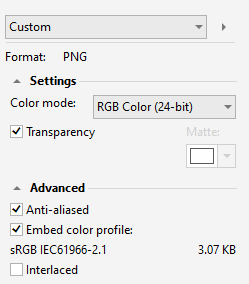
Last edited by asoo on 07 Jul 2022, 14:33, edited 3 times in total.
ͼͽ To request please use the interrelated forum in action ͼͽ
Please do not PM to me for requests ported watchface.
Please do not PM to me for requests ported watchface.
Still getting the same result using lpclean_packed_packed.bin
-
asoo
- Posts: 2188
- Joined: 03 Jan 2019, 01:48
- Location: ͼͽ Thailand ͼͽ
- Has thanked: 419 times
- Been thanked: 2115 times
If I'm not mistaken, in the GTR47mm if the main screen doesn't use the first image file, it doesn't display. But I'm not sure Will it be the same with Trex-Pro as well?
The attached file has changed the main screen to 0001.png.
Please try this WF
ͼͽ To request please use the interrelated forum in action ͼͽ
Please do not PM to me for requests ported watchface.
Please do not PM to me for requests ported watchface.
Who is online
Users browsing this forum: No registered users and 1 guest