• Administrator
  •  
    Support Ukraine
    If you experience any problems with the forum (it is not visible, there is no way to post messages, or some functionality does not work), please let us know. If you have problems with registration or you did not receive confirmation letter, let us know and we will activate your account manually.
    If you get an "The submitted form was invalid. Try submitting again" error, delete cookies, then try again.
     

Mi Band 5 & 6 WatchFace Editor GUI

This forum is designed to discuss and develop tools creating watch faces.

Moderators: asoo, lvpokka, Internal error, Watchmens

Forum rules
All communication in this branch should only be in English.
To discuss tools that are not in this section, use the “Watchfaces tools (discussion)” forum.
User avatar
Johnson070
WF maker
Posts: 12
Joined: 02 Jan 2021, 16:22
Location: Москва
Has thanked: 5 times
Been thanked: 13 times
Contact:

Mi Band 5 & 6 WatchFace Editor GUI

Post by Johnson070 »

Author
Johnson070

Thank you very much for your help in creating the project
lvpokka

Tool description
  • All widgets support
  • Easy creation of watchfaces
  • Unpacking .bin
  • Create or modyfing watchfaces
  • Support Mi Band 5
  • Support Mi Band 6
How to
1. Unzip Mi Band WatchFace Editor.zip
2. Open MiBandWatchFaces.exe
3. Create watchface or click File => Open
4. Save file File => Save
5. Choose .bin(.json will also be saved in the directory) or .json file save
6. Copy the newly generated bin file to the corresponding directory of the mobile phone, and the synchronization will be completed. (This step is not very clear, you can refer to the original tutorial) above, you're done!
Changelog
1.0.1.8 (2021-06-09)

- Fixed Circle Scale bug

- Fixed alarm on/off add image

- Fixed oneline date

- Fixed bug number size 0

- Fixed ImageSufficCN2 to ImageSuffixCN2 (lol)

1.0.1.2 (2021-04-22)

- Bug fixes

- Add full support MiBand 6(With building a bin file yet)

- Add simple select images(Hold down the left mouse button to select, and to delete with shift)

- Animation preview(use carefully, the program uses more than 100 MB of RAM)

- (FIXED) If you have a problem with the image, try changing the scale of windows to 100%

- (FIXED) Month/Date add

- (FIXED) Add wind error and today separate temperature

1.0.1.0 (2021-03-14)

Bug fixes

Add convert GIF to PNG frames

Animation preview(use carefully, the program uses more than 100 MB of RAM)

(Maybe solved) If you have a problem with the image, try changing the scale of windows to 100%

Thank you for downloading the program.

If you find a bug, please write to github or telegram: @vveber

1.0.0.7 (2021-03-14)
  • Bug fixes
  • Bug fix time form, when add minutes tens(ERROR)
  • Add download zip file update

1.0.0.6 (2021-03-13)
  • Bug fix images form(Use image removal with care)
  • Bug fixes
  • Add json manual editor(Advanced user) RobCraftStudio for you)
  • Add culture(Add in github excel file with translations)
  • Add delete button in properties forms

1.0.0.5 (2021-03-12)
  • Bug fix images form(Use image removal with care)
  • Bug fix steps progress form
  • Fix circle scale form
  • Add delete button in properties forms
  • Start work for languages

1.0.0.4 (2021-03-10)
  • Bug fix images form(Use image removal with care)
  • Add open .bin file and decompile

1.0.0.3 (2021-03-10)
  • Bug fix status simple form
  • Bug fix images form(Use image removal with care)

1.0.0.2 (2021-03-10)
  • Bug fix status simple form

1.0.0.1 (2021-03-09)
  • First release!
Screenshots
Preview.png
Preview.png (122.77 KiB) Viewed 183849 times
Support
https://paypal.me/j0hnson070

Download:
https://github.com/Johnson070/MiBand-5- ... r/releases

Click Assets

GitHub: https://github.com/Johnson070/MiBand-5-watchface-editor
Last edited by Johnson070 on 21 May 2021, 17:35, edited 6 times in total.
joaokit
WF maker
Posts: 1
Joined: 19 May 2021, 06:18
Location: Brasil
Has thanked: 1 time
Contact:

Post by joaokit »

I'm having trouble turning the json file into bin, can someone help me?
User avatar
Johnson070
WF maker
Posts: 12
Joined: 02 Jan 2021, 16:22
Location: Москва
Has thanked: 5 times
Been thanked: 13 times
Contact:

Post by Johnson070 »

Peoplehater wrote: 20 May 2021, 16:40
pepe pepon wrote: 15 May 2021, 12:50
I am getting a "Trojan:Win32/Zpevdo.B" warning from Windows Security
Same here :roll:
Problem because I include wininet,dll
User avatar
Johnson070
WF maker
Posts: 12
Joined: 02 Jan 2021, 16:22
Location: Москва
Has thanked: 5 times
Been thanked: 13 times
Contact:

Post by Johnson070 »

1) bug with save bin file fix in 1.0.1.5
2) i don't understand why antivirus warning
lcyfer
WF maker
Posts: 5
Joined: 24 May 2021, 15:53
Location: japan
Been thanked: 1 time
Contact:

Post by lcyfer »

Backdoor:Win32/Bladabindi!ml
lcyfer
WF maker
Posts: 5
Joined: 24 May 2021, 15:53
Location: japan
Been thanked: 1 time
Contact:

Post by lcyfer »

Program:Win32/Wacapew.C!ml
User avatar
Johnson070
WF maker
Posts: 12
Joined: 02 Jan 2021, 16:22
Location: Москва
Has thanked: 5 times
Been thanked: 13 times
Contact:

Post by Johnson070 »

Peoplehater wrote: 20 May 2021, 16:40
pepe pepon wrote: 15 May 2021, 12:50
I am getting a "Trojan:Win32/Zpevdo.B" warning from Windows Security
Same here :roll:
Fixed in 1.0.1.6, because obfuscator

https://www.virustotal.com/gui/file/ce6 ... /detection
eve4bizz
Posts: 1
Joined: 06 Jun 2021, 10:08
Location: Israel
Been thanked: 1 time
Contact:

Post by eve4bizz »

joaokit wrote: 21 May 2021, 00:22
I'm having trouble turning the json file into bin, can someone help me?
Also can't export it as bin.
Is there anything I'm missing? Or is it a bug?
Thanks
User avatar
CASIONFAN2021
WF maker
Posts: 31
Joined: 16 Apr 2021, 21:23
Location: uk
Has thanked: 1 time
Been thanked: 4 times
Contact:

Post by CASIONFAN2021 »

i cant find the option to unpack bin file.. can someone help me. the program is missing this option, if i drag the bin file over to the .exe it does nothing at all.. it doesnt make a folder
User avatar
CASIONFAN2021
WF maker
Posts: 31
Joined: 16 Apr 2021, 21:23
Location: uk
Has thanked: 1 time
Been thanked: 4 times
Contact:

Post by CASIONFAN2021 »

Can anyone help please. Forum seems to bit a bit deaded. Private messages unanswered.
ntelas
WF maker
Posts: 5
Joined: 04 Aug 2019, 09:13
Has thanked: 2 times
Contact:

Post by ntelas »

CASIONFAN2021 wrote: 12 Jun 2021, 19:01
i cant find the option to unpack bin file.. can someone help me. the program is missing this option, if i drag the bin file over to the .exe it does nothing at all.. it doesnt make a folder
Select file -> open, then on the window that appeared in the bottom right corner click "json watchface" and then select "packed bin file". Then open the file you want to unpack, and it should create a folder with the unpacked watchface!
karthik31
Posts: 1
Joined: 09 Jun 2021, 16:06
Location: India
Contact:

Post by karthik31 »

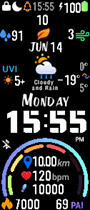
hello, after getting error while packing .json I saw log file it said 615kb max but my wf was 663kb, after searching this thread for solution I used Palette mode and It created a bin. I synced it to Band 5 but the Problem is Weather and Animation Icons( Blinking ":" icon between hours and minutes ex. 20:12) is also not working.

Image
Weather elements I used
  • Temp Icon
    Temp
    Air pollution
    Humidity
    Wind
    UV Index
I synced that bin file to MI BAND 5 and I dont see any weather elements and animation elements working.

please help me: I am a newbie and tried to create this WF took me 4 whole days. It has all the elements I love.

Image
Attachments
KART_FINAL01_packed_packed.bin
(246.28 KiB) Downloaded 304 times
lcyfer
WF maker
Posts: 5
Joined: 24 May 2021, 15:53
Location: japan
Been thanked: 1 time
Contact:

Post by lcyfer »

The bin file could not be created.
I could not create it with "save", "save as", or "save bin".
But when I did one thing, I was able to create a bin file.
I went to "Background", then "Generate previews", then "Save", and after the 0104.png file was created, the bin file was created and I could save it.
When the bin file could not be created, the 0104.png file was not there either.
Try deleting the image created and saved by "Background" and see if you can create and save a bin file.
errslima
Posts: 1
Joined: 19 Jun 2021, 15:22
Location: London
Has thanked: 1 time
Contact:

Post by errslima »

Thanks for your tool, it's amazing!

I've designed the watch face that i want to use, but i can't figure out how to set the heart rate icons.

I can choose "Heart rate progress" and then there are 4 tabs, "scale", "line scale", "linear", and "add images".

What do these mean? What kind of images does it expect? Where should i upload the heart icon and where the images for the numbers?
nxdlxfb.,xfmfd
Posts: 1
Joined: 05 Jun 2021, 12:14
Location: Germany
Contact:

Post by nxdlxfb.,xfmfd »

Mi.Band.WatchFace.Editor\MiBandWatchFaces.exe
Gefunden: Trojan.GenericKD.46452556 (B)
ilneminis
Posts: 1
Joined: 12 Jan 2021, 19:44
Location: Turkey
Contact:

Post by ilneminis »

Hello, thanks for the editor! I have Mi Band 6 and trying to translate some watchfaces but I, too, can not export the wf as .bin...
User avatar
CASIONFAN2021
WF maker
Posts: 31
Joined: 16 Apr 2021, 21:23
Location: uk
Has thanked: 1 time
Been thanked: 4 times
Contact:

Post by CASIONFAN2021 »

ive not managed to use this program at all as it should. i downloaded a bin file from here, that i know works on my Band 5 - i unpacked and just to check the program worked, i repacked it as a bin file and the bin file is not being created. ive tried running the program in administrator mode and that makes no difference, the first time i try and create a bin file the antivirus software goes nuts so i accept the program as safe and redo the procedure but it refuses to create the bin file, even though it says it has been created.

this program is not working.. please help
lcyfer
WF maker
Posts: 5
Joined: 24 May 2021, 15:53
Location: japan
Been thanked: 1 time
Contact:

Post by lcyfer »

AhnLab-V3 Malware/Win.AGEN.C4476096
Alibaba Trojan:Win32/Generic.dcc53516
ALYac Gen:Variant.Bulz.508197
Arcabit Trojan.Bulz.D7C125
Avast Win32:Malware-gen
AVG Win32:Malware-gen
BitDefender Gen:Variant.Bulz.508197
Emsisoft Gen:Variant.Bulz.508197 (B)
FireEye Gen:Variant.Bulz.508197
GData Gen:Variant.Bulz.508197
MAX Malware (ai Score=86)
McAfee RDN/Generic.com
McAfee-GW-Edition RDN/Generic.dx
Sangfor Engine Zero Trojan.Win32.Generic.dx
TrendMicro-HouseCall TROJ_GEN.R002H06E121

This app is riddled with viruses.
We recommend that you stop using it immediately.
PsychoMatt
WF maker
Posts: 4
Joined: 04 Feb 2020, 19:29
Location: Warsaw, Poland
Contact:

Post by PsychoMatt »

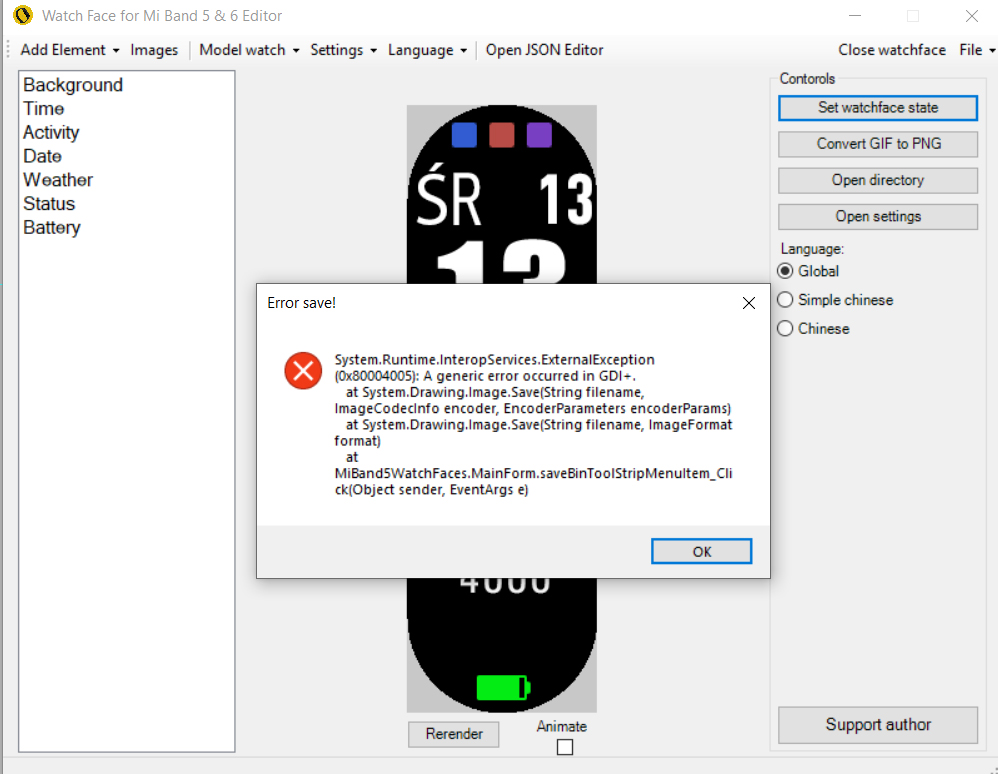
Hi

pls help me. i cant save bin file
Image
raejin
WF maker
Posts: 2
Joined: 13 Jul 2021, 03:37
Location: United Kingdom
Has thanked: 2 times
Contact:

Post by raejin »

Hi !! o/
I made a watch face but i can't create a .bin as the file is too big? I have 721kb of images total but log says file too big and will not be acepted? I've tried reducing my image size as much as I can but it isn't helping ;A;

I opened another user's watch face (from bin to json) with the program and tried to save as bin to see if i get the same error and I did

Fatal|[ERROR] Watchface is greater than 1300kb, it will not be accepted by Mi Band 6, please reduce size! Current size:2768kb.
Fatal|System.ArgumentException: [ERROR] Watchface is greater than 1300kb, it will not be accepted by Mi Band 6, please reduce size! Current size:2768kb.
at IvAgHVd4mYbL19b0oG.BhU54AsmePbEYl5b7h.SjD0RiGg7(String )
raejin
WF maker
Posts: 2
Joined: 13 Jul 2021, 03:37
Location: United Kingdom
Has thanked: 2 times
Contact:

Post by raejin »

update: I've managed to create a .bin by using 'pallette mode' and it writes okay. The only problem is now I can't install it to my Mi Band :? Using the Notify app I get update failed, im guessing the bin is faulty somehow

I'm really at a loss as to what to do now. Dropping a link here with the files if anyone could create a .bin and/or tell me how I'd be grateful ~
https://drive.google.com/drive/folders/ ... sp=sharing


Image
lcyfer
WF maker
Posts: 5
Joined: 24 May 2021, 15:53
Location: japan
Been thanked: 1 time
Contact:

Post by lcyfer »

Why do the authors of this app continue to leave the virus being detected?
Normally, if a virus is detected in an application that you have created, you will make every effort to avoid it.
But even with the latest version, viruses are still being detected.
Even if the virus detection is a false positive, there are many ways to avoid it.
I hope it will be improved as soon as possible.
juras13
Posts: 1
Joined: 23 Jul 2021, 14:16
Location: Mi band 6
Contact:

Post by juras13 »

Language Česká Republika CZ?
my xyz
Posts: 2
Joined: 27 Jul 2021, 23:52
Location: 福州
Contact:

Post by my xyz »

Hello, AFTER unpacking bin, I only adjusted and modified the date. After the package was installed, the wristband did not show the date (week, month and day). If you change the date, even a single change, the date will not be displayed on the finger ring. What am I supposed to do now?
my xyz
Posts: 2
Joined: 27 Jul 2021, 23:52
Location: 福州
Contact:

Post by my xyz »

I tried to modify the date configuration in the json file, save it and install it on the bracelet, the date can be displayed normally. However, the date is modified through the editor, but it is not displayed after the installation is saved.
KrakeCZ
WF maker
Posts: 3
Joined: 18 Jul 2021, 07:25
Location: Czech
Contact:

Post by KrakeCZ »

Weather not working after save as bin
Post Reply

Return to “Watchfaces tools”

Who is online

Users browsing this forum: No registered users and 1 guest