• Administrador
  •  
    Support Ukraine
    If you experience any problems with the forum (it is not visible, there is no way to post messages, or some functionality does not work), please let us know. If you have problems with registration or you did not receive confirmation letter, let us know and we will activate your account manually.
    If you get an "The submitted form was invalid. Try submitting again" error, delete cookies, then try again.
     

beta py amazfit tool for GTR2(GTS2 also should work but not tested)

This forum is designed to discuss and develop tools creating watch faces.

Moderadores: asoo, lvpokka, Internal error, Watchmens

Regras do fórum
All communication in this branch should only be in English.
To discuss tools that are not in this section, use the “Watchfaces tools (discussion)” forum.
bigdigital.kov
Mensagens: 4
Registrado em: 03 Ago 2020, 12:55
Localização: Kyiv
Has thanked: 2 times
Been thanked: 9 times
Contato:

beta py amazfit tool for GTR2(GTS2 also should work but not tested)

Mensagem por bigdigital.kov »

The link to the project on github /bigdigital/py_amazfit_tools/tree/GTR2
Hi to all. Recenly I did some research in gtr2 watchface structure and made this tool.

Its a well known py amazfit tool but with adaptation for GTR2.
It is also has included tool which allows to compress and decompress GTR2 bin files. Before uploading bin file to your watch, you should compress it with help of this tool.

The JSON structure for GTR2 is completely different. To get the basic knowledge about the structure you can unpack any existing GTR2 dial.

How to use it.
1. Unpack existing dial with help of the GTR2_Packer.exe tool by executing

Código: Selecionar todos

GTR2_Packer.exe -unc2 WATCH_FACE_FILE.bin
2 After uncompressing, you should receive a new file with .unc extension, rename file extension back to .bin
3. Now you can parse uncompressed dial with a command

Código: Selecionar todos

python main._py --gtr2  47 --file WATCH_FACE_FILE.bin
* due to the limitation on this forum, i can't post a topic with the correct python file name, so please remove "_" char between "main." and "py" in the command above.
As a result, if everything was ok, you should receive json file.
4 Now you can modificate json file or watchface images.
5. After all the modifications are completed, you can build watchface with help of the command

Código: Selecionar todos

python main._py --gtr2 47 --file WATCH_FACE_FILE.json
* due to the limitation on this forum, i can't post a topic with the correct python file name, so please remove "_" char between "main." and "py" in the command above.
6 . Pack a new bin file with help of GTR2_Packer.exe

Código: Selecionar todos

GTR2_Packer.exe -cmp2 WATCH_FACE_FILE_packed.bin
7. Rename compressed file extension back to .bin and upload to your watch to test it

Notes .
1. The previews generation does not work for GTR2 mode.
2 .Available Commands for GTR2_Packer.exe :

Código: Selecionar todos

-cmp Compress bin (for gtr(gts) first gen)
-cmp2 Compress gtr2(gts2) bin 
-unc Decompress
-unc2 Decompress gtr2(gts2) bin
3. Image numeration on GTR2 and GTS2 starting from 0001, not from zero like it was for previous Huami devices.


Current version 0.2

Chagelog
v0.2
Added widgets.
Fixed Images loss when packing bin file
Anexos
py_amazfit_tools-GTR2_v0_2.zip
(323.58 KiB) Baixado 2305 vezes
Editado pela última vez por bigdigital.kov em 31 Jan 2021, 18:53, em um total de 3 vezes.
demiurg1
WF maker
Mensagens: 114
Registrado em: 23 Fev 2020, 22:49
Localização: Poland
Has thanked: 23 times
Been thanked: 17 times
Contato:

Mensagem por demiurg1 »

Fact. I entered the bluetooth icon in the code ("OFF" instead of "ON") and it helped, it is displayed when the smartphone is out of bluetooth range. If the smartwach is within bluetooth range of the smartphone, then there is no bluetooth icon on the watch. It is a pity there is no reverse option.
As for the alarm, it actually turned off unnoticed. When turned on, the icon appears.
Thanks.
demiurg1
WF maker
Mensagens: 114
Registrado em: 23 Fev 2020, 22:49
Localização: Poland
Has thanked: 23 times
Been thanked: 17 times
Contato:

Mensagem por demiurg1 »

OK
Editado pela última vez por demiurg1 em 02 Fev 2021, 17:03, em um total de 1 vez.
demiurg1
WF maker
Mensagens: 114
Registrado em: 23 Fev 2020, 22:49
Localização: Poland
Has thanked: 23 times
Been thanked: 17 times
Contato:

Mensagem por demiurg1 »

It works, but it's a pity that it is contrary to logic.
Currently, it works like this: there is bluetooth, there is no icon, and when there is no bluetooth the icon is there.
Editado pela última vez por demiurg1 em 02 Fev 2021, 21:11, em um total de 1 vez.
MatZil02
WF maker
Mensagens: 2
Registrado em: 31 Jan 2021, 22:04
Localização: Italia
Contato:

Mensagem por MatZil02 »

For the Bluetooth connected, I've Just made a background with the Bluetooth icon and the in the tool i have put over the icon when Is not connected.

By doing this way It can "switch" between connected or not.
cmelcher78

Mensagem por cmelcher78 »

The upload with Notify for Amazfit is not working. Does anyone has an idea or alternative?
demiurg1
WF maker
Mensagens: 114
Registrado em: 23 Fev 2020, 22:49
Localização: Poland
Has thanked: 23 times
Been thanked: 17 times
Contato:

Mensagem por demiurg1 »

This trick with a dial background with a bluetooth mark on it is pretty cool.
When there is no bluetooth, it is enough to programmatically enter the "no bluetooth" icon so that it covers the badge on the dial. This is a way. A good idea.
demiurg1
WF maker
Mensagens: 114
Registrado em: 23 Fev 2020, 22:49
Localização: Poland
Has thanked: 23 times
Been thanked: 17 times
Contato:

Mensagem por demiurg1 »

For me, loading the shield via the Notify for Amazfit app works. I can easily send the watch faces (packed BIN files) from the Samsung Galaxy S20 Ultra smartphone (from any directory) to the Amazfit GTR 2 smartwatch. So I know how I could help?
PVa__
Mensagens: 17
Registrado em: 25 Out 2020, 17:24
Localização: Paris
Been thanked: 3 times
Contato:

Mensagem por PVa__ »

Hi Community,
I need a little help.
How many watchfaces maximum can we upload to a GTR2 watch ?
I currently have 5 watch faces installed on my GTR2 watch (of which 3 seem to be default and unfortunately cannot be deleted..., and 2 new ones Rolex & IWC models which I download via the mobile Amazfaces app).
However, when trying to install new additional watch faces via the 'Notify for Amazfit' app, it seems the watch is simply overwriting the last installed watch face ??? I cannot believe the limitation would only be set to 5 watch faces max ???
Any good hints for me to try out ? I believe I should be able to at least upload a dozen different watch faces to the GTR2, am I wrong in stating this ?
Thank you very much for your kind help.
Avatar do usuário
asoo
Mensagens: 2126
Registrado em: 03 Jan 2019, 01:48
Localização: ͼͽ Thailand ͼͽ
Has thanked: 410 times
Been thanked: 2044 times

Mensagem por asoo »

PVa__ escreveu: 03 Fev 2021, 15:14
Spoiler
Hi Community,
I need a little help.
How many watchfaces maximum can we upload to a GTR2 watch ?
I currently have 5 watch faces installed on my GTR2 watch (of which 3 seem to be default and unfortunately cannot be deleted..., and 2 new ones Rolex & IWC models which I download via the mobile Amazfaces app).
However, when trying to install new additional watch faces via the 'Notify for Amazfit' app, it seems the watch is simply overwriting the last installed watch face ??? I cannot believe the limitation would only be set to 5 watch faces max ???
Any good hints for me to try out ? I believe I should be able to at least upload a dozen different watch faces to the GTR2, am I wrong in stating this ?
Thank you very much for your kind help.
The maximum number you can upload . I am not sure.
But the problem that the new .BiN overwrites the last BIN is caused by
The entire header of the file has the same value, making the clock see as the same file, thus overwriting.

If you want to add a custom BIN without overlaying the existing one. You need to edit the header file to be different from the existing one.
You can edit 1 byte in the header of the file. Then can take that file to use.

How to do :
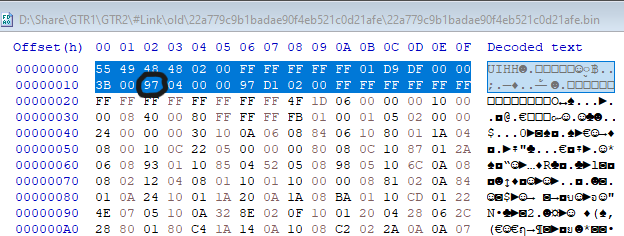
You open the BIN file you want to edit with HEX edit and (overwrite) the 19th Byte to a value that is unique to the existing one on your watch. Files modified upon installation will be saved without overwriting the existing files.


Please edit by Overwrit the 19th Byte , Do not edit by insert if you edit by insert the BIN size is change and BIN will be broken

Imagem


But this kind of correction may have some risks because I'm not sure What is the system used in the header? But as I understand it, I think the program Probably used to verify files


If you are unsure or do not dare to try it, I recommend waiting for the program developer.

Editing files to import the clock is risky. Please use your judgment before deciding to give it a try.

Ps. : Personally, I have tested and applied it. Haven't had any problem yet. I added 4 files I like on the watch. it's work normal.
Editado pela última vez por asoo em 07 Fev 2021, 16:39, em um total de 1 vez.
ͼͽ To request please use the interrelated forum in action ͼͽ
Please do not PM to me for requests ported watchface.
PVa__
Mensagens: 17
Registrado em: 25 Out 2020, 17:24
Localização: Paris
Been thanked: 3 times
Contato:

Mensagem por PVa__ »

Hi asoo,
Thanks a lot for your detailed answer. I just used the HxD application and randomly changed the 19th byte, and was able to add a new watch face without overwriting the previously installed .BIN file.
Thanks again :-)
demiurg1
WF maker
Mensagens: 114
Registrado em: 23 Fev 2020, 22:49
Localização: Poland
Has thanked: 23 times
Been thanked: 17 times
Contato:

Mensagem por demiurg1 »

Great tip. I congratulate you on your knowledge and idea. It worked flawlessly for me. COOL !
demiurg1
WF maker
Mensagens: 114
Registrado em: 23 Fev 2020, 22:49
Localização: Poland
Has thanked: 23 times
Been thanked: 17 times
Contato:

Mensagem por demiurg1 »

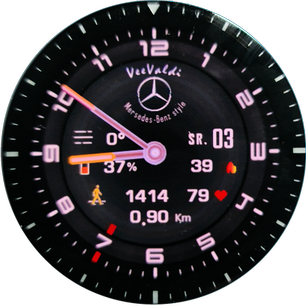
At the link: https://amazfitwatchfaces.com/gtr/view/12120 I have placed a new (version 3) of my watch face called "VeeValdi Mercedes", intended for the GTR 2 watch.
In this next version of my watch face, I have introduced or improved the display of additional information. Currently, the watch face displays km, steps, battery status (in percent and with a changing icon), heart rate, kilocalories (kcal), weather (in the form of an alternating icon and a number showing the temperature in ° C), two-letter abbreviation names of the weekday (PL), the day of the month (number), as well as the icon of no bluetooth range and the alarm icon (alarm clock, if an alarm is set).
Below I present a picture (taken from a photo) of the changed watch face. After uploading to the smartwatch, it looks much better.
A shield created thanks to the advice of people from this online community. Thanks a lot.
Imagem
Avatar do usuário
eliasf
Mensagens: 23
Registrado em: 29 Jan 2021, 18:10
Localização: GR
Has thanked: 5 times
Been thanked: 5 times
Contato:

Mensagem por eliasf »

Ok so after fiddling with the python code a bit I managed to resolve below issue by changing the file inside py_amazfit_tools-GTR2\watchFaceParser\elements\progress.py like this:

Código: Selecionar todos

from watchFaceParser.elements.gtr2.analogDialFaceElements.clockHand import ClockHand
class Progress:
    definitions = { 
   	1: { 'Name': 'AnalogDialFace', 'Type': ClockHand},
        3: { 'Name': 'AnalogDialFace', 'Type': ClockHand},
    }
Simply added the same line with a 3 in front and now the parameter can be read.
Don't know how correct this is or if it broke something else but it worked in my case.
Trying to decompile a couple of watchfaces and it results in a traceback error.

The log says:

Código: Selecionar todos

WARNING - [ParamConv:parse] currentPath 5/./2/./3/./3 / Parameter 3 isn't supported for <class 'watchFaceParser.elements.gtr2.progress.Progress'>
CRITICAL - Parameter 3 isn't supported for <class 'watchFaceParser.elements.gtr2.progress.Progress'>
Traceback (most recent call last):
Has anyone else encountered it and is there a solution?

I can provide full log if necessary.
Avatar do usuário
asoo
Mensagens: 2126
Registrado em: 03 Jan 2019, 01:48
Localização: ͼͽ Thailand ͼͽ
Has thanked: 410 times
Been thanked: 2044 times

Mensagem por asoo »

demiurg1 escreveu: 01 Fev 2021, 21:43
I do not have access to the HUAMI online tool. I applied for access more than 7 days ago and to no avail. When I try to enter the website, I get the message "You registration application is under review".
As for the display of icons: alarm and bluetooth, I coped with the alarm icon. Unfortunately, the bluetooth icon is not displayed on the watch face, even though bluetooth is turned on and the smartphone and the watch "see" each other. In the applications:" Zepp" and" "Notify for Amazfit" my GTR 2 is visible. I don't know what about this bluetooth icon?
Bluetooth in GTR2 Default is ON. SO the background you must create picture Bluetooth ON And icon in "Status" you must create icon Bluetooth OFF icon

On GTR2 It shows the opposite effect to GTR.

As for Huemi, I have to wait about 4 weeks for a response to be able to use the tool.
ͼͽ To request please use the interrelated forum in action ͼͽ
Please do not PM to me for requests ported watchface.
Avatar do usuário
asoo
Mensagens: 2126
Registrado em: 03 Jan 2019, 01:48
Localização: ͼͽ Thailand ͼͽ
Has thanked: 410 times
Been thanked: 2044 times

Mensagem por asoo »

bigdigital /py_amazfit_tools have new update (07-02-2021)

- Add in type. Replace types in FontRotate
- Fixes in header. Use CRC16 to generate unique dial ID.
- header_1.md (Initial release )
- Can unpack watchface have "week Progress"
https://github.com/bigdigital/py_amazfi ... /tree/GTR2

Imagem
My tested unpack and pack , it's Work .


Thank bigdigital.kov very much for new update
ͼͽ To request please use the interrelated forum in action ͼͽ
Please do not PM to me for requests ported watchface.
Avatar do usuário
spormill
WF maker
Mensagens: 1
Registrado em: 04 Jan 2021, 07:08
Localização: Bavaria
Has thanked: 1 time
Contato:

Mensagem por spormill »

When I want to download the tool, I get a virus warning!
Is it safe to use?
loukie
Mensagens: 1
Registrado em: 04 Fev 2021, 21:27
Localização: Hungary
Contato:

Mensagem por loukie »

I'v tried to create GTS 2 watchface, but I can't trugh the 3. phase , so I can't create a json file. Somebody can give me any suggestion?
Avatar do usuário
asoo
Mensagens: 2126
Registrado em: 03 Jan 2019, 01:48
Localização: ͼͽ Thailand ͼͽ
Has thanked: 410 times
Been thanked: 2044 times

Mensagem por asoo »

spormill escreveu: 09 Fev 2021, 16:07
When I want to download the tool, I get a virus warning!
Is it safe to use?
Your antivirus is Windows Security ? if yes , I found too But I use other antivirus scan again it's not report any virus . In my opinion, I think there are only some commands that work similar to virus. But it's not a virus
Imagem

I think it's save to use , but if you are uncomfortable using it, Please tried this pack ( make upx )
PY.zip
(331.88 KiB) Baixado 252 vezes
PS. But anyway, it depends on your decision.
ͼͽ To request please use the interrelated forum in action ͼͽ
Please do not PM to me for requests ported watchface.
bigdigital.kov
Mensagens: 4
Registrado em: 03 Ago 2020, 12:55
Localização: Kyiv
Has thanked: 2 times
Been thanked: 9 times
Contato:

Mensagem por bigdigital.kov »

Hi. There no viruses. The gtr2packer is a java program which was packed in the exe file together with java environment. It does not have any certificates, that's why it can be suspicious for some antiviruses, especially windows defender.
It seems the packer works well now. And it already has features that not available in the official huami tool.
For now, SashaCX75 working on the gui tool adaptation, to make it work with the new gtr2 json structure. I guess we will see a nice free editor very soon.
demiurg1
WF maker
Mensagens: 114
Registrado em: 23 Fev 2020, 22:49
Localização: Poland
Has thanked: 23 times
Been thanked: 17 times
Contato:

Mensagem por demiurg1 »

I am very happy that the SashaCX75 is working on an editing tool for the GTR2 and probably for the GTR2e (because I think it already has such a watch). So I can't wait.
jorgealmeida.rs
WF maker
Mensagens: 10
Registrado em: 16 Jul 2020, 01:28
Localização: Brazil
Been thanked: 2 times
Contato:

Mensagem por jorgealmeida.rs »

Please. When I try do download py_amazfit_tools-GTR2_v0_2.zip the antivirus blocked this file like a virus.
What is wrong? What I must to do? Thanks
Avatar do usuário
asoo
Mensagens: 2126
Registrado em: 03 Jan 2019, 01:48
Localização: ͼͽ Thailand ͼͽ
Has thanked: 410 times
Been thanked: 2044 times

Mensagem por asoo »

jorgealmeida.rs escreveu: 16 Fev 2021, 02:29
Please. When I try do download py_amazfit_tools-GTR2_v0_2.zip the antivirus blocked this file like a virus.
What is wrong? What I must to do? Thanks
viewtopic.php?p=8110#p8110
ͼͽ To request please use the interrelated forum in action ͼͽ
Please do not PM to me for requests ported watchface.
Messef
Mensagens: 2
Registrado em: 15 Fev 2021, 15:50
Localização: Belgium
Contato:

Mensagem por Messef »

I'm trying to unpack the following watch face /gtr/view/11757
It looks like it's working, but the json file is empty, so I can't pack it afterwards.
I like this watch face and only want to make the backgrounds fully black.
Any idea what the problem could be?
Avatar do usuário
asoo
Mensagens: 2126
Registrado em: 03 Jan 2019, 01:48
Localização: ͼͽ Thailand ͼͽ
Has thanked: 410 times
Been thanked: 2044 times

Mensagem por asoo »

Messef escreveu: 16 Fev 2021, 14:06
I'm trying to unpack the following watch face /gtr/view/11757
It looks like it's working, but the json file is empty, so I can't pack it afterwards.
I like this watch face and only want to make the backgrounds fully black.
Any idea what the problem could be?
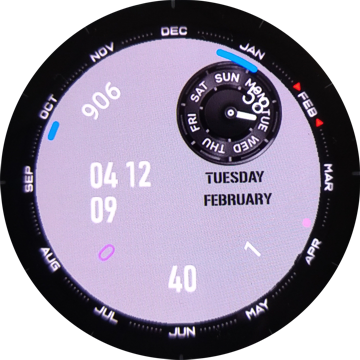
Try this : ( main.exe by SashaCX75 )
https://4pda.ru/forum/index.php?showtop ... y104352153

lowconsumptionanalog unpack :
ͼͽ To request please use the interrelated forum in action ͼͽ
Please do not PM to me for requests ported watchface.
Messef
Mensagens: 2
Registrado em: 15 Fev 2021, 15:50
Localização: Belgium
Contato:

Mensagem por Messef »

asoo escreveu: 16 Fev 2021, 15:26
Messef escreveu: 16 Fev 2021, 14:06
I'm trying to unpack the following watch face /gtr/view/11757
It looks like it's working, but the json file is empty, so I can't pack it afterwards.
I like this watch face and only want to make the backgrounds fully black.
Any idea what the problem could be?
Try this : ( main.exe by SashaCX75 )


lowconsumptionanalog unpack :
lowconsumptionanalog-433119-7b6a9d2ad6_2.bin.unc.zip
Thank you for your response and the unpack.
I don't speak Russian, so I can't do much with the link to main.exe by SashaCX75.

When trying to runs the python command with the json file I now get the following error:
[Fatal] [WinError 2] The system cannot find the file specified: '..\\lowconsumptionanalog-433119-7b6a9d2ad6_2.bin.unc\\lowconsumptionanalog-433119-7b6a9d2ad6_2.bin.unc_packed.bin'
Responder

Voltar para “Watchfaces tools”

Quem está online

Usuários navegando neste fórum: Nenhum usuário registrado e 1 visitante