Hello,
Greetings from Bangladesh!
Is it possible to assign z-index value to battery text and icon so that I can place them both in same location and control which one to come above and vice-versa?
I'm trying to put percentage value above the icon but it gets behind and thus becomes invisible.
I want the battery icon to become red if percentage is low, and making the icon transparent in the text area won't look good.
Thanks in advance.
-
- Administrator
-
-
Support Ukraine
If you experience any problems with the forum (it is not visible, there is no way to post messages, or some functionality does not work), please let us know. If you have problems with registration or you did not receive confirmation letter, let us know and we will activate your account manually.
If you get an "The submitted form was invalid. Try submitting again" error, delete cookies, then try again.
z-index for battery text and icon
Moderators: Internal error, Watchmens
-
TXK

- Posts: 299
- Joined: 10 Apr 2018, 05:15
- Location: china
- Has thanked: 149 times
- Been thanked: 97 times
- Contact:
like this?:
https://amazfitwatchfaces.com/bip/view/?id=15517
Please let the number of electrical text is transparent background.
https://amazfitwatchfaces.com/bip/view/?id=15517
Please let the number of electrical text is transparent background.
-
nishu
- WF maker
- Posts: 11
- Joined: 28 Oct 2018, 07:00
- Location: Dhaka, Bangladesh
- Has thanked: 6 times
- Contact:
I haven't figured it out the whole thing yet, but i'm attaching the idea here.
It's not totally done, so the numbers might not be aligned properly and the coloring might have some problems,
I know the design is a bit unusual, but I'm trying to be different here.
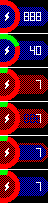
my setup is #1. (I know I don't need full 3 digits for 100% but whatever)
It will be #2 when 40%.
But if it goes 10% or lower, blue back will be red (#3).
Since I can't put the text above the image, I tried to cut of the text area and put the blue dots in the main background of the watch face.
It worked perfectly with blue background, until it becomes red (#4).
I tried #5, but, eh, not quite happy with the outcome.
So I've settled for #6 now, but any suggestions are welcome. And It'd be great if it is possible to make it like #3.
It's not totally done, so the numbers might not be aligned properly and the coloring might have some problems,
I know the design is a bit unusual, but I'm trying to be different here.
my setup is #1. (I know I don't need full 3 digits for 100% but whatever)
It will be #2 when 40%.
But if it goes 10% or lower, blue back will be red (#3).
Since I can't put the text above the image, I tried to cut of the text area and put the blue dots in the main background of the watch face.
It worked perfectly with blue background, until it becomes red (#4).
I tried #5, but, eh, not quite happy with the outcome.
So I've settled for #6 now, but any suggestions are welcome. And It'd be great if it is possible to make it like #3.
-
TXK
- Posts: 299
- Joined: 10 Apr 2018, 05:15
- Location: china
- Has thanked: 149 times
- Been thanked: 97 times
- Contact:
My English is not good.nishu wrote: 30 Oct 2018, 14:18Hi,
Thank you very much for your replay!
But as I've mentioned, making the icon transparent in the text area is not the solution I'm looking for!
I can't understand your meaning well, I'm sorry.
-
TXK
- Posts: 299
- Joined: 10 Apr 2018, 05:15
- Location: china
- Has thanked: 149 times
- Been thanked: 97 times
- Contact:
1、It seems that we can not change the number of layers.
2、I made an experiment, it seems to be able to show, but there are some small BUG..
https://amazfitwatchfaces.com/bip/view/?id=15539
2、I made an experiment, it seems to be able to show, but there are some small BUG..
https://amazfitwatchfaces.com/bip/view/?id=15539
-
nishu
- WF maker
- Posts: 11
- Joined: 28 Oct 2018, 07:00
- Location: Dhaka, Bangladesh
- Has thanked: 6 times
- Contact:
Hello,TXK wrote: 30 Oct 2018, 15:551、It seems that we can not change the number of layers.
2、I made an experiment, it seems to be able to show, but there are some small BUG..
https://amazfitwatchfaces.com/bip/view/?id=15539
Thank you again for your reply! And I really appreciate your time and effort on this issue!
Looks like your solution is similar to the #4 of my previously posted image. It's a pity there's no workaround on this.
By the way, I see you have made quite a good number of watch faces! Great work I must say! Keep up the good work! Cheers!
-
mihaiolimpiu
- WF maker
- Posts: 1
- Joined: 02 Jan 2019, 23:37
- Location: Romania
- Been thanked: 1 time
- Contact:
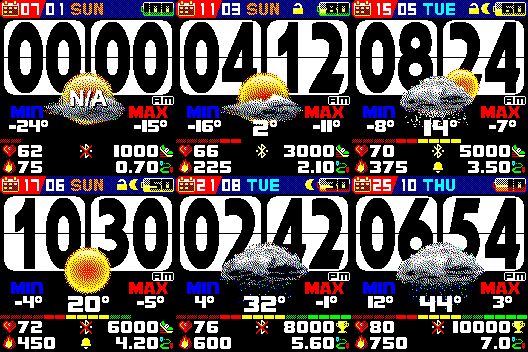
Not what you wanted, but I've did a "mesh" overlay, on the watch it works quite beautiful.
https://amazfitwatchfaces.com/bip/view/?id=18500
https://amazfitwatchfaces.com/bip/view/?id=18500
Who is online
Users browsing this forum: No registered users and 1 guest