• Administrador
  •  
    Support Ukraine
    If you experience any problems with the forum (it is not visible, there is no way to post messages, or some functionality does not work), please let us know. If you have problems with registration or you did not receive confirmation letter, let us know and we will activate your account manually.
    If you get an "The submitted form was invalid. Try submitting again" error, delete cookies, then try again.
     

AmazFit WatchFace editor for Windows by SashaCX75

This forum is designed to discuss and develop tools creating watch faces.

Moderadores: asoo, lvpokka, Internal error, Watchmens

Reglas del Foro
All communication in this branch should only be in English.
To discuss tools that are not in this section, use the “Watchfaces tools (discussion)” forum.
Avatar de Usuario
SashaCX75
Mensajes: 820
Registrado: 26 Oct 2019, 15:18
Ubicación: Ukraine
Has thanked: 13 times
Been thanked: 1029 times
Contactar:

AmazFit WatchFace editor for Windows by SashaCX75

Mensaje por SashaCX75 »

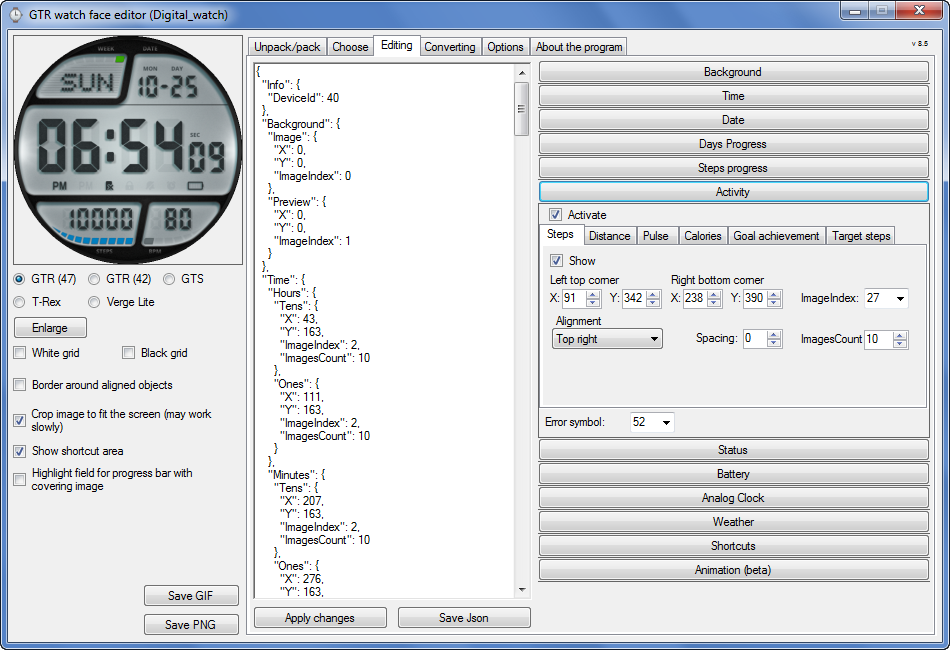
Graphics editor for working with dials Amazfit
The editor supports watch faces from GTR 47, GTR 42, GTS, T-Rex, Verge Lite.
Screenshot
Imagen
Note: the path to the program should not contain spaces, it is advisable to unpack it to the root of the disk.
Not all dials can be unpacked.
You can reduce the size of the bin file only by reducing the size of the images (height * width) or by reducing the number of images.

The drawing order of elements cannot be changed. The only exception is if you move the second hand from the center, it will be drawn under the hour and minute hands.

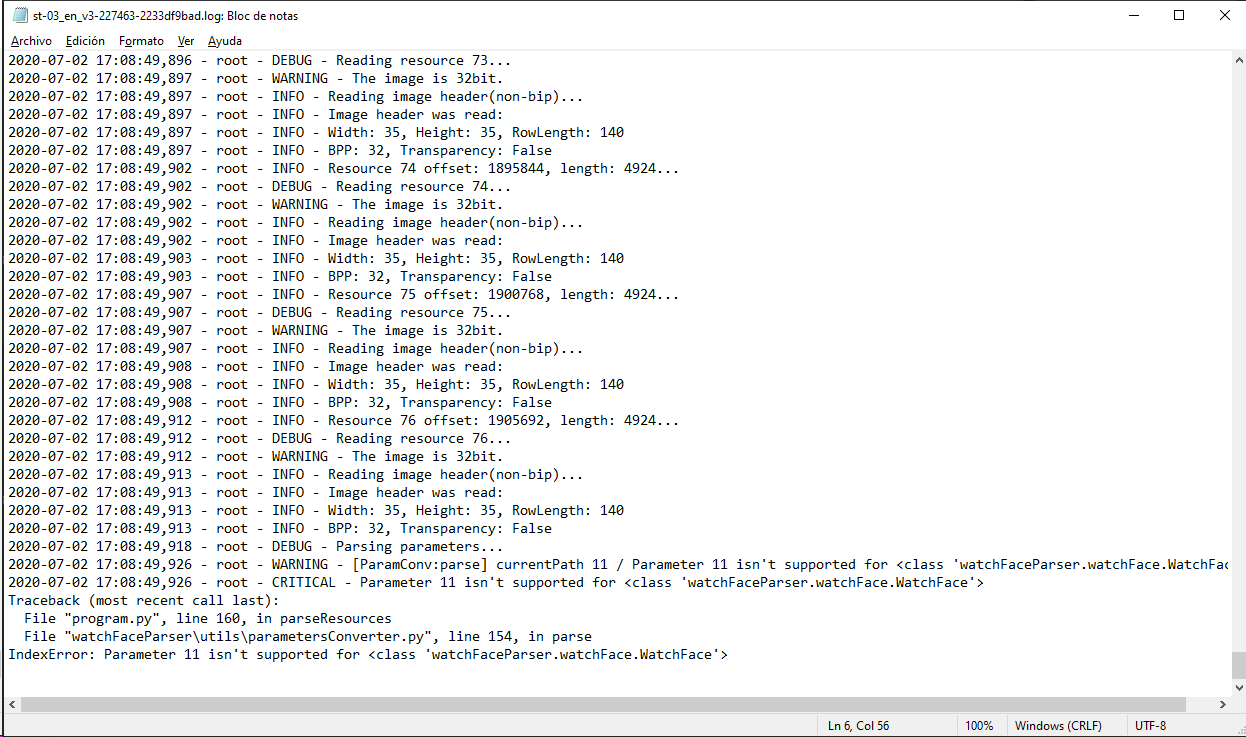
If the .bin file is not created, then you need to look for errors in the .log file. Most often this happens when images have the wrong format.

If the bin file is not created, and the log file contains the entry “bad transparency mask”, this means that the format of one or more images is incorrect (most often it occurs if you save the image in Photoshop without transparent pixels). You can fix it as follows:
- in Photoshop - add at least one transparent pixel
- in GIMP exported to PNG 16 bit RGBA
- in XnView - Image -> 32 bits

Version 10.0
List of changes
Added the ability to display the distance traveled in kilometers and miles.
Updated translation.
v 9.0
Fixed display of date if pictures have different sizes (often pictures for "1" are narrower than others)
Added new warnings about possible errors.
Fixed the order of displaying items.
Added a button to refresh the preview image.
Fixed bugs when converting watch faces.
Updated Chinese and Italian translations.
v 8.5
Fixed work with Verge Lite
v 8.4
Fixed Italian translation.
Added Chinese manual.
v 8.3
Bugs fixed.
Added a manual in English.
v 8.2
Added the display of the target steps (StepsGoal)
Added preliminary calculation of the size of the .bin file.
v 8.1
Fixed work on monitors with high resolution.
Updated translation (French, Italian, Chinese, Spanish).
v 8.0
Added the ability to convert dials between different watch models (GTR / T-Rex / Verge Lite).
v 7.1
Italian language added.
Minor fixes.
v 7.0
Added animation support
Verge Lite Support Added
Added the ability to quickly save the project (Ctrl + S)
Added support for languages (French, Chinese).
v 6.1
Added support for T-Rex.
Added the ability to auto-correct image files (error "bad transparency mask").
Added a reminder to save the project when it is closed.
v 6.0
Added support for shortcuts.
Added background image support for circular indicator.
Added display of a set of icons (segments) for the progress of steps.
Added display of a set of icons (segments) for the battery.
Added display of a set of icons (segments) for the pulse.
Added display of an indicator (arrow) for a pulse.
Added display of indicator (arrows) for calories.
Added display of a circular indicator for the pulse.
Added display of a circular indicator for calories.
Added the ability to crop the image to fit the screen.
Added support for languages ​​(Portuguese, Czech, Slovak, Hungarian).
v 5.2
Added support for a set of icons (icons and a set of coordinates for them) for the progress of steps and battery.
Added the ability to crop the preview according to the shape of the screen.
Bugs fixed in the English version.
v 5.1
Fixed incorrect display of the distance traveled.
Added the ability to adjust the speed of gif animation.
Added the ability to work with compressed bin files.
Updated bin file packer.
Added display of the year.
Added display of a charge indicator (arrow).
Added display of indicator (arrow) of steps.
Added display of the indicator (arrow) of the date.
Added display of indicator (arrow) of the day of the week.
Added display of indicator (arrow) of the month.
Added the ability to paste copied coordinates into offset fields from the center (for arrows).
English support added.
Old versions
If you want to supplement the missing translation, write to the PM.

Beta version of the editor with support for Amazfit X

AmazFit WatchFace editor 2 with support for GTR 2, GTS 2, T-Rex Pro

My editor doesn't work with GTR2 (GTS2) watch faces and I have no plans to add support for these models anytime soon. I don't know any other programs that can work with these dials. I have no information if anyone is working in this direction.

Because I bought a GTR 2e, the program will no longer be updated.

Donate to the author
PayPal: [email protected].
Última edición por SashaCX75 el 01 Jun 2022, 07:20, editado 25 veces en total.
panuj
WF maker
Mensajes: 3
Registrado: 22 Ago 2018, 05:09
Contactar:

Mensaje por panuj »

Hi! I hava a problem with day/night temperature on t-rex watchface.

I would want to add into watchface all weather info: icon, current, night and day temperature. Everything works nicely when creating the watchface, but when installed, only it shows only current weather - day/night temperatures are blanc.... I've read all the previous conversation about the day/nigh temperature, tried all the tricks and nothing seems to work. I have double checked that all the needed info and files are there, error files etc...

Anyone else has the same problem? Any idea how to fix this?

I haven't found any t-rex watchface with all the info so I could test that...
muhvs
Mensajes: 1
Registrado: 02 Jul 2020, 10:27
Ubicación: germany
Contactar:

Mensaje por muhvs »

We're sorry. You can't access this item because it is in violation of our Terms of Service.
I keep getting this when i Try to Download your Editor Tool ;(
Kraudi
WF maker
Mensajes: 4
Registrado: 30 Jun 2020, 11:47
Ubicación: Germany
Contactar:

Mensaje por Kraudi »

muhvs escribió: 02 Jul 2020, 10:29
We're sorry. You can't access this item because it is in violation of our Terms of Service.
I keep getting this when i Try to Download your Editor Tool ;(
Same here.
kampanita
WF maker
Mensajes: 34
Registrado: 25 Oct 2019, 06:15
Has thanked: 8 times
Been thanked: 7 times
Contactar:

Mensaje por kampanita »

[mention]SashaCX75[/mention]
I'm using the 8.1 version of your tool with this one https://amazfitwatchfaces.com/gtr/view/6815
i'm getting an error....could you help me ? I was unable to find 8.2 version, is not at google drive and i can not log into 4pda.ru

Thank you in advance.

Imagen
Avatar de Usuario
SashaCX75
Mensajes: 820
Registrado: 26 Oct 2019, 15:18
Ubicación: Ukraine
Has thanked: 13 times
Been thanked: 1029 times
Contactar:

Mensaje por SashaCX75 »

muhvs escribió: 02 Jul 2020, 10:29
We're sorry. You can't access this item because it is in violation of our Terms of Service.
I keep getting this when i Try to Download your Editor Tool ;(
Updated download links.

[mention]kampanita[/mention]
Checked this dial. I normally unpacked it. Try resetting the program or downloading the latest version.
Avatar de Usuario
SashaCX75
Mensajes: 820
Registrado: 26 Oct 2019, 15:18
Ubicación: Ukraine
Has thanked: 13 times
Been thanked: 1029 times
Contactar:

Mensaje por SashaCX75 »

panuj escribió: 01 Jul 2020, 08:38
Hi! I hava a problem with day/night temperature on t-rex watchface.

I would want to add into watchface all weather info: icon, current, night and day temperature. Everything works nicely when creating the watchface, but when installed, only it shows only current weather - day/night temperatures are blanc....
Day / night temperature is only displayed if the current temperature cannot be displayed.
panuj
WF maker
Mensajes: 3
Registrado: 22 Ago 2018, 05:09
Contactar:

Mensaje por panuj »

Ok, thanks. I used to have Amazfit Bip -and created watchfaces which showed all of them at the same time. Shame that t-Rex can’t do the same.
Avatar de Usuario
wing0826
Mensajes: 35
Registrado: 09 Jun 2020, 14:47
Ubicación: TW
Has thanked: 9 times
Been thanked: 4 times
Contactar:

Mensaje por wing0826 »

I try many watchface for T-rex

they all dont show AM/PM on my watch , it's no photo or incorrect

can someone try this?


another question~

can I show the two digit year?


thanks!~
Última edición por wing0826 el 16 Jul 2020, 14:42, editado 1 vez en total.
Avatar de Usuario
SashaCX75
Mensajes: 820
Registrado: 26 Oct 2019, 15:18
Ubicación: Ukraine
Has thanked: 13 times
Been thanked: 1029 times
Contactar:

Mensaje por SashaCX75 »

[mention]wing0826[/mention]
The format for displaying the time on the watch depends on the settings of the phone. For the 12 h format to work. must be enabled in phone settings. (Settings-System-Date and Time-Disable 24-hour format.)
Avatar de Usuario
wing0826
Mensajes: 35
Registrado: 09 Jun 2020, 14:47
Ubicación: TW
Has thanked: 9 times
Been thanked: 4 times
Contactar:

Mensaje por wing0826 »

thanks [mention]SashaCX75[/mention]

after trying, i got this

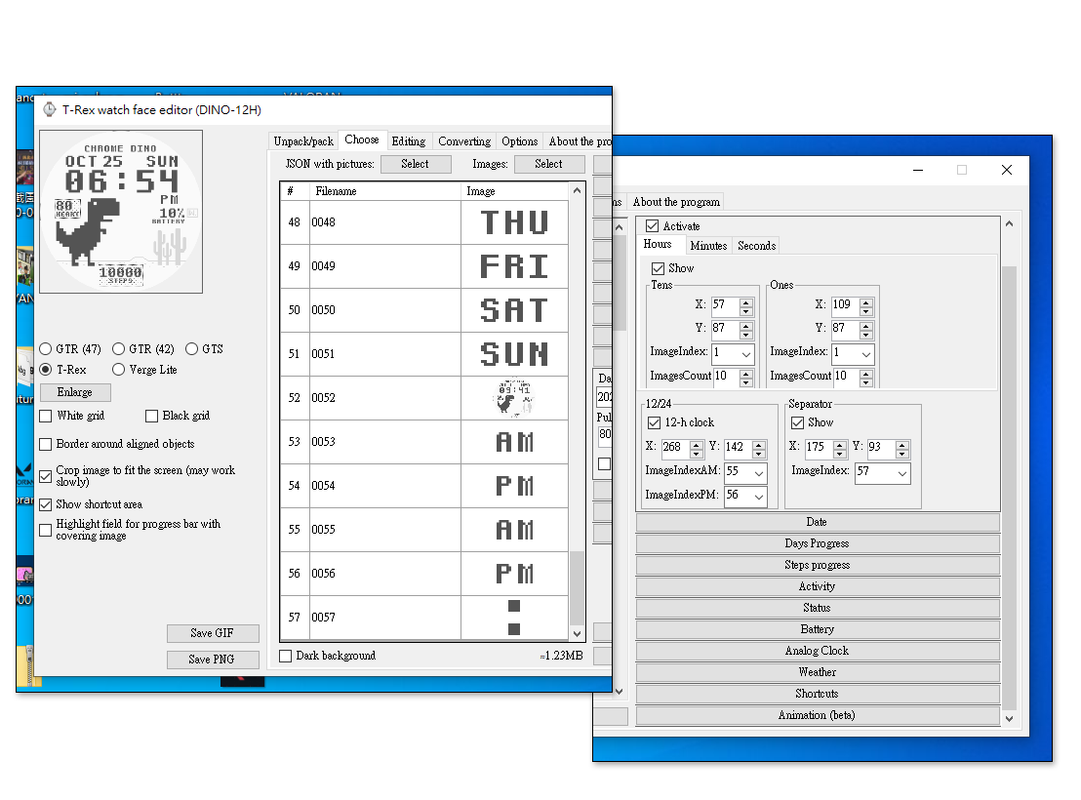
if I want use the AM/PM image, I must set the two AM & two PM image,

like this one, but I dont know why :shock:

https://amazfitwatchfaces.com/t-rex/view/908


Imagen
Avatar de Usuario
SashaCX75
Mensajes: 820
Registrado: 26 Oct 2019, 15:18
Ubicación: Ukraine
Has thanked: 13 times
Been thanked: 1029 times
Contactar:

Mensaje por SashaCX75 »

[mention]wing0826[/mention]
Not. One AM image and one PM image are enough. The dials seem to support two images for AM / PM (like for two languages), but this is not implemented in the program.
Avatar de Usuario
wing0826
Mensajes: 35
Registrado: 09 Jun 2020, 14:47
Ubicación: TW
Has thanked: 9 times
Been thanked: 4 times
Contactar:

Mensaje por wing0826 »

Oh okay, now I get it!

thanks @SashaCX75 making this program!~
Avatar de Usuario
madmax
WF maker
Mensajes: 4
Registrado: 25 Sep 2019, 10:40
Ubicación: Roma
Contactar:

Mensaje por madmax »

Hi, i have a problem with the temperature indicator if i don't use before amazfit with my iPhone there is nothing on screen: why? thank you
spidercrab
Mensajes: 24
Registrado: 25 Jun 2020, 09:13
Ubicación: UK
Has thanked: 27 times
Been thanked: 3 times
Contactar:

Mensaje por spidercrab »

@SashaCX75
I have a strange problem when using the Activity - Pulse - Pulse Segments.

I am using 123, 140 for 6 images, and each image is 2Kb. The Preview works perfectly when testing inside the Tool. All 27 images now total to about 120Kb.

Before I added this pulse segment feature, my zipped packed bin was 147k with 108Kb of images.

However, I now get a warning when creating a new Packed Zipped bin to say the Packed size is over 1.5Mb, and it may not work. This size seems huge in relation to the images used.

So my expectation was that the worst increase in Packed Bin size would be 6 x 2Kb = 12Kb of added images.

I have a 0001 image which is a duplicate of 0000.png. Can I create a blank round image for the 0001.png to save space here? Or is there something else I need to do.

Edit - I am wondering if an image is being created for every pulse, i.e. 200 approx image = 2k x 200 = 400kb ?
Última edición por spidercrab el 07 Jul 2020, 15:46, editado 1 vez en total.
Avatar de Usuario
SashaCX75
Mensajes: 820
Registrado: 26 Oct 2019, 15:18
Ubicación: Ukraine
Has thanked: 13 times
Been thanked: 1029 times
Contactar:

Mensaje por SashaCX75 »

[mention]madmax[/mention]
Where do you think the weather data comes from? Amazfit downloads data from the weather server and transfers it to the watch. It often happens that amazfit cannot receive data on current weather and then it is not displayed on the clock either.
Avatar de Usuario
SashaCX75
Mensajes: 820
Registrado: 26 Oct 2019, 15:18
Ubicación: Ukraine
Has thanked: 13 times
Been thanked: 1029 times
Contactar:

Mensaje por SashaCX75 »

[mention]spidercrab[/mention]
No need to consider the size of the pictures in kb. Read the first post to understand what the size of the bin file depends on.

The size of the preview image is usually smaller than the background and if necessary it can be reduced to 1px.
Avatar de Usuario
madmax
WF maker
Mensajes: 4
Registrado: 25 Sep 2019, 10:40
Ubicación: Roma
Contactar:

Mensaje por madmax »

ok but the thing I don't understand is that the weather icon is always there while the number disappears completely. have a nice day
my fault set-up on the wrong cell phone sorry
Última edición por madmax el 08 Jul 2020, 09:41, editado 1 vez en total.
Avatar de Usuario
madmax
WF maker
Mensajes: 4
Registrado: 25 Sep 2019, 10:40
Ubicación: Roma
Contactar:

Mensaje por madmax »

your program is very very very good!!! thank you so much for it
Horatius80

Mensaje por Horatius80 »

spidercrab escribió: 07 Jul 2020, 12:04
@SashaCX75
I have a strange problem when using the Activity - Pulse - Pulse Segments.

I am using 123, 140 for 6 images, and each image is 2Kb. The Preview works perfectly when testing inside the Tool. All 27 images now total to about 120Kb.

Before I added this pulse segment feature, my zipped packed bin was 147k with 108Kb of images.

However, I now get a warning when creating a new Packed Zipped bin to say the Packed size is over 1.5Mb, and it may not work. This size seems huge in relation to the images used.

So my expectation was that the worst increase in Packed Bin size would be 6 x 2Kb = 12Kb of added images.

I have a 0001 image which is a duplicate of 0000.png. Can I create a blank round image for the 0001.png to save space here? Or is there something else I need to do.

Edit - I am wondering if an image is being created for every pulse, i.e. 200 approx image = 2k x 200 = 400kb ?
1.) Size (MiB) of .bin depends on the size of the image in pixel and not in KiB
2.) The preview image 0001.png does not need to be defined (you leave a blank space for the imageindex in the editor). Then you can continue numbering other pictures from 0001.png etc.
enerwate
WF maker
Mensajes: 1
Registrado: 30 Jun 2020, 07:27
Ubicación: Łódź
Contactar:

Mensaje por enerwate »

panuj escribió: 03 Jul 2020, 08:07
Ok, thanks. I used to have Amazfit Bip -and created watchfaces which showed all of them at the same time. Shame that t-Rex can’t do the same.
I confirm that. The current and max min temperature does not work in GTR at the same time. I also tried various tricks with json and nothing.
pity.
leonlee99999
WF maker
Mensajes: 1
Registrado: 26 Jun 2020, 23:11
Ubicación: Taiwan
Contactar:

Mensaje por leonlee99999 »

Thank you so much Need Try It
Avatar de Usuario
SashaCX75
Mensajes: 820
Registrado: 26 Oct 2019, 15:18
Ubicación: Ukraine
Has thanked: 13 times
Been thanked: 1029 times
Contactar:

Mensaje por SashaCX75 »

Version 8.3
List of changes (Google Translate)
Bugs fixed.
Added a manual in English.
Avatar de Usuario
kyle
Mensajes: 23
Registrado: 22 Abr 2018, 14:32
Ubicación: CHINA
Has thanked: 3 times
Been thanked: 5 times
Contactar:

Mensaje por kyle »

SashaCX75 escribió: 17 Jul 2020, 18:32
Version 8.3
List of changes (Google Translate)
Bugs fixed.
Added a manual in English.
I want to translate to Chinese manual
Contact please email:[email protected]
如有需要可联系!
muskatim
Mensajes: 2
Registrado: 08 Abr 2020, 23:38
Ubicación: Turkiye
Contactar:

Mensaje por muskatim »

I downloaded the program. I changed the png images after loading the watch face. Could you please write the instructions for use?
muskatim
Mensajes: 2
Registrado: 08 Abr 2020, 23:38
Ubicación: Turkiye
Contactar:

Mensaje por muskatim »

I downloaded the program. I changed the png images after loading the watch face. Could you please write the instructions for use?
Responder

Volver a “Watchfaces tools”

¿Quién está conectado?

Usuarios navegando por este Foro: No hay usuarios registrados visitando el Foro y 1 invitado