• Administrator
  •  
    Support Ukraine
    If you experience any problems with the forum (it is not visible, there is no way to post messages, or some functionality does not work), please let us know. If you have problems with registration or you did not receive confirmation letter, let us know and we will activate your account manually.
    If you get an "The submitted form was invalid. Try submitting again" error, delete cookies, then try again.
     

MiBandWFTool

This forum is designed to discuss and develop tools creating watch faces.

Moderators: asoo, lvpokka, Internal error, Watchmens

Forum rules
All communication in this branch should only be in English.
To discuss tools that are not in this section, use the “Watchfaces tools (discussion)” forum.
lvpokka
Posts: 178
Joined: 07 Jul 2019, 20:22
Location: L1
Has thanked: 19 times
Been thanked: 152 times
Contact:

MiBandWFTool

Post by lvpokka »

Author
lvpokka

Tool Description
1. The tool is based on a modified version of AmazfitBipTools, thanks to the original open source .
2. The tool supports unpacking, packing of the official watch face bin file.
3. Mi band 4 supports 16,581,375 colors.
4. Mi band 5 supports 15,499,008 colors.

How to
1. Unzip MiBandWFTool_X.X.zip.
2. Download .bin file from catalog or get standard watchface file.
3. Drag the .bin file to WatchFace.exe (in step 1. , get the decompressed file)
(if there is only one log file, the decompression failed).

4. There are two ways to modify the dial.
  • is to modify the corresponding image file and replace it with what we want.
  • is to modify the corresponding json file and modify the position of the image.
5. After all the modifications are completed, drag the modified json into WatchFace.exe in step 1 to get the corresponding bin file
(the file name depends on the name of the bin. If the .bin file is not generated, the package is wrong)

6. Copy the newly generated bin file to the corresponding directory of the mobile phone, and the synchronization will be completed. (This step is not very clear, you can refer to the original tutorial) above, you're done!
History log
What's new
  • added animation support
  • fixed pulse and weather
  • removed color restrictions for images
  • analog clock support
ver1.2
- Added compatibility for Pulse progress bar

ver1.3
- added full support for transparent images
- drawing 20 frames for preview GIF

ver1.3.2
- bug fixes
- added 2 versions, both with transparency but Palette version uses less memory if images are simple.

ver1.3.3
- Added circular/linear step progress on preview

Stable v1.3.6
- locked transparency for palette mode, support only (0 and 255) values
- palette mode fix

Stable v1.3.7
v1.3.7 (cosmetic changes, you can use 1.3.6 if everything suits)
- Fixed GIF preview (Pulse rendering, Step segments, Kilometer drawing, Calories)
- Added the ability to choose which Set of images to use for WeekDays. (Config file WatchFace.exe.config)
- STRONGLY fixed json examples in README.
(to avoid problems, pack 1.3.6 and unpack 1.3.7 for a smooth transition)

Stable v1.3.8
- Removed image order dependency for json (sorting images no longer required)
- Fixed display bugs
Important: the order of the images should be from 0000 to XXXX without gaps.

v1.3.9
- Removed dependence on images order 0000->XXXX
- Calories rendering fixed
- Added ability to change Preview Speed (available from 50ms - 1000ms)
- TimeElement DrawingOrder hardcoded to 1234 (not used by MiBand4)

v1.4.1
- Other bugfixes
- New WF support
- Added new elements (time delimiter / step icon / linear progress )

v2.1.4
- Added support Mi Band 5 wfaces
- Pandafix (new unknown element)
- BugFixes

v2.1.5
- Preview bugfixes
- [WFPreview] Added Copy/Paste/Save ability
- [WFPreview] Added ability to replace watchface header
Mi Band 4 WF Tool
v1.4.2
- Added miles image support
NOTE:
- if your using image for MilesSuffixImageIndex, then KmSuffixImageIndex is required! you can use the same image for it

Mi Band 5 WF Tool
v2.1.6
- Preview bugfixes
- Watchfaces generating with random header identifier
- Fixed problem with Windows scaling, DPI is tied to 96
- [WFPreview] Removed ability to clone watchface header

Mi Band 6 WF Tool
v4.1.0
- Added Lunar calendar
- Bug fixes
- New preview generator, should be pixel perfect (big thx to Johnson070)

MiBandWFTool_4.1.0.zip

MiBandWFTool_2.1.6.zip [alt url] [alt url 2]

MiBandWFTool_1.4.2.zip [alt url] [alt url 2]
Last edited by lvpokka on 02 Aug 2020, 19:41, edited 24 times in total.
dzsergio
WF maker
Posts: 4
Joined: 07 Mar 2020, 19:51
Location: Algeria
Contact:

Post by dzsergio »

lumenvindex wrote: 08 Apr 2020, 19:03
dzsergio wrote: 07 Apr 2020, 10:14
why should it be 96dpi?
can u make it higher?
Mi Band ignores dpi anyway. You need it to be 96 to get nice preview, that's all.
even if the preview was messed up the band will display it correctly? :o
User avatar
lumenvindex
Posts: 114
Joined: 08 Sep 2019, 19:01
Has thanked: 2 times
Been thanked: 49 times
Contact:

Post by lumenvindex »

dzsergio wrote: 09 Apr 2020, 15:14
even if the preview was messed up the band will display it correctly? :o
Well, yeah. But how do you know that you've placed everything well without normal preview? :lol:
MESS WITH THE BEST
DIE LIKE THE REST
wes.newman
Posts: 1
Joined: 17 May 2020, 15:28
Location: U.S.
Contact:

Post by wes.newman »

I'm looking at creating a custom watch face for the Mi Band. I've downloaded several different faces looking at the different options.
The weather doesn't work on any of the faces I've downloaded. The icon stays the same and the temperature never shows. Is this currently broken in firmware version 1.0.9.48? Any other suggestions? The distance traveled also only shows in km. Can this be switched to miles yet?
User avatar
lumenvindex
Posts: 114
Joined: 08 Sep 2019, 19:01
Has thanked: 2 times
Been thanked: 49 times
Contact:

Post by lumenvindex »

wes.newman wrote: 18 May 2020, 13:24
I'm looking at creating a custom watch face for the Mi Band. I've downloaded several different faces looking at the different options.
The weather doesn't work on any of the faces I've downloaded. The icon stays the same and the temperature never shows. Is this currently broken in firmware version 1.0.9.48? Any other suggestions? The distance traveled also only shows in km. Can this be switched to miles yet?
Search the topic.
MESS WITH THE BEST
DIE LIKE THE REST
User avatar
LluisQuilez
WF maker
Posts: 1
Joined: 06 Mar 2020, 11:19
Location: Tenerife
Contact:

Post by LluisQuilez »

Buenas tardes,

Últimamente cuando voy a crear el bin, la pantalla del fondo 0000.png no se ajusta correctamente al formato 120x240 y se hace más pequeña.

Por qué?
User avatar
lumenvindex
Posts: 114
Joined: 08 Sep 2019, 19:01
Has thanked: 2 times
Been thanked: 49 times
Contact:

Post by lumenvindex »

LluisQuilez wrote: 22 May 2020, 17:08
Por qué?
Compruebe el DPI de la imagen. Debe ser igual a 96 para que la vista previa se genere normalmente.
Check the DPI of the picture. It should be equal to 96 for the preview to be generated normally.
MESS WITH THE BEST
DIE LIKE THE REST
Stylus
Posts: 1
Joined: 06 Jun 2020, 18:31
Location: James Craik
Contact:

Post by Stylus »

Hola,

Tengo un problema, modifique algunas imágenes de una esfera que descargue de la pagina. La esfera es la F1 V3. Y me tira este error.

Fatal|[ERROR] Watchface is greater than 321kb, it will not be accepted by Mi Band 4, please reduce size! Current size:368kb.

Como puedo solucionarlo?
zebymanga
Posts: 1
Joined: 16 Jun 2020, 17:15
Location: uhh
Contact:

Post by zebymanga »

I am presented this error when I try to replace distance with weather
Fatal|[ERROR]Could not find member 'Step' on object of type 'Steps'. Path 'Activity.Steps.Step', line 41, position 1
can someone help me?
User avatar
lumenvindex
Posts: 114
Joined: 08 Sep 2019, 19:01
Has thanked: 2 times
Been thanked: 49 times
Contact:

Post by lumenvindex »

zebymanga wrote: 16 Jun 2020, 17:45
I am presented this error when I try to replace distance with weather
Fatal|[ERROR]Could not find member 'Step' on object of type 'Steps'. Path 'Activity.Steps.Step', line 41, position 1
can someone help me?
It says that there is a mistake in your json. Need to see the code to say what is wrong with it.
By the way, Mi Band 4 doesn't show the weather.
MESS WITH THE BEST
DIE LIKE THE REST
lvpokka
Posts: 178
Joined: 07 Jul 2019, 20:22
Location: L1
Has thanked: 19 times
Been thanked: 152 times
Contact:

Post by lvpokka »

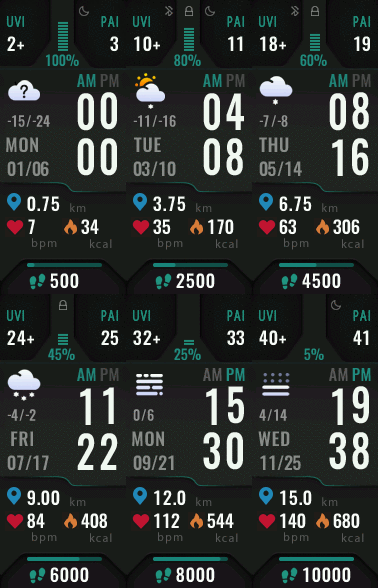
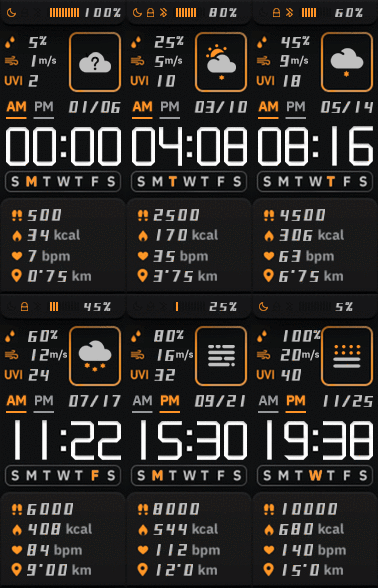
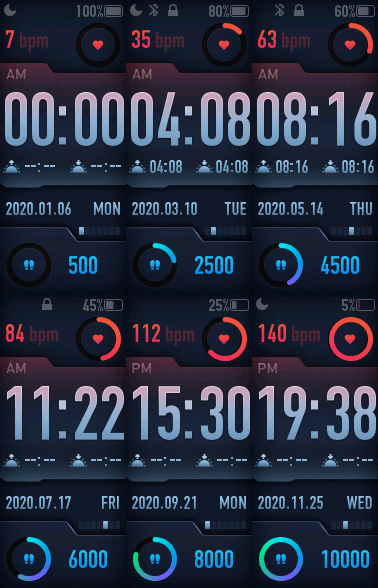
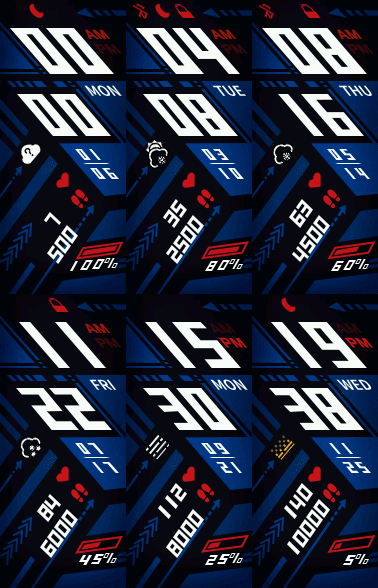
New Mi band 5 support will be released soon. :!: :D

Animation preview for new watchfaces!

Image ImageImageImage
User avatar
mediatouch
Posts: 3
Joined: 14 Oct 2019, 06:15
Location: Kazakhstan, Almaty
Has thanked: 4 times
Been thanked: 2 times
Contact:

Post by mediatouch »

Just got my new MI Band 5. It is great!

Can't wait for the new Tools and start making something awesome for Band5!

Who knows, when, where, why!? )))
lvpokka
Posts: 178
Joined: 07 Jul 2019, 20:22
Location: L1
Has thanked: 19 times
Been thanked: 152 times
Contact:

Post by lvpokka »

Currently i have beta version, but its not deeply tested for public release... but its already working with all mi band 5 components)

Beta version can be used with full understanding that what it can brick your Mi Band, use it at your own risk.
User avatar
mediatouch
Posts: 3
Joined: 14 Oct 2019, 06:15
Location: Kazakhstan, Almaty
Has thanked: 4 times
Been thanked: 2 times
Contact:

Post by mediatouch »

lvpokka wrote: 03 Jul 2020, 16:18
Currently i have beta version, but its not deeply tested for public release... but its already working with all mi band 5 components)

Beta version can be used with full understanding that what it can brick your Mi Band, use it at your own risk.
This is great news! So.., waiting for tested and stable release.

Anyway, here (on this website) are no Mi Band 5 category for upload yet. I guess it is upcoming soon... 8-)
franluciani
Posts: 43
Joined: 04 Oct 2019, 16:55
Location: Argentina
Has thanked: 9 times
Been thanked: 6 times
Contact:

Post by franluciani »

Amazing! Incredible that mi band 5 add new elements as temperature min and max, humidity, index UV, and time to dawn and sunset.
I did apple faces and this elements will be great to add them. But i would like that the GEEK Team add other tools, as alignement to digital clock, or variation in time to complete one lap on pointers for analog clock (to do for example cronograph for 10, 20 or 30 seconds). Also the order of layers will be nice that i can change. For example, to do a circle with points in circuference that represents the 60 seconds, will be nice that the ones layer be below than the ten layer, to cover that i doesn't need to see. Also i like see a tool for asign 24 elements to hours in clock digital. There are many creators that will apreciate this, because you can change the color, alignament or position hour by hour.
I hope the GEEK Team develope this tools soon. Excelent your job by the way. Best regards!
franluciani
Posts: 43
Joined: 04 Oct 2019, 16:55
Location: Argentina
Has thanked: 9 times
Been thanked: 6 times
Contact:

Post by franluciani »

And the layer of heartrate will be nice if it be below the pointers of analog clock
franluciani
Posts: 43
Joined: 04 Oct 2019, 16:55
Location: Argentina
Has thanked: 9 times
Been thanked: 6 times
Contact:

Post by franluciani »

Stylus wrote: 06 Jun 2020, 18:36
Hola,

Tengo un problema, modifique algunas imágenes de una esfera que descargue de la pagina. La esfera es la F1 V3. Y me tira este error.

Fatal|[ERROR] Watchface is greater than 321kb, it will not be accepted by Mi Band 4, please reduce size! Current size:368kb.

Como puedo solucionarlo?
Probá con pallete mode. Si no funciona es porque hay muchos elementos en pantalla. Tenes que reducir el BIN a 321 kb
glassphone
WF maker
Posts: 4
Joined: 30 Jun 2019, 23:43
Has thanked: 2 times
Contact:

Post by glassphone »

Miband5 BETA test user.
User avatar
mediatouch
Posts: 3
Joined: 14 Oct 2019, 06:15
Location: Kazakhstan, Almaty
Has thanked: 4 times
Been thanked: 2 times
Contact:

Post by mediatouch »

Well.., my first Band 5 WF complete and works well! ;)
IMG_20200706_094415.png
IMG_20200706_094415.png (794.04 KiB) Viewed 18925 times
Here is the all bundle:
mt-b5-wf1-demo.png
mt-b5-wf1-demo.png (110.4 KiB) Viewed 18888 times
Waiting for an upload category...
antinuvens
WF maker
Posts: 3
Joined: 17 Jul 2020, 00:12
Location: Londrina PR
Has thanked: 1 time
Been thanked: 1 time
Contact:

Post by antinuvens »

Hello everyone!
I'm customizing my first watchface, but I'm having trouble editing the commands in jason. Here would have any guide explaining each jason module and how to get the X and Y coordinates?
Thank you!
Yife Playte
WF maker
Posts: 3
Joined: 11 Jul 2020, 15:15
Location: China
Has thanked: 1 time
Been thanked: 1 time
Contact:

Post by Yife Playte »

So how can I get the beta one ?
lvpokka
Posts: 178
Joined: 07 Jul 2019, 20:22
Location: L1
Has thanked: 19 times
Been thanked: 152 times
Contact:

Post by lvpokka »

antinuvens wrote: 17 Jul 2020, 00:17
Hello everyone!
I'm customizing my first watchface, but I'm having trouble editing the commands in jason. Here would have any guide explaining each jason module and how to get the X and Y coordinates?
Thank you!
Check any tutorial ofr mi band 4 wf creation. X and 6 you can get, simple openned paint and find needed pixel position.
Yife Playte wrote: 17 Jul 2020, 12:12
So how can I get the beta one ?
Pm me
franluciani
Posts: 43
Joined: 04 Oct 2019, 16:55
Location: Argentina
Has thanked: 9 times
Been thanked: 6 times
Contact:

Post by franluciani »

Hi, anyone knows how much does the maximum .bin file weigh that can run the Mi Band 5? i'm creating my first WF for MB5 and the .bin file has 926kb. It's ok to install?
lvpokka
Posts: 178
Joined: 07 Jul 2019, 20:22
Location: L1
Has thanked: 19 times
Been thanked: 152 times
Contact:

Post by lvpokka »

610kb max, you can try upload 900+ in result you will get an error from miband

btw. last beta build - 2.1.3, do you have last version?
franluciani
Posts: 43
Joined: 04 Oct 2019, 16:55
Location: Argentina
Has thanked: 9 times
Been thanked: 6 times
Contact:

Post by franluciani »

no, i have 2.1.2. Can you send me the last version?
franluciani
Posts: 43
Joined: 04 Oct 2019, 16:55
Location: Argentina
Has thanked: 9 times
Been thanked: 6 times
Contact:

Post by franluciani »

do you have any version of tool, same pallet mode in Mi band 4, that reduces the .bin file?
Post Reply

Return to “Watchfaces tools”

Who is online

Users browsing this forum: No registered users and 2 guests