• Administrator
  •  
    Support Ukraine
    If you experience any problems with the forum (it is not visible, there is no way to post messages, or some functionality does not work), please let us know. If you have problems with registration or you did not receive confirmation letter, let us know and we will activate your account manually.
    If you get an "The submitted form was invalid. Try submitting again" error, delete cookies, then try again.
     

AmazFit WatchFace editor for Windows by SashaCX75

This forum is designed to discuss and develop tools creating watch faces.

Moderators: asoo, lvpokka, Internal error, Watchmens

Forum rules
All communication in this branch should only be in English.
To discuss tools that are not in this section, use the “Watchfaces tools (discussion)” forum.
Post Reply
User avatar
SashaCX75
Posts: 812
Joined: 26 Oct 2019, 15:18
Location: Ukraine
Has thanked: 13 times
Been thanked: 1007 times
Contact:

AmazFit WatchFace editor for Windows by SashaCX75

Post by SashaCX75 »

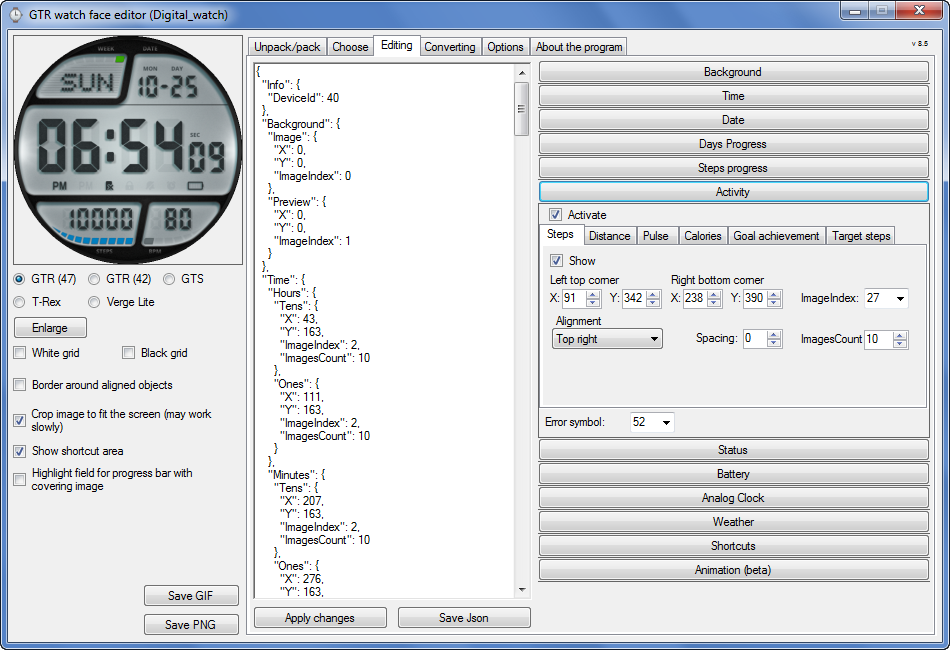
Graphics editor for working with dials Amazfit
The editor supports watch faces from GTR 47, GTR 42, GTS, T-Rex, Verge Lite.
Screenshot
Image
Note: the path to the program should not contain spaces, it is advisable to unpack it to the root of the disk.
Not all dials can be unpacked.
You can reduce the size of the bin file only by reducing the size of the images (height * width) or by reducing the number of images.

The drawing order of elements cannot be changed. The only exception is if you move the second hand from the center, it will be drawn under the hour and minute hands.

If the .bin file is not created, then you need to look for errors in the .log file. Most often this happens when images have the wrong format.

If the bin file is not created, and the log file contains the entry “bad transparency mask”, this means that the format of one or more images is incorrect (most often it occurs if you save the image in Photoshop without transparent pixels). You can fix it as follows:
- in Photoshop - add at least one transparent pixel
- in GIMP exported to PNG 16 bit RGBA
- in XnView - Image -> 32 bits

Version 10.0
List of changes
Added the ability to display the distance traveled in kilometers and miles.
Updated translation.
v 9.0
Fixed display of date if pictures have different sizes (often pictures for "1" are narrower than others)
Added new warnings about possible errors.
Fixed the order of displaying items.
Added a button to refresh the preview image.
Fixed bugs when converting watch faces.
Updated Chinese and Italian translations.
v 8.5
Fixed work with Verge Lite
v 8.4
Fixed Italian translation.
Added Chinese manual.
v 8.3
Bugs fixed.
Added a manual in English.
v 8.2
Added the display of the target steps (StepsGoal)
Added preliminary calculation of the size of the .bin file.
v 8.1
Fixed work on monitors with high resolution.
Updated translation (French, Italian, Chinese, Spanish).
v 8.0
Added the ability to convert dials between different watch models (GTR / T-Rex / Verge Lite).
v 7.1
Italian language added.
Minor fixes.
v 7.0
Added animation support
Verge Lite Support Added
Added the ability to quickly save the project (Ctrl + S)
Added support for languages (French, Chinese).
v 6.1
Added support for T-Rex.
Added the ability to auto-correct image files (error "bad transparency mask").
Added a reminder to save the project when it is closed.
v 6.0
Added support for shortcuts.
Added background image support for circular indicator.
Added display of a set of icons (segments) for the progress of steps.
Added display of a set of icons (segments) for the battery.
Added display of a set of icons (segments) for the pulse.
Added display of an indicator (arrow) for a pulse.
Added display of indicator (arrows) for calories.
Added display of a circular indicator for the pulse.
Added display of a circular indicator for calories.
Added the ability to crop the image to fit the screen.
Added support for languages ​​(Portuguese, Czech, Slovak, Hungarian).
v 5.2
Added support for a set of icons (icons and a set of coordinates for them) for the progress of steps and battery.
Added the ability to crop the preview according to the shape of the screen.
Bugs fixed in the English version.
v 5.1
Fixed incorrect display of the distance traveled.
Added the ability to adjust the speed of gif animation.
Added the ability to work with compressed bin files.
Updated bin file packer.
Added display of the year.
Added display of a charge indicator (arrow).
Added display of indicator (arrow) of steps.
Added display of the indicator (arrow) of the date.
Added display of indicator (arrow) of the day of the week.
Added display of indicator (arrow) of the month.
Added the ability to paste copied coordinates into offset fields from the center (for arrows).
English support added.
Old versions
If you want to supplement the missing translation, write to the PM.

Beta version of the editor with support for Amazfit X

AmazFit WatchFace editor 2 with support for GTR 2, GTS 2, T-Rex Pro

My editor doesn't work with GTR2 (GTS2) watch faces and I have no plans to add support for these models anytime soon. I don't know any other programs that can work with these dials. I have no information if anyone is working in this direction.

Because I bought a GTR 2e, the program will no longer be updated.

Donate to the author
PayPal: [email protected].

Last edited by SashaCX75 on 01 Jun 2022, 07:20, edited 25 times in total.
shirumitsu
WF maker
Posts: 15
Joined: 07 Jul 2019, 01:48
Location: Brazil
Has thanked: 2 times
Been thanked: 1 time
Contact:

Post by shirumitsu »

I'm having a problem, when I will compress for .bin always be giving more than 1.95mb, I have already changed the fonts, I already took the time, dates, everything, even without editing anything when I will compress the .bin give the warning
please help
User avatar
Maikeldevil
Posts: 64
Joined: 17 Aug 2019, 12:05
Location: unknown
Has thanked: 3 times
Been thanked: 44 times
Contact:

Post by Maikeldevil »

shirumitsu wrote: 02 Apr 2020, 01:04
I'm having a problem, when I will compress for .bin always be giving more than 1.95mb, I have already changed the fonts, I already took the time, dates, everything, even without editing anything when I will compress the .bin give the warning
please help
Could you share the file so we can see?
User avatar
RainerR
Posts: 1
Joined: 28 Jan 2020, 15:50
Location: erlangen
Contact:

Post by RainerR »

Hello Sasha CX75,

I have a very interesting problem with my GTR47 and a watch face.
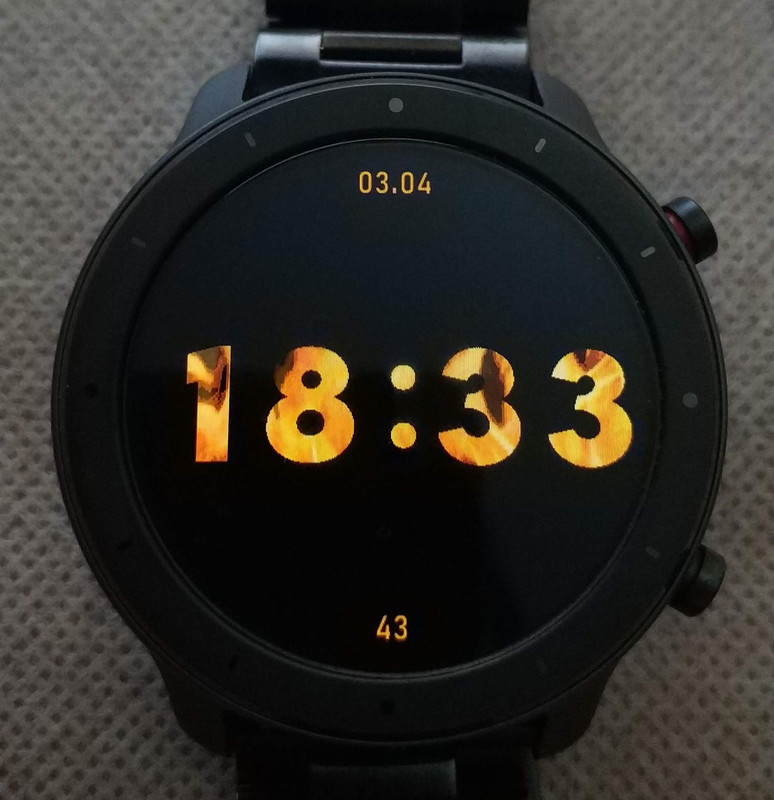
The 1. photo shows a WF created with your Watch Face Editor (V6) and as it should be. The WF is packed and compressed, and synchronized with the watch - everything is okay up to here. The WF is loaded and it is correctly visible. The preview image is also okay (photo 3)
Info: the file not compressed 1.5 MB, compressed 480 kB.

But .... later the WF is not displayed correctly - as shown on my watch in photo 2.
But that doesn't always stay that way. I will be shown later (15 min - 30 min or more) the WF is correct and then later again is not correctly displayed.

I only have the problem with this WF. I've changed different images, rearranged them, but always the same problem.
What could be the mistake? Do you have any idea?

Thanks for this great WatchFace Editor and thank for you reply.


... and that was it - thanks Sasha for your help.

Rainer
Attachments
Photo 3
Photo 3
20200402_184256.jpg (11.9 KiB) Viewed 38411 times
Photo 2
Photo 2
20200402_174255.jpg (26.91 KiB) Viewed 38415 times
Photo 1
Photo 1
rr_24_analog.png (102.64 KiB) Viewed 38415 times
Last edited by RainerR on 02 Apr 2020, 20:28, edited 3 times in total.
Greetings from Bavaria
Rainer
User avatar
SashaCX75
Posts: 812
Joined: 26 Oct 2019, 15:18
Location: Ukraine
Has thanked: 13 times
Been thanked: 1007 times
Contact:

Post by SashaCX75 »

[mention]RainerR[/mention]
Usually this happens when the number of the image with the background is indicated in the weather section for the place of the error symbol
andrebstv
WF maker
Posts: 2
Joined: 02 Apr 2020, 16:54
Location: Brazil
Contact:

Post by andrebstv »

I`ve a weird issue. I can edit the watchface using the software, but when I try to upload it to the watch it goes ok, but it end up reverting to a stock watchface. Can anyone help me find the error ?

Here is the link to it:
https://amazfitwatchfaces.com/gtr/view/4737
And here is the one I based on:
https://amazfitwatchfaces.com/gtr/view/2165
andrebstv
WF maker
Posts: 2
Joined: 02 Apr 2020, 16:54
Location: Brazil
Contact:

Post by andrebstv »

I`ve identified the error source as the Shortcuts. But now sure why. See below how it was used. And also full json.

Code: Select all

  "Shortcuts": {
    "Weather": {
      "Element": {
        "TopLeftX": 152,
        "TopLeftY": 244,
        "Width": 85,
        "Height": 85
      }
    }
  }

Code: Select all

{
  "Info": {
    "DeviceId": 42
  },
  "Background": {
    "Image": {
      "X": 0,
      "Y": 0,
      "ImageIndex": 0
    },
    "Preview": {
      "X": 0,
      "Y": 0,
      "ImageIndex": 1
    }
  },
  "Time": {
    "Hours": {
      "Tens": {
        "X": 114,
        "Y": 78,
        "ImageIndex": 2,
        "ImagesCount": 10
      },
      "Ones": {
        "X": 152,
        "Y": 78,
        "ImageIndex": 2,
        "ImagesCount": 10
      }
    },
    "Minutes": {
      "Tens": {
        "X": 205,
        "Y": 78,
        "ImageIndex": 2,
        "ImagesCount": 10
      },
      "Ones": {
        "X": 243,
        "Y": 78,
        "ImageIndex": 2,
        "ImagesCount": 10
      }
    }
  },
  "Activity": {
    "Pulse": {
      "TopLeftX": 277,
      "TopLeftY": 212,
      "BottomRightX": 311,
      "BottomRightY": 231,
      "Alignment": "TopRight",
      "Spacing": 2,
      "ImageIndex": 12,
      "ImagesCount": 10
    },
    "Steps": {
      "Step": {
        "TopLeftX": 253,
        "TopLeftY": 179,
        "BottomRightX": 311,
        "BottomRightY": 198,
        "Alignment": "TopRight",
        "Spacing": 2,
        "ImageIndex": 12,
        "ImagesCount": 10
      }
    },
    "StarImage": {
      "X": 275,
      "Y": 159,
      "ImageIndex": 22
    }
  },
  "Date": {
    "MonthAndDay": {
      "Separate": {
        "Day": {
          "TopLeftX": 269,
          "TopLeftY": 284,
          "BottomRightX": 345,
          "BottomRightY": 318,
          "Alignment": "TopLeft",
          "Spacing": -7,
          "ImageIndex": 23,
          "ImagesCount": 10
        }
      },
      "TwoDigitsMonth": true,
      "TwoDigitsDay": true
    },
    "WeekDay": {
      "X": 157,
      "Y": 246,
      "ImageIndex": 33,
      "ImagesCount": 7
    }
  },
  "StepsProgress": {
    "Circle": {
      "CenterX": 282,
      "CenterY": 195,
      "RadiusX": 48,
      "RadiusY": 48,
      "StartAngle": -90,
      "EndAngle": 90,
      "Width": 6,
      "Color": "0x00AAC9EC",
      "Flatness": 180
    }
  },
  "Status": {
    "Bluetooth": {
      "Coordinates": {
        "X": 283,
        "Y": 112
      },
      "ImageIndexOn": 48,
      "ImageIndexOff": 41
    },
    "Alarm": {
      "Coordinates": {
        "X": 86,
        "Y": 112
      },
      "ImageIndexOn": 42,
      "ImageIndexOff": 40
    },
    "Lock": {
      "Coordinates": {
        "X": 283,
        "Y": 86
      },
      "ImageIndexOn": 43,
      "ImageIndexOff": 40
    },
    "DoNotDisturb": {
      "Coordinates": {
        "X": 86,
        "Y": 86
      },
      "ImageIndexOn": 44,
      "ImageIndexOff": 40
    }
  },
  "Battery": {
    "Text": {
      "TopLeftX": 91,
      "TopLeftY": 186,
      "BottomRightX": 125,
      "BottomRightY": 204,
      "Alignment": "TopRight",
      "Spacing": 2,
      "ImageIndex": 12,
      "ImagesCount": 10
    },
    "Scale": {
      "CenterX": 108,
      "CenterY": 194,
      "RadiusX": 40,
      "RadiusY": 40,
      "StartAngle": -150,
      "EndAngle": 150,
      "Width": 6,
      "Color": "0x00FFFFFF",
      "Flatness": 180
    }
  },
  "AnalogDialFace": {
    "Hours": {
      "OnlyBorder": false,
      "Color": "0x00000000",
      "CenterOffset": {
        "X": 0,
        "Y": 0
      },
      "Image": {
        "X": 16,
        "Y": 106,
        "ImageIndex": 45
      }
    },
    "Minutes": {
      "OnlyBorder": false,
      "Color": "0x00000000",
      "CenterOffset": {
        "X": 0,
        "Y": 0
      },
      "Image": {
        "X": 13,
        "Y": 178,
        "ImageIndex": 46
      }
    },
    "Seconds": {
      "OnlyBorder": false,
      "Color": "0x00000000",
      "CenterOffset": {
        "X": 0,
        "Y": 0
      },
      "Image": {
        "X": 15,
        "Y": 178,
        "ImageIndex": 47
      }
    }
  },
  "Shortcuts": {
    "Weather": {
      "Element": {
        "TopLeftX": 152,
        "TopLeftY": 244,
        "Width": 85,
        "Height": 85
      }
    }
  }
}
shirumitsu
WF maker
Posts: 15
Joined: 07 Jul 2019, 01:48
Location: Brazil
Has thanked: 2 times
Been thanked: 1 time
Contact:

Post by shirumitsu »

Maikeldevil wrote: 02 Apr 2020, 06:22
shirumitsu wrote: 02 Apr 2020, 01:04
I'm having a problem, when I will compress for .bin always be giving more than 1.95mb, I have already changed the fonts, I already took the time, dates, everything, even without editing anything when I will compress the .bin give the warning
please help
Could you share the file so we can see?
unpack this .bin and see please, a simple wf
https://drive.google.com/file/d/1VcRwDM ... sp=sharing
User avatar
Maikeldevil
Posts: 64
Joined: 17 Aug 2019, 12:05
Location: unknown
Has thanked: 3 times
Been thanked: 44 times
Contact:

Post by Maikeldevil »

Im afraid the newest firmware has changed things, we have a lot of wierd bugs lately..
User avatar
Maikeldevil
Posts: 64
Joined: 17 Aug 2019, 12:05
Location: unknown
Has thanked: 3 times
Been thanked: 44 times
Contact:

Post by Maikeldevil »

shirumitsu wrote: 02 Apr 2020, 23:41
Maikeldevil wrote: 02 Apr 2020, 06:22
shirumitsu wrote: 02 Apr 2020, 01:04
I'm having a problem, when I will compress for .bin always be giving more than 1.95mb, I have already changed the fonts, I already took the time, dates, everything, even without editing anything when I will compress the .bin give the warning
please help
Could you share the file so we can see?
unpack this .bin and see please, a simple wf
https://drive.google.com/file/d/1VcRwDM ... sp=sharing
Sorry, your number images are to large.. The watchfaces are really sensitive to large images, try to remove all not used spaces around the number to make it smaller.. A few pixels less could make it 0,20mb less or more
User avatar
SashaCX75
Posts: 812
Joined: 26 Oct 2019, 15:18
Location: Ukraine
Has thanked: 13 times
Been thanked: 1007 times
Contact:

Post by SashaCX75 »

shirumitsu wrote: 02 Apr 2020, 23:41
unpack this .bin and see please, a simple wf
An interesting dial. Slightly reduced the pictures to make it work. You can reduce the image for preview and then there will probably be enough space to slightly increase the font for the date and battery.
Spoiler
Image
Image
https://drive.google.com/open?id=1i84kn ... kaFLICQova
Vinca
WF maker
Posts: 2
Joined: 16 Mar 2020, 23:44
Location: bari
Contact:

Post by Vinca »

Hi guys, is there any way to add a suffix image to the number of calories?
Thanx
User avatar
SashaCX75
Posts: 812
Joined: 26 Oct 2019, 15:18
Location: Ukraine
Has thanked: 13 times
Been thanked: 1007 times
Contact:

Post by SashaCX75 »

Vinca wrote: 03 Apr 2020, 17:48
Hi guys, is there any way to add a suffix image to the number of calories?
1. Can draw on the background
2. Before creating a bin file, manually add the parameter "CaloriesTextualIcon" to the json file.
Code example

Code: Select all

    "CaloriesTextualIcon": 46,
    "Calories": {
      "TopLeftX": 313,
      "TopLeftY": 235,
      "BottomRightX": 353,
      "BottomRightY": 257,
      "Alignment": "TopCenter",
      "Spacing": 0,
      "ImageIndex": 2,
      "ImagesCount": 10
    },
Vinca
WF maker
Posts: 2
Joined: 16 Mar 2020, 23:44
Location: bari
Contact:

Post by Vinca »

Manually added the parameter to the json file and packed the bin file but, when I loaded the watchface, the suffiix "cal" after the number is not shown on my GTR
User avatar
SashaCX75
Posts: 812
Joined: 26 Oct 2019, 15:18
Location: Ukraine
Has thanked: 13 times
Been thanked: 1007 times
Contact:

Post by SashaCX75 »

Version 7.1
List of changes (Google Translate)
Italian language added.
Minor fixes.
User avatar
GIK-Team
root
Posts: 1014
Joined: 22 Mar 2018, 10:00
Location: Ukraine
Has thanked: 1107 times
Been thanked: 267 times
Contact:

Post by GIK-Team »

[mention]SashaCX75[/mention], Вам передано керування першим постом (там Ви можете актуалізувати інформацію).

P.S.: Ласкаво просимо в групу "Privileged users" :)
"sometimes it's scary but it's still just you and me” — Leaving Laurel
SteMo
WF maker
Posts: 4
Joined: 16 Mar 2020, 19:30
Location: italia
Contact:

Post by SteMo »

SashaCX75 wrote: 06 Apr 2020, 12:18
Version 7.1
List of changes (Google Translate)
Italian language added.
Minor fixes.
thanks for the translation (italian)
SWCI
WF maker
Posts: 9
Joined: 26 Aug 2019, 09:55
Location: Roma
Has thanked: 1 time
Contact:

Post by SWCI »

SashaCX75 wrote: 06 Apr 2020, 12:18
Version 7.1
Italian language added.
GRAZIE.
SnowMaker
WF maker
Posts: 3
Joined: 14 Apr 2020, 08:31
Location: Slovakia
Contact:

Post by SnowMaker »

Hi guys. You are my last hope. I tried everything. I make my own fatchfaces but if I try save packed .bin file then nothing happen. Just DOS window for 1 secconds and nothing else. And The DOS window say:

Fatal WinError 2 The system cannot find the file specified: C: bla bla bla watchfaces_packed.bin
File main. py , line 46 , in <module>

So I dont know... system can not find watchfaces_packed.bin because I just trying create it now!
Any idea what i can do? :|
Thank you.
User avatar
SashaCX75
Posts: 812
Joined: 26 Oct 2019, 15:18
Location: Ukraine
Has thanked: 13 times
Been thanked: 1007 times
Contact:

Post by SashaCX75 »

[mention]SnowMaker[/mention]
What you wrote is the consequences of an error. The error itself is written somewhere in the log file above. Therefore, it is better to apply the entire log file or the entire project.
Most of these errors occur when the file numbers are not in order. Or when it is wrong to save images in Photoshop without a transparent background.
SnowMaker
WF maker
Posts: 3
Joined: 14 Apr 2020, 08:31
Location: Slovakia
Contact:

Post by SnowMaker »

SashaCX75 wrote: 14 Apr 2020, 14:01
@SnowMaker
What you wrote is the consequences of an error. The error itself is written somewhere in the log file above. Therefore, it is better to apply the entire log file or the entire project.
Most of these errors occur when the file numbers are not in order. Or when it is wrong to save images in Photoshop without a transparent background.
I spent 2 days with this. Dont show any log file, and pictures is fine I thing. Can you (or somebody) download my pictures, json file and try make bin file? Because I have no more ideas what I doing wrong. Please tell me what is wrong.

Here is pic and json file:
https://drive.google.com/file/d/1qai5nj ... sp=sharing

Big thanks for any help ;)
User avatar
SashaCX75
Posts: 812
Joined: 26 Oct 2019, 15:18
Location: Ukraine
Has thanked: 13 times
Been thanked: 1007 times
Contact:

Post by SashaCX75 »

[mention]SnowMaker[/mention]
1. File numbers are not in order.
2. A picture with the name of the month is better divided into two blocks - the name of the month and the number of the month (this will reduce the size of the pictures and, accordingly, the file size).
3. The size of the pictures for the day of the week is larger than necessary.
4. At the current size of images, the .bin file size significantly exceeds the permissible size.
5. The field for displaying the number of steps and distance is better to do more and make alignment to the right. Otherwise, with values greater than 9999, it will look bad.
User avatar
asoo
Posts: 2105
Joined: 03 Jan 2019, 01:48
Location: ͼͽ Thailand ͼͽ
Has thanked: 404 times
Been thanked: 2021 times

Post by asoo »

SnowMaker wrote: 14 Apr 2020, 16:28
I spent 2 days with this. Dont show any log file, and pictures is fine I thing. Can you (or somebody) download my pictures, json file and try make bin file? Because I have no more ideas what I doing wrong. Please tell me what is wrong.

Here is pic and json file:

Big thanks for any help ;)
Fixed
Link Downlaod : https://www.dropbox.com/s/wnfiujpljew7a ... -.zip?dl=0
But cannot pack as "BIN" because your existing image is too large to store. If you pack , your "BIN" more than 1.5 mb, it will exceed the allowed size. ( T-Rex)

As SashaCX75 said
ͼͽ To request please use the interrelated forum in action ͼͽ
Please do not PM to me for requests ported watchface.
User avatar
SashaCX75
Posts: 812
Joined: 26 Oct 2019, 15:18
Location: Ukraine
Has thanked: 13 times
Been thanked: 1007 times
Contact:

Post by SashaCX75 »

asoo wrote: 15 Apr 2020, 10:42
But cannot pack as "BIN" because your existing image is too large to store. If you pack , your "BIN" more than 1.5 mb, it will exceed the allowed size. ( T-Rex)
If you remove the animation and crop the unused part from the pictures, you can fit in 1.5 MB
https://drive.google.com/open?id=1tGfbf ... cAI5JcNRjp
User avatar
LoboGT
WF maker
Posts: 2
Joined: 17 Jun 2018, 01:57
Has thanked: 2 times
Contact:

Post by LoboGT »

Hi. First of all thanks to SashaCX75 for great editor. This is my first try witch gtr wf. I had problems with the volume of bin file but I used the modification of the 0001 file as suggested by Lordalpine and successful created the bin file. However after synchronization the stock watch face appeared in the watch - not mine. Could someone take a look and help me fix it? Thanks for help.

https://amazfitwatchfaces.com/gtr/view/5060
SnowMaker
WF maker
Posts: 3
Joined: 14 Apr 2020, 08:31
Location: Slovakia
Contact:

Post by SnowMaker »

I rework all pictures, reduce size and tedaaa... its working now! Except annimation but... does not matter.

I am realy glad for this editor. Excelent work! So... thank you very very much! :D :D
Post Reply

Return to “Watchfaces tools”

Who is online

Users browsing this forum: No registered users and 1 guest