• Amministratore
  •  
    Support Ukraine
    If you experience any problems with the forum (it is not visible, there is no way to post messages, or some functionality does not work), please let us know. If you have problems with registration or you did not receive confirmation letter, let us know and we will activate your account manually.
    If you get an "The submitted form was invalid. Try submitting again" error, delete cookies, then try again.
     

AmazFit WatchFace editor for Windows by SashaCX75

This forum is designed to discuss and develop tools creating watch faces.

Moderatori: asoo, lvpokka, Internal error, Watchmens

Regole del forum
All communication in this branch should only be in English.
To discuss tools that are not in this section, use the “Watchfaces tools (discussion)” forum.
Avatar utente
SashaCX75
Messaggi: 820
Iscritto il: 26 ott 2019, 15:18
Località: Ukraine
Has thanked: 13 times
Been thanked: 1029 times
Contatta:

AmazFit WatchFace editor for Windows by SashaCX75

Messaggio da SashaCX75 »

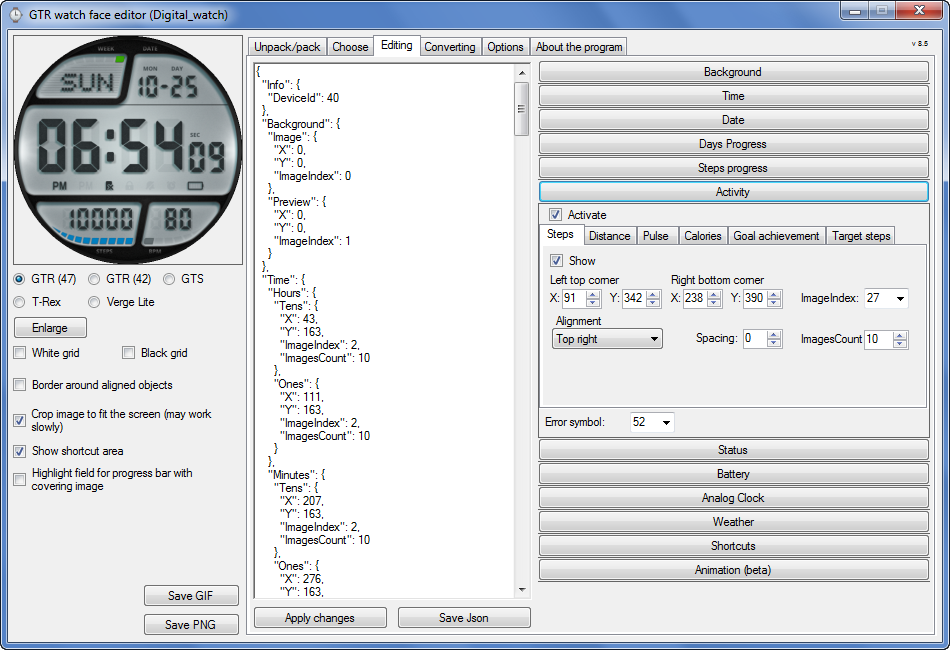
Graphics editor for working with dials Amazfit
The editor supports watch faces from GTR 47, GTR 42, GTS, T-Rex, Verge Lite.
Screenshot
Immagine
Note: the path to the program should not contain spaces, it is advisable to unpack it to the root of the disk.
Not all dials can be unpacked.
You can reduce the size of the bin file only by reducing the size of the images (height * width) or by reducing the number of images.

The drawing order of elements cannot be changed. The only exception is if you move the second hand from the center, it will be drawn under the hour and minute hands.

If the .bin file is not created, then you need to look for errors in the .log file. Most often this happens when images have the wrong format.

If the bin file is not created, and the log file contains the entry “bad transparency mask”, this means that the format of one or more images is incorrect (most often it occurs if you save the image in Photoshop without transparent pixels). You can fix it as follows:
- in Photoshop - add at least one transparent pixel
- in GIMP exported to PNG 16 bit RGBA
- in XnView - Image -> 32 bits

Version 10.0
List of changes
Added the ability to display the distance traveled in kilometers and miles.
Updated translation.
v 9.0
Fixed display of date if pictures have different sizes (often pictures for "1" are narrower than others)
Added new warnings about possible errors.
Fixed the order of displaying items.
Added a button to refresh the preview image.
Fixed bugs when converting watch faces.
Updated Chinese and Italian translations.
v 8.5
Fixed work with Verge Lite
v 8.4
Fixed Italian translation.
Added Chinese manual.
v 8.3
Bugs fixed.
Added a manual in English.
v 8.2
Added the display of the target steps (StepsGoal)
Added preliminary calculation of the size of the .bin file.
v 8.1
Fixed work on monitors with high resolution.
Updated translation (French, Italian, Chinese, Spanish).
v 8.0
Added the ability to convert dials between different watch models (GTR / T-Rex / Verge Lite).
v 7.1
Italian language added.
Minor fixes.
v 7.0
Added animation support
Verge Lite Support Added
Added the ability to quickly save the project (Ctrl + S)
Added support for languages (French, Chinese).
v 6.1
Added support for T-Rex.
Added the ability to auto-correct image files (error "bad transparency mask").
Added a reminder to save the project when it is closed.
v 6.0
Added support for shortcuts.
Added background image support for circular indicator.
Added display of a set of icons (segments) for the progress of steps.
Added display of a set of icons (segments) for the battery.
Added display of a set of icons (segments) for the pulse.
Added display of an indicator (arrow) for a pulse.
Added display of indicator (arrows) for calories.
Added display of a circular indicator for the pulse.
Added display of a circular indicator for calories.
Added the ability to crop the image to fit the screen.
Added support for languages ​​(Portuguese, Czech, Slovak, Hungarian).
v 5.2
Added support for a set of icons (icons and a set of coordinates for them) for the progress of steps and battery.
Added the ability to crop the preview according to the shape of the screen.
Bugs fixed in the English version.
v 5.1
Fixed incorrect display of the distance traveled.
Added the ability to adjust the speed of gif animation.
Added the ability to work with compressed bin files.
Updated bin file packer.
Added display of the year.
Added display of a charge indicator (arrow).
Added display of indicator (arrow) of steps.
Added display of the indicator (arrow) of the date.
Added display of indicator (arrow) of the day of the week.
Added display of indicator (arrow) of the month.
Added the ability to paste copied coordinates into offset fields from the center (for arrows).
English support added.
Old versions
If you want to supplement the missing translation, write to the PM.

Beta version of the editor with support for Amazfit X

AmazFit WatchFace editor 2 with support for GTR 2, GTS 2, T-Rex Pro

My editor doesn't work with GTR2 (GTS2) watch faces and I have no plans to add support for these models anytime soon. I don't know any other programs that can work with these dials. I have no information if anyone is working in this direction.

Because I bought a GTR 2e, the program will no longer be updated.

Donate to the author
PayPal: [email protected].
Ultima modifica di SashaCX75 il 01 giu 2022, 07:20, modificato 25 volte in totale.
Avatar utente
Lordalpine
WF maker
Messaggi: 62
Iscritto il: 09 ott 2019, 22:09
Località: Santo Tirso
Has thanked: 6 times
Been thanked: 35 times
Contatta:

Messaggio da Lordalpine »

rubiales41 ha scritto: 29 feb 2020, 19:48
hello, how is it done, or where can I find the time points and minutes to make analog clocks ?, thank you very much
- Picking up some element : viewtopic.php?f=41&t=980
- Searching for faces on google by Key Word : Faces, Watch faces, Clean Dial
- Cutting out elements on site that sell Watch or repair watch or Aliexpress [ for Bezel, No I'm not kinding ]
- Unpack faces for android wear, GTR, [ All system :D ]
- Do the Hour Ring // Tachys // Minute ring [ everything you need ] on Watchmaker app for android on your smatphone or Android Emulator, screenshot, retrieve and edit in Photoshop [ Again I'm serious ]
- The Best solution :
Spoiler
do it yourself on Photoshop, Gimp, Illustrator, Autocad [ The best solution IMO ]
Immagine
Avatar utente
albertowd
WF maker
Messaggi: 2
Iscritto il: 26 set 2019, 01:01
Località: Brazil
Has thanked: 4 times
Been thanked: 1 time
Contatta:

Messaggio da albertowd »

A quick tip for Photoshop users when saving PNG-24 preset:

When saving a solid PNG (with no transparent pixel, ex.: a full background picture), the exporter does not includes the alpha channel on the final file, leaving it with a true 24-bit PNG file.

The tool will use the same mask for all image files, so if the background image is solid but all other images are transparent, it will save as a 32-bit PNG file and it will crash the bin packer.

Solution: when using transparent and solid images, save solid ones with the normal "Save As ..." option so it will not be optimized into a different bit mask.
[email protected]
WF maker
Messaggi: 4
Iscritto il: 10 gen 2020, 14:12
Località: 邯郸
Has thanked: 1 time
Contatta:

Messaggio da [email protected] »

我说一句,哥们们,我作为一个中国人,看英文都困难,你们让我去一个俄罗斯网站下载东西,还要求注册一个账户……我下下来一个一看,俄文,你们说郁闷不?谁能给我这个中国朋友提供一个中文版本的下载地址,而且能直接下载的,谢谢大家了……
Let me say, man, as a Chinese, it's difficult to read English. You asked me to go to a Russian website to download things and register an account I'll take a look next time. Russian, do you think it's depressing? Who can provide a Chinese version download address for my Chinese friend, and can download it directly? Thank you
Avatar utente
SashaCX75
Messaggi: 820
Iscritto il: 26 ott 2019, 15:18
Località: Ukraine
Has thanked: 13 times
Been thanked: 1029 times
Contatta:

Messaggio da SashaCX75 »

[email protected] ha scritto: 10 mar 2020, 00:05
Who can provide a Chinese version download address for my Chinese friend, and can download it directly? Thank you
Download v6.2 here.

Or v7.0 beta with Chinese.
[email protected]
WF maker
Messaggi: 4
Iscritto il: 10 gen 2020, 14:12
Località: 邯郸
Has thanked: 1 time
Contatta:

Messaggio da [email protected] »

感谢兄弟,这个我需要翻墙……中国对翻墙软件管理很严,有咱们论坛直接下载的就好了……
Thank you brother, I need to climb over the wall China is very strict in the management of wall climbing software. It's good to have those downloaded directly from our forum
[email protected]
WF maker
Messaggi: 4
Iscritto il: 10 gen 2020, 14:12
Località: 邯郸
Has thanked: 1 time
Contatta:

Messaggio da [email protected] »

我已经翻墙下下来了,但是在表盘制作好以后不知道如何保存成手表能用的文件,谁能告诉我保存文件的步骤呢?麻烦了
I've come down the wall, but I don't know how to save the watch file after the dial is made. Who can tell me the steps to save the file? Sorry for the inconvenience
Avatar utente
Maikeldevil
Messaggi: 64
Iscritto il: 17 ago 2019, 12:05
Località: unknown
Has thanked: 3 times
Been thanked: 44 times
Contatta:

Messaggio da Maikeldevil »

Hi people, im a bit struggeling with a thing.. So i made this watch face to copy it like the original one:

https://amazfitwatchfaces.com/gtr/view/1160

But my problem is that the hand for step progress is going underneat the digital time. Is there any way to make sure this yellow hand is going over the digital times and status icons instead of under them? Is there any way to difine a dominant order? If there is we could do way more great things, just by changing orders..

Hope someone could reply to me!

(I use the sasha tool together with python)
Avatar utente
Pucci14
Messaggi: 3
Iscritto il: 08 mar 2020, 16:42
Località: Roma
Contatta:

Messaggio da Pucci14 »

Is there any Manual (in any language) wich I could then translate with Google?
Thanks
taw_bip
WF maker
Messaggi: 130
Iscritto il: 12 apr 2018, 16:29
Has thanked: 127 times
Been thanked: 19 times
Contatta:

Messaggio da taw_bip »

SashaCX75 ha scritto: 10 mar 2020, 17:04
[email protected] ha scritto: 10 mar 2020, 00:05
Who can provide a Chinese version download address for my Chinese friend, and can download it directly? Thank you
Download v6.2 here.

Or v7.0 beta with Chinese.
Thank you for adding Verge Lite to the app!
Avatar utente
SashaCX75
Messaggi: 820
Iscritto il: 26 ott 2019, 15:18
Località: Ukraine
Has thanked: 13 times
Been thanked: 1029 times
Contatta:

Messaggio da SashaCX75 »

Maikeldevil ha scritto: 12 mar 2020, 07:31
But my problem is that the hand for step progress is going underneat the digital time. Is there any way to make sure this yellow hand is going over the digital times and status icons instead of under them? Is there any way to difine a dominant order? If there is we could do way more great things, just by changing orders..
Hand for step progress is going under digital time and over status icons.
The order cannot be changed.
The best way to check is to install on the watch and see.

Pucci14 ha scritto: 12 mar 2020, 12:58
Is there any Manual (in any language) wich I could then translate with Google?
Thanks
Help is in the program (a question mark beside to the button to close the window or a link on the "About" tab). I have not seen a more detailed help anywhere. Maybe someone will do the best help.

taw_bip ha scritto: 12 mar 2020, 13:40
Thank you for adding Verge Lite to the app!
Verge Lite support in beta may not work properly.
After the release of the stable version, I recommend updating to it.
Avatar utente
SashaCX75
Messaggi: 820
Iscritto il: 26 ott 2019, 15:18
Località: Ukraine
Has thanked: 13 times
Been thanked: 1029 times
Contatta:

Messaggio da SashaCX75 »

[email protected] ha scritto: 12 mar 2020, 04:44
我已经翻墙下下来了,但是在表盘制作好以后不知道如何保存成手表能用的文件,谁能告诉我保存文件的步骤呢?麻烦了
I've come down the wall, but I don't know how to save the watch file after the dial is made. Who can tell me the steps to save the file? Sorry for the inconvenience
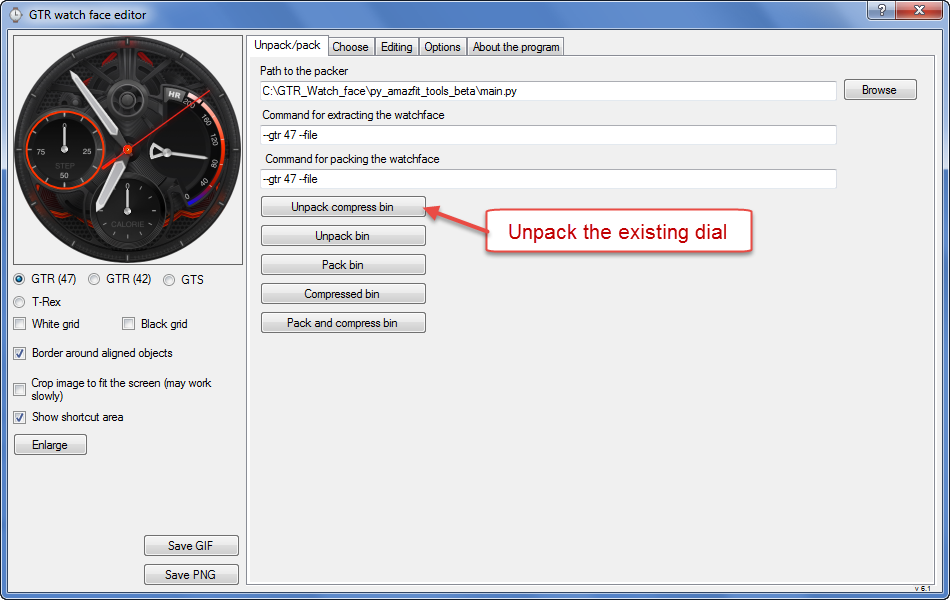
0. Unpack the existing dial or create a new one.
Immagine

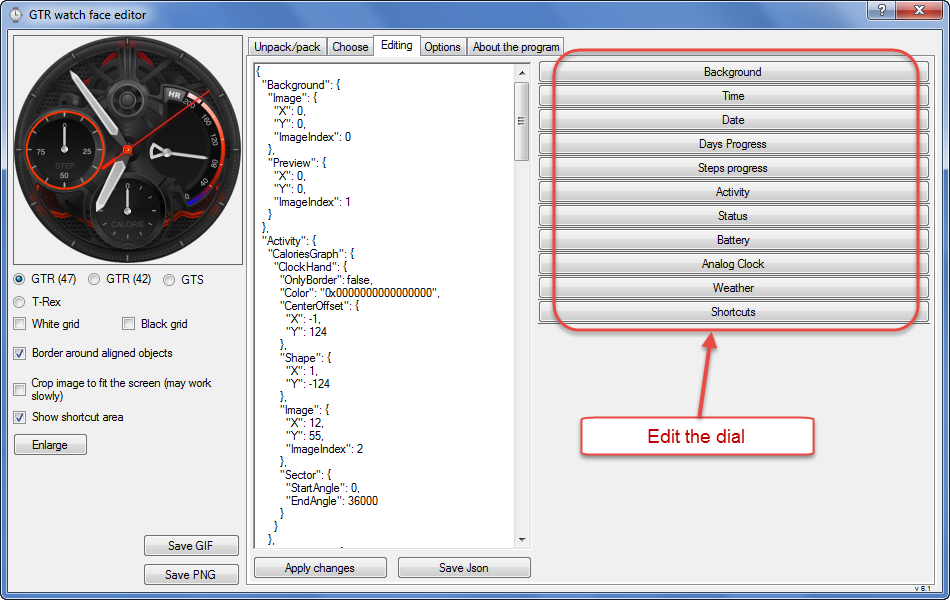
1. Edit the dial.
Immagine

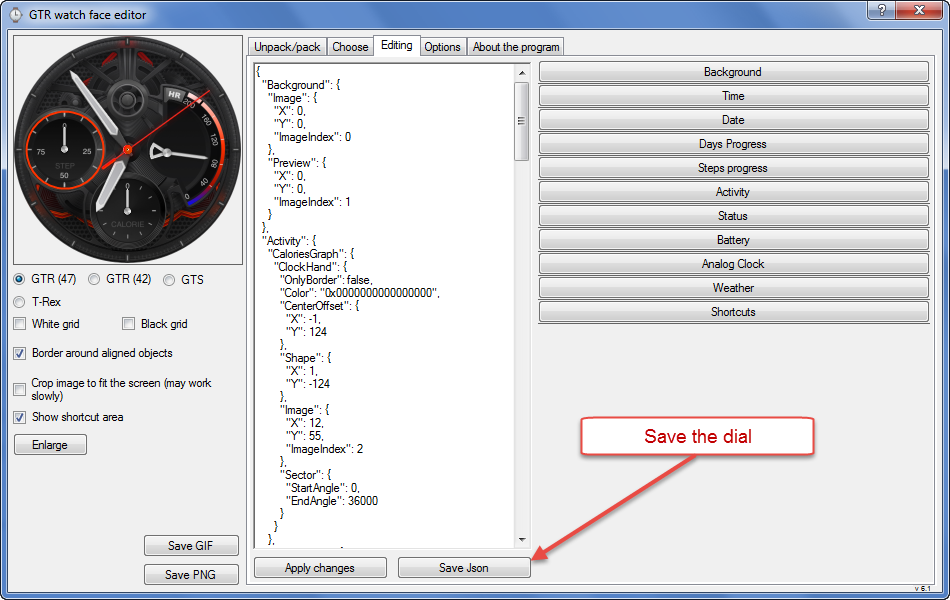
2. Save the dial.
Immagine

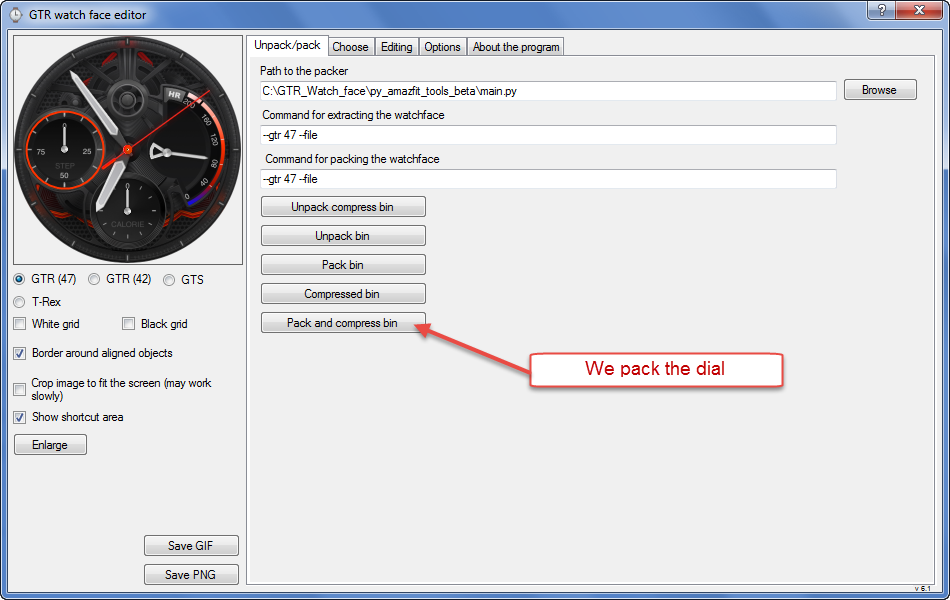
3. We pack the dial.
Immagine
Avatar utente
Pucci14
Messaggi: 3
Iscritto il: 08 mar 2020, 16:42
Località: Roma
Contatta:

Messaggio da Pucci14 »

Thanks SashaCX75!
[email protected]
WF maker
Messaggi: 4
Iscritto il: 10 gen 2020, 14:12
Località: 邯郸
Has thanked: 1 time
Contatta:

Messaggio da [email protected] »

兄弟,谢谢了,我已经自己研究出怎样保存了,还是感谢你的帮助,谢谢。
Brother, thank you. I have worked out how to save it. Thank you for your help. Thank you.
Avatar utente
Pucci14
Messaggi: 3
Iscritto il: 08 mar 2020, 16:42
Località: Roma
Contatta:

Messaggio da Pucci14 »

First of all I apologize if this question was alredy posted but I have just managed to create a file *packed_zip.bin.
This is a modification of an existing one.
I would also be ready to publish it but, to be sure of the result, I need to see it on my whatch,

Now the question: how can I load into my Watch?

Sorry again for a possible double posst.
It is enough the link to the correct post.

Thanks
shirumitsu
WF maker
Messaggi: 15
Iscritto il: 07 lug 2019, 01:48
Località: Brazil
Has thanked: 2 times
Been thanked: 1 time
Contatta:

Messaggio da shirumitsu »

Version 7.0 suport animation? if not, please make it!
SashaCX75 ha scritto: 10 mar 2020, 17:04
[email protected] ha scritto: 10 mar 2020, 00:05
Who can provide a Chinese version download address for my Chinese friend, and can download it directly? Thank you
Download v6.2 here.

Or v7.0 beta with Chinese.
Westy
Messaggi: 2
Iscritto il: 14 mar 2020, 20:25
Località: Roma
Contatta:

Messaggio da Westy »

Pucci14 ha scritto: 13 mar 2020, 16:40
First of all I apologize if this question was alredy posted but I have just managed to create a file *packed_zip.bin.
This is a modification of an existing one.
I would also be ready to publish it but, to be sure of the result, I need to see it on my whatch,

Now the question: how can I load into my Watch?

Sorry again for a possible double posst.
It is enough the link to the correct post.

Thanks
I forgot to mention but it is important that I have an iOS phone.
Avatar utente
SashaCX75
Messaggi: 820
Iscritto il: 26 ott 2019, 15:18
Località: Ukraine
Has thanked: 13 times
Been thanked: 1029 times
Contatta:

Messaggio da SashaCX75 »

Westy ha scritto: 15 mar 2020, 10:16
I forgot to mention but it is important that I have an iOS phone.
How to install watchfaces (Bip, Verge Lite, GTR, GTS, T-Rex, Cor, Mi Band 4)
Westy
Messaggi: 2
Iscritto il: 14 mar 2020, 20:25
Località: Roma
Contatta:

Messaggio da Westy »

SashaCX75! Thanks! A lot of them.
WillyB.
WF maker
Messaggi: 1
Iscritto il: 03 set 2019, 19:59
Contatta:

Messaggio da WillyB. »

"Open the folder with the downloaded watch face in the file manager with the path:
/iPhone/Amazfit/watchSkin/"
I cannot open the /iPhone/Amazfit/watchSkin/ folder. Is this only possible with a jailbreak? Or which file manager must I use?
SteMo
WF maker
Messaggi: 4
Iscritto il: 16 mar 2020, 19:30
Località: italia
Contatta:

Messaggio da SteMo »

Pulse (Progress Bar) still not working in GTS devices?
In the spectacular software you made (SashaCX75) I see the correct preview. Then on the clock it doesn't appear in any way. Is it also up to you?
Thank you
Avatar utente
SashaCX75
Messaggi: 820
Iscritto il: 26 ott 2019, 15:18
Località: Ukraine
Has thanked: 13 times
Been thanked: 1029 times
Contatta:

Messaggio da SashaCX75 »

[mention]SteMo[/mention]
I can not check on the GTS.
But here is the dial where there is Pulse (Progress Bar). To check, you can set the dial. If it works, then unpack and repack the dial and check it.
I can only say that everything works for me on GTR.
SteMo
WF maker
Messaggi: 4
Iscritto il: 16 mar 2020, 19:30
Località: italia
Contatta:

Messaggio da SteMo »

Starting from your quadrant, everything works ... now I can understand what I'm wrong. In any case, thanks, you have been very fast and are doing an exceptional job.
thank you ;)
Avatar utente
Maikeldevil
Messaggi: 64
Iscritto il: 17 ago 2019, 12:05
Località: unknown
Has thanked: 3 times
Been thanked: 44 times
Contatta:

Messaggio da Maikeldevil »

Hi Sasha, i have made this watchface:

https://amazfitwatchfaces.com/gtr/view/4381

I used step segments to show the step progress but somehow it doesnt reset after a new day.. Any idea why? (So when i walk 4000 steps and the segments shows me its half way the next day the steps are at 0 but the segments are still stuck on 4000 steps..

Hope someone knows this.
Avatar utente
Maikeldevil
Messaggi: 64
Iscritto il: 17 ago 2019, 12:05
Località: unknown
Has thanked: 3 times
Been thanked: 44 times
Contatta:

Messaggio da Maikeldevil »

Maikeldevil ha scritto: 23 mar 2020, 10:04
Hi Sasha, i have made this watchface:

https://amazfitwatchfaces.com/gtr/view/4381

I used step segments to show the step progress but somehow it doesnt reset after a new day.. Any idea why? (So when i walk 4000 steps and the segments shows me its half way the next day the steps are at 0 but the segments are still stuck on 4000 steps..

Hope someone knows this.
So it had reset.. On its own on 11:15.. Wierd time :roll:
Avatar utente
SashaCX75
Messaggi: 820
Iscritto il: 26 ott 2019, 15:18
Località: Ukraine
Has thanked: 13 times
Been thanked: 1029 times
Contatta:

Messaggio da SashaCX75 »

[mention]Maikeldevil[/mention]
Everything looks normal and should work.
A little tip. According to my information, a maximum of 10 pictures is used for the battery and 11 pictures are used in your dial.
Rispondi

Torna a “Watchfaces tools”

Chi c’è in linea

Visitano il forum: bonaccolto90 e 1 ospite