• Administrador
  •  
    Support Ukraine
    If you experience any problems with the forum (it is not visible, there is no way to post messages, or some functionality does not work), please let us know. If you have problems with registration or you did not receive confirmation letter, let us know and we will activate your account manually.
    If you get an "The submitted form was invalid. Try submitting again" error, delete cookies, then try again.
     

AmazFit WatchFace editor for Windows by SashaCX75

This forum is designed to discuss and develop tools creating watch faces.

Moderadores: asoo, lvpokka, Internal error, Watchmens

Reglas del Foro
All communication in this branch should only be in English.
To discuss tools that are not in this section, use the “Watchfaces tools (discussion)” forum.
Avatar de Usuario
SashaCX75
Mensajes: 816
Registrado: 26 Oct 2019, 15:18
Ubicación: Ukraine
Has thanked: 13 times
Been thanked: 1026 times
Contactar:

AmazFit WatchFace editor for Windows by SashaCX75

Mensaje por SashaCX75 »

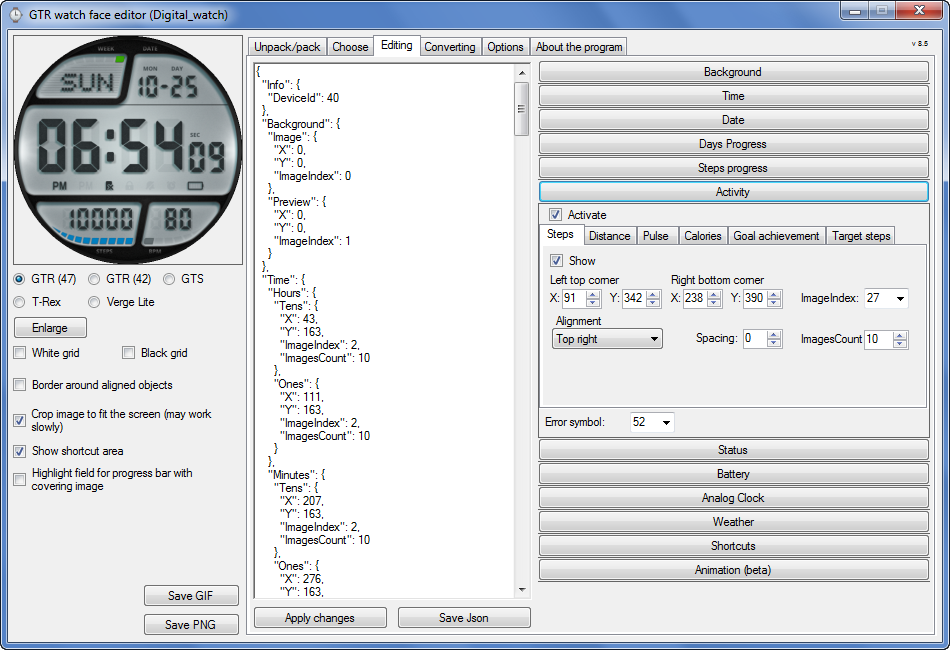
Graphics editor for working with dials Amazfit
The editor supports watch faces from GTR 47, GTR 42, GTS, T-Rex, Verge Lite.
Screenshot
Imagen
Note: the path to the program should not contain spaces, it is advisable to unpack it to the root of the disk.
Not all dials can be unpacked.
You can reduce the size of the bin file only by reducing the size of the images (height * width) or by reducing the number of images.

The drawing order of elements cannot be changed. The only exception is if you move the second hand from the center, it will be drawn under the hour and minute hands.

If the .bin file is not created, then you need to look for errors in the .log file. Most often this happens when images have the wrong format.

If the bin file is not created, and the log file contains the entry “bad transparency mask”, this means that the format of one or more images is incorrect (most often it occurs if you save the image in Photoshop without transparent pixels). You can fix it as follows:
- in Photoshop - add at least one transparent pixel
- in GIMP exported to PNG 16 bit RGBA
- in XnView - Image -> 32 bits

Version 10.0
List of changes
Added the ability to display the distance traveled in kilometers and miles.
Updated translation.
v 9.0
Fixed display of date if pictures have different sizes (often pictures for "1" are narrower than others)
Added new warnings about possible errors.
Fixed the order of displaying items.
Added a button to refresh the preview image.
Fixed bugs when converting watch faces.
Updated Chinese and Italian translations.
v 8.5
Fixed work with Verge Lite
v 8.4
Fixed Italian translation.
Added Chinese manual.
v 8.3
Bugs fixed.
Added a manual in English.
v 8.2
Added the display of the target steps (StepsGoal)
Added preliminary calculation of the size of the .bin file.
v 8.1
Fixed work on monitors with high resolution.
Updated translation (French, Italian, Chinese, Spanish).
v 8.0
Added the ability to convert dials between different watch models (GTR / T-Rex / Verge Lite).
v 7.1
Italian language added.
Minor fixes.
v 7.0
Added animation support
Verge Lite Support Added
Added the ability to quickly save the project (Ctrl + S)
Added support for languages (French, Chinese).
v 6.1
Added support for T-Rex.
Added the ability to auto-correct image files (error "bad transparency mask").
Added a reminder to save the project when it is closed.
v 6.0
Added support for shortcuts.
Added background image support for circular indicator.
Added display of a set of icons (segments) for the progress of steps.
Added display of a set of icons (segments) for the battery.
Added display of a set of icons (segments) for the pulse.
Added display of an indicator (arrow) for a pulse.
Added display of indicator (arrows) for calories.
Added display of a circular indicator for the pulse.
Added display of a circular indicator for calories.
Added the ability to crop the image to fit the screen.
Added support for languages ​​(Portuguese, Czech, Slovak, Hungarian).
v 5.2
Added support for a set of icons (icons and a set of coordinates for them) for the progress of steps and battery.
Added the ability to crop the preview according to the shape of the screen.
Bugs fixed in the English version.
v 5.1
Fixed incorrect display of the distance traveled.
Added the ability to adjust the speed of gif animation.
Added the ability to work with compressed bin files.
Updated bin file packer.
Added display of the year.
Added display of a charge indicator (arrow).
Added display of indicator (arrow) of steps.
Added display of the indicator (arrow) of the date.
Added display of indicator (arrow) of the day of the week.
Added display of indicator (arrow) of the month.
Added the ability to paste copied coordinates into offset fields from the center (for arrows).
English support added.
Old versions
If you want to supplement the missing translation, write to the PM.

Beta version of the editor with support for Amazfit X

AmazFit WatchFace editor 2 with support for GTR 2, GTS 2, T-Rex Pro

My editor doesn't work with GTR2 (GTS2) watch faces and I have no plans to add support for these models anytime soon. I don't know any other programs that can work with these dials. I have no information if anyone is working in this direction.

Because I bought a GTR 2e, the program will no longer be updated.

Donate to the author
PayPal: [email protected].
Última edición por SashaCX75 el 01 Jun 2022, 07:20, editado 25 veces en total.
ionut02
WF maker
Mensajes: 27
Registrado: 02 Oct 2018, 13:25
Ubicación: Romania
Has thanked: 1 time
Been thanked: 2 times
Contactar:

Mensaje por ionut02 »

Horatius80 escribió: 30 Ene 2020, 10:00
@ionut02 the size of .bin is dependent on the dimensions of the png images (X*Y size, not on the size in bytes) You have to scale some of used elements in Your Watchface, that is the trick ... Based on my own experience, I also faced this problem and all that helped was to minimize the X*Y size of png images
Yeah, I figured this out on my latest watch face - https://amazfitwatchfaces.com/gts/view/855 - size decreased by about 400kb, just under 1.5MB after I used a narrower font, my initial design had a nicer font but a bit wider then the one in the final release. I've tried without transparency with solid background, removing aliasing, using 8 bits (this doesn't work at all) 16 bits etc. The only thing that made a difference in final bin size was the dimensions of the PNG ind if I used or not an image for preview. Because the GTS has 2 standard faces and one custom, if you want to switch between them you need an image for preview, I refereed to background image instead of an additional PNG file.
Avatar de Usuario
SashaCX75
Mensajes: 816
Registrado: 26 Oct 2019, 15:18
Ubicación: Ukraine
Has thanked: 13 times
Been thanked: 1026 times
Contactar:

Mensaje por SashaCX75 »

ionut02 escribió: 30 Ene 2020, 13:47
Yeah, I figured this out on my latest watch face - https://amazfitwatchfaces.com/gts/view/855 - size decreased by about 400kb, just under 1.5MB
Looked at your watch face. In some pictures with the name of the day of the week on the right there is a lot of empty space that can be cropped. Some weather icons on the right and bottom also have an empty space that can be cut off.
Try it, this should help reduce the size of the watch face.
156156h
Mensajes: 1
Registrado: 29 Ene 2020, 05:22
Ubicación: china
Contactar:

Mensaje por 156156h »

Who can tell me how to save after modify the dial with GTR_WatchFace editor5.2 software file into bin file? How to operate and modify ok, don't save, thank you!
ionut02
WF maker
Mensajes: 27
Registrado: 02 Oct 2018, 13:25
Ubicación: Romania
Has thanked: 1 time
Been thanked: 2 times
Contactar:

Mensaje por ionut02 »

SashaCX75 escribió: 30 Ene 2020, 18:31
ionut02 escribió: 30 Ene 2020, 13:47
Yeah, I figured this out on my latest watch face - https://amazfitwatchfaces.com/gts/view/855 - size decreased by about 400kb, just under 1.5MB
Looked at your watch face. In some pictures with the name of the day of the week on the right there is a lot of empty space that can be cropped. Some weather icons on the right and bottom also have an empty space that can be cut off.
Try it, this should help reduce the size of the watch face.
Thank you SashaCX75, really appreciate what you are doing and the effort that you put in your tool. I knew that the blank spaces are increasing my bin size, but my design is mostly centered, and since week days have various length and I can only specify the coordinates for the upper left corner this was the only way to have them centered. This wouldn't be in issue if I had used shorten day name and another type of alignment. I will try different designs and see how this can be improved. Right now I'm working on watch face with very large weather icons but I'm still over the max size, since my weather icons are 125x125
Ekohero
WF maker
Mensajes: 16
Registrado: 28 Dic 2019, 18:44
Ubicación: Ffo
Contactar:

Mensaje por Ekohero »

Hi, i have the problem that some bins cant be unpacked ionut02 do you have the same issues?
999Nocturne
WF maker
Mensajes: 15
Registrado: 30 Ene 2020, 20:52
Ubicación: Italia
Has thanked: 2 times
Been thanked: 1 time
Contactar:

Mensaje por 999Nocturne »

hi guys, how can i add more second hands?
i can't put more than one..
Avatar de Usuario
chb
WF maker
Mensajes: 15
Registrado: 26 Abr 2018, 21:28
Ubicación: near Vienna
Has thanked: 10 times
Contactar:

Mensaje por chb »

you can paste & copy the russian text out of the readme.chm-file (Windows-help-manual)...
but i'm not able to import an existing bin-file and edit it.
Don't worry, eat Curry!
Avatar de Usuario
SashaCX75
Mensajes: 816
Registrado: 26 Oct 2019, 15:18
Ubicación: Ukraine
Has thanked: 13 times
Been thanked: 1026 times
Contactar:

Mensaje por SashaCX75 »

It is advisable to unpack the program to the root of the disk.
If the bin file is not unpacked, then a folder with the file name should appear in the Watch_face folder. In it, you can look at the log file with errors.
kampanita
WF maker
Mensajes: 34
Registrado: 25 Oct 2019, 06:15
Has thanked: 8 times
Been thanked: 7 times
Contactar:

Mensaje por kampanita »

Ekohero escribió: 31 Ene 2020, 06:48
Hi, i have the problem that some bins cant be unpacked ionut02 do you have the same issues?
You must uncompress them before unpacking. ( you must use ResUNPACKER.exe for doing that ) , or use Sasha's tool for uncompressing a packed bin )
ionut02
WF maker
Mensajes: 27
Registrado: 02 Oct 2018, 13:25
Ubicación: Romania
Has thanked: 1 time
Been thanked: 2 times
Contactar:

Mensaje por ionut02 »

Day and night temperature not working for GTS, only current temperature and weather icons are OK. Is there a workaround to have all values show on the same watch faces?
Avatar de Usuario
SashaCX75
Mensajes: 816
Registrado: 26 Oct 2019, 15:18
Ubicación: Ukraine
Has thanked: 13 times
Been thanked: 1026 times
Contactar:

Mensaje por SashaCX75 »

As far as I know, either the current temperature or the temperature during the day or night can be displayed. They cannot be displayed at the same time.

Who cares GTR_Watch_face_(without_Puthon)_5_2
https://drive.google.com/open?id=1T8u_f ... vW6vtZc-c8
Avatar de Usuario
SashaCX75
Mensajes: 816
Registrado: 26 Oct 2019, 15:18
Ubicación: Ukraine
Has thanked: 13 times
Been thanked: 1026 times
Contactar:

Mensaje por SashaCX75 »

New version of GTR/GTS WatchFace editor v6.0

List of changes (google translation)
Added support for shortcuts.
Added background image support for circular indicator.
Added display of a set of icons (segments) for the progress of steps.
Added display of a set of icons (segments) for the battery.
Added display of a set of icons (segments) for the pulse.
Added display of an indicator (arrow) for a pulse.
Added display of indicator (arrows) for calories.
Added display of a circular indicator for the pulse.
Added display of a circular indicator for calories.
Added the ability to crop the image to fit the screen.
Added support for languages ​​(Portuguese, Czech, Slovak, Hungarian).
https://drive.google.com/open?id=1Sn5oh ... elbtYCx4CS
Avatar de Usuario
yinas
WF maker
Mensajes: 13
Registrado: 19 Oct 2018, 13:40
Ubicación: Austria
Has thanked: 6 times
Contactar:

Mensaje por yinas »

hey hello.
i already read in this thread regarding, exceeding 1.5MB file size of BIN file.
but i do not want to accept that it depends on visual PNG x*y size...
feels like the packing of the editor is off in some place.
i know how to design the layout, and handle PNGs in a way that file size is minimal with desired visuals.
but this should not be the duty of the designer to be limited to something way smaller than the available screenspace.
currently my actual PNG file sizes are smaller than in some other watchfaces using smaller actual screen estate, and definitely smaller than the largest used fonts for custom watchfaces that still seem to work (but dont have complications).

this does not work:
Imagen

maybe someone has an idea how to optimize, while still retaining the desired layout and function?
i added a new 1.1 version with smaller main clock font, since the larger one breaks the watchface and even caused bootloop... but i left the original file still within the watchface post.

this works:
Imagen

this is my watchface post:
https://amazfitwatchfaces.com/gts/view/949

any chance the packing of the bin will be optimized in future versions, to properly allow for all possible combinations of PNGs, aka allowing to use the full screen whichever way imaginable?

thanks for input!
br ;)
Zaslon
Mensajes: 3
Registrado: 01 Dic 2019, 00:11
Contactar:

Mensaje por Zaslon »

Does anyone know how to resolve the "ValueError: bad transparent mask" error during compilation?
I uses GTR/GTS WatchFace editor v6.0 for GTR 42mm.

Thanks
Avatar de Usuario
yinas
WF maker
Mensajes: 13
Registrado: 19 Oct 2018, 13:40
Ubicación: Austria
Has thanked: 6 times
Contactar:

Mensaje por yinas »

Zaslon escribió: 08 Feb 2020, 08:53
Does anyone know how to resolve the "ValueError: bad transparent mask" error during compilation?
I uses GTR/GTS WatchFace editor v6.0 for GTR 42mm.

Thanks
Had the same issue when I tried to force compress my PNGs with eg. "PngOptimizer".
Check the images you use in your watchface, and ideally save them properly as PNG via something like Photoshop or GIMP.
shirumitsu
WF maker
Mensajes: 15
Registrado: 07 Jul 2019, 01:48
Ubicación: Brazil
Has thanked: 2 times
Been thanked: 1 time
Contactar:

Mensaje por shirumitsu »

anyone post any tutorial vídeo how create a watch face with this program?
Avatar de Usuario
maikeandre
WF maker
Mensajes: 5
Registrado: 04 Ene 2020, 19:42
Ubicación: Brasil
Has thanked: 5 times
Been thanked: 1 time
Contactar:

Mensaje por maikeandre »

shirumitsu escribió: 08 Feb 2020, 14:37
anyone post any tutorial vídeo how create a watch face with this program?
The software is so much easy to do. Try use it. I suggest you to get one whatch from site (a simple) and open it in editor. This is the best way to be a master! :)
999Nocturne
WF maker
Mensajes: 15
Registrado: 30 Ene 2020, 20:52
Ubicación: Italia
Has thanked: 2 times
Been thanked: 1 time
Contactar:

Mensaje por 999Nocturne »

maikeandre escribió: 08 Feb 2020, 14:46
shirumitsu escribió: 08 Feb 2020, 14:37
anyone post any tutorial vídeo how create a watch face with this program?
The software is so much easy to do. Try use it. I suggest you to get one whatch from site (a simple) and open it in editor. This is the best way to be a master! :)
Sorry but the program does not manage the animation?
Avatar de Usuario
maikeandre
WF maker
Mensajes: 5
Registrado: 04 Ene 2020, 19:42
Ubicación: Brasil
Has thanked: 5 times
Been thanked: 1 time
Contactar:

Mensaje por maikeandre »

999Nocturne escribió: 08 Feb 2020, 14:58
maikeandre escribió: 08 Feb 2020, 14:46
shirumitsu escribió: 08 Feb 2020, 14:37
anyone post any tutorial vídeo how create a watch face with this program?
The software is so much easy to do. Try use it. I suggest you to get one whatch from site (a simple) and open it in editor. This is the best way to be a master! :)
Sorry but the program does not manage the animation?
Not yet.
Avatar de Usuario
SashaCX75
Mensajes: 816
Registrado: 26 Oct 2019, 15:18
Ubicación: Ukraine
Has thanked: 13 times
Been thanked: 1026 times
Contactar:

Mensaje por SashaCX75 »

Zaslon escribió: 08 Feb 2020, 08:53
Does anyone know how to resolve the "ValueError: bad transparent mask" error during compilation?
I uses GTR/GTS WatchFace editor v6.0 for GTR 42mm.
This usually happens when there are 8-bit pictures.
Zaslon
Mensajes: 3
Registrado: 01 Dic 2019, 00:11
Contactar:

Mensaje por Zaslon »

SashaCX75 escribió: 08 Feb 2020, 18:50
Zaslon escribió: 08 Feb 2020, 08:53
Does anyone know how to resolve the "ValueError: bad transparent mask" error during compilation?
I uses GTR/GTS WatchFace editor v6.0 for GTR 42mm.
This usually happens when there are 8-bit pictures.
Now I try changing images to PNG-8/PNG-16 but both cause the error.
I use the Affinity Designer but this might be not gfood.

I'll try something else. Thank you!
Avatar de Usuario
SashaCX75
Mensajes: 816
Registrado: 26 Oct 2019, 15:18
Ubicación: Ukraine
Has thanked: 13 times
Been thanked: 1026 times
Contactar:

Mensaje por SashaCX75 »

Zaslon escribió: 09 Feb 2020, 02:55
Now I try changing images to PNG-8/PNG-16 but both cause the error.
I use the Affinity Designer but this might be not gfood.

I'll try something else. Thank you!
PNG-8 - definitely not working
PNG-16/24 - it doesn't work for me, but some people write what works
PNG-32 - works fine
You can lay out the source, try to see why it does not work.
Zaslon
Mensajes: 3
Registrado: 01 Dic 2019, 00:11
Contactar:

Mensaje por Zaslon »

SashaCX75 escribió: 09 Feb 2020, 08:50
Zaslon escribió: 09 Feb 2020, 02:55
Now I try changing images to PNG-8/PNG-16 but both cause the error.
I use the Affinity Designer but this might be not gfood.

I'll try something else. Thank you!
PNG-8 - definitely not working
PNG-16/24 - it doesn't work for me, but some people write what works
PNG-32 - works fine
You can lay out the source, try to see why it does not work.
I checked Affinity forum and finally I got the core of this problem.
My background image's background 8-) filled with black colour so there's no transparent area.
It causes 32bit PNG changed into 24bit PNG as no alpha channel automatically.

I changed some images into 32bit PNG, It works!
shirumitsu
WF maker
Mensajes: 15
Registrado: 07 Jul 2019, 01:48
Ubicación: Brazil
Has thanked: 2 times
Been thanked: 1 time
Contactar:

Mensaje por shirumitsu »

this program work on windows 10? here i cant use, any bug
Horatius80

Mensaje por Horatius80 »

shirumitsu escribió: 11 Feb 2020, 10:32
this program work on windows 10? here i cant use, any bug
The editor must be in the root C:\GTR_watchface_editor .... or D:\GTR_ .... and better run it on 64bit OS ... I have Windows 10 64bit in root of "D" disk and it works perfectly without any problems ...
Responder

Volver a “Watchfaces tools”

¿Quién está conectado?

Usuarios navegando por este Foro: No hay usuarios registrados visitando el Foro y 33 invitados