• Administrator
  •  
    Support Ukraine
    If you experience any problems with the forum (it is not visible, there is no way to post messages, or some functionality does not work), please let us know. If you have problems with registration or you did not receive confirmation letter, let us know and we will activate your account manually.
    If you get an "The submitted form was invalid. Try submitting again" error, delete cookies, then try again.
     

WatchFaces New Features

Archive closed topics

Moderators: Internal error, Watchmens

Locked
Tugas
WF maker
Posts: 17
Joined: 30 Nov 2019, 21:09
Has thanked: 7 times
Been thanked: 3 times
Contact:

WatchFaces New Features

Post by Tugas »

Hello Lets post the new features

Compress PNG files online : https://tinypng.com/

Animations

With this online tool you can edit and make animations and then split to png files
https://ezgif.com

This is other great site with many animations
https://giphy.com
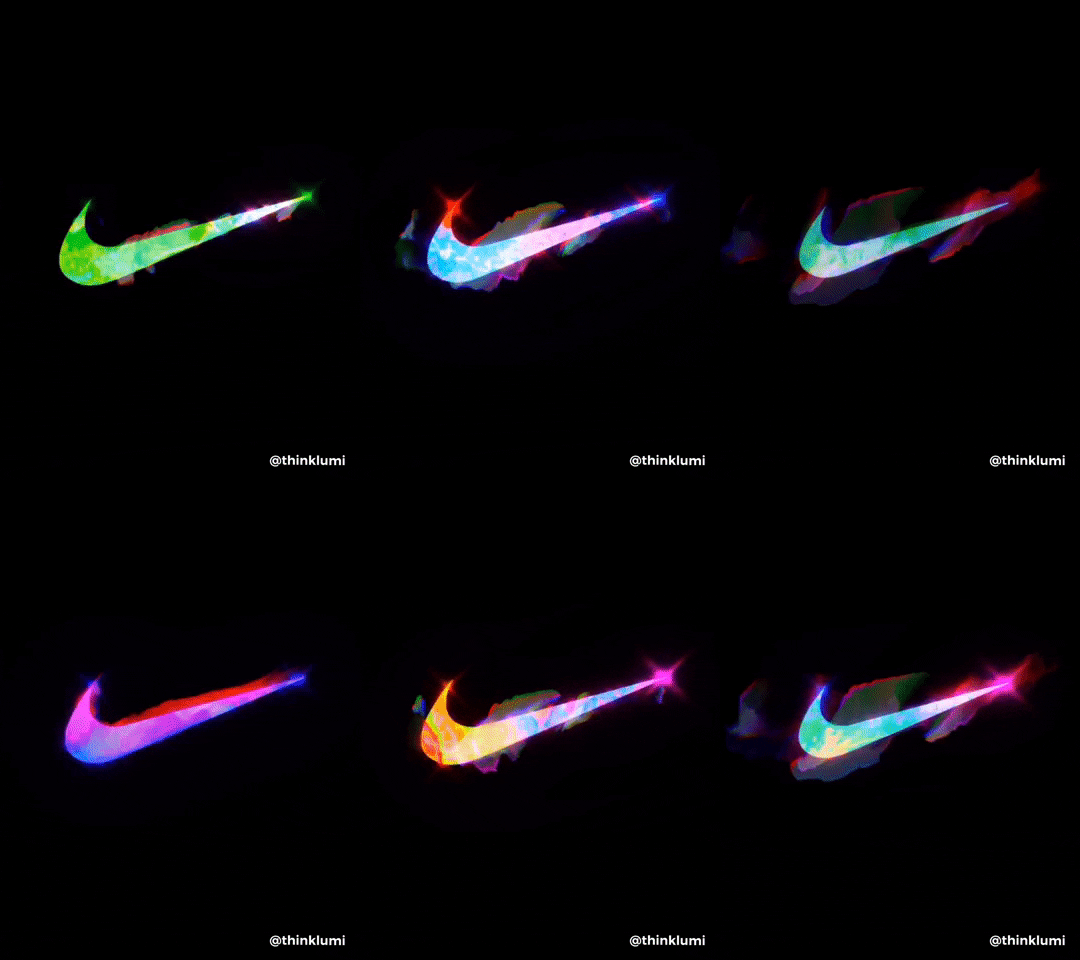
Some examples
Image
Image

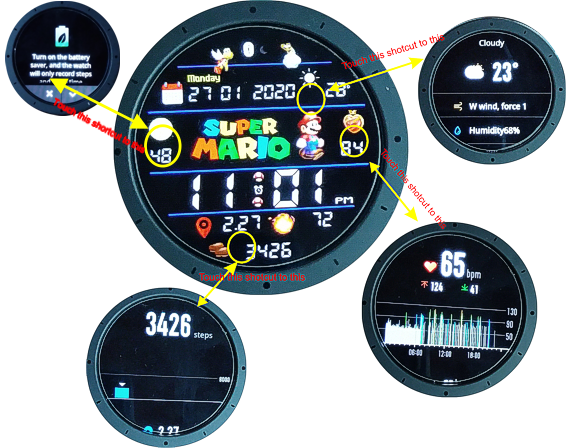
Shortcuts to Steps, Battery, Weather and Heart BPM

Example of a great watchface with all this ;)
https://amazfitwatchfaces.com/gtr/view/3251

You can use this tool to extract and pack again.
https://github.com/amazfitbip/py_amazfit_tools/releases
(Thanks asoo)
Last edited by Tugas on 13 Feb 2020, 19:08, edited 5 times in total.
User avatar
asoo
Posts: 2109
Joined: 03 Jan 2019, 01:48
Location: ͼͽ Thailand ͼͽ
Has thanked: 404 times
Been thanked: 2024 times

Post by asoo »

Tugas wrote: 27 Jan 2020, 19:13
Hello Lets post the new features
Animations
https://4pda.ru/forum/index.php?showtop ... ry93164604
Shortcuts -> still don't extract, I put the bin file

SashaCX75 talk about "SHORTCUT"
http://4pda.ru/forum/index.php?showtopi ... ry93281373

new main.exe for extract this BIN
https://github.com/amazfitbip/py_amazfit_tools/releases

Extracted
Sports_click.zip
(766.09 KiB) Downloaded 173 times
----------------------------------------------------------------
My watchface add Animation and shortcut
https://amazfitwatchfaces.com/gtr/view/3251
Image
ͼͽ To request please use the interrelated forum in action ͼͽ
Please do not PM to me for requests ported watchface.
999Nocturne
WF maker
Posts: 15
Joined: 30 Jan 2020, 20:52
Location: Italia
Has thanked: 2 times
Been thanked: 1 time
Contact:

Post by 999Nocturne »

Hi, could you help me with the animation?
I really can't understand, I compose the json with GTR_Watch_Face_v6.0 and then I add the animation code with my images, 23 is an empty image, and from 27 to 36 my animation, but it doesn't work.
doing the tests I found out that my images 27 to 36 are not inserted in the .bin file, can someone help me?
I answer myself, it could help someone.
When the animation images are not inserted in .bin, just put them in the middle, example:
img0 Background, img1 Preview, from img2 to img6 animation, img7 hands and so on.
If you put it like this it does not insert the images in the .bin, wrong example:
img0 background, img1 preview, img2, img3, img4 hands, finally from img5 to img 9 animation
User avatar
asoo
Posts: 2109
Joined: 03 Jan 2019, 01:48
Location: ͼͽ Thailand ͼͽ
Has thanked: 404 times
Been thanked: 2024 times

Post by asoo »

After you unpack in some time the Animation code is change and if you pack again it's not work
I do not know why too. so After i unpack i will delete animation code out and add my cut code represent
I cut Only StaticAnimation (Unknown11_2) because MotiomAnimation (Unknown11_2) some time add it not work

Code: Select all

},
  "Unknown11": {
    "Unknown11_2": {
      "Unknown11d2p1": {
        "X": 327,
        "Y": 264,
        "ImageIndex": 8,
        "ImagesCount": 4
      },
      "Unknown11d2p2": 400,
      "Unknown11d2p3": 0,
      "Unknown11d2p4": 6000,
      "Unknown11d2p5": 100
    }
 
-----------------------------------------------------------------------------------------------------------------------
"Unknown11d2p2": 400, <----- delay Animation ( Speed)
"Unknown11d2p4": 6000, <-------How long of Animation
"Unknown11d2p5": 100 <------------- wait in round
------------------------------------------------------------------------------------------------------------------------

I add code like this :
Spoiler
{
"Info": {
"DeviceId": 40
},
"Background": {
"Image": {
"X": 0,
"Y": 0,
"ImageIndex": 0
},
"Preview": {
"X": 0,
"Y": 0,
"ImageIndex": 1
}

},
"Unknown11": {
"Unknown11_2": {
"Unknown11d2p1": {
"X": 327,
"Y": 264,
"ImageIndex": 8,
"ImagesCount": 4
},
"Unknown11d2p2": 400,
"Unknown11d2p3": 0,
"Unknown11d2p4": 6000,
"Unknown11d2p5": 100
}

},
"Time": {
ͼͽ To request please use the interrelated forum in action ͼͽ
Please do not PM to me for requests ported watchface.
999Nocturne
WF maker
Posts: 15
Joined: 30 Jan 2020, 20:52
Location: Italia
Has thanked: 2 times
Been thanked: 1 time
Contact:

Post by 999Nocturne »

Thanks a lot, but this worked for me:

Code: Select all

    "Unknown11": {
    "Unknown11_1": [
      {
        "Unknown11d1p1": 0,
        "Unknown11d1p2": {
          "X": 43,
          "Y": 90
        },
        "Unknown11d1p3": {
          "X": 42,
          "Y": 300
        },
        "ImageIndex": 1,
        "Unknown11d1p5": 3500,
        "Unknown11d1p6": 0,
        "Unknown11d1p7": 0,
        "Unknown11d1p8": 1,
        "Unknown11d1p9": 0,
        "Unknown11d1p10": 0
      },
      {
        "Unknown11d1p1": 0,
        "Unknown11d1p2": {
          "X": 159,
          "Y": 0
        },
        "Unknown11d1p3": {
          "X": 188,
          "Y": 5
        },
        "ImageIndex": 2,
        "Unknown11d1p5": 2000,
        "Unknown11d1p6": 0,
        "Unknown11d1p7": 0,
        "Unknown11d1p8": 1,
        "Unknown11d1p9": 0,
        "Unknown11d1p10": 0
      },
      {
        "Unknown11d2p1": {
          "X": 173,
          "Y": 308,
          "ImageIndex": 3,
          "ImagesCount": 6
        },
        "Unknown11d2p2": 200,
        "Unknown11d2p3": 0,
        "Unknown11d2p4": 10000,
        "Unknown11d2p5": 100
      }
    ],
    "Unknown11_2": [
      {
        "Unknown11d1p1": 0,
        "Unknown11d1p2": {
          "X": 43,
          "Y": 90
        },
        "Unknown11d1p3": {
          "X": 42,
          "Y": 300
        },
        "ImageIndex": 1,
        "Unknown11d1p5": 3500,
        "Unknown11d1p6": 0,
        "Unknown11d1p7": 0,
        "Unknown11d1p8": 1,
        "Unknown11d1p9": 0,
        "Unknown11d1p10": 0
      },
      {
        "Unknown11d1p1": 0,
        "Unknown11d1p2": {
          "X": 159,
          "Y": 0
        },
        "Unknown11d1p3": {
          "X": 188,
          "Y": 5
        },
        "ImageIndex": 2,
        "Unknown11d1p5": 2000,
        "Unknown11d1p6": 0,
        "Unknown11d1p7": 0,
        "Unknown11d1p8": 1,
        "Unknown11d1p9": 0,
        "Unknown11d1p10": 0
      },
      {
        "Unknown11d2p1": {
          "X": 173,
          "Y": 308,
          "ImageIndex": 3,
          "ImagesCount": 6
        },
        "Unknown11d2p2": 200,
        "Unknown11d2p3": 0,
        "Unknown11d2p4": 10000,
        "Unknown11d2p5": 100
      }
    ]
  },
Tugas
WF maker
Posts: 17
Joined: 30 Nov 2019, 21:09
Has thanked: 7 times
Been thanked: 3 times
Contact:

Post by Tugas »

asoo wrote: 10 Feb 2020, 13:25
After you unpack in some time the Animation code is change and if you pack again it's not work
I do not know why too. so After i unpack i will delete animation code out and add my cut code represent
I cut Only StaticAnimation (Unknown11_2) because MotiomAnimation (Unknown11_2) some time add it not work

Code: Select all

},
  "Unknown11": {
    "Unknown11_2": {
      "Unknown11d2p1": {
        "X": 327,
        "Y": 264,
        "ImageIndex": 8,
        "ImagesCount": 4
      },
      "Unknown11d2p2": 400,
      "Unknown11d2p3": 0,
      "Unknown11d2p4": 6000,
      "Unknown11d2p5": 100
    }
 
-----------------------------------------------------------------------------------------------------------------------
"Unknown11d2p2": 400, <----- delay Animation ( Speed)
"Unknown11d2p4": 6000, <-------How long of Animation
"Unknown11d2p5": 100 <------------- wait in round
------------------------------------------------------------------------------------------------------------------------

I add code like this :
Spoiler
{
"Info": {
"DeviceId": 40
},
"Background": {
"Image": {
"X": 0,
"Y": 0,
"ImageIndex": 0
},
"Preview": {
"X": 0,
"Y": 0,
"ImageIndex": 1
}

},
"Unknown11": {
"Unknown11_2": {
"Unknown11d2p1": {
"X": 327,
"Y": 264,
"ImageIndex": 8,
"ImagesCount": 4
},
"Unknown11d2p2": 400,
"Unknown11d2p3": 0,
"Unknown11d2p4": 6000,
"Unknown11d2p5": 100
}

},
"Time": {
Hello!

Can you please put the json file of your watchface already fixed so that we can see the differences after unpacking and make sure it will work, thanks
User avatar
asoo
Posts: 2109
Joined: 03 Jan 2019, 01:48
Location: ͼͽ Thailand ͼͽ
Has thanked: 404 times
Been thanked: 2024 times

Post by asoo »

Tugas wrote: 12 Feb 2020, 17:51

Hello!

Can you please put the json file of your watchface already fixed so that we can see the differences after unpacking and make sure it will work, thanks
https://amazfitwatchfaces.com/gtr/view/2883 <<------- test Only StaticAnimation
ͼͽ To request please use the interrelated forum in action ͼͽ
Please do not PM to me for requests ported watchface.
yill5880
WF maker
Posts: 1
Joined: 05 Feb 2020, 02:40
Location: seoul
Contact:

Post by yill5880 »

"Unknown11": {
"Unknown11_2": {
"Unknown11d2p1": {
"X": 327,
"Y": 264,
"ImageIndex": 8,
"ImagesCount": 4
},
"Unknown11d2p2": 400,
"Unknown11d2p3": 0,
"Unknown11d2p4": 6000,
"Unknown11d2p5": 100
User avatar
asoo
Posts: 2109
Joined: 03 Jan 2019, 01:48
Location: ͼͽ Thailand ͼͽ
Has thanked: 404 times
Been thanked: 2024 times

Post by asoo »

yill5880 wrote: 13 Feb 2020, 08:51
Is there any way I can add multiple pieces at once using the form below?
As far as I know now, have only one code can be used for Static Animation.
can not add multiple.
ͼͽ To request please use the interrelated forum in action ͼͽ
Please do not PM to me for requests ported watchface.
User avatar
Lordalpine
WF maker
Posts: 62
Joined: 09 Oct 2019, 22:09
Location: Santo Tirso
Has thanked: 6 times
Been thanked: 35 times
Contact:

Post by Lordalpine »

Image
Animation made on Watchmaker App
Screen in real time saved with the Onscreen Video Samsung capture App [ Note 10 ]
Crop on Inshot
Converted in Gif in Gifshop [ 1000*1000 gif]
Resized and frame kept in Photoshop [ 150*152 png ]

Let's say I try... [ I'm so Sad of the final result... It's better with 10 frames now but not satisfying for me ]
The gif is 150 frames [ Tourbillon make a total rotation ]
Only kept 10 frames of this animation [ 150*152 size ] to animate the tourbillon of :
https://amazfitwatchfaces.com/gtr/view/3779

Code: Select all

 },
"Unknown11": {
    "Unknown11_2": {
      "Unknown11d2p1": {
        "X": 150,
        "Y": 291,
        "ImageIndex": 7,
        "ImagesCount": 10
      },
      "Unknown11d2p2": 350,
      "Unknown11d2p3": 0,
      "Unknown11d2p4": 60000,                     [It's like playing euromillion, and pray for nice effect^^ ]
      "Unknown11d2p5": 10000
    }
  },
It's not like the price would change a lot if Huami engineer put a 16Mb of Internal memory to at least support Huge detailed face.

edit : 10 frames used here instead of 5 now
In Photoshop export in PNG with 8 bit colours [ -50% of each Png weight ]
Totally killed the 0001Png [ 1*1 Px :mrgreen: ]

[mention]asoo[/mention] Maybe a silly question : Does a code exist to make a total rotation of an element with 1 Png...
Ley's say i Only keep 1 frame [or only the tourbillon and put the rest of elements on the background 0000.Png ] and the code make it rotate from 0 to 360° ?
User avatar
asoo
Posts: 2109
Joined: 03 Jan 2019, 01:48
Location: ͼͽ Thailand ͼͽ
Has thanked: 404 times
Been thanked: 2024 times

Post by asoo »

Lordalpine wrote: 16 Feb 2020, 20:41

@asoo Maybe a silly question : Does a code exist to make a total rotation of an element with 1 Png...
Ley's say i Only keep 1 frame [or only the tourbillon and put the rest of elements on the background 0000.Png ] and the code make it rotate from 0 to 360° ?
As far as I know, there is no code used to do that you said.

-----------------------------------------------------------------------------------------------------------------------------------------------------

Code: Select all

 
        "ImageIndex": 8,   
        "ImagesCount": 4
 },
      "Unknown11d2p2": 350,
      "Unknown11d2p3": 0,
      "Unknown11d2p4": 60000,                    
      "Unknown11d2p5": 10000   <--- Have you stopped for too long for one round ?  If you want continuity, I think you  maybe should use 100.
    }

Good idea for this watchface :o :idea:
ͼͽ To request please use the interrelated forum in action ͼͽ
Please do not PM to me for requests ported watchface.
User avatar
Lordalpine
WF maker
Posts: 62
Joined: 09 Oct 2019, 22:09
Location: Santo Tirso
Has thanked: 6 times
Been thanked: 35 times
Contact:

Post by Lordalpine »

[mention]asoo[/mention]

With the code you provided me, It's definitively better.

-----------------------------------------------------------------------------------------------------------------------

Preview cheat^^ :

Image
https://amazfitwatchfaces.com/gtr/view/3819

If you are lazy and don't use some function....Just use the steps counter for animated preview, just simply put frame for number.
Adjust the preview state on the Gui with simple value like 1 - 2 - 3 - 4 etc.

Code: Select all

  },
  "Unknown11": {
    "Unknown11_2": {
      "Unknown11d2p1": {
        "X": 150,
        "Y": 291,
        "ImageIndex": 7,
        "ImagesCount": 9
      },
      "Unknown11d2p2": 1000,
      "Unknown11d2p3": 0,
      "Unknown11d2p4": 0,
      "Unknown11d2p5": 0        So a "0" deactivate the function [ never think of putting here a 0  :mrgreen:  ]
    }

  },
User avatar
Maikeldevil
Posts: 64
Joined: 17 Aug 2019, 12:05
Location: unknown
Has thanked: 3 times
Been thanked: 44 times
Contact:

Post by Maikeldevil »

Is there a option to set speed on an animation? The mi band 4 has a speed option.. altough my biggest wish is a smooth sweeping seconds hand.. hope it could be done someday..
Locked

Return to “Closed topics”

Who is online

Users browsing this forum: No registered users and 1 guest