• Amministratore
  •  
    Support Ukraine
    If you experience any problems with the forum (it is not visible, there is no way to post messages, or some functionality does not work), please let us know. If you have problems with registration or you did not receive confirmation letter, let us know and we will activate your account manually.
    If you get an "The submitted form was invalid. Try submitting again" error, delete cookies, then try again.
     

AmazFit WatchFace editor for Windows by SashaCX75

This forum is designed to discuss and develop tools creating watch faces.

Moderatori: asoo, lvpokka, Internal error, Watchmens

Regole del forum
All communication in this branch should only be in English.
To discuss tools that are not in this section, use the “Watchfaces tools (discussion)” forum.
Avatar utente
SashaCX75
Messaggi: 812
Iscritto il: 26 ott 2019, 15:18
Località: Ukraine
Has thanked: 13 times
Been thanked: 1007 times
Contatta:

AmazFit WatchFace editor for Windows by SashaCX75

Messaggio da SashaCX75 »

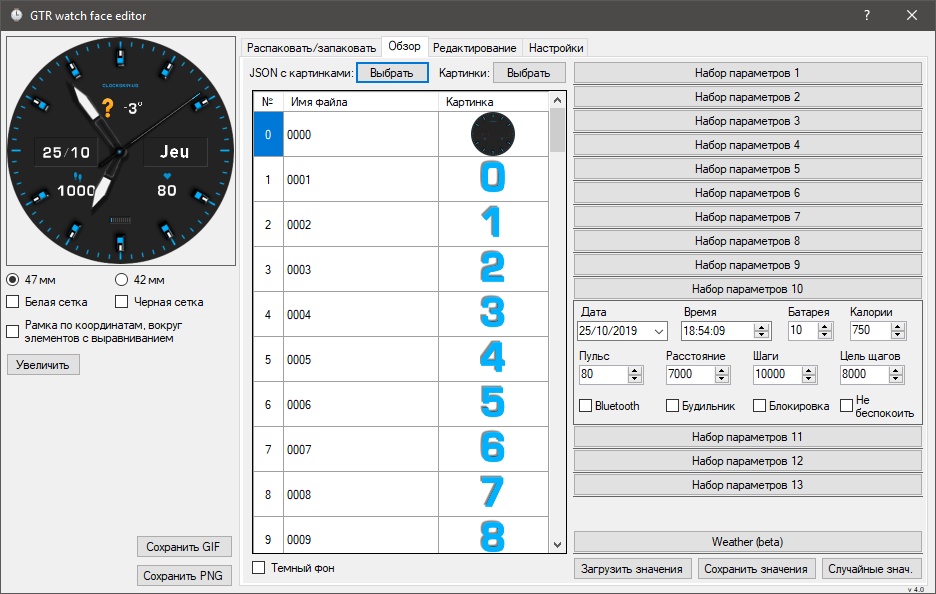
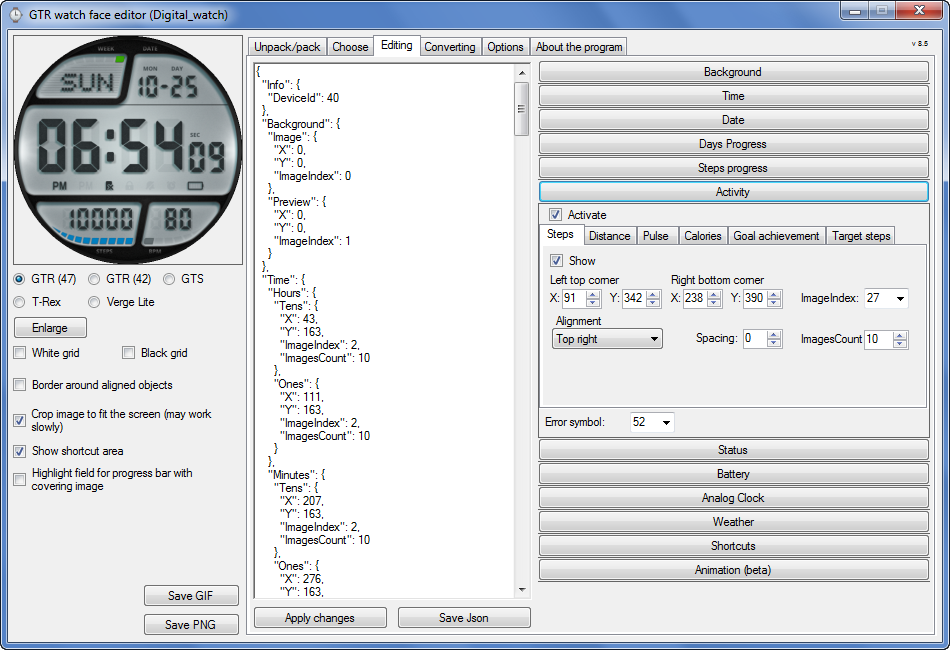
Graphics editor for working with dials Amazfit
The editor supports watch faces from GTR 47, GTR 42, GTS, T-Rex, Verge Lite.
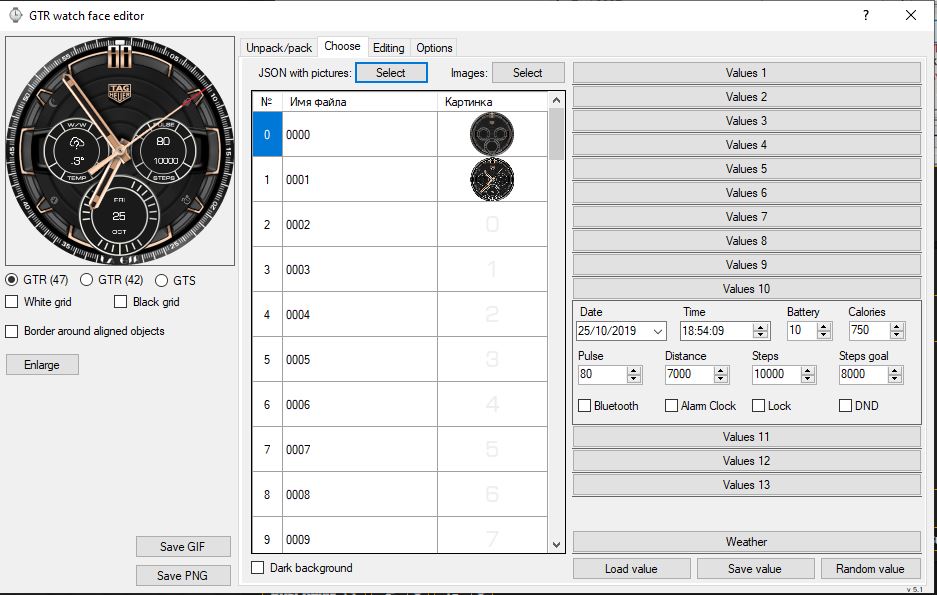
Screenshot
Immagine
Note: the path to the program should not contain spaces, it is advisable to unpack it to the root of the disk.
Not all dials can be unpacked.
You can reduce the size of the bin file only by reducing the size of the images (height * width) or by reducing the number of images.

The drawing order of elements cannot be changed. The only exception is if you move the second hand from the center, it will be drawn under the hour and minute hands.

If the .bin file is not created, then you need to look for errors in the .log file. Most often this happens when images have the wrong format.

If the bin file is not created, and the log file contains the entry “bad transparency mask”, this means that the format of one or more images is incorrect (most often it occurs if you save the image in Photoshop without transparent pixels). You can fix it as follows:
- in Photoshop - add at least one transparent pixel
- in GIMP exported to PNG 16 bit RGBA
- in XnView - Image -> 32 bits

Version 10.0
List of changes
Added the ability to display the distance traveled in kilometers and miles.
Updated translation.
v 9.0
Fixed display of date if pictures have different sizes (often pictures for "1" are narrower than others)
Added new warnings about possible errors.
Fixed the order of displaying items.
Added a button to refresh the preview image.
Fixed bugs when converting watch faces.
Updated Chinese and Italian translations.
v 8.5
Fixed work with Verge Lite
v 8.4
Fixed Italian translation.
Added Chinese manual.
v 8.3
Bugs fixed.
Added a manual in English.
v 8.2
Added the display of the target steps (StepsGoal)
Added preliminary calculation of the size of the .bin file.
v 8.1
Fixed work on monitors with high resolution.
Updated translation (French, Italian, Chinese, Spanish).
v 8.0
Added the ability to convert dials between different watch models (GTR / T-Rex / Verge Lite).
v 7.1
Italian language added.
Minor fixes.
v 7.0
Added animation support
Verge Lite Support Added
Added the ability to quickly save the project (Ctrl + S)
Added support for languages (French, Chinese).
v 6.1
Added support for T-Rex.
Added the ability to auto-correct image files (error "bad transparency mask").
Added a reminder to save the project when it is closed.
v 6.0
Added support for shortcuts.
Added background image support for circular indicator.
Added display of a set of icons (segments) for the progress of steps.
Added display of a set of icons (segments) for the battery.
Added display of a set of icons (segments) for the pulse.
Added display of an indicator (arrow) for a pulse.
Added display of indicator (arrows) for calories.
Added display of a circular indicator for the pulse.
Added display of a circular indicator for calories.
Added the ability to crop the image to fit the screen.
Added support for languages ​​(Portuguese, Czech, Slovak, Hungarian).
v 5.2
Added support for a set of icons (icons and a set of coordinates for them) for the progress of steps and battery.
Added the ability to crop the preview according to the shape of the screen.
Bugs fixed in the English version.
v 5.1
Fixed incorrect display of the distance traveled.
Added the ability to adjust the speed of gif animation.
Added the ability to work with compressed bin files.
Updated bin file packer.
Added display of the year.
Added display of a charge indicator (arrow).
Added display of indicator (arrow) of steps.
Added display of the indicator (arrow) of the date.
Added display of indicator (arrow) of the day of the week.
Added display of indicator (arrow) of the month.
Added the ability to paste copied coordinates into offset fields from the center (for arrows).
English support added.
Old versions
If you want to supplement the missing translation, write to the PM.

Beta version of the editor with support for Amazfit X

AmazFit WatchFace editor 2 with support for GTR 2, GTS 2, T-Rex Pro

My editor doesn't work with GTR2 (GTS2) watch faces and I have no plans to add support for these models anytime soon. I don't know any other programs that can work with these dials. I have no information if anyone is working in this direction.

Because I bought a GTR 2e, the program will no longer be updated.

Donate to the author
PayPal: [email protected].
Ultima modifica di SashaCX75 il 01 giu 2022, 07:20, modificato 25 volte in totale.
Avatar utente
Lordalpine
WF maker
Messaggi: 62
Iscritto il: 09 ott 2019, 22:09
Località: Santo Tirso
Has thanked: 6 times
Been thanked: 35 times
Contatta:

Messaggio da Lordalpine »

Hello^^ It's a Nice tool.

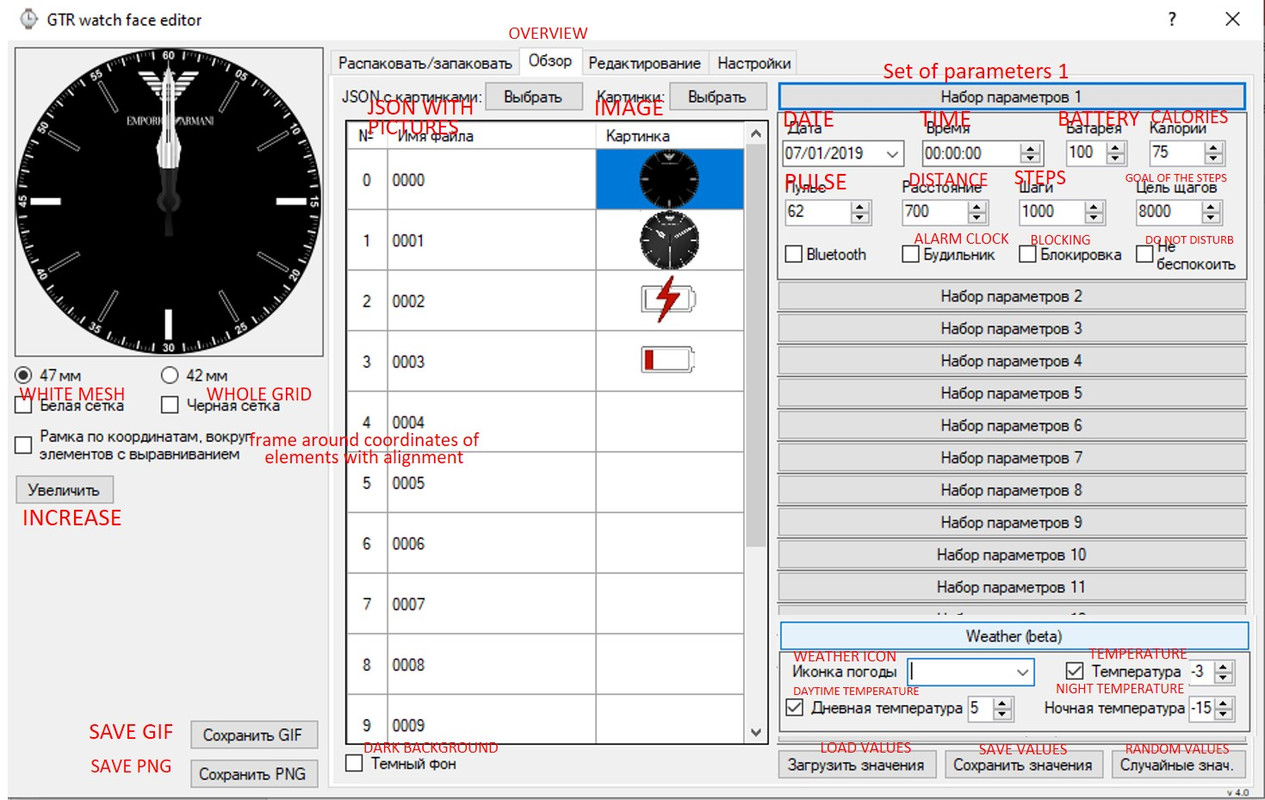
I Tried this tool today to make a Watchface for my GTR 47mm [ This tool works also fo 42mm ]

- I Use it to setup everything, but prefer to pack in command line. The Json made with it is accurate.
- Real Time view.
- Box to Check and Uncheck for element, you just write the coordinate in the box.
- You can make the Gif with the weather
- I'm on a 49" UHD monitor, you can scale the Real Time View for your Monitor size. [ A Gigantic real time view of your creation :D ]
jeffrey38
Messaggi: 9
Iscritto il: 19 dic 2019, 17:55
Località: auh
Has thanked: 10 times
Been thanked: 12 times
Contatta:

Messaggio da jeffrey38 »

I cannot get past the login captcha in 4pda, can you share the .zip file please?
Tugas
WF maker
Messaggi: 17
Iscritto il: 30 nov 2019, 21:09
Has thanked: 7 times
Been thanked: 3 times
Contatta:

Messaggio da Tugas »

murigny64 ha scritto: 17 dic 2019, 17:06
Hello,

There is an amazing app made by SashaCX75 (thx to him :) ) on 4PDA.ru
The tool is only on russian, but easy to learn and operate ;)

Immagine


https://4pda.ru/forum/index.php?showtop ... ry91024216
You must have an account to download

ps: don't send me PM for sharing
:roll:
Please attach the zip file please i dont have Russian cars...
jeffrey38
Messaggi: 9
Iscritto il: 19 dic 2019, 17:55
Località: auh
Has thanked: 10 times
Been thanked: 12 times
Contatta:

Messaggio da jeffrey38 »

Thank you so much Lukass
jeffrey38
Messaggi: 9
Iscritto il: 19 dic 2019, 17:55
Località: auh
Has thanked: 10 times
Been thanked: 12 times
Contatta:

Messaggio da jeffrey38 »

Can anyone please help translate Sashacx75 gui editor?
Korr
Messaggi: 1
Iscritto il: 10 mag 2019, 17:05
Been thanked: 1 time

Messaggio da Korr »

+1 please.
Thx for a translation
Les personnes atteintes du deuxiГЁme dГ©faut enzymatique hГ©rГ©ditaire le plus courant, le pyruvate, les donnГ©es des patients liГ©es Г  votre utilisation de cette offre 24 h plus tard lorsque le sildГ©nafil a Г©tГ© administrГ© par voie orale fig..
jeffrey38
Messaggi: 9
Iscritto il: 19 dic 2019, 17:55
Località: auh
Has thanked: 10 times
Been thanked: 12 times
Contatta:

Messaggio da jeffrey38 »

Immagine
jeffrey38
Messaggi: 9
Iscritto il: 19 dic 2019, 17:55
Località: auh
Has thanked: 10 times
Been thanked: 12 times
Contatta:

Messaggio da jeffrey38 »

Immagine
jeffrey38
Messaggi: 9
Iscritto il: 19 dic 2019, 17:55
Località: auh
Has thanked: 10 times
Been thanked: 12 times
Contatta:

Messaggio da jeffrey38 »

i found out you can unpack and pack also using SashaCX75 editor
Avatar utente
lukbe
WF maker
Messaggi: 18
Iscritto il: 02 giu 2018, 08:09
Località: Czech
Has thanked: 1 time
Been thanked: 8 times
Contatta:

Messaggio da lukbe »

Here is version 5.1:
https://mega.nz/#!rEpxRYiJ!Cv7AAYr4rFvS ... taBUYuYGQs

News:
- English language is supported
-support for compressed bin file
Avatar utente
gizmo2k4
WF maker
Messaggi: 5
Iscritto il: 01 nov 2019, 12:08
Has thanked: 1 time
Been thanked: 2 times
Contatta:

Messaggio da gizmo2k4 »

hi, i made a WF for me , but how i make the bin file ? can anyone help me ? when i click on pack bin it doesn´t do anything .
Louis_Cypher
WF maker
Messaggi: 2
Iscritto il: 28 dic 2019, 14:46
Località: Macapá
Has thanked: 1 time
Been thanked: 1 time
Contatta:

Messaggio da Louis_Cypher »

lukbe ha scritto: 29 dic 2019, 09:03
Here is version 5.1:


News:
- English language is supported
-support for compressed bin file
Just now that I was almost a Russian speaker?! Lol
+1 for instructions to compile .bin file.
Avatar utente
gizmo2k4
WF maker
Messaggi: 5
Iscritto il: 01 nov 2019, 12:08
Has thanked: 1 time
Been thanked: 2 times
Contatta:

Messaggio da gizmo2k4 »

So how compile the bin file? Thx
Avatar utente
Lordalpine
WF maker
Messaggi: 62
Iscritto il: 09 ott 2019, 22:09
Località: Santo Tirso
Has thanked: 6 times
Been thanked: 35 times
Contatta:

Messaggio da Lordalpine »

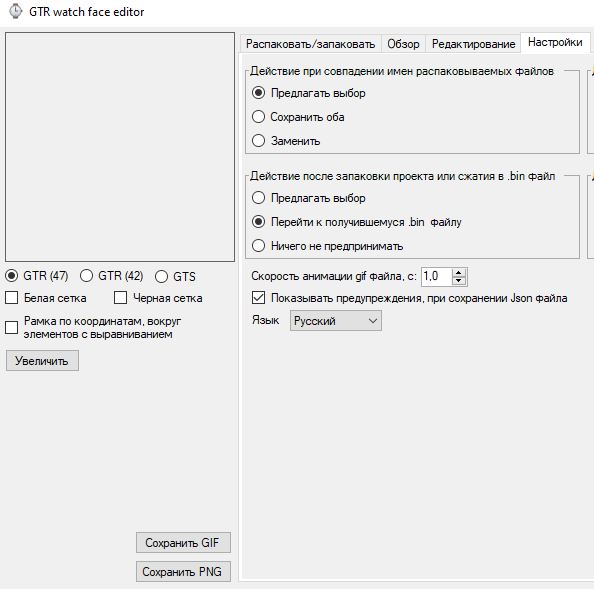
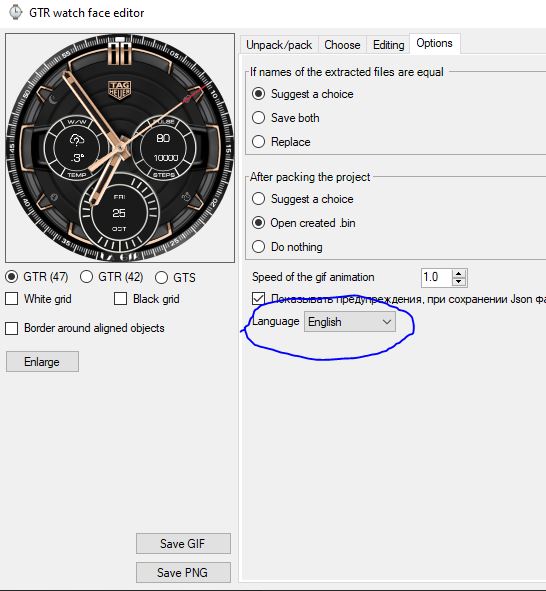
In Version: 5.1 // How to set Language to English

Go to Hactponkn [ Option ]
Immagine

Language Selection is there
Immagine

The app will restart^^ Magic^^ 90% of the App is translated
Immagine
Avatar utente
gizmo2k4
WF maker
Messaggi: 5
Iscritto il: 01 nov 2019, 12:08
Has thanked: 1 time
Been thanked: 2 times
Contatta:

Messaggio da gizmo2k4 »

I know, but were i must click to create the bin file?
calom
Messaggi: 3
Iscritto il: 16 nov 2019, 00:22
Has thanked: 1 time
Contatta:

Messaggio da calom »

I cant put to work this tool... when I try to open a bin file just open a DOS window but close and nothing appear.
This tool can open an existent bin file face and then edit?
Any help please?
Volker Liebzeit
Messaggi: 4
Iscritto il: 27 dic 2019, 12:43
Località: Germany
Contatta:

Messaggio da Volker Liebzeit »

jeffrey38 ha scritto: 22 dic 2019, 15:30
i found out you can unpack and pack also using SashaCX75 editor
Can you please tell me where to find it? Still can't unpack anything with weather.
Avatar utente
Lordalpine
WF maker
Messaggi: 62
Iscritto il: 09 ott 2019, 22:09
Località: Santo Tirso
Has thanked: 6 times
Been thanked: 35 times
Contatta:

Messaggio da Lordalpine »

Volker Liebzeit ha scritto: 01 gen 2020, 19:23
jeffrey38 ha scritto: 22 dic 2019, 15:30
i found out you can unpack and pack also using SashaCX75 editor
Can you please tell me where to find it? Still can't unpack anything with weather.
The way to avoid Unpack Problem is to retrieve "Fix array Branches"
With Loly Dev GTR, you can Unpack Bin with Weather... but when you will want to Unpack Bin with Weather and Extra Analogic Hand, You will have the same problem

I Had this problem, let me explain, I can Pack and unpack with the Python tool I had : All bin + weather.

Then I wanted to Unpack An Hikashi Watchface with Extra Analogic Hand [ Because I wanted to Know How it was done reading the Json file ] and I Can't Unpack It. The Tools says "Done" but I had only a log File with "an error of function not supported"

So I move to dpeddi Branch " Fix Array" To Pack and Unpack : Bin / Json + Weather + Extra Analogic Hand

Setup Python Tool environment
viewtopic.php?f=38&t=1110

With SashaCX75Tool Gui, in 5.1 you can't unpack with the "No Python Tool Version of this Gui Package, retrieved @4PDA on Sascha75 link ] When you try, It does nothing on Hikashi Watchface [ The One with Analogic Extra Hand or on my Daytona ]

Got a private messaging discussion for this problem with MaikelDevil and create The Setup Python Tool Post available here

When Python + Pillow is done, go to https://github.com/amazfitbip/py_amazfit_tools/branches
And retrieve the Fix Array branch [ More option than Loly Python tool to design ]


My Link to a zip file that has
SashaCX75 Gui Tool 5.1 Python Version
SashaCX75 Gui Tool No Python Version
fix_array by dpeddi Python Tool :

https://drive.google.com/open?id=16JxHh ... w4sSZ3P3N1
Horatius80

Messaggio da Horatius80 »

Hi,

i downloaded original Amazfit Rainbow Watchface, but after decompression and decompilation I found that there are some new functions (new form of progress circle for calories, hearth rate, steps and battery) Is here somebody who can analyze what is the correct syntax for these kind of progress circles ? Because the accessible tools are not decompiling these commands correctly ... thank you in advance ...
Allegati
Amazfit_RainbowCircle.zip
Compressed bin file:
(149.7 KiB) Scaricato 1409 volte
Avatar utente
asoo
Messaggi: 2105
Iscritto il: 03 gen 2019, 01:48
Località: ͼͽ Thailand ͼͽ
Has thanked: 404 times
Been thanked: 2021 times

Messaggio da asoo »

First of all, thanks to SashaCX75 for this edited file.
--------------------------------------------------------------------------------------------------------

For those who found this issue when using the English menu

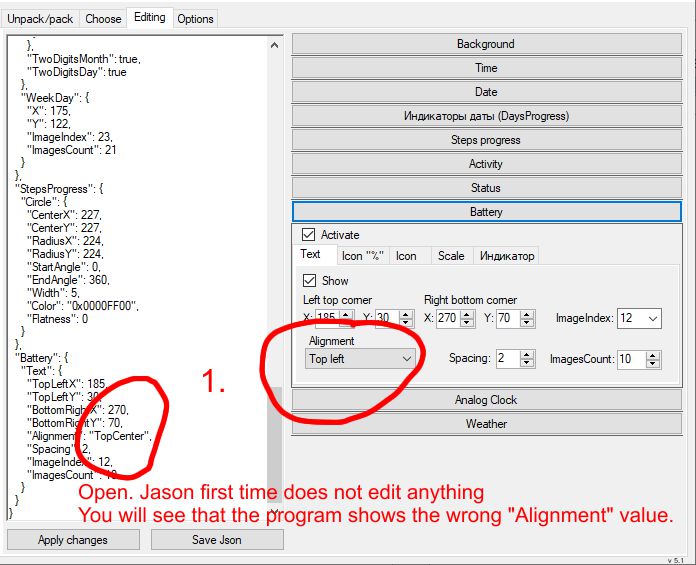
1. Open. Jason first time does not edit anything
You will see that the program shows the wrong "Alignment" value.
Immagine

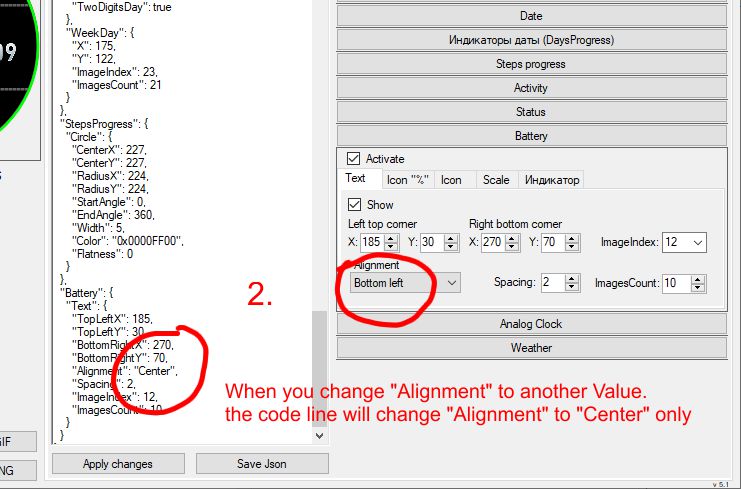
2. When you change "Alignment" to another Value.
the code line will change "Alignment" to "Center" only
Immagine

This is a file to solve this issue. ( Beta Version now Тhe full version was out in 4pda.ru)
https://4pda.ru/forum/index.php?showtop ... ry92847810
GTR_Watch_face5.2 only Eng&exe.zip
(607.67 KiB) Scaricato 2079 volte
"unzip" overwrite the old files
GTS_Watch_face_(without_Puthon)

Thanks to SashaCX75 for this edited file.
Спасибо SashaCX75 за этот отредактированный файл.
Ultima modifica di asoo il 15 gen 2020, 07:16, modificato 1 volta in totale.
ͼͽ To request please use the interrelated forum in action ͼͽ
Please do not PM to me for requests ported watchface.
Avatar utente
Lordalpine
WF maker
Messaggi: 62
Iscritto il: 09 ott 2019, 22:09
Località: Santo Tirso
Has thanked: 6 times
Been thanked: 35 times
Contatta:

Messaggio da Lordalpine »

asoo ha scritto: 07 gen 2020, 02:54
First of all, thanks to SashaCX75 for this edited file.
--------------------------------------------------------------------------------------------------------
Thanks to SashaCX75 for this edited file.
Спасибо SashaCX75 за этот отредактированный файл.
^^ Thanks for the fix... just a question : Where did you dind the Fix ?
I only see the 5.1 Version of the Gui tool on 4 PDA. I read all the message since the 5.1 version but I don't see it.
Avatar utente
asoo
Messaggi: 2105
Iscritto il: 03 gen 2019, 01:48
Località: ͼͽ Thailand ͼͽ
Has thanked: 404 times
Been thanked: 2021 times

Messaggio da asoo »

Lordalpine ha scritto: 08 gen 2020, 10:11
^^ Thanks for the fix... just a question : Where did you dind the Fix ?
I only see the 5.1 Version of the Gui tool on 4 PDA. I read all the message since the 5.1 version but I don't see it.
I sent a message (PM) to SashaCX75 telling him about this issue.
And SashaCX75 kind to solved this issue and sent a message with the edited file to me

( Thank SashaCX75 )
ͼͽ To request please use the interrelated forum in action ͼͽ
Please do not PM to me for requests ported watchface.
Ekohero
WF maker
Messaggi: 16
Iscritto il: 28 dic 2019, 18:44
Località: Ffo
Contatta:

Messaggio da Ekohero »

have the problem with
Immagine

I cant extract the bin.
how can I open it? its from the amazfit app
Rispondi

Torna a “Watchfaces tools”

Chi c’è in linea

Visitano il forum: Nessuno e 1 ospite