Ad blocker detected: Our website is made possible by showing ads to visitors. Please consider supporting us by disabling your ad blocker on our website.
If you experience any problems with the forum (it is not visible, there is no way to post messages, or some functionality does not work), please let us know.
If you have problems with registration or you did not receive confirmation letter, let us know and we will activate your account manually.
If you get an "The submitted form was invalid. Try submitting again" error, delete cookies, then try again.
Forum rules
When adding a new topic, use the template: Topic title [device name]
For example: Requesting creation of watch face [T-Rex Pro]
All communication in this branch should only be in English.
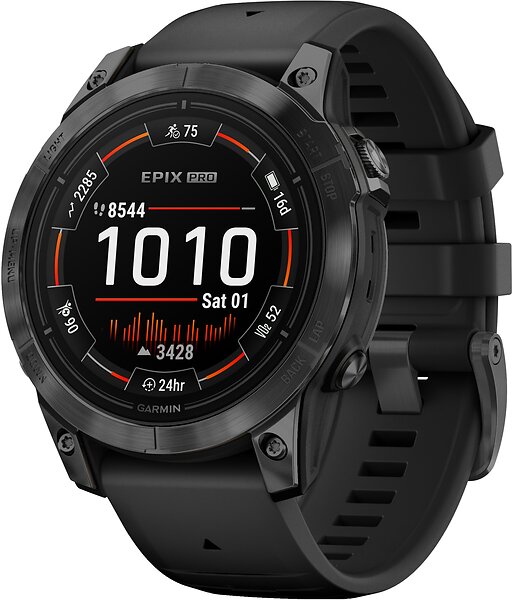
Found a few Garmin-inspired watchfaces on this website, but the one that has really caught my eye is one of the stock offerings for the Garmin Epix pro 2.
Has anyone come across a watchface similar to this or can it be made? Spoiler
I have no idea how hard it is to replicate. Tried to look up how to use the Amazfit watchface editor, but im at a loss...
Does not need to be exactly the same datafileds and logo, but I like the way the watchface accentuates the side buttons. I also like the amber red colorway.
Hi!
Found a few Garmin-inspired watchfaces on this website, but the one that has really caught my eye is one of the stock offerings for the Garmin Epix pro 2.
Has anyone come across a watchface similar to this or can it be made?
Spoiler
I have no idea how hard it is to replicate. Tried to look up how to use the Amazfit watchface editor, but im at a loss...
Does not need to be exactly the same datafileds and logo, but I like the way the watchface accentuates the side buttons. I also like the amber red colorway.
My Trex 3 pro 44mm has 466x466 resolution.
Thankful for any and all replies/help!
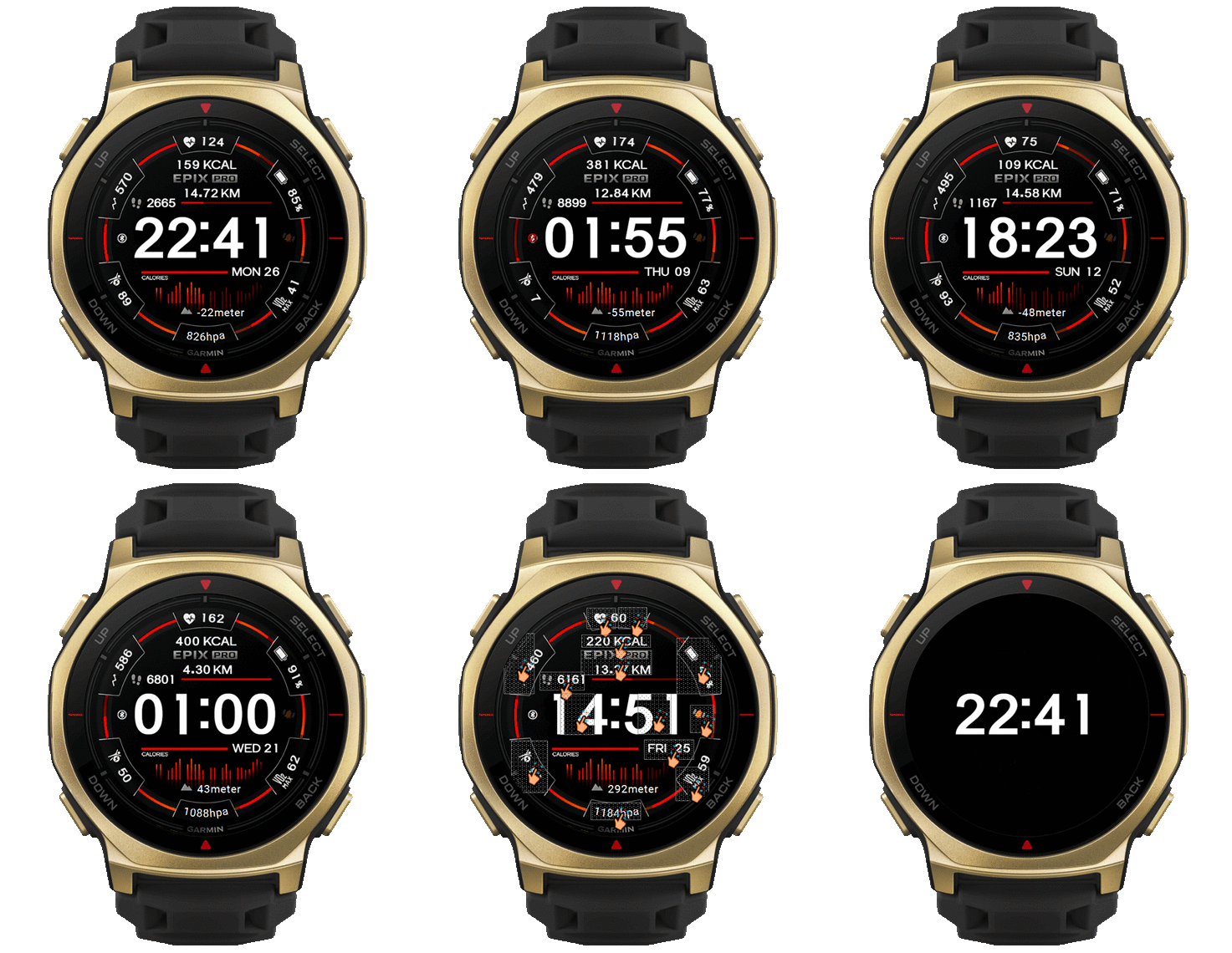
Understand before downloading This watch face I made will not accept any further edit requests.
It has been modified to suit the functions that the device can display, so this dial has some elements that are different from the original.
This watch face was not test on real device .
Therefore, users please manage the risk yourself.
If anyone wants to make additional changes to be compatible with your existing device, please do so yourself.
If you post it in the upload section, you don't have to give me credit, but please take responsibility for the files you upload to the web yourself.
PS. If the requester has not yet asked for permission from the owner of the work to adapt it. If the owner requests deletion, I will delete it immediately. Preview and download
Hi!
Found a few Garmin-inspired watchfaces on this website, but the one that has really caught my eye is one of the stock offerings for the Garmin Epix pro 2.
Has anyone come across a watchface similar to this or can it be made?
Spoiler
I have no idea how hard it is to replicate. Tried to look up how to use the Amazfit watchface editor, but im at a loss...
Does not need to be exactly the same datafileds and logo, but I like the way the watchface accentuates the side buttons. I also like the amber red colorway.
My Trex 3 pro 44mm has 466x466 resolution.
Thankful for any and all replies/help!
Understand before downloading This watch face I made will not accept any further edit requests.
It has been modified to suit the functions that the device can display, so this dial has some elements that are different from the original.
This watch face was not test on real device .
Therefore, users please manage the risk yourself.
If anyone wants to make additional changes to be compatible with your existing device, please do so yourself.
If you post it in the upload section, you don't have to give me credit, but please take responsibility for the files you upload to the web yourself.
PS. If the requester has not yet asked for permission from the owner of the work to adapt it. If the owner requests deletion, I will delete it immediately. Preview and download
Epix_pro2_T_Rex_3_Pro_44mm.zip
Wow, Thanks! I have only installed faces with qr-code before. How to I install this with the downloaded files?
Wow, Thanks! I have only installed faces with qr-code before. How to I install this with the downloaded files?
You can read How to install watchface to your device in this link : viewtopic.php?p=17161#p17161 QR Code for install
Alternatively, you can install it via this QR code.
The file is hosted on catbox, which may sometimes experience high user traffic, preventing installation. Please wait a while and try again.
ͼͽ To request please use the interrelated forum in action ͼͽ
Please do not PM to me for requests ported watchface.
Wow, Thanks! I have only installed faces with qr-code before. How to I install this with the downloaded files?
You can read How to install watchface to your device in this link : viewtopic.php?p=17161#p17161 QR Code for install
Alternatively, you can install it via this QR code.
The file is hosted on catbox, which may sometimes experience high user traffic, preventing installation. Please wait a while and try again.
I uploaded it so that more users can get it. Seems to work just as intended. Huge thanks again!
Wow, Thanks! I have only installed faces with qr-code before. How to I install this with the downloaded files?
You can read How to install watchface to your device in this link : viewtopic.php?p=17161#p17161 QR Code for install
Alternatively, you can install it via this QR code.
The file is hosted on catbox, which may sometimes experience high user traffic, preventing installation. Please wait a while and try again.
Hesitant to ask since you had a disclaimer on further adjustments, but I really like this watchface and want to use it permanently. Kind of regret not asking for weather or anything other useful than HR and biocharge since I have tattoos and the hrm does not work on me. I use a Helio strap instead for that but it does not sync with the watch.
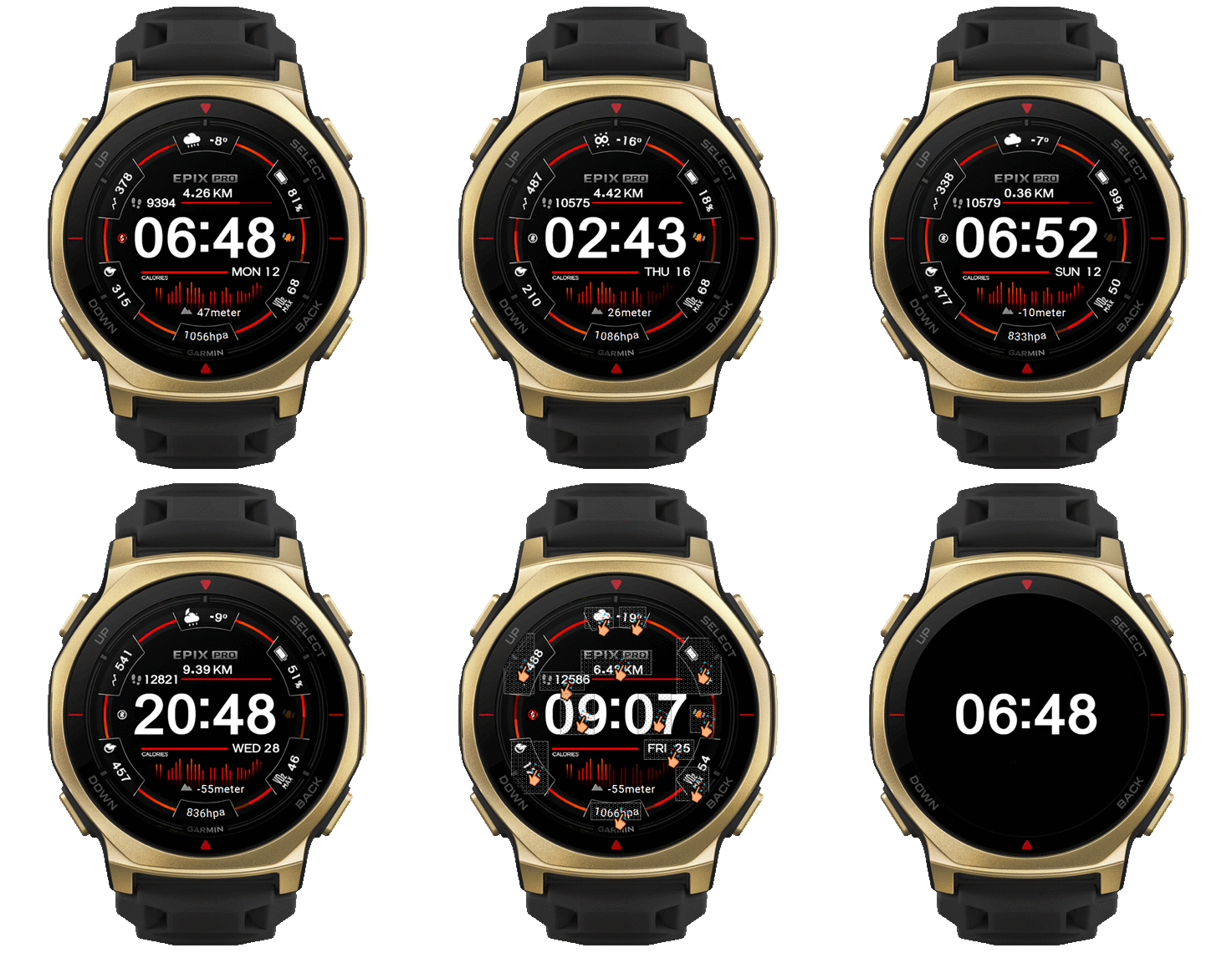
How much hassle would it be to switch hr to weather temp and biocharge with calories for a cleaner look?
Hesitant to ask since you had a disclaimer on further adjustments, but I really like this watchface and want to use it permanently. Kind of regret not asking for weather or anything other useful than HR and biocharge since I have tattoos and the hrm does not work on me. I use a Helio strap instead for that but it does not sync with the watch.
How much hassle would it be to switch hr to weather temp and biocharge with calories for a cleaner look?
Cheers!
Based on your request, I will do it. I believe this new version will be more useful to you than the previous one. However, I will not be making any further changes to the completed work. Preview and Download
Alternatively, you can install it via this QR code.
The file is hosted on catbox, which may sometimes experience high user traffic, preventing installation. Please wait a while and try again.
ͼͽ To request please use the interrelated forum in action ͼͽ
Please do not PM to me for requests ported watchface.
Hesitant to ask since you had a disclaimer on further adjustments, but I really like this watchface and want to use it permanently. Kind of regret not asking for weather or anything other useful than HR and biocharge since I have tattoos and the hrm does not work on me. I use a Helio strap instead for that but it does not sync with the watch.
How much hassle would it be to switch hr to weather temp and biocharge with calories for a cleaner look?
Cheers!
Based on your request, I will do it. I believe this new version will be more useful to you than the previous one. However, I will not be making any further changes to the completed work. Preview and Download
Epix_pro2_T_Rex_3_Pro_44mm_Nit0.zip
Alternatively, you can install it via this QR code.
The file is hosted on catbox, which may sometimes experience high user traffic, preventing installation. Please wait a while and try again.
You, good sir, are awesome!
If I want to change the primary color of the face in the future, is it something a novice like me can tweak relatively easily using the content in the zip file or do I have to replace/redo all the bars in the corners? Im guessing the bottom graph is static background picture?
Hesitant to ask since you had a disclaimer on further adjustments, but I really like this watchface and want to use it permanently. Kind of regret not asking for weather or anything other useful than HR and biocharge since I have tattoos and the hrm does not work on me. I use a Helio strap instead for that but it does not sync with the watch.
How much hassle would it be to switch hr to weather temp and biocharge with calories for a cleaner look?
Cheers!
Based on your request, I will do it. I believe this new version will be more useful to you than the previous one. However, I will not be making any further changes to the completed work. Preview and Download
Epix_pro2_T_Rex_3_Pro_44mm_Nit0.zip
Alternatively, you can install it via this QR code.
The file is hosted on catbox, which may sometimes experience high user traffic, preventing installation. Please wait a while and try again.
You, good sir, are awesome!
If I want to change the primary color of the face in the future, is it something a novice like me can tweak relatively easily using the content in the zip file or do I have to replace/redo all the bars in the corners? Im guessing the bottom graph is static background picture?
Cheers from Sweden.
Yes, graph is a background, you can unpack the watchface and edit images
you can use sasha's editor to unpack .
link editor : viewtopic.php?p=11643#p11643
ͼͽ To request please use the interrelated forum in action ͼͽ
Please do not PM to me for requests ported watchface.
Newbie question: I tried messing with the tool you linked. I can open the project fine and move around the different data points. I gave up on trying to change the color of the background graphics in the app. I guess I can try to change the hue with a photo editor but I can not open the png file bg1 in the folder with any software on win11. Says the bitmap file is not valid. Is it possible the file is corrupt/locked or am I missing something obvious? Usually I can open PNG and JPEG etc. without any issues.
I would also like to crop the Garmin logo and ring around the image to make the image bigger and more legible. I should be able to do that also with a photo editor?
Can you perhaps share the original background image used so I can change it and import it into the project instead?
Newbie question: I tried messing with the tool you linked. I can open the project fine and move around the different data points. I gave up on trying to change the color of the background graphics in the app. I guess I can try to change the hue with a photo editor but I can not open the png file bg1 in the folder with any software on win11. Says the bitmap file is not valid. Is it possible the file is corrupt/locked or am I missing something obvious? Usually I can open PNG and JPEG etc. without any issues.
I would also like to crop the Garmin logo and ring around the image to make the image bigger and more legible. I should be able to do that also with a photo editor?
Can you perhaps share the original background image used so I can change it and import it into the project instead?
Sorry for all the questions!
you must unpack watchface before , because png in watchface is not normal png can not edit by normal graphic editor , after you unpack watchface by use sasha's editor, you will have "assets" folder and png i that folder is normal png ,
if you unzip watchface by use normal zip , the file png in folder "assets" is a encode "png" , so you can not edit it.
So you mush unpack by sasha's editor and edit image in folder "assets" that you want and pack to watchface by use sasha's editor
PS. The PNG files obtained from unpacking with Sasha's Editor will be standard PNG files that can be edited. However, after editing, if you want to use them in a watchface, please use Sasha's Editor to pack them, as the packing process requires encoding the PNG to match the device's specific standard
ͼͽ To request please use the interrelated forum in action ͼͽ
Please do not PM to me for requests ported watchface.
Newbie question: I tried messing with the tool you linked. I can open the project fine and move around the different data points. I gave up on trying to change the color of the background graphics in the app. I guess I can try to change the hue with a photo editor but I can not open the png file bg1 in the folder with any software on win11. Says the bitmap file is not valid. Is it possible the file is corrupt/locked or am I missing something obvious? Usually I can open PNG and JPEG etc. without any issues.
I would also like to crop the Garmin logo and ring around the image to make the image bigger and more legible. I should be able to do that also with a photo editor?
Can you perhaps share the original background image used so I can change it and import it into the project instead?
Sorry for all the questions!
you must unpack watchface before , because png in watchface is not normal png can not edit by normal graphic editor , after you unpack watchface by use sasha's editor, you will have "assets" folder and png i that folder is normal png ,
if you unzip watchface by use normal zip , the file png in folder "assets" is a encode "png" , so you can not edit it.
So you mush unpack by sasha's editor and edit image in folder "assets" that you want and pack to watchface by use sasha's editor
PS. The PNG files obtained from unpacking with Sasha's Editor will be standard PNG files that can be edited. However, after editing, if you want to use them in a watchface, please use Sasha's Editor to pack them, as the packing process requires encoding the PNG to match the device's specific standard
This took far more time than I care to admit but I've tried to adjust the watchface to my liking but some parameters I just can't wrap my head around. The inverted big grey bar-thing that you made to cover the horisontal bars for progress is hard for me to replicate and I can't figure it out. I tried to change it to fat burning time but it does not seem to work. I want to change it to PAI-progress instead but the bar gets messed up everytime I try to add it. Added it in color to see the problem easier but want it in transparent black like before.
Also added sunrise and sunset but can't get the numbers to wrap around the watch like the other ones you added... Can you perhaps take a look at the upload and see if you understand what i'm trying to do and how to fix it?
This took far more time than I care to admit but I've tried to adjust the watchface to my liking but some parameters I just can't wrap my head around. The inverted big grey bar-thing that you made to cover the horisontal bars for progress is hard for me to replicate and I can't figure it out. I tried to change it to fat burning time but it does not seem to work. I want to change it to PAI-progress instead but the bar gets messed up everytime I try to add it. Added it in color to see the problem easier but want it in transparent black like before.
Also added sunrise and sunset but can't get the numbers to wrap around the watch like the other ones you added... Can you perhaps take a look at the upload and see if you understand what i'm trying to do and how to fix it?
This took far more time than I care to admit but I've tried to adjust the watchface to my liking but some parameters I just can't wrap my head around. The inverted big grey bar-thing that you made to cover the horisontal bars for progress is hard for me to replicate and I can't figure it out. I tried to change it to fat burning time but it does not seem to work. I want to change it to PAI-progress instead but the bar gets messed up everytime I try to add it. Added it in color to see the problem easier but want it in transparent black like before.
Also added sunrise and sunset but can't get the numbers to wrap around the watch like the other ones you added... Can you perhaps take a look at the upload and see if you understand what i'm trying to do and how to fix it?
The moon icon was just me trying to find a fitting symbol for sunrise/sunset with the stuff you have added. If you have a more fitting symbol I would gladely take it.
This took far more time than I care to admit but I've tried to adjust the watchface to my liking but some parameters I just can't wrap my head around. The inverted big grey bar-thing that you made to cover the horisontal bars for progress is hard for me to replicate and I can't figure it out. I tried to change it to fat burning time but it does not seem to work. I want to change it to PAI-progress instead but the bar gets messed up everytime I try to add it. Added it in color to see the problem easier but want it in transparent black like before.
Also added sunrise and sunset but can't get the numbers to wrap around the watch like the other ones you added... Can you perhaps take a look at the upload and see if you understand what i'm trying to do and how to fix it?
Cheers!
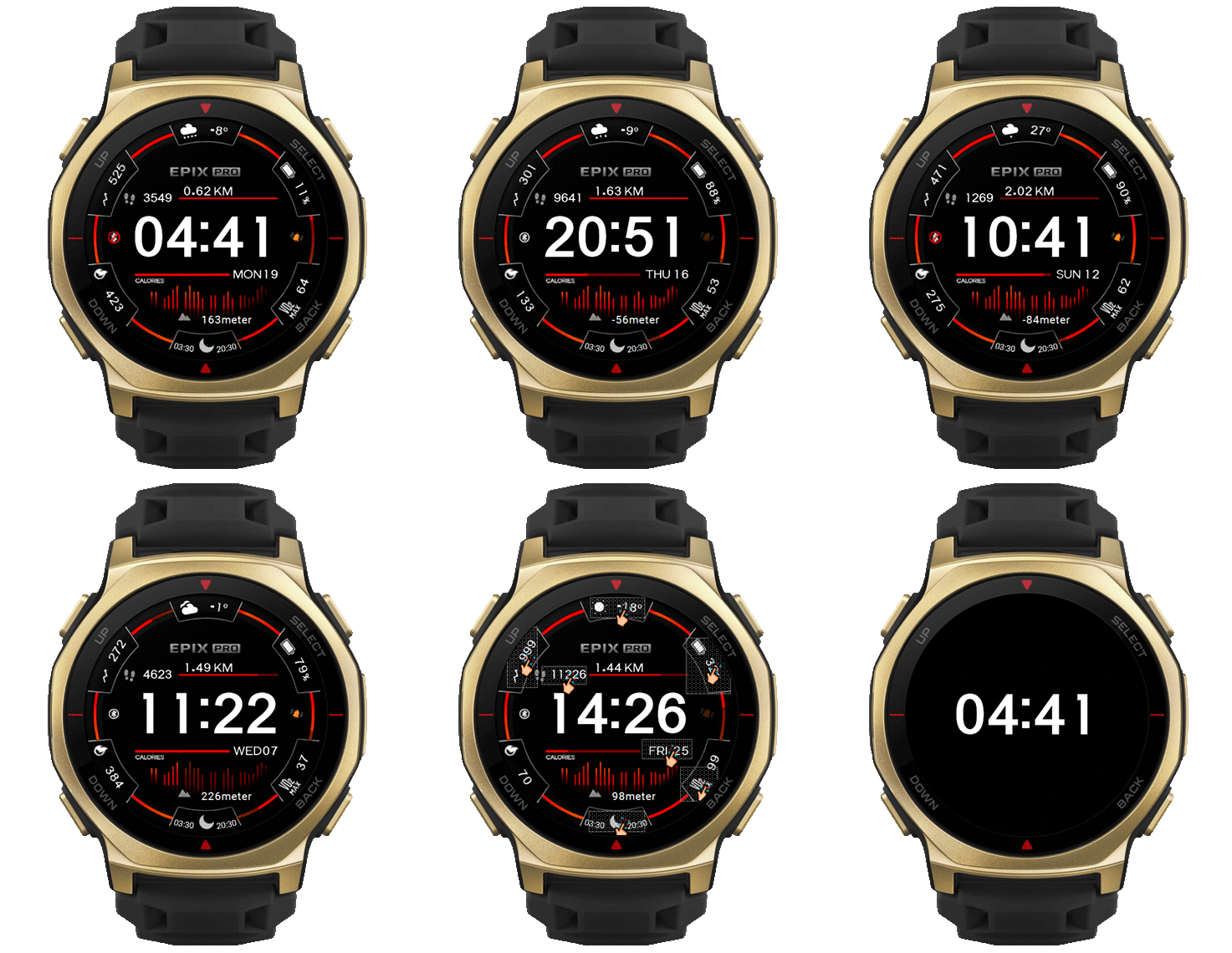
1. Change line progress Fat Burning to PAI week
2. Fixed some calories line progress
3. Fixed some layout
4. Change Sun rise/set to use display text in a circle
If the layout is incorrect on the clock, you'll need to make further modifications yourself, as I cannot test it because I don't have the device you're using.
Preview and download
This took far more time than I care to admit but I've tried to adjust the watchface to my liking but some parameters I just can't wrap my head around. The inverted big grey bar-thing that you made to cover the horisontal bars for progress is hard for me to replicate and I can't figure it out. I tried to change it to fat burning time but it does not seem to work. I want to change it to PAI-progress instead but the bar gets messed up everytime I try to add it. Added it in color to see the problem easier but want it in transparent black like before.
Also added sunrise and sunset but can't get the numbers to wrap around the watch like the other ones you added... Can you perhaps take a look at the upload and see if you understand what i'm trying to do and how to fix it?
Cheers!
1. Change line progress Fat Burning to PAI week
2. Fixed some calories line progress
3. Fixed some layout
4. Change Sun rise/set to use display text in a circle
If the layout is incorrect on the clock, you'll need to make further modifications yourself, as I cannot test it because I don't have the device you're using.
Preview and download
Epix-2-pro-Trex-3-pro-44mm.zip
Thank you! Finally I can wear it and just enjoy it without thinking about improvements.
Users browsing this forum: No registered users and 1 guest
Cookie Consent
This website uses cookie or similar technologies, to enhance your browsing experience and provide personalised recommendations. By continuing to use our website, you agree to our Privacy Policy