• 管理员
  •  
    Support Ukraine
    If you experience any problems with the forum (it is not visible, there is no way to post messages, or some functionality does not work), please let us know. If you have problems with registration or you did not receive confirmation letter, let us know and we will activate your account manually.
    If you get an "The submitted form was invalid. Try submitting again" error, delete cookies, then try again.
     

AOD battery drain - how to optimize

This forum is designed to discuss and develop tools creating watch faces.

版主: asoolvpokkaInternal errorWatchmens

版面规则
All communication in this branch should only be in English.
To discuss tools that are not in this section, use the “Watchfaces tools (discussion)” forum.
回复
fluxkompensator
帖子: 4
注册时间: 07 1月 2025, 06:40
来自: Luxembourg
Has thanked: 2 time
Been thanked: 2 time
联系:

AOD battery drain - how to optimize

帖子 fluxkompensator »

I don't understand how to create energy saving AOD WF in detail. Of course there should be only small areas with information (light), low update frequency (e.g. no seconds) and no data that need to check sensors.
I created those 2 WF and compared the power consumption. With the analogue one I have a power consumption of ~20% per day, with the digital one it's only around 12% on my Amazfit Balance. My usage profile is the same with both WF (almost all sensors on, AOD on, avg. 30-45 GPS/day,....)

https://amazfitwatchfaces.com/balance/view/6522
https://amazfitwatchfaces.com/balance/view/5006

Why is there so a huge difference?
Could anybody please check if this happens on another device as well?
What could be improved to get a low energy AOD?

Thank you for any help 🙏🏼
头像
asoo
帖子: 2203
注册时间: 03 1月 2019, 01:48
来自: ͼͽ Thailand ͼͽ
Has thanked: 420 time
Been thanked: 2125 time

帖子 asoo »

fluxkompensator 写了: 02 3月 2026, 18:20
I don't understand how to create energy saving AOD WF in detail. Of course there should be only small areas with information (light), low update frequency (e.g. no seconds) and no data that need to check sensors.
I created those 2 WF and compared the power consumption. With the analogue one I have a power consumption of ~20% per day, with the digital one it's only around 12% on my Amazfit Balance. My usage profile is the same with both WF (almost all sensors on, AOD on, avg. 30-45 GPS/day,....)

https://amazfitwatchfaces.com/balance/view/6522
https://amazfitwatchfaces.com/balance/view/5006

Why is there so a huge difference?
Could anybody please check if this happens on another device as well?
What could be improved to get a low energy AOD?

Thank you for any help 🙏🏼
Regarding the watch faces you mentioned, the analog watchface that you said consumes more power, in my opinion, might be because it uses "smooth seconds" on the home screen. This function is similar to displaying an animation, which consumes more power than a analog normal watchface. However, for the AOD , from what I've seen, I think both watchfaces maybe consume similar amounts of power. Therefore, I believe the higher power consumption of the analog watchface is likely due to the home screen display.

However, I haven't tested this; it's just a guess.
If you want to test it, try changing the analog watchface to use
"Normal Analog" for both the home screen and AOD and see if it consumes less power.
ͼͽ To request please use the interrelated forum in action ͼͽ
Please do not PM to me for requests ported watchface.
fluxkompensator
帖子: 4
注册时间: 07 1月 2025, 06:40
来自: Luxembourg
Has thanked: 2 time
Been thanked: 2 time
联系:

帖子 fluxkompensator »

Thanks for your reply. I really appreciate!
You're correct, on analog WF the normal screen is with smooth second, but for the AOD (only minute & hour visible) I used "normal analog", not "Pro analog".
Since I see all my desired information (day, date & time) on the AOD, I do NOT use the normal screen often, sometimes even not for days. That is why I'm very confused about the big difference between the two WFs.

But it's an interesting aspect that not the AOD but the normal screen could be the reason. I will give it a try and change the normal screen to "normal analog" as well.

Thank you!
MarioLie
WF maker
帖子: 64
注册时间: 12 5月 2025, 19:37
来自: Berlin
Has thanked: 50 time
Been thanked: 35 time
联系:

帖子 MarioLie »

fluxkompensator 写了: 02 3月 2026, 18:20
I don't understand how to create energy saving AOD WF in detail. Of course there should be only small areas with information (light), low update frequency (e.g. no seconds) and no data that need to check sensors.
I created those 2 WF and compared the power consumption. With the analogue one I have a power consumption of ~20% per day, with the digital one it's only around 12% on my Amazfit Balance. My usage profile is the same with both WF (almost all sensors on, AOD on, avg. 30-45 GPS/day,....)

https://amazfitwatchfaces.com/balance/view/6522
https://amazfitwatchfaces.com/balance/view/5006

Why is there so a huge difference?
Could anybody please check if this happens on another device as well?
What could be improved to get a low energy AOD?

Thank you for any help 🙏🏼
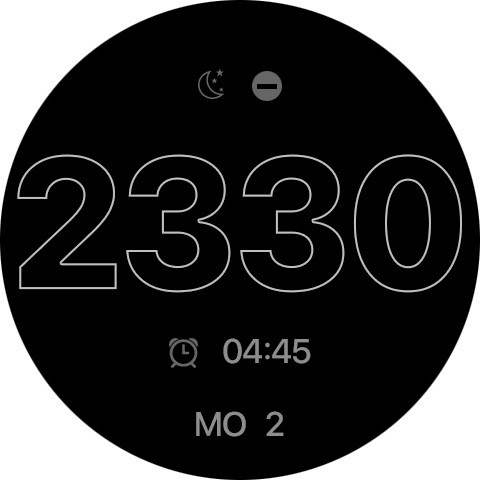
Your problem won't be in the display, but in the background applications running on your watch.

Of course there's a difference in what the always-on display contains compared to the fully active view, and I'll give you a tip - find someone who has Garmin watches and look at the night display of information and I think you'll understand where the problem lies. The white display is only 40% on a black background #000000. White will only show information about sleep, time, alarm settings, and day display, nothing more.
Image AOD
图片
头像
asoo
帖子: 2203
注册时间: 03 1月 2019, 01:48
来自: ͼͽ Thailand ͼͽ
Has thanked: 420 time
Been thanked: 2125 time

帖子 asoo »

fluxkompensator 写了: 02 3月 2026, 20:56
Thanks for your reply. I really appreciate!
You're correct, on analog WF the normal screen is with smooth second, but for the AOD (only minute & hour visible) I used "normal analog", not "Pro analog".
Since I see all my desired information (day, date & time) on the AOD, I do NOT use the normal screen often, sometimes even not for days. That is why I'm very confused about the big difference between the two WFs.

But it's an interesting aspect that not the AOD but the normal screen could be the reason. I will give it a try and change the normal screen to "normal analog" as well.

Thank you!
I'm happy to help.
After you testing finish, Please let we know the results. This will be helpful for others who want to create an AOD similar style to yours, providing them with information to help them make informed decisions about their own AOD creation.

Thank you.
ͼͽ To request please use the interrelated forum in action ͼͽ
Please do not PM to me for requests ported watchface.
fluxkompensator
帖子: 4
注册时间: 07 1月 2025, 06:40
来自: Luxembourg
Has thanked: 2 time
Been thanked: 2 time
联系:

帖子 fluxkompensator »

MarioLie 写了: 02 3月 2026, 21:46

Your problem won't be in the display, but in the background applications running on your watch.

Of course there's a difference in what the always-on display contains compared to the fully active view, and I'll give you a tip - find someone who has Garmin watches and look at the night display of information and I think you'll understand where the problem lies. The white display is only 40% on a black background #000000. White will only show information about sleep, time, alarm settings, and day display, nothing more.
Image AOD
图片
Thank you!
So you mean that the applications, that run on the normal screen (e.g. steps, weather, compass,...), are also somehow active (in background) when the AOD is on?
For the AOD I generally do not use information that need to be updated regularly, but just minute, hour, date and weekday (so even less than your Garmin example), and mostly with a reduced level (e.g. 127 instead if 255).
But if applications of the "normal screen" are also active during AOD, this could be a reason. I will test it.
Thank you.
上次由 fluxkompensator 在 03 3月 2026, 06:38,总共编辑 2 次。
MarioLie
WF maker
帖子: 64
注册时间: 12 5月 2025, 19:37
来自: Berlin
Has thanked: 50 time
Been thanked: 35 time
联系:

帖子 MarioLie »

fluxkompensator 写了: 03 3月 2026, 06:34
MarioLie 写了: 02 3月 2026, 21:46

Your problem won't be in the display, but in the background applications running on your watch.

Of course there's a difference in what the always-on display contains compared to the fully active view, and I'll give you a tip - find someone who has Garmin watches and look at the night display of information and I think you'll understand where the problem lies. The white display is only 40% on a black background #000000. White will only show information about sleep, time, alarm settings, and day display, nothing more.
Image AOD
图片
Thank you!
So you mean that the applications, that run on the normal screen (e.g. steps, weather, compass,...), are also somehow active (in background) when the AOD is on?
For the AOD I generally do not use information that need to be updated regularly, but just minute, hour, date and weekday (so even less than your Garmin example), and mostly with a reduced level (e.g. 127 instead if 255).
But if applications of the "normal screen" are also active during AOD, this could be a reason. I will test it.
Thank you.
You're welcome, and yes, that's the case even when AOD is active, everything continues running in the background. This means step counting, recovery, sleep tracking, etc. Most importantly, the watch constantly verifies if the phone is available and checks for new information. So even though it looks like we have a power-saving mode, the watch is actually running at 80% in the background.
fluxkompensator
帖子: 4
注册时间: 07 1月 2025, 06:40
来自: Luxembourg
Has thanked: 2 time
Been thanked: 2 time
联系:

帖子 fluxkompensator »

MarioLie 写了: 03 3月 2026, 08:31
So in terms of energy it would be better to design normal watch faces with less information panels and AOD faces with little areas an no unnecessary information, right?
I was not aware that applications that are shown in normal screen influence the energy consumption in "AOD mode". I thought that all those services run in background, depending on what is set in settings, independently of what is shown on "normal screen".
MarioLie
WF maker
帖子: 64
注册时间: 12 5月 2025, 19:37
来自: Berlin
Has thanked: 50 time
Been thanked: 35 time
联系:

帖子 MarioLie »

As I showed in the picture above, simple readable information on the alarm clock - alarm time/no alarm, do not disturb, sleep and info about the day and time, nothing more.
fluxkompensator
帖子: 4
注册时间: 07 1月 2025, 06:40
来自: Luxembourg
Has thanked: 2 time
Been thanked: 2 time
联系:

帖子 fluxkompensator »

asoo 写了: 03 3月 2026, 01:51
I'm happy to help.
After you testing finish, Please let we know the results. This will be helpful for others who want to create an AOD similar style to yours, providing them with information to help them make informed decisions about their own AOD creation.

Thank you.
here´s an first update:
I reworked the WF just with "normal" analog hands (no smooth seconds) both for home screen and AOD, additionally I deleted almost all applications from home screen, so that there is just hour, minute, second, day, date, month and battery available.
=> minimalistic version 3.1.3 here: https://amazfitwatchfaces.com/balance/view/6522

Currently the battery drain with my usage profile is around 8.x and 9.x % per day (Sasha´s battery tool), so that´s fantastic for me.

Maybe I will built other test versions with more applications (like steps / HR / ...) on the home screen and test how this will influence the battery drain.

THANK YOU guys for your help!
回复

回到 “Watchfaces tools”

在线用户

正浏览此版面之用户: 没有注册用户 和 2 访客