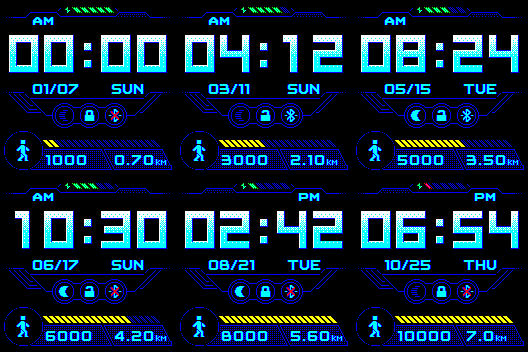
This watchface { Belenkoks -Tomuxpl 10724}
is almost perfect for my needs but I live in the UK and I would like it to show miles instead of km and the date to show dd/mm not mm/dad, I did message ‘tomuxpl’ unsuccessfully so I thought someone here might be able to help. I have looked at editors but at 76 I am afraid of bricking my bip :lol
Sorry unable to post image or url
If you experience any problems with the forum (it is not visible, there is no way to post messages, or some functionality does not work), please let us know.
If you have problems with registration or you did not receive confirmation letter, let us know and we will activate your account manually.
If you get an "The submitted form was invalid. Try submitting again" error, delete cookies, then try again.
If you have problems with registration or you did not receive confirmation letter, let us know and we will activate your account manually.
If you get an "The submitted form was invalid. Try submitting again" error, delete cookies, then try again.
Help wanted to make this watchface perfect
Moderators: Internal error, Watchmens
Hi CGB,
As far as I know, the BIP's firmware only reports distance in kilometers, not miles, regardless of the settings in the app, so I think you're stuck with KM.
I can offer some help with changing the date format to dd (top)/mm (bottom).
Give me a few days to make the change. Meanwhile, send me a PM with an email address so I can send you the modified watchface.
Regards,
Eric
As far as I know, the BIP's firmware only reports distance in kilometers, not miles, regardless of the settings in the app, so I think you're stuck with KM.
I can offer some help with changing the date format to dd (top)/mm (bottom).
Give me a few days to make the change. Meanwhile, send me a PM with an email address so I can send you the modified watchface.
Regards,
Eric
Hi Eric, thank you so much, PM'd as requested
Interestingly on the status page on the watch it shows miles, probably a conversion internally.
Regards
Chris
Interestingly on the status page on the watch it shows miles, probably a conversion internally.
Regards
Chris
Hi Chris,
Yeah - for reasons I don't understand, BIP watchfaces can only display distance in kilometers, while the status page and app can be set to display miles.
A few developers have tried to create watchfaces that display miles but, as far as I know, no one has been successful.
I should have the modified watchface for you tomorrow or Wednesday.
Regards,
Eric
Yeah - for reasons I don't understand, BIP watchfaces can only display distance in kilometers, while the status page and app can be set to display miles.
A few developers have tried to create watchfaces that display miles but, as far as I know, no one has been successful.
I should have the modified watchface for you tomorrow or Wednesday.
Regards,
Eric
Eric, thank you so much, I received the new file and it installed perfectly
Regards
Chris
Regards
Chris
-
cooloutac
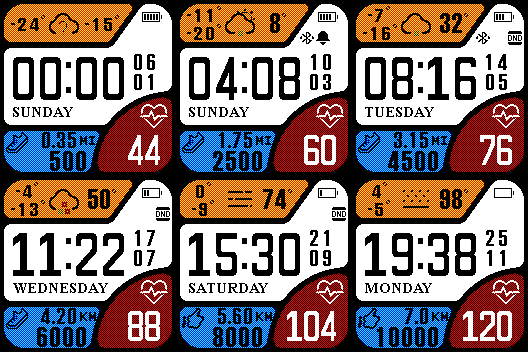
This watchface has correct number of miles. Amazfit customer support pointed it out to me. Can't a savy developer edit this one and see how its done? Its in the online section of app, one of the defaults. I'm gonna have to eventually try myself, this is nuts.
- watchface.png (22.85 KiB) Viewed 4108 times
If someone knows how to get the .BIN file for that watchface, I could take a look at the .JSON file and see if there's a clue as to how they managed to display miles.
Regards,
Eric
Regards,
Eric
-
cooloutac
Just install it on your phone and then it will be in the local section of the mi fit app. If you need me to upload it let me know.ebs wrote: 01 Aug 2019, 13:26If someone knows how to get the .BIN file for that watchface, I could take a look at the .JSON file and see if there's a clue as to how they managed to display miles.
Regards,
Eric
-
cooloutac
I think this is right one. let me know. Are you able to download it from here?
And I should note, the developer of the amazfit bip and cor watchfaces was denying this, but this watch face changes to kilometers or miles based on your app settings. Wondering if this one was made by an amazfit developer, which is probably why its one of their supported ones?
But then again maybe not because the other faces in the online list don't change according to settings. Only this one does. I would use it. but I like to have heart rate on screen too
For some reason I think the custom watch faces have the Mi or Kilometers as a static image I think, instead of dynamically changing. It just might not be done right. Same thing goes for the F and C in weather temperature, although at least the numerical amount for temperature changes according to settings even though the C or F symbol don't on most watch faces. I have a feeling distance level can also be changed automatically according to unit settings, but I guess this is more complicated then it looks.
Could it be that the watch editor publicly used is incomplete or limited? Could Amazfit be an anti American company? Is that why the app is called "Mi" fit hahaha. They have this one watchface just in case anyone brings up any questions or inquiries? They are definitely punning Amazon and fitbit, wonder if same goes for the imperial measurement system. I kid.
But seriously, am I being a traitor to my country not buying fitbit or garmin?
Someone needs to let the developer of the watch editor know he has some more reverse engineering to do, but I'm hoping you figure this out Eric.
And I should note, the developer of the amazfit bip and cor watchfaces was denying this, but this watch face changes to kilometers or miles based on your app settings. Wondering if this one was made by an amazfit developer, which is probably why its one of their supported ones?
But then again maybe not because the other faces in the online list don't change according to settings. Only this one does. I would use it. but I like to have heart rate on screen too
For some reason I think the custom watch faces have the Mi or Kilometers as a static image I think, instead of dynamically changing. It just might not be done right. Same thing goes for the F and C in weather temperature, although at least the numerical amount for temperature changes according to settings even though the C or F symbol don't on most watch faces. I have a feeling distance level can also be changed automatically according to unit settings, but I guess this is more complicated then it looks.
Could it be that the watch editor publicly used is incomplete or limited? Could Amazfit be an anti American company? Is that why the app is called "Mi" fit hahaha. They have this one watchface just in case anyone brings up any questions or inquiries? They are definitely punning Amazon and fitbit, wonder if same goes for the imperial measurement system. I kid.
But seriously, am I being a traitor to my country not buying fitbit or garmin?
Someone needs to let the developer of the watch editor know he has some more reverse engineering to do, but I'm hoping you figure this out Eric.
I downloaded the .BIN file and tried to open it with AmazfitBIPTools Watchface.exe program.
It had a fatal error and was unable to open it.
Can you give me a link to the description page or forum post that leads to the watchface?
It had a fatal error and was unable to open it.
Can you give me a link to the description page or forum post that leads to the watchface?
-
cooloutac
You simply open the mi fit app. go to online watch faces. and you will see it there, i posted a pic of it in this thread.ebs wrote: 01 Aug 2019, 18:39I downloaded the .BIN file and tried to open it with AmazfitBIPTools Watchface.exe program.
It had a fatal error and was unable to open it.
Can you give me a link to the description page or forum post that leads to the watchface?
I would do that, but I don't use the MiFit app and I don't have it installed.You simply open the mi fit app. go to online watch faces. and you will see it there
In any case, it can't be opened with the standard BIP watchface expander, so there's no way I can see the contents of the .BIN file.
Assuming that it is a valid .BIN file and can be successfully loaded on a BIP, that probably means that there's something in it that the Watchface.exe program doesn't understand. Without the .JSON file to look at, there's nothing that can be learned.
-
asoo
- Posts: 2222
- Joined: 03 Jan 2019, 01:48
- Location: ͼͽ Thailand ͼͽ
- Has thanked: 437 times
- Been thanked: 2141 times
- Contact:

you can use MiBandWFTool_1.3.6 (for Mi band 4) viewtopic.php?f=25&t=720 to Extract this bin file but .json after extract it have many unknow command so you can not pack to bin with WFTool for Mibip but if you edit and delete some command line in .json . it will work for WFtool for MiBip .ebs wrote: 02 Aug 2019, 00:26Spoiler
I would do that, but I don't use the MiFit app and I don't have it installed.You simply open the mi fit app. go to online watch faces. and you will see it there
In any case, it can't be opened with the standard BIP watchface expander, so there's no way I can see the contents of the .BIN file.
Assuming that it is a valid .BIN file and can be successfully loaded on a BIP, that probably means that there's something in it that the Watchface.exe program doesn't understand. Without the .JSON file to look at, there's nothing that can be learned.
PS. my bin fix can not change km to ml . I think the problem is probably
due to watchface.exe of bip is still not able to pack and extract all the instructions correctly. so, it must wait for the developer.
Amendment in this problem first.
it may be usable.
Spoiler
Code: Select all
Ex.
  },
  "Activity": {
    "Steps": {},
    "Distance": {
      "Number": {
        "TopLeftX": 114,
        "TopLeftY": 155,
        "BottomRightX": 167,
        "BottomRightY": 165,
        "Alignment": "TopLeft",
        "Spacing": 1,
        "ImageIndex": 13,
        "ImagesCount": 10
      },
      "SuffixImageIndex": 31,
      "DecimalPointImageIndex": 33,
      "SuffixMilesImageIndex": 32   <---------------  Watchface.exe  unknow  this command
All File unpack BIN by MiBandWFTool_1.3.6 (for Mi band 4)
 Extract.bin by watchface.exe miband4.zip
- (32.18 KiB) Downloaded 156 times
My .json fix
- fix jason for create bin for watchface.exe mibip.zip
- (52.51 KiB) Downloaded 182 times
ͼͽ To request please use the interrelated forum in action ͼͽ
Please do not PM to me for requests ported watchface.
Please do not PM to me for requests ported watchface.
-
cooloutac
Well darn I was afraid of that. Figures. I still wonder if amazfit engineers did this on purpose, to spite Americans. And they made this one watchface to pretend they didn't. I hope developer of the watchface editor can figure out the problem. Maybe someone can contact amazfit.
They are ignoring me now. They probably use this watchface to silence people, and then blame you guys as if it is your fault. I have linked this thread to them.
They are ignoring me now. They probably use this watchface to silence people, and then blame you guys as if it is your fault. I have linked this thread to them.
-
cooloutac
load it up man and see. Is it the only watchface in existence that change to kilometers or miles, depending on unit settings in the app,ebs wrote: 02 Aug 2019, 00:26I would do that, but I don't use the MiFit app and I don't have it installed.You simply open the mi fit app. go to online watch faces. and you will see it there
In any case, it can't be opened with the standard BIP watchface expander, so there's no way I can see the contents of the .BIN file.
Assuming that it is a valid .BIN file and can be successfully loaded on a BIP, that probably means that there's something in it that the Watchface.exe program doesn't understand. Without the .JSON file to look at, there's nothing that can be learned.
and shows correct numerical value of miles? Again I use mi fit.
-
asoo
- Posts: 2222
- Joined: 03 Jan 2019, 01:48
- Location: ͼͽ Thailand ͼͽ
- Has thanked: 437 times
- Been thanked: 2141 times
- Contact:
CGB wrote: 07 Jul 2019, 08:45This watchface { Belenkoks -Tomuxpl 10724}
is almost perfect for my needs but I live in the UK and I would like it to show miles instead of km and the date to show dd/mm not mm/dad, I did message ‘tomuxpl’ unsuccessfully so I thought someone here might be able to help. I have looked at editors but at 76 I am afraid of bricking my bip :lol
Sorry unable to post image or url
 - Date to show DD MM
- Can change KM to MI on Mi Fit and show in watchface
- If you want to Extract or Create this .BIN or jason Please use Amazfit watchfaces Tool version 0.1.0.10 viewtopic.php?f=29&t=782 Because have some command line The old watchface.exe cannot Extract or Create
Ex.
Code: Select all
   },
    "Distance": {
      "Number": {
        "TopLeftX": 25,
        "TopLeftY": 131,
        "BottomRightX": 95,
        "BottomRightY": 150,
        "Alignment": "TopRight",
        "Spacing": 1,
        "ImageIndex": 31,
        "ImagesCount": 10
      },
      "SuffixImageIndex": 41,
      "DecimalPointImageIndex": 42,
      "SuffixMilesImageIndex": 99    <----- The old watchface.exe  don't know this command line
    }
ͼͽ To request please use the interrelated forum in action ͼͽ
Please do not PM to me for requests ported watchface.
Please do not PM to me for requests ported watchface.
asoo,
That's great - I can finally see distance in miles on my watchfaces. Thank you!
Just to clarify - I don't develop watchfaces, I just modify the ones I like to be MM/DD and true 12-hour time.
Now I can change them to miles as well.
I wonder if there's a chance that the Watchface Editor by ilgruppotester will be updated to handle miles.
It reads the .json file without a problem, but only displays in KM. It still works fine for everything else.
Regards,
Eric
That's great - I can finally see distance in miles on my watchfaces. Thank you!
Just to clarify - I don't develop watchfaces, I just modify the ones I like to be MM/DD and true 12-hour time.
Now I can change them to miles as well.
I wonder if there's a chance that the Watchface Editor by ilgruppotester will be updated to handle miles.
It reads the .json file without a problem, but only displays in KM. It still works fine for everything else.
Regards,
Eric
-
asoo
- Posts: 2222
- Joined: 03 Jan 2019, 01:48
- Location: ͼͽ Thailand ͼͽ
- Has thanked: 437 times
- Been thanked: 2141 times
- Contact:
I hope too that the ilgruppotester will be upgraded to use with Amazfit watchfaces Toolebs wrote: 06 Aug 2019, 22:07I wonder if there's a chance that the Watchface Editor by ilgruppotester will be updated to handle miles.Spoiler
asoo,
That's great - I can finally see distance in miles on my watchfaces. Thank you!
Just to clarify - I don't develop watchfaces, I just modify the ones I like to be MM/DD and true 12-hour time.
Now I can change them to miles as well.
It reads the .json file without a problem, but only displays in KM. It still works fine for everything else.
Regards,
Eric
ilgruppotester can read the new json, but not 100%. Some sets of command line, if available in the new Jason, ilgruppotester Will not open and The program will close itself immediately.
Ex. code ( if have this in .json the ilgruppotester program will not open this json file )
Code: Select all
 },
    "AmPm": {
      "X": 0,
      "Y": 0,
      "ImageIndexAMCN": 0,
      "ImageIndexPMCN": 0,
      "ImageIndexAMEN": 0,
      "ImageIndexPMEN": 0
    }
ͼͽ To request please use the interrelated forum in action ͼͽ
Please do not PM to me for requests ported watchface.
Please do not PM to me for requests ported watchface.
Who is online
Users browsing this forum: Google Adsense [Bot] and 1 guest