Hello
I installed this program on my Windows PC, but are there any tutorials on how to modify an existing watch face? How to add a hidden shortcut to a watch face? To access, for example, the daily step count. Thank you all for your help
Mike
-
- Amministratore
-
-
Support Ukraine
If you experience any problems with the forum (it is not visible, there is no way to post messages, or some functionality does not work), please let us know. If you have problems with registration or you did not receive confirmation letter, let us know and we will activate your account manually.
If you get an "The submitted form was invalid. Try submitting again" error, delete cookies, then try again.
tuto Watch-face-editor-for-Amazfit-watch-on-ZeppOS
Moderatori: asoo, lvpokka, Internal error, Watchmens
Regole del forum
All communication in this branch should only be in English.
All communication in this branch should only be in English.
-
mike413muo3
- Messaggi: 8
- Iscritto il: 20 apr 2025, 15:02
- Località: Switzerland
- Contatta:
-
GIK-Team

- root
- Messaggi: 1026
- Iscritto il: 22 mar 2018, 10:00
- Località: Ukraine
- Has thanked: 1150 times
- Been thanked: 277 times
- Contatta:
Hi Mike,mike413muo3 ha scritto: 04 giu 2025, 18:01Hello
I installed this program on my Windows PC, but are there any tutorials on how to modify an existing watch face? How to add a hidden shortcut to a watch face? To access, for example, the daily step count. Thank you all for your help
Mike
We’re just not entirely sure which specific editor you’re referring to — there are a few tools out there for editing ZeppOS watch faces, and without more details it’s hard to give you a clear answer.
If you could share the exact name of the program or a link to where you downloaded it from, we’d be happy to try and help (or at least point you in the right direction).
"sometimes it's scary but it's still just you and me” — Leaving Laurel
-
mike413muo3
- Messaggi: 8
- Iscritto il: 20 apr 2025, 15:02
- Località: Switzerland
- Contatta:
Hello
The program is called AmazFit_Watchface_Editor_2_v7.3
This is the only one I found on the site to open *.zip dial configurations on a PC and after opening the dial I have trouble understanding how to make changes if, for example, you want to change or add wallpapers to the dial. In any case, thank you for your help
Mike
The program is called AmazFit_Watchface_Editor_2_v7.3
This is the only one I found on the site to open *.zip dial configurations on a PC and after opening the dial I have trouble understanding how to make changes if, for example, you want to change or add wallpapers to the dial. In any case, thank you for your help
Mike
-
asoo
- Messaggi: 2178
- Iscritto il: 03 gen 2019, 01:48
- Località: ͼͽ Thailand ͼͽ
- Has thanked: 418 times
- Been thanked: 2101 times

I'm not sure if I understand correctly, do you want to create or edit watchface for ZeppOS based devices?mike413muo3 ha scritto: 05 giu 2025, 05:00Hello
The program is called AmazFit_Watchface_Editor_2_v7.3
This is the only one I found on the site to open *.zip dial configurations on a PC and after opening the dial I have trouble understanding how to make changes if, for example, you want to change or add wallpapers to the dial. In any case, thank you for your help
Mike
If yes, you need to use "Watch face editor for Amazfit watch on ZeppOS"
viewtopic.php?p=11643#p11643
The AmazFit_Watchface_Editor_2_v7.3 you mentioned is not for ZeppOS based devices, it is used to create watchface for GTR2 and other Gen2 that do not use zeppOS.
It is recommended that you specify in your question which Device's watch face you want to edit.
ͼͽ To request please use the interrelated forum in action ͼͽ
Please do not PM to me for requests ported watchface.
Please do not PM to me for requests ported watchface.
-
mike413muo3
- Messaggi: 8
- Iscritto il: 20 apr 2025, 15:02
- Località: Switzerland
- Contatta:
I would like to be able to edit an existing dial that is on amazfit and adapt it to my desires but do this on a Windows PC
The screen that I would like to be able to adapt is called Bartoe, it has lots of interesting functions but I would like to change the wallpapers and then convert it to be able to install it on my t rex 3
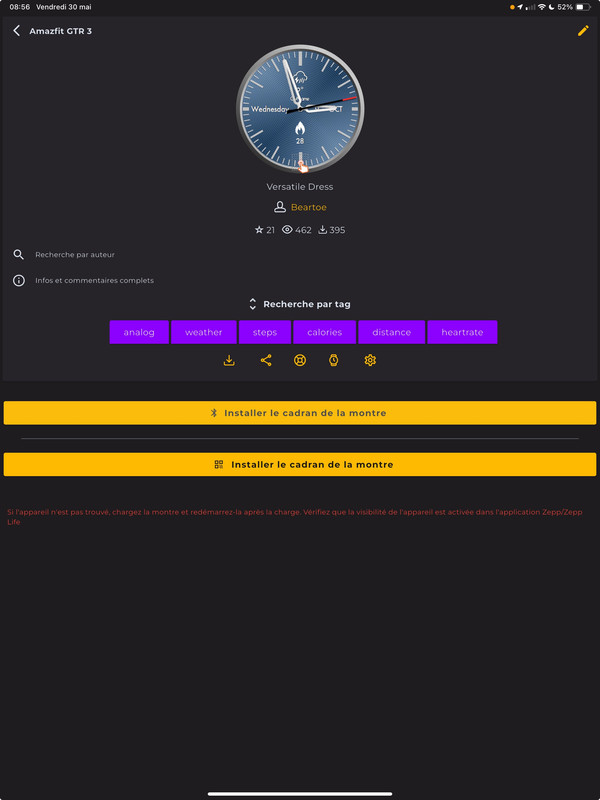
The screen that I would like to be able to adapt is called Bartoe, it has lots of interesting functions but I would like to change the wallpapers and then convert it to be able to install it on my t rex 3
Spoiler
-
asoo
- Messaggi: 2178
- Iscritto il: 03 gen 2019, 01:48
- Località: ͼͽ Thailand ͼͽ
- Has thanked: 418 times
- Been thanked: 2101 times
mike413muo3 ha scritto: 05 giu 2025, 12:34Spoiler
I would like to be able to edit an existing dial that is on amazfit and adapt it to my desires but do this on a Windows PC
The screen that I would like to be able to adapt is called Bartoe, it has lots of interesting functions but I would like to change the wallpapers and then convert it to be able to install it on my t rex 3
Spoiler
First of all, if you are going to edit someone's watch face, I recommend asking for permission from the owner of the work first.
From the watch face you mentioned, you can unpack it with the "Watch face editor for Amazfit watch on ZeppOS" program. ( viewtopic.php?p=11643#p11643 )
🖼️Exemple
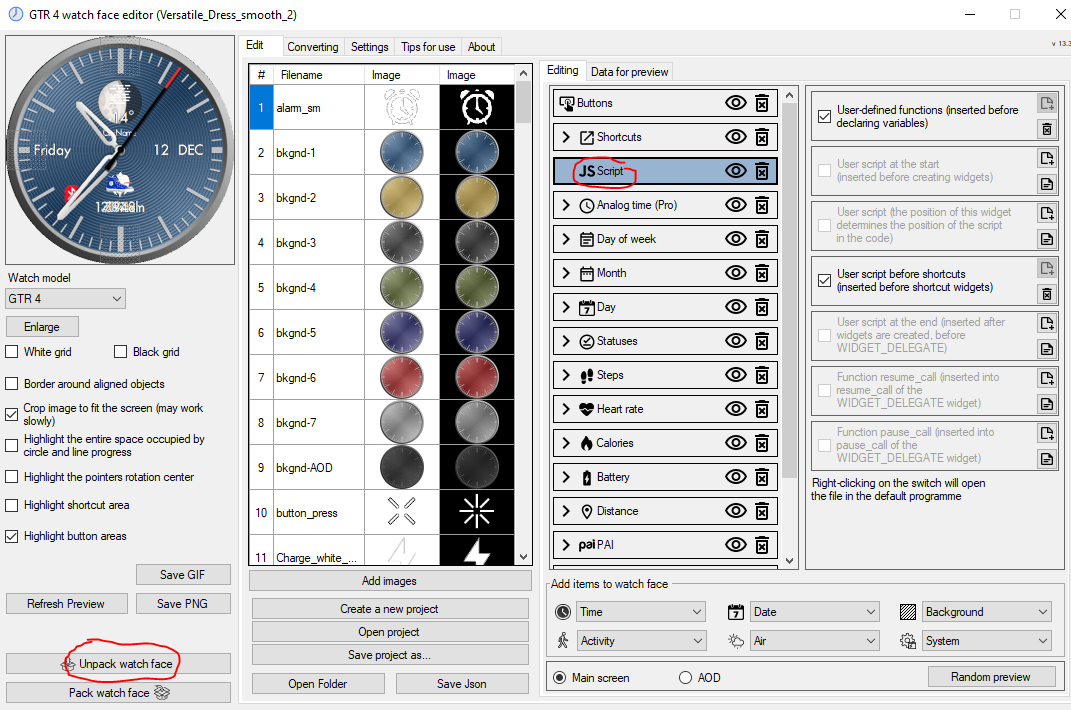
As for the javascript part, you will have to study it yourself. I cannot explain it because it is not ready-made. It is a programming that depends on each person.
🖼️ Convert
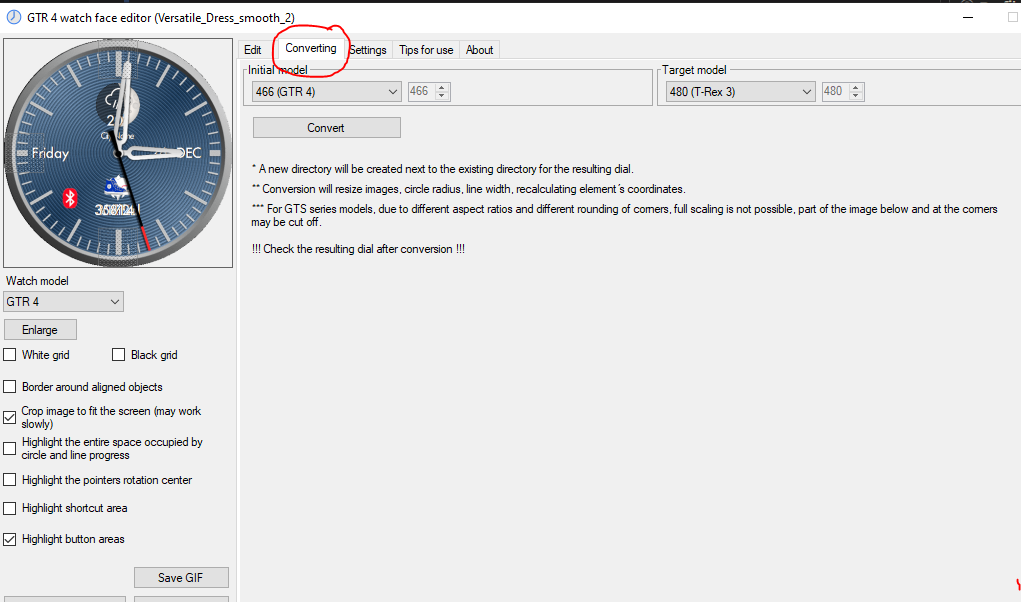
ͼͽ To request please use the interrelated forum in action ͼͽ
Please do not PM to me for requests ported watchface.
Please do not PM to me for requests ported watchface.
-
mike413muo3
- Messaggi: 8
- Iscritto il: 20 apr 2025, 15:02
- Località: Switzerland
- Contatta:
Thanks for all this info, but it seems too complex for my level of experience, so perhaps another option is to use simple software to create my own watch face that would allow me to change the background color of the watch face by clicking, for example, the number 9 on my watch face, and have another button (hidden on the screen) to access a background displaying the following information:
- Number of steps taken
- Heart rate
- Watch battery
Thanks again for your time and hopefully your future answers.
Mike
- Number of steps taken
- Heart rate
- Watch battery
Thanks again for your time and hopefully your future answers.
Mike
-
taw_bip
- WF maker
- Messaggi: 131
- Iscritto il: 12 apr 2018, 16:29
- Has thanked: 130 times
- Been thanked: 19 times
- Contatta:
Hey Mike, totally understand. I used to make watchfaces but it's gotten more complicated. I think my ambitions outstrip my ability so I haven't made one for quite some time.
There is someone who does tutorials (in Russian I believe) for using the SashaCX75 tool but with YouTube auto-translate, you can get subtitles in English.
https://www.youtube.com/playlist?list=P ... x3fLTqRoJk
Another option is to use the Zepp online watchface tool. You need to log in to use it so you can save your work in their cloud:
https://watchface.zepp.com/create
Lastly, there is a Facemaker tool made by a Portuguese developer that's got a lot of advanced tools.
https://facemaker.pt/
He makes a lot of tutorials at his YouTube channel: https://www.youtube.com/@FacemakerNunoBessa
He's also very active with support on the Discord: https://discord.gg/Xkq3QtT
It's not free but I think it's very well developed in the Amazfit area. I think one of its biggest advantages is its GUI interface and drawing tools. A few of his tutorials demonstrate how he overlays a screenshot of a watchface he wants then uses the Facemaker drawing tools to recreate it.
There is someone who does tutorials (in Russian I believe) for using the SashaCX75 tool but with YouTube auto-translate, you can get subtitles in English.
https://www.youtube.com/playlist?list=P ... x3fLTqRoJk
Another option is to use the Zepp online watchface tool. You need to log in to use it so you can save your work in their cloud:
https://watchface.zepp.com/create
Lastly, there is a Facemaker tool made by a Portuguese developer that's got a lot of advanced tools.
https://facemaker.pt/
He makes a lot of tutorials at his YouTube channel: https://www.youtube.com/@FacemakerNunoBessa
He's also very active with support on the Discord: https://discord.gg/Xkq3QtT
It's not free but I think it's very well developed in the Amazfit area. I think one of its biggest advantages is its GUI interface and drawing tools. A few of his tutorials demonstrate how he overlays a screenshot of a watchface he wants then uses the Facemaker drawing tools to recreate it.
Chi c’è in linea
Visitano il forum: Nessuno e 1 ospite