• Administrator
  •  
    Support Ukraine
    If you experience any problems with the forum (it is not visible, there is no way to post messages, or some functionality does not work), please let us know. If you have problems with registration or you did not receive confirmation letter, let us know and we will activate your account manually.
    If you get an "The submitted form was invalid. Try submitting again" error, delete cookies, then try again.
     

AmazFaces for Android [Support]

AmazFaces application for Android & iOS.

Moderators: asoo, Internal error, Watchmens

User avatar
GIK-Team
root
Posts: 1014
Joined: 22 Mar 2018, 10:00
Location: Ukraine
Has thanked: 1105 times
Been thanked: 266 times
Contact:

AmazFaces for Android [Support]

Post by GIK-Team »

In this topic, you may report a problem with our AmazFaces app for Android.
To do this, please, provide the following information:

App version (Stable or Beta)
Watch model
Phone model
OS version

Description of your problem

Filling example:

Code: Select all

App version: 2.0.111 Stable
Watch model: GTR
Phone model: Samsung S10
OS version: Android 10

Not able to sync watch faces to zepp
Messages that does not meet these requirements will not be considered.
All information is transmitted to the developer, even if you do not receive a response in this thread.
"sometimes it's scary but it's still just you and me” — Leaving Laurel
User avatar
TRK88PL
Posts: 116
Joined: 17 Jan 2023, 08:23
Location: Poland
Has thanked: 67 times
Been thanked: 40 times
Contact:

Post by TRK88PL »

Stas wrote: 10 May 2024, 16:37
Describe in more detail which watch model and at what point the problem occurs
TRK88PL wrote: 10 May 2024, 15:33
V4.5.360
I explained everything before on my older comment... But okay - in app, in lightweight ui (default one in app settings) the preview isn't displayed correctly compared to amazfitwatchfaces.com site, previews with watches frame image aren't cropped correctly (full ui [in app settings] doesn't have this problem), also...

When I try to import zip file to my watch preview image is random, preview is not taken from watchface, let's try yourself - download zip file - go to last page - touch on + button and compare how preview it's looking and should be.

My watch it's Amazfit Gtr 3.
Phone Xiaomi Mi Note 10 lite.
boliang.peng
Posts: 3
Joined: 17 Oct 2022, 06:47
Location: 湖南
Contact:

Post by boliang.peng »

App version: 4.6.362
Watch model: Balance
Phone model: RedMi K50
OS version: Xiaomi HyperOS 1.0.6.0

Problem:
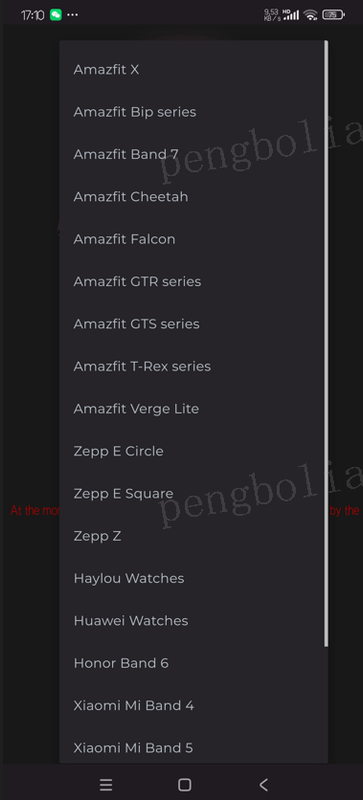
The device list does not include Amazfit Balance for Android version, It's OK in IOS version. please fix it, thank you!
Spoiler
Image
User avatar
GIK-Team
root
Posts: 1014
Joined: 22 Mar 2018, 10:00
Location: Ukraine
Has thanked: 1105 times
Been thanked: 266 times
Contact:

Post by GIK-Team »

boliang.peng wrote: 17 May 2024, 09:16
Problem:
The device list does not include Amazfit Balance for Android version, It's OK in IOS version. please fix it, thank you!
Supported models:
Amazfit Bip
Amazfit Bip 3
Amazfit Bip 5
Amazfit Bip S
Amazfit Bip U
Amazfit Cheetah
Amazfit Cheetah Pro
Amazfit Falcon
Amazfit GTR (47mm / 42mm)
Amazfit GTR 2
Amazfit GTR 3
Amazfit GTR 3 Pro
Amazfit GTR 4
Amazfit GTR Mini
Amazfit GTS
Amazfit GTS 2
Amazfit GTS 2 mini
Amazfit GTS 3
Amazfit GTS 4
Amazfit GTS 4 mini
Amazfit T-Rex
Amazfit T-Rex 2
Amazfit T-Rex Pro
Amazfit Verge Lite
Xiaomi Mi Band 4
Xiaomi Mi Band 5 (Amazfit Band 5)
Xiaomi Smart Band 7
"sometimes it's scary but it's still just you and me” — Leaving Laurel
boliang.peng
Posts: 3
Joined: 17 Oct 2022, 06:47
Location: 湖南
Contact:

Post by boliang.peng »

When will AW app for Android version support Amazfit Balance, do you have any update plan? In IOS version, I can select "Amazfit Balance" in device list, and I can sync watch faces to my device, in website, I can select "Amazfit Balance" to download watch faces, but I can't import it to my watch, because app can't detect my device, in app, I can't select "Balance" and also can not see any watch faces of "Balance "in app.
GIK-Team wrote: 17 May 2024, 10:25
boliang.peng wrote: 17 May 2024, 09:16
Problem:
The device list does not include Amazfit Balance for Android version, It's OK in IOS version. please fix it, thank you!
Supported models:
Amazfit Bip
Amazfit Bip 3
Amazfit Bip 5
Amazfit Bip S
Amazfit Bip U
Amazfit Cheetah
Amazfit Cheetah Pro
Amazfit Falcon
Amazfit GTR (47mm / 42mm)
Amazfit GTR 2
Amazfit GTR 3
Amazfit GTR 3 Pro
Amazfit GTR 4
Amazfit GTR Mini
Amazfit GTS
Amazfit GTS 2
Amazfit GTS 2 mini
Amazfit GTS 3
Amazfit GTS 4
Amazfit GTS 4 mini
Amazfit T-Rex
Amazfit T-Rex 2
Amazfit T-Rex Pro
Amazfit Verge Lite
Xiaomi Mi Band 4
Xiaomi Mi Band 5 (Amazfit Band 5)
Xiaomi Smart Band 7
User avatar
GIK-Team
root
Posts: 1014
Joined: 22 Mar 2018, 10:00
Location: Ukraine
Has thanked: 1105 times
Been thanked: 266 times
Contact:

Post by GIK-Team »

boliang.peng wrote: 20 May 2024, 01:16
When will AW app for Android version support Amazfit Balance, do you have any update plan? In IOS version, I can select "Amazfit Balance" in device list, and I can sync watch faces to my device, in website, I can select "Amazfit Balance" to download watch faces, but I can't import it to my watch, because app can't detect my device, in app, I can't select "Balance" and also can not see any watch faces of "Balance "in app.
We understand your frustration with the current limitations regarding the Amazfit Balance on the Android version of our app. There are specific technical challenges that are beyond our control, mainly due to certain restrictions and changes implemented by the watch manufacturer.

We are actively working to overcome these difficulties and make the Amazfit Balance compatible with our app on Android. Unfortunately, these technical hurdles have made the process more complicated and time-consuming than we anticipated.
"sometimes it's scary but it's still just you and me” — Leaving Laurel
boliang.peng
Posts: 3
Joined: 17 Oct 2022, 06:47
Location: 湖南
Contact:

Post by boliang.peng »

OK, I got it, I will wait for it, hope it can coming soon, thank you and your team
GIK-Team wrote: 20 May 2024, 09:07
boliang.peng wrote: 20 May 2024, 01:16
When will AW app for Android version support Amazfit Balance, do you have any update plan? In IOS version, I can select "Amazfit Balance" in device list, and I can sync watch faces to my device, in website, I can select "Amazfit Balance" to download watch faces, but I can't import it to my watch, because app can't detect my device, in app, I can't select "Balance" and also can not see any watch faces of "Balance "in app.
We understand your frustration with the current limitations regarding the Amazfit Balance on the Android version of our app. There are specific technical challenges that are beyond our control, mainly due to certain restrictions and changes implemented by the watch manufacturer.

We are actively working to overcome these difficulties and make the Amazfit Balance compatible with our app on Android. Unfortunately, these technical hurdles have made the process more complicated and time-consuming than we anticipated.
Przemko
Posts: 1
Joined: 15 Apr 2022, 19:12
Location: Jebie
Contact:

Post by Przemko »

App version: 1.4.0.18 Stable
Watch model: T-Rex
Phone model: Lenovo P2
OS version: Android 7

When i click DOWNLOAD in AmazFaces app i see text: Nothing found on your request.
ZEpp in run in background, internet is connected, smartwatch connected.

Any idea how to install watchfaces from app?
User avatar
Stas
Posts: 184
Joined: 22 Jan 2019, 21:18
Location: Ukraine
Has thanked: 4 times
Been thanked: 34 times
Contact:

Post by Stas »

Thanks for the message, do you have a web or new application interface?
Przemko wrote: 23 May 2024, 07:44
App version: 1.4.0.18 Stable
Watch model: T-Rex
Phone model: Lenovo P2
OS version: Android 7

When i click DOWNLOAD in AmazFaces app i see text: Nothing found on your request.
ZEpp in run in background, internet is connected, smartwatch connected.

Any idea how to install watchfaces from app?
Cebefe
WF maker
Posts: 4
Joined: 04 Jan 2024, 18:59
Location: Madrid
Has thanked: 1 time
Contact:

Post by Cebefe »

App version: 4.6.363 Stable
Watch model: T-REX 2
Phone model: Moto G73 5G
OS version: Android 14

Watchfaces cannot be installed from a USB drive, but the installation works by downloading from the app, both in the lightweight UI and in the full UI.
User avatar
Stas
Posts: 184
Joined: 22 Jan 2019, 21:18
Location: Ukraine
Has thanked: 4 times
Been thanked: 34 times
Contact:

Post by Stas »

What do you mean by USB installation?
Cebefe wrote: 31 May 2024, 19:40
App version: 4.6.363 Stable
Watch model: T-REX 2
Phone model: Moto G73 5G
OS version: Android 14

Watchfaces cannot be installed from a USB drive, but the installation works by downloading from the app, both in the lightweight UI and in the full UI.
Cebefe
WF maker
Posts: 4
Joined: 04 Jan 2024, 18:59
Location: Madrid
Has thanked: 1 time
Contact:

Post by Cebefe »

I make my own watchfaces and I check them before uploading them to the web, so when I pack one (thanks to SashaCX75's magnificent editor), I copy the created zip file to a USB drive, which I later place on the phone and with the App I select the zip to install by looking for it on the USB drive. Until a couple of days ago, there was no problem, but now apparently there is no synchronization with Zepp, but it does allow you to install files downloaded from the web without any problem.
User avatar
Stas
Posts: 184
Joined: 22 Jan 2019, 21:18
Location: Ukraine
Has thanked: 4 times
Been thanked: 34 times
Contact:

Post by Stas »

Thanks for the message, there will be a fix in the next update
Cebefe wrote: 01 Jun 2024, 10:25
I make my own watchfaces and I check them before uploading them to the web, so when I pack one (thanks to SashaCX75's magnificent editor), I copy the created zip file to a USB drive, which I later place on the phone and with the App I select the zip to install by looking for it on the USB drive. Until a couple of days ago, there was no problem, but now apparently there is no synchronization with Zepp, but it does allow you to install files downloaded from the web without any problem.
Rudolph13
Posts: 1
Joined: 31 May 2024, 22:37
Location: Portugal
Contact:

Post by Rudolph13 »

App version: 4.6.368
Watch model: Amazfit Balance
Phone model: Samsung Galaxy S10
OS version: Android 12

Not able to sync watch to amazfaces app, app does not detect the watch, i have an ultra and it runs fine.
User avatar
Stas
Posts: 184
Joined: 22 Jan 2019, 21:18
Location: Ukraine
Has thanked: 4 times
Been thanked: 34 times
Contact:

Post by Stas »

Amazfit Balance works through a Qr-code, on the page there is an instruction on how to turn on the developer mode

Rudolph13 wrote: 19 Jun 2024, 10:54
App version: 4.6.368
Watch model: Amazfit Balance
Phone model: Samsung Galaxy S10
OS version: Android 12

Not able to sync watch to amazfaces app, app does not detect the watch, i have an ultra and it runs fine.
MariaWB
Posts: 1
Joined: 29 Jun 2024, 02:40
Location: Denmark
Contact:

Post by MariaWB »

App version: 4.6
Watch model: Xiaomi Smart Band 7
Phone model: Sony Xperia 5 III
OS version: Android 13

Not able to sync watchface

https://amazfitwatchfaces.com/mi-band-7/view/384
User avatar
dvdsm
Posts: 1
Joined: 07 Sep 2024, 23:42
Location: Spain
Contact:

Post by dvdsm »

Code: Select all

App version: 4.6 St
Watch model: T-Rex PRO
Phone model: Pixel 6a 
OS version: GrapheneOS 2024090400 (equivalent Android 14)
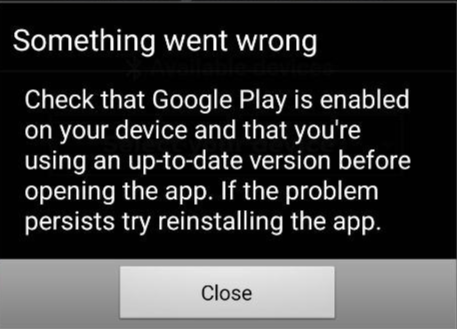
Is there a way to have AmazFaces w/out the requirement to have GApps (GSF) installed? Shortly after show up the GUI remarks the failure of GApps not installed and closes the app.

It's a problem for those of us who don't have (or chosen haven't) GooglePlay or with Huawei devices.

Image

A solution could be same as Telegram app; a version for GPlay and dev-pure version in an alternate hosting, in Github or self-hosted in your server.
User avatar
GIK-Team
root
Posts: 1014
Joined: 22 Mar 2018, 10:00
Location: Ukraine
Has thanked: 1105 times
Been thanked: 266 times
Contact:

Post by GIK-Team »

dvdsm wrote: 08 Sep 2024, 18:27
A solution could be same as Telegram app; a version for GPlay and dev-pure version in an alternate hosting, in Github or self-hosted in your server.
The issue is that without Google Play and GApps, we lose the main method of monetizing the app. However, we're exploring alternative monetization strategies that don't rely on Google services, but this will take some time to implement. Thank you for your understanding and patience!
"sometimes it's scary but it's still just you and me” — Leaving Laurel
ilmas
Posts: 3
Joined: 12 Feb 2020, 13:03
Location: Arcadia
Contact:

Post by ilmas »

The app is not working here for a long time on my mobile Redmi Note 12. It says "this app isn't compatible with your device" even though it's been working for years. Do you know any solution? Thank you very much!
Start309
Posts: 2
Joined: 25 Jun 2024, 12:34
Location: Moroko
Contact:

Post by Start309 »

What's your watch model? It'll help me find a solution.

ilmas wrote: 26 Oct 2024, 07:21
The app is not working here for a long time on my mobile Redmi Note 12. It says "this app isn't compatible with your device" even though it's been working for years. Do you know any solution? Thank you very much!
ilmas
Posts: 3
Joined: 12 Feb 2020, 13:03
Location: Arcadia
Contact:

Post by ilmas »

Start309 wrote: 26 Oct 2024, 09:13
What's your watch model? It'll help me find a solution.

ilmas wrote: 26 Oct 2024, 07:21
The app is not working here for a long time on my mobile Redmi Note 12. It says "this app isn't compatible with your device" even though it's been working for years. Do you know any solution? Thank you very much!
I installed an "apkm" version from the internet and it works fine now. Thank you!!!
Start309
Posts: 2
Joined: 25 Jun 2024, 12:34
Location: Moroko
Contact:

Post by Start309 »

ilmas wrote: 26 Oct 2024, 10:48
I installed an "apkm" version from the internet and it works fine now. Thank you!!!
Where did you get the apk? Share download link
ilmas
Posts: 3
Joined: 12 Feb 2020, 13:03
Location: Arcadia
Contact:

Post by ilmas »

Start309 wrote: 26 Oct 2024, 12:25
ilmas wrote: 26 Oct 2024, 10:48
I installed an "apkm" version from the internet and it works fine now. Thank you!!!
Where did you get the apk? Share download link
By searching on google, it's easy!
abuaqif
Posts: 2
Joined: 22 Sep 2020, 08:52
Location: Melaka
Has thanked: 1 time
Contact:

Post by abuaqif »

App version: Unable to install any of apps version
Watch model: T-Rex
Phone model: Nubia Redmagic 7
OS version: Android 13

Not able to install AmazFaces apps at all, error not compatible.
User avatar
Stas
Posts: 184
Joined: 22 Jan 2019, 21:18
Location: Ukraine
Has thanked: 4 times
Been thanked: 34 times
Contact:

Post by Stas »

We will soon upload the APK version on our website for your convenience.
abuaqif wrote: 25 Dec 2024, 15:27
App version: Unable to install any of apps version
Watch model: T-Rex
Phone model: Nubia Redmagic 7
OS version: Android 13

Not able to install AmazFaces apps at all, error not compatible.
User avatar
ZduneX25
WF maker
Posts: 31
Joined: 12 Oct 2022, 16:22
Location: Poland
Has thanked: 6 times
Been thanked: 6 times
Contact:

Post by ZduneX25 »

Google Play says AmazFaces app is not compatible with my Redmi 8, Android 10, works fine on Redmi K70 Pro, Android 15.
Post Reply

Return to “AmazFaces app”

Who is online

Users browsing this forum: No registered users and 1 guest