-
- Administrator
-
-
Support Ukraine
If you experience any problems with the forum (it is not visible, there is no way to post messages, or some functionality does not work), please let us know. If you have problems with registration or you did not receive confirmation letter, let us know and we will activate your account manually.
If you get an "The submitted form was invalid. Try submitting again" error, delete cookies, then try again.
Problem installing Watch Face on Amazfit Balance
Forum rules
When adding a new topic, use the template: Topic title [device name]
For example: How to create watch face [Falcon]
All communication in this branch should only be in English.
When adding a new topic, use the template: Topic title [device name]
For example: How to create watch face [Falcon]
All communication in this branch should only be in English.
-
schwaitz
- Posts: 4
- Joined: 22 Feb 2021, 21:14
- Location: São Paulo, Brazil
- Been thanked: 1 time
- Contact:
Problem installing Watch Face on Amazfit Balance
I have an Amazfit Balance and I'm having trouble downloading watchfaces. When I click on the "show QR on watch" option, it appears that the file has been downloaded, but when I open the Zepp application, click on developer options, then scan and open the gallery, there is no file there, and all the Permissions have been given on Android to both the Amazfaces app and the Zepp app. Could you make a more detailed tutorial on how to install to find out the problem??
-
GIK-Team

- root
- Posts: 1026
- Joined: 22 Mar 2018, 10:00
- Location: Ukraine
- Has thanked: 1150 times
- Been thanked: 277 times
- Contact:
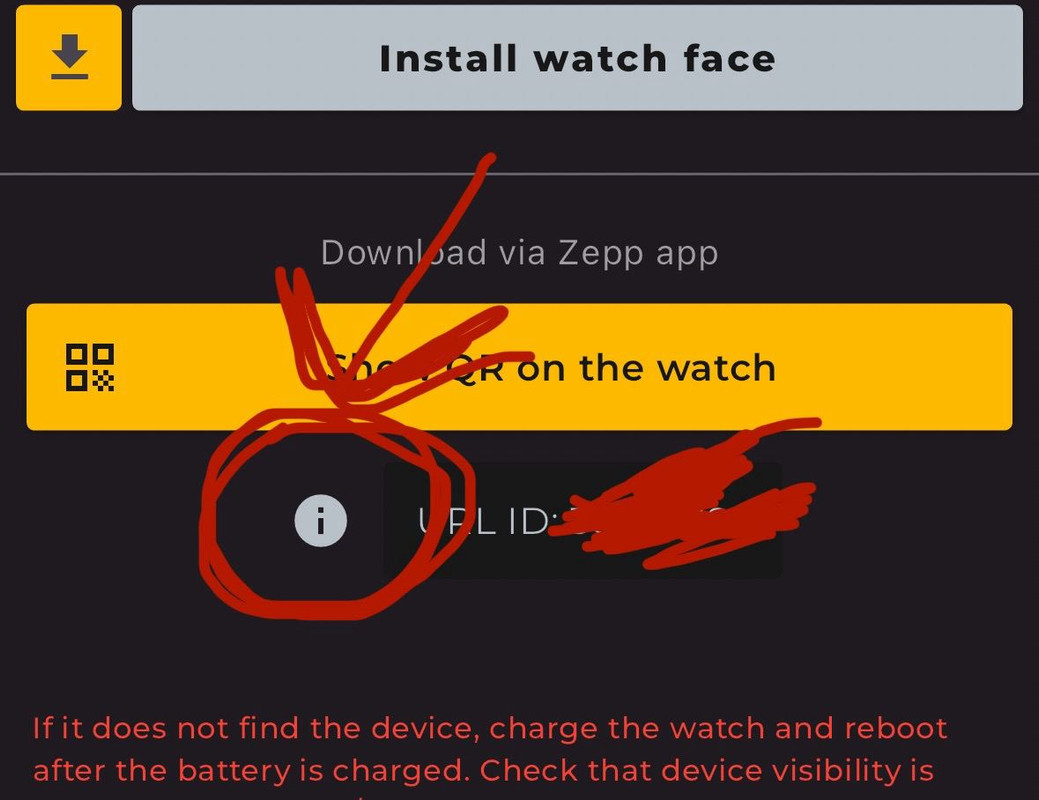
schwaitz wrote: 30 Jun 2024, 17:57Could you make a more detailed tutorial on how to install to find out the problem??
Spoiler
"sometimes it's scary but it's still just you and me” — Leaving Laurel
-
GIK-Team
- root
- Posts: 1026
- Joined: 22 Mar 2018, 10:00
- Location: Ukraine
- Has thanked: 1150 times
- Been thanked: 277 times
- Contact:
1. https://docs.zepp.com/docs/guides/tools/zepp-app/schwaitz wrote: 30 Jun 2024, 20:40The problem is after the installation of QR list. It´s not clear, and even I putting the URL code nothing happens
2. Download QR List app
3. Copy and past URL ID into the QR List app
4. Press "Show QR on the watch" button
"sometimes it's scary but it's still just you and me” — Leaving Laurel
-
schwaitz
- Posts: 4
- Joined: 22 Feb 2021, 21:14
- Location: São Paulo, Brazil
- Been thanked: 1 time
- Contact:
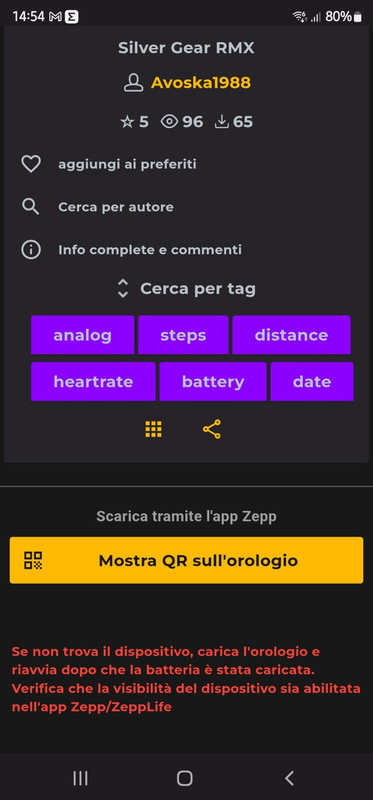
The explanation it´s not clear. When I choose the watch face in the app and click on " show QR on the watch ", I wait the advertisement, than nothing happens, there is no QR code appearing at the watch. The old way to sinchronize , as amazfit GTR 4 is much better
Amazfit balance + Samsung s23 Plus
I can't see the QR code
I have given all permissions activated developer mode
If I send the file to qrcode on balance I don't see it and I don't even see the url to copy
Where am I wrong
Sorry my bad English
I can't see the QR code
I have given all permissions activated developer mode
If I send the file to qrcode on balance I don't see it and I don't even see the url to copy
Where am I wrong
Sorry my bad English
Spoiler
-
GIK-Team
- root
- Posts: 1026
- Joined: 22 Mar 2018, 10:00
- Location: Ukraine
- Has thanked: 1150 times
- Been thanked: 277 times
- Contact:
Hai letto le istruzioni mostrate dall’app? Troverai tutti i passaggi spiegati passo dopo passo. Prova a seguire la guida e, se riscontri ancora problemi, faccelo sapere!TONYRM wrote: 06 Nov 2024, 14:01Amazfit balance + Samsung s23 Plus
I can't see the QR code
I have given all permissions activated developer mode
If I send the file to qrcode on balance I don't see it and I don't even see the url to copy
Where am I wrong
Sorry my bad English
"sometimes it's scary but it's still just you and me” — Leaving Laurel
Grazie della rispostaGIK-Team wrote: 06 Nov 2024, 20:12Hai letto le istruzioni mostrate dall’app? Troverai tutti i passaggi spiegati passo dopo passo. Prova a seguire la guida e, se riscontri ancora problemi, faccelo sapere!TONYRM wrote: 06 Nov 2024, 14:01Amazfit balance + Samsung s23 Plus
I can't see the QR code
I have given all permissions activated developer mode
If I send the file to qrcode on balance I don't see it and I don't even see the url to copy
Where am I wrong
Sorry my bad English
Ho seguito la guida, il balance è connesso al telefono
-Attivato la modalità sviluppatore
-Messo visibile in zepp il balance
-dato i permessi
-Scaricato Qrcode
Nulla ...quando invio il qrcode al balance non lo vedo e non vedo neanche url da app AW
Come posso verificare se AW si connette a zeep o al Balance?
Grazie
-
GIK-Team
- root
- Posts: 1026
- Joined: 22 Mar 2018, 10:00
- Location: Ukraine
- Has thanked: 1150 times
- Been thanked: 277 times
- Contact:
Ecco l’istruzione completa:TONYRM wrote: 07 Nov 2024, 09:06Grazie della risposta
Ho seguito la guida, il balance è connesso al telefono
-Attivato la modalità sviluppatore
-Messo visibile in zepp il balance
-dato i permessi
-Scaricato Qrcode
Nulla ...quando invio il qrcode al balance non lo vedo e non vedo neanche url da app AW
Come posso verificare se AW si connette a zeep o al Balance?
Grazie
- Abilita la modalità sviluppatore (dev mode) su Zepp: Link alla guida.
- Scarica l’app QR List dal Zepp App Store.
- Copia l’URL ID (passaggio 2 dell’istruzione mostrata nella nostra app durante il download del quadrante) e incollalo nell’app QR List.
- Apri QR List sull’orologio e scansiona il QR con l’app Zepp in modalità sviluppatore.
"sometimes it's scary but it's still just you and me” — Leaving Laurel
Ho letto le istruzioni..GIK-Team wrote: 07 Nov 2024, 09:35Ecco l’istruzione completa:TONYRM wrote: 07 Nov 2024, 09:06Grazie della risposta
Ho seguito la guida, il balance è connesso al telefono
-Attivato la modalità sviluppatore
-Messo visibile in zepp il balance
-dato i permessi
-Scaricato Qrcode
Nulla ...quando invio il qrcode al balance non lo vedo e non vedo neanche url da app AW
Come posso verificare se AW si connette a zeep o al Balance?
GrazieFammi sapere se riscontri ancora problemi!
- Abilita la modalità sviluppatore (dev mode) su Zepp: Link alla guida.
- Scarica l’app QR List dal Zepp App Store.
- Copia l’URL ID (passaggio 2 dell’istruzione mostrata nella nostra app durante il download del quadrante) e incollalo nell’app QR List.
- Apri QR List sull’orologio e scansiona il QR con l’app Zepp in modalità sviluppatore.
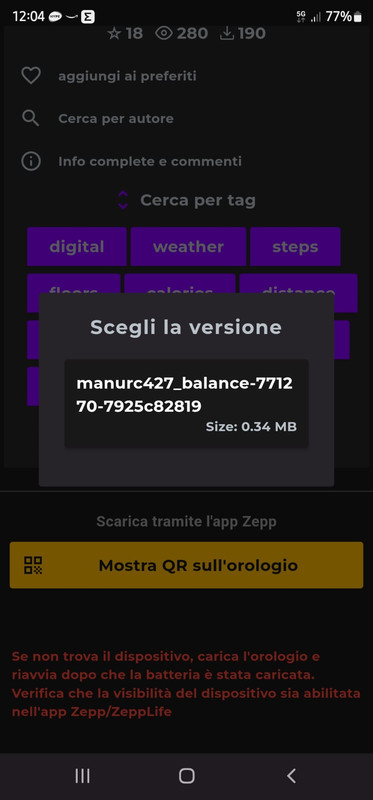
Ho seguito la guida passo per passo
Nella applicazione non vedo url e non riesco a copiare url
Non riesco ad inviare qrcode al Balance
Da pc funziona se leggo il qrcode
Da Telefono non funziona
Spoiler
-
GIK-Team
- root
- Posts: 1026
- Joined: 22 Mar 2018, 10:00
- Location: Ukraine
- Has thanked: 1150 times
- Been thanked: 277 times
- Contact:
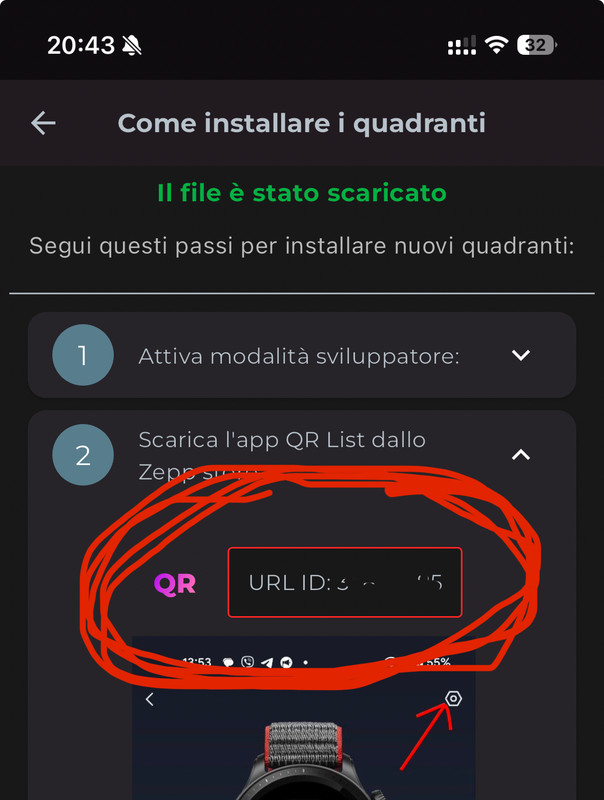
Come puoi vedere, nella zona evidenziata sullo screenshot, basta cliccare lì per copiare l’URL. Una volta copiato, puoi incollarlo nell’app QR List e procedere con l’installazione. Facci sapere se funziona!TONYRM wrote: 07 Nov 2024, 13:50Ho letto le istruzioni..
Ho seguito la guida passo per passo
Nella applicazione non vedo url e non riesco a copiare url
Spoiler
"sometimes it's scary but it's still just you and me” — Leaving Laurel
Veramente Grazie...grazieGIK-Team wrote: 07 Nov 2024, 18:49Come puoi vedere, nella zona evidenziata sullo screenshot, basta cliccare lì per copiare l’URL. Una volta copiato, puoi incollarlo nell’app QR List e procedere con l’installazione. Facci sapere se funziona!TONYRM wrote: 07 Nov 2024, 13:50Ho letto le istruzioni..
Ho seguito la guida passo per passo
Nella applicazione non vedo url e non riesco a copiare urlSpoiler
Alla fine ci sono riuscito...
Per me era uno spoiler uguale per tutte le whatchface...credevo fossero solo le istruzioni d'uso...

Ti ringrazio ancora...
-
GIK-Team
- root
- Posts: 1026
- Joined: 22 Mar 2018, 10:00
- Location: Ukraine
- Has thanked: 1150 times
- Been thanked: 277 times
- Contact:
Siamo lieti che alla fine tu ci sia riuscito!TONYRM wrote: 07 Nov 2024, 22:02Veramente Grazie...grazie
Alla fine ci sono riuscito...
Per me era uno spoiler uguale per tutte le whatchface...credevo fossero solo le istruzioni d'uso...
Ti ringrazio ancora...
 Grazie per il tuo feedback – stiamo lavorando per rendere il tutto più intuitivo e facile da usare.
"sometimes it's scary but it's still just you and me” — Leaving Laurel
-
Alfred2021
- Posts: 2
- Joined: 01 Jan 2021, 19:01
- Location: Naples
- Contact:
Ciao a Tutti. Non vedo qr list da Amazfit app store
-
GIK-Team
- root
- Posts: 1026
- Joined: 22 Mar 2018, 10:00
- Location: Ukraine
- Has thanked: 1150 times
- Been thanked: 277 times
- Contact:
Per quale modello di orologio stai cercando l’app QR List?
"sometimes it's scary but it's still just you and me” — Leaving Laurel
-
Alfred2021
- Posts: 2
- Joined: 01 Jan 2021, 19:01
- Location: Naples
- Contact:
-
Ilducatone
- Posts: 1
- Joined: 19 Sep 2024, 21:15
- Location: Milano
- Contact:
Buongiorno,
su QR list non riesco ad inserire nessun URL ID.
Ho seguito tutte le istruzioni ma niente
su QR list non riesco ad inserire nessun URL ID.
Ho seguito tutte le istruzioni ma niente
-
GIK-Team
- root
- Posts: 1026
- Joined: 22 Mar 2018, 10:00
- Location: Ukraine
- Has thanked: 1150 times
- Been thanked: 277 times
- Contact:
Mi dispiace per i problemi che stai incontrando con l’inserimento degli URL ID su QR list. Per aiutarti al meglio, potresti specificare esattamente cosa succede quando provi ad inserire un URL? Ricevi qualche messaggio di errore? Queste informazioni ci aiuteranno a comprendere meglio il problema e a fornirti una soluzione più precisa.Ilducatone wrote: 02 Dec 2024, 14:47Buongiorno,
su QR list non riesco ad inserire nessun URL ID.
Ho seguito tutte le istruzioni ma niente
"sometimes it's scary but it's still just you and me” — Leaving Laurel
Tengo un Amazfit Balance y en la tienda de aplicaciones de la aplicación Zeep no aparece ninguna apk que se llame QR list, si que aparece una llama QR Card 3.
-
GIK-Team
- root
- Posts: 1026
- Joined: 22 Mar 2018, 10:00
- Location: Ukraine
- Has thanked: 1150 times
- Been thanked: 277 times
- Contact:
Para utilizar correctamente la funcionalidad QR Card en tu Amazfit Balance, necesitas actualizar nuestra aplicación a la última versión beta disponible. Asegúrate de instalar esta versión beta para acceder a todas las nuevas características, incluida la QR Card.seat600 wrote: 02 Dec 2024, 20:41Tengo un Amazfit Balance y en la tienda de aplicaciones de la aplicación Zeep no aparece ninguna apk que se llame QR list, si que aparece una llama QR Card 3.
"sometimes it's scary but it's still just you and me” — Leaving Laurel
Muchas gracias. Cómo actualizo a la última versión beta?
He actualizado a la versión Beta de amazfit watch faces y no me aparece por ningún lado en la store de zepp QR list
Who is online
Users browsing this forum: No registered users and 1 guest