-
- Administrator
-
-
Support Ukraine
If you experience any problems with the forum (it is not visible, there is no way to post messages, or some functionality does not work), please let us know. If you have problems with registration or you did not receive confirmation letter, let us know and we will activate your account manually.
If you get an "The submitted form was invalid. Try submitting again" error, delete cookies, then try again.
How can i open an .png images after unpacking them?
Moderators: asoo, lvpokka, Internal error, Watchmens
Forum rules
All communication in this branch should only be in English.
All communication in this branch should only be in English.
How can i open an .png images after unpacking them?
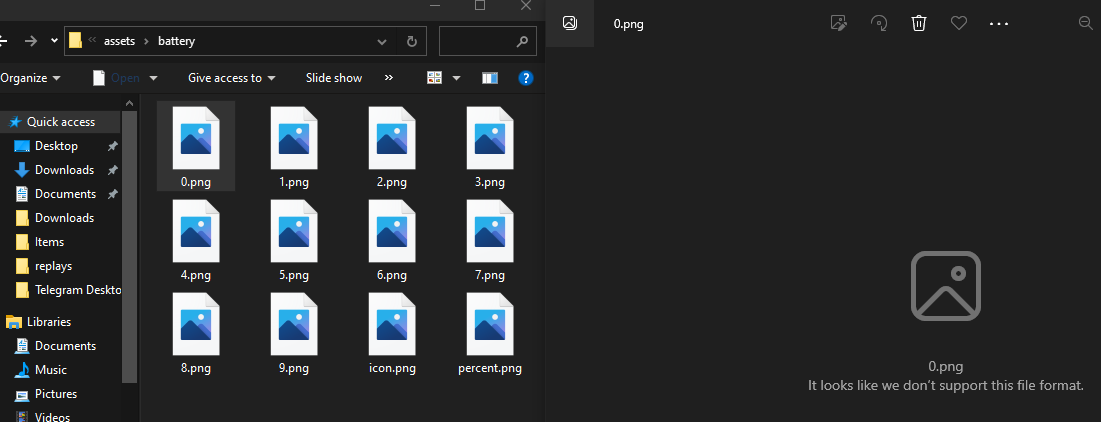
Was trying to make custom watchface and wanted to check out how the numbers would look like in .png files but they wouldn't open, is there's a way to open them?
-
asoo
- Posts: 2181
- Joined: 03 Jan 2019, 01:48
- Location: ͼͽ Thailand ͼͽ
- Has thanked: 419 times
- Been thanked: 2105 times

png in pack is PNG ( amazfit format ) if you want to edit you must to convert to normal PNG
You can use this utility to convert :
viewtopic.php?p=14958#p14958
Or use this program to unpack and edit layout :
viewtopic.php?p=11643#p11643
You can use this utility to convert :
viewtopic.php?p=14958#p14958
Or use this program to unpack and edit layout :
viewtopic.php?p=11643#p11643
ͼͽ To request please use the interrelated forum in action ͼͽ
Please do not PM to me for requests ported watchface.
Please do not PM to me for requests ported watchface.
Alright... What if i use Mi Fit, i wanna create a watch face for Mi Band 6 and looking at this programm looking like this is not what i need at allasoo wrote: 09 Jun 2023, 11:55png in pack is PNG ( amazfit format ) if you want to edit you must to convert to normal PNG
You can use this utility to convert :
viewtopic.php?p=14958#p14958
Or use this program to unpack and edit layout :
viewtopic.php?p=11643#p11643
-
asoo
- Posts: 2181
- Joined: 03 Jan 2019, 01:48
- Location: ͼͽ Thailand ͼͽ
- Has thanked: 419 times
- Been thanked: 2105 times
Since you didn't mention in the first post which device you are using, I looked at the picture you attached and saw folder "assets" which is same as GTR 3 / 3 pro / 4 , so I replied that way.seeya wrote: 09 Jun 2023, 13:41
Alright... What if i use Mi Fit, i wanna create a watch face for Mi Band 6 and looking at this programm looking like this is not what i need at all
If it's Mi Fit, I no idea for that.
-------------------------------------------------------------
But as far as I can find on the web, there is a topic related to the Mi band 6 editor, follow the link.
viewtopic.php?p=8477#p8477
ͼͽ To request please use the interrelated forum in action ͼͽ
Please do not PM to me for requests ported watchface.
Please do not PM to me for requests ported watchface.
I see, thanks! Looks like a perfect tool, the only thing i couldn't understand is how to create a time, maybe you have any ideas cuz i'm so confused
-
asoo
- Posts: 2181
- Joined: 03 Jan 2019, 01:48
- Location: ͼͽ Thailand ͼͽ
- Has thanked: 419 times
- Been thanked: 2105 times
Sorry, I can't give you advice on this part because I don't use mi band. I recommend you to ask the questio it , at the topics in related, There should be someone who can help solve your problem exactly to the point, such as this topicseeya wrote: 11 Jun 2023, 09:50I see, thanks! Looks like a perfect tool, the only thing i couldn't understand is how to create a time, maybe you have any ideas cuz i'm so confused
viewtopic.php?p=8477#p8477
Or this
viewtopic.php?t=3078
ͼͽ To request please use the interrelated forum in action ͼͽ
Please do not PM to me for requests ported watchface.
Please do not PM to me for requests ported watchface.
Who is online
Users browsing this forum: No registered users and 2 guests