Hi. Could someone convert this watch face to t-rex ultar, please.
Its a nice watchface.
Thank you.
https://www.facer.io/watchface/ypqSo2Lj ... cwatchpro3
-
- Administrator
-
-
Support Ukraine
If you experience any problems with the forum (it is not visible, there is no way to post messages, or some functionality does not work), please let us know. If you have problems with registration or you did not receive confirmation letter, let us know and we will activate your account manually.
If you get an "The submitted form was invalid. Try submitting again" error, delete cookies, then try again.
Please port "PICK (C) LOCK" to Trex ultar
Forum rules
When adding a new topic, use the template: Topic title [device name]
For example: Requesting creation of watch face [T-Rex Pro]
All communication in this branch should only be in English.
When adding a new topic, use the template: Topic title [device name]
For example: Requesting creation of watch face [T-Rex Pro]
All communication in this branch should only be in English.
-
asoo
- Posts: 2188
- Joined: 03 Jan 2019, 01:48
- Location: ͼͽ Thailand ͼͽ
- Has thanked: 419 times
- Been thanked: 2115 times

If you would like to have the compass like the original watchfacePyczek wrote: 10 Aug 2024, 04:51Hi. Could someone convert this watch face to gtr3, please.
Its a nice watchface.
Thank you.
https://www.facer.io/watchface/ypqSo2Lj ... cwatchpro3
I think it is not possible because If I remember correctly,the GTR3 (ZeppOS 1 ) does not support showing compass on the watchface.
ͼͽ To request please use the interrelated forum in action ͼͽ
Please do not PM to me for requests ported watchface.
Please do not PM to me for requests ported watchface.


-
asoo
- Posts: 2188
- Joined: 03 Jan 2019, 01:48
- Location: ͼͽ Thailand ͼͽ
- Has thanked: 419 times
- Been thanked: 2115 times
I haven't decided to make this dial yet.
I'm just letting you know the limitations of GTR3.
I suggest that next time you make a request, you should specify the device you want correctly, so that those who want to help you can decide it correctly.
For example, in this topic, I saw the dial you requested and wanted to convert it to GTR3. When I saw that, I decided not to do it because I saw the limitations of GTR3 that could not be done.
And now I have done other work, so I think I may not follow this request. Any user who are interested to help, please help him.
I'm just letting you know the limitations of GTR3.
I suggest that next time you make a request, you should specify the device you want correctly, so that those who want to help you can decide it correctly.
For example, in this topic, I saw the dial you requested and wanted to convert it to GTR3. When I saw that, I decided not to do it because I saw the limitations of GTR3 that could not be done.
And now I have done other work, so I think I may not follow this request. Any user who are interested to help, please help him.
ͼͽ To request please use the interrelated forum in action ͼͽ
Please do not PM to me for requests ported watchface.
Please do not PM to me for requests ported watchface.
asoo, I understand, but my intention was not to mislead anyone about the device I have. I personally have a trex ultra, but I use trex2 and gtr3 watch faces on it because I see that they fit my watch. I admit, I didn't know that even though watch faces fit different models, some functions may not work, my mistake. Next time I will use ultra when asking for a different version. However, I am asking you to agree to my request to convert this watch face, because I think that many forum members will like it. Regards
-
asoo
- Posts: 2188
- Joined: 03 Jan 2019, 01:48
- Location: ͼͽ Thailand ͼͽ
- Has thanked: 419 times
- Been thanked: 2115 times
Understand before downloading
This watch face I made will not accept any further edit requests.
This dial has some elements that are different from the original.
It will work properly on Zepp OS Version 2.x or higher.
You can bring this watchface to upload it on the web,
But if this dial has an original on this website, please request permission from the owner of the work before proceeding.
I will not take any responsibility. regarding actions that have not yet received consent from the owner of the work .
And please do not give credit to me
and please take responsibility for the work you upload yourself.
This watch face was not test on real device .
Therefore, users please manage the risk yourself.
If anyone wants to make additional changes to be compatible with your existing device, please do so yourself.
PS.
If the requester has not yet asked for permission from the owner of the work to adapt it. If the owner requests deletion, I will delete it immediately.
Download
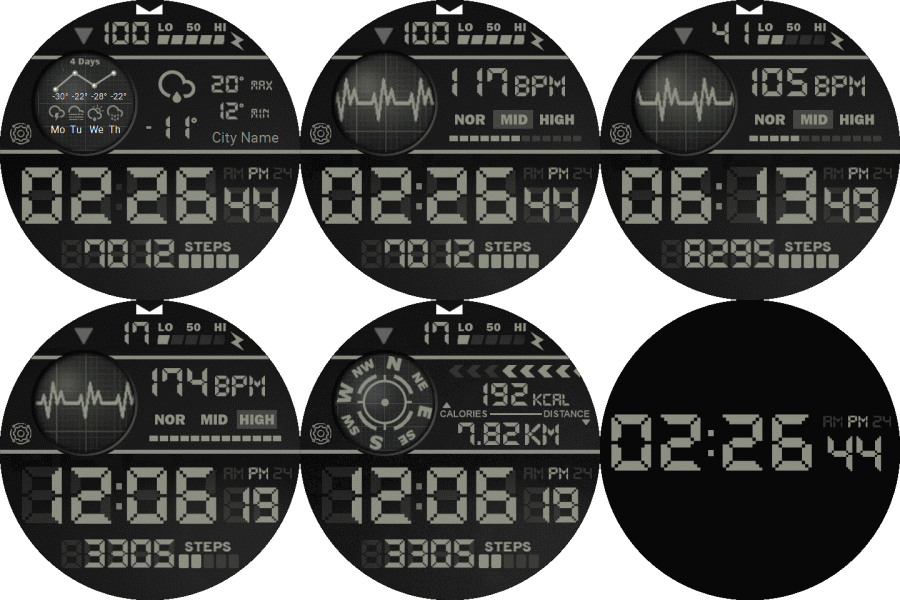
Animation will be active only one time :
 PICK(C)LOCK_T_Rex_UltraA1.zip
- (880.62 KiB) Downloaded 150 times
- PICK(C)LOCK_T_Rex_Ultra2.zip
- (881.86 KiB) Downloaded 125 times
ͼͽ To request please use the interrelated forum in action ͼͽ
Please do not PM to me for requests ported watchface.
Please do not PM to me for requests ported watchface.
asoo, thank you very much for this fantastic watch face, it's amazing. I have a purely technical question: is there any way to prevent it from using a lot of energy, because such information is displayed on the display of my watch? Maybe you can slow down the dot seconds between the hours and minutes, because it works very quickly, or simply turn it off so that the dots are displayed all the time without them working, because digital seconds do work. Or maybe the working compass has an impact on higher energy consumption and there is a chance to turn it off, because after clicking the triangle, the normal compass turns on.
Once again, I apologize for the confusion that resulted from my ignorance, my intention was not to mislead anyone. I will post requests regarding my trex ultra in the appropriate place. I thought there was no difference between trex 2, ultra or gtr3 and that converted chainrings worked the same on these models. Regards.
Once again, I apologize for the confusion that resulted from my ignorance, my intention was not to mislead anyone. I will post requests regarding my trex ultra in the appropriate place. I thought there was no difference between trex 2, ultra or gtr3 and that converted chainrings worked the same on these models. Regards.
-
asoo
- Posts: 2188
- Joined: 03 Jan 2019, 01:48
- Location: ͼͽ Thailand ͼͽ
- Has thanked: 419 times
- Been thanked: 2115 times
The message indicating that the power consumption is higher than normal will be displayed when the watch face has animation enabled regardless of the number of animations. Therefore, if the animation is used , the message will be displayed.Pyczek wrote: 11 Aug 2024, 18:31Spoiler
asoo, thank you very much for this fantastic watch face, it's amazing. I have a purely technical question: is there any way to prevent it from using a lot of energy, because such information is displayed on the display of my watch? Maybe you can slow down the dot seconds between the hours and minutes, because it works very quickly, or simply turn it off so that the dots are displayed all the time without them working, because digital seconds do work. Or maybe the working compass has an impact on higher energy consumption and there is a chance to turn it off, because after clicking the triangle, the normal compass turns on.
Once again, I apologize for the confusion that resulted from my ignorance, my intention was not to mislead anyone. I will post requests regarding my trex ultra in the appropriate place. I thought there was no difference between trex 2, ultra or gtr3 and that converted chainrings worked the same on these models. Regards.
This watch face uses only 2 animations, so it will consume slightly more power than normal.
As for the speed of the animation, please manage it yourself. You can unpack the watch face and edit the "speed fps" value as you like. It is not difficult to do this because you do not have to create anything new. Just enter the values you want.
Spoiler
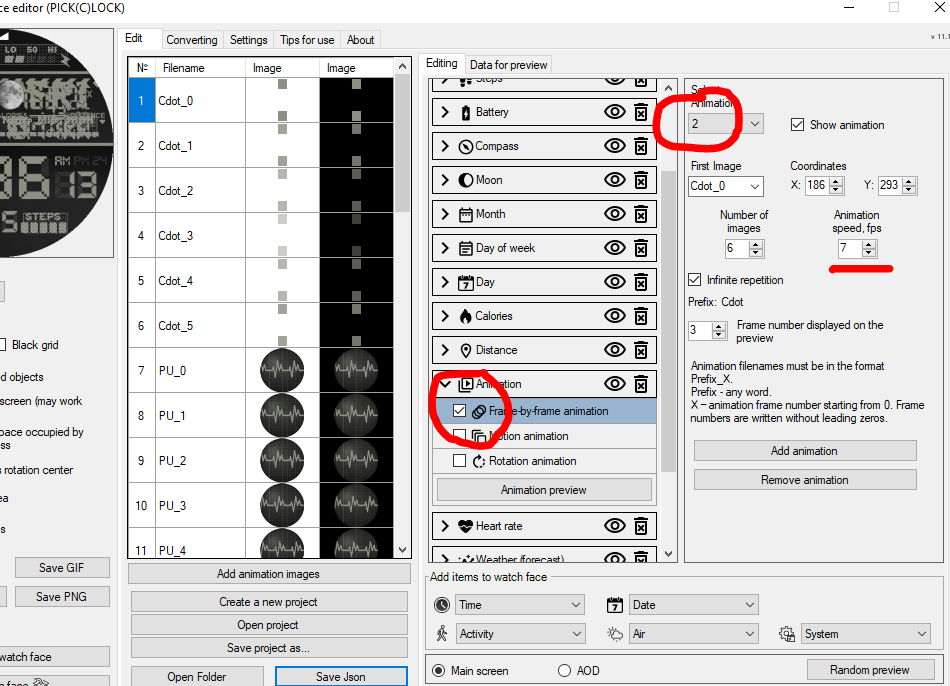
And I have already said that I will not edit the watch face I have finished.
Because I do not have that device. The minor requirements for speed, image placement, etc. are not difficult to do. Please do it yourself.
Minor adjustments in terms of speed and layout, please do it yourself, because each device has different limitations and I do not have all devices. I used a simulator to create it.
The speed displayed in the simulator looks normal, not too fast. But if the display on your device looks faster than you want, please modify and test until you are satisfied with it by yourself
Because I cannot know your satisfaction. And each device has a different display. So please do it yourself.
As for the compass, from what I've tested, I don't think it's a power hog, since there's no power consumption warning in the compass. I don't think this should be a problem, and more importantly, removing the compass would require a lot of script modifications, which I won't do, but if you want to modify it yourself, I have no problem with that.
This is my personal opinion. If you are serious about the power consumption of your watch, I recommend not using a watch that has element-changing features or uses "user script" to create the watch face, because it is inevitable that these watchface will consume more power than normal. and You can't avoid the higher power consumption of these dials.
ͼͽ To request please use the interrelated forum in action ͼͽ
Please do not PM to me for requests ported watchface.
Please do not PM to me for requests ported watchface.
I understand, it's probably the flashing dot seconds between the hours and minutes that consumes more energy. Maybe I can slow it down or turn it off myself. Please send a link to the program where I can try to do this. Thank you very much again for the amazing watch face.
-
asoo
- Posts: 2188
- Joined: 03 Jan 2019, 01:48
- Location: ͼͽ Thailand ͼͽ
- Has thanked: 419 times
- Been thanked: 2115 times
viewtopic.php?p=11643#p11643Pyczek wrote: 11 Aug 2024, 20:00I understand, it's probably the flashing dot seconds between the hours and minutes that consumes more energy. Maybe I can slow it down or turn it off myself. Please send a link to the program where I can try to do this. Thank you very much again for the amazing watch face.
ͼͽ To request please use the interrelated forum in action ͼͽ
Please do not PM to me for requests ported watchface.
Please do not PM to me for requests ported watchface.
-
asoo
- Posts: 2188
- Joined: 03 Jan 2019, 01:48
- Location: ͼͽ Thailand ͼͽ
- Has thanked: 419 times
- Been thanked: 2115 times
@Pyczek
This is the best I can do in this case
I have limited the animation to be shown only once. When the animation ends, the animation stops, only showing a still image.
You can download it in the original thread.
viewtopic.php?p=18792#p18792
This is the best I can do in this case
I have limited the animation to be shown only once. When the animation ends, the animation stops, only showing a still image.
You can download it in the original thread.
viewtopic.php?p=18792#p18792
ͼͽ To request please use the interrelated forum in action ͼͽ
Please do not PM to me for requests ported watchface.
Please do not PM to me for requests ported watchface.
asoo, thanks to the change in the animation you introduced and the second hand no longer flashing dots, I no longer have information about high energy consumption. Thank you very much!!!asoo wrote: 11 Aug 2024, 20:42@Pyczek
This is the best I can do in this case
I have limited the animation to be shown only once. When the animation ends, the animation stops, only showing a still image.
You can download it in the original thread.
viewtopic.php?p=18792#p18792
I'll try to do something in this editor again, maybe I'll be able to remove this white mark at the top of the display, because it doesn't really match the rest.asoo wrote: 11 Aug 2024, 20:03viewtopic.php?p=11643#p11643Pyczek wrote: 11 Aug 2024, 20:00I understand, it's probably the flashing dot seconds between the hours and minutes that consumes more energy. Maybe I can slow it down or turn it off myself. Please send a link to the program where I can try to do this. Thank you very much again for the amazing watch face.
-
asoo
- Posts: 2188
- Joined: 03 Jan 2019, 01:48
- Location: ͼͽ Thailand ͼͽ
- Has thanked: 419 times
- Been thanked: 2115 times
The white part you mentioned is in the picture main.png.Pyczek wrote: 12 Aug 2024, 04:49
I'll try to do something in this editor again, maybe I'll be able to remove this white mark at the top of the display, because it doesn't really match the rest.
So if you want to manipulate it, you can use any graphic editor you have available, edit the main.png image by painting over the white
main.png
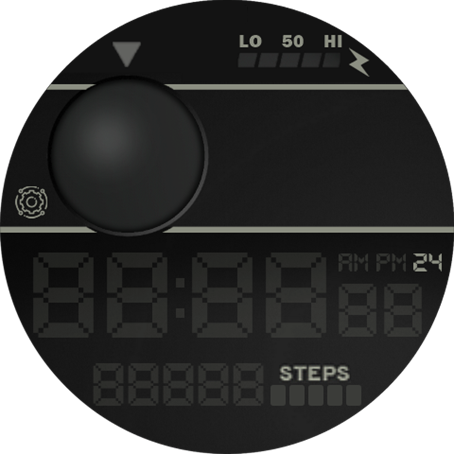
- main1.rar
- (126.9 KiB) Downloaded 119 times
ͼͽ To request please use the interrelated forum in action ͼͽ
Please do not PM to me for requests ported watchface.
Please do not PM to me for requests ported watchface.
asoo, I have already written that I have two left hands when it comes to activities related to watch faces, and it is the same now. I tried to open the main.png file, which is in the zip file with the watch face, but no graphics program could open this file so that I could blur the white indicator with black.
So I thought about replacing the main1.rar file that you inserted with the one from the shield zip folder, because I see that there is no white indicator on it, but nothing came of it, not only did the zip file get bigger, but After installing the watch, there is still this white indicator on the display.
For me it's some kind of black magic, maybe there's a chance you could get rid of this white indicator and attach the file without it, please.
So I thought about replacing the main1.rar file that you inserted with the one from the shield zip folder, because I see that there is no white indicator on it, but nothing came of it, not only did the zip file get bigger, but After installing the watch, there is still this white indicator on the display.
For me it's some kind of black magic, maybe there's a chance you could get rid of this white indicator and attach the file without it, please.
-
asoo
- Posts: 2188
- Joined: 03 Jan 2019, 01:48
- Location: ͼͽ Thailand ͼͽ
- Has thanked: 419 times
- Been thanked: 2115 times
The attached file is a normal png file. If you want to use this image,Pyczek wrote: 12 Aug 2024, 13:16asoo, I have already written that I have two left hands when it comes to activities related to watch faces, and it is the same now. I tried to open the main.png file, which is in the zip file with the watch face, but no graphics program could open this file so that I could blur the white indicator with black.
So I thought about replacing the main1.rar file that you inserted with the one from the shield zip folder, because I see that there is no white indicator on it, but nothing came of it, not only did the zip file get bigger, but After installing the watch, there is still this white indicator on the display.
For me it's some kind of black magic, maybe there's a chance you could get rid of this white indicator and attach the file without it, please.
you need to unpack the watchface file with sasha editor first, then replace this image in the folder from unpacking.
But if you want to put the image directly into .zip, you need to convert the normal
png image to zeppos png format before you can use it.
For the conversion part, if you want details, you can search in the forum.
viewtopic.php?p=15457#p15457
This rar file contains the image main1.png in zeppos format., and then you can replace it in ".zip".
- main1.rar
- (58.99 KiB) Downloaded 117 times
ͼͽ To request please use the interrelated forum in action ͼͽ
Please do not PM to me for requests ported watchface.
Please do not PM to me for requests ported watchface.
If I understand correctly, this first main.png file needs to be replaced in the editor, and the one you inserted now can be replaced directly in the zip file. Well, now I will try if one of my children allows me to use the computer. But if it doesn't work out, it will be a shame

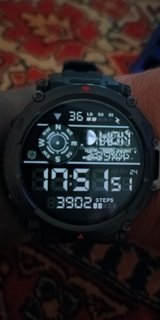
asoo, I managed to replace the file in the editor and there is no white indicator, but the compass doesn't work, you can't switch between date, weather, distance and in general it's some kind of armageddon. Please have mercy on me and make it the way it should be. I probably messed something up but I have no idea what. 



Spoiler
-
asoo
- Posts: 2188
- Joined: 03 Jan 2019, 01:48
- Location: ͼͽ Thailand ͼͽ
- Has thanked: 419 times
- Been thanked: 2115 times
You can download the version without the white logo from the original Download.Pyczek wrote: 12 Aug 2024, 16:00asoo, I managed to replace the file in the editor and there is no white indicator, but the compass doesn't work, you can't switch between date, weather, distance and in general it's some kind of armageddon. Please have mercy on me and make it the way it should be. I probably messed something up but I have no idea what.Spoiler
viewtopic.php?p=18792#p18792
And I will not proceed with this request again.
If there is anything else you need, please do it yourself.
ͼͽ To request please use the interrelated forum in action ͼͽ
Please do not PM to me for requests ported watchface.
Please do not PM to me for requests ported watchface.

Who is online
Users browsing this forum: No registered users and 1 guest