-
- Administrator
-
-
Support Ukraine
If you experience any problems with the forum (it is not visible, there is no way to post messages, or some functionality does not work), please let us know. If you have problems with registration or you did not receive confirmation letter, let us know and we will activate your account manually.
If you get an "The submitted form was invalid. Try submitting again" error, delete cookies, then try again.
Resources to create Watchfaces?
Forum rules
All communication in this branch should only be in English.
All communication in this branch should only be in English.
Resources to create Watchfaces?
Hi! I bought an Amazfit Band 7 a couple days ago and I want to costumize it but when i use the watchface maker i don't have the resources (like the style of digital time, weather, calories, etc) and i would like to know if there's any resource package to create the Watchfaces easily! Thanks in advance!
-
asoo
- Posts: 2198
- Joined: 03 Jan 2019, 01:48
- Location: ͼͽ Thailand ͼͽ
- Has thanked: 420 times
- Been thanked: 2120 times

All resources are images, you have to create them from scratchTomynsdk wrote: 03 Aug 2024, 18:11Hi! I bought an Amazfit Band 7 a couple days ago and I want to costumize it but when i use the watchface maker i don't have the resources (like the style of digital time, weather, calories, etc) and i would like to know if there's any resource package to create the Watchfaces easily! Thanks in advance!
Or the easiest way is you can select resources from the existing watchface in this web and then unpack and bring resource image to make your watchface
And you can create images of numbers, days, months, years from TTF fonts, you can create them through the web at the link below
https://mmk.pw/en/font_extract/
ͼͽ To request please use the interrelated forum in action ͼͽ
Please do not PM to me for requests ported watchface.
Please do not PM to me for requests ported watchface.
Thanks for the answer! It's actually quite difficult.
I wanted to install a Pipboy watchface that i loved a lot, but i can't download the AmazFaces app because is not available on my Moto g60s and i don't know how to install that watchface any other way
I read about some qr codes, but i think that's only for self-created watchfaces.
Anyway, i'll keep trying! Thanks!
I wanted to install a Pipboy watchface that i loved a lot, but i can't download the AmazFaces app because is not available on my Moto g60s and i don't know how to install that watchface any other way
I read about some qr codes, but i think that's only for self-created watchfaces.
Anyway, i'll keep trying! Thanks!
-
asoo
- Posts: 2198
- Joined: 03 Jan 2019, 01:48
- Location: ͼͽ Thailand ͼͽ
- Has thanked: 420 times
- Been thanked: 2120 times
Moto g60s it use android OS, why you can not Download and install App AmazFaces ??????
I think you should be able to install App AmazFast via Google Play.
https://play.google.com/store/search?q= ... apps&hl=en
I think you should be able to install App AmazFast via Google Play.
https://play.google.com/store/search?q= ... apps&hl=en
ͼͽ To request please use the interrelated forum in action ͼͽ
Please do not PM to me for requests ported watchface.
Please do not PM to me for requests ported watchface.
-
taw_bip
- WF maker
- Posts: 131
- Joined: 12 Apr 2018, 16:29
- Has thanked: 130 times
- Been thanked: 19 times
- Contact:
Another option is the Facemaker application. It has a library that can get you started with different hands, backgrounds, etc. It also has a vector drawing tool. The author has several tutorials on YouTube:
https://www.youtube.com/@FacemakerNunoBessa/videos
https://www.youtube.com/@FacemakerNunoBessa/videos
I don't know why it sais that my phone is not compatible. I downloaded it on my tablet but it's really curious that for using it you need Zepp aplications and Zepp is not compatible with my tablet jajajajajaja
(Everything that could go wrong, went wrong xD)
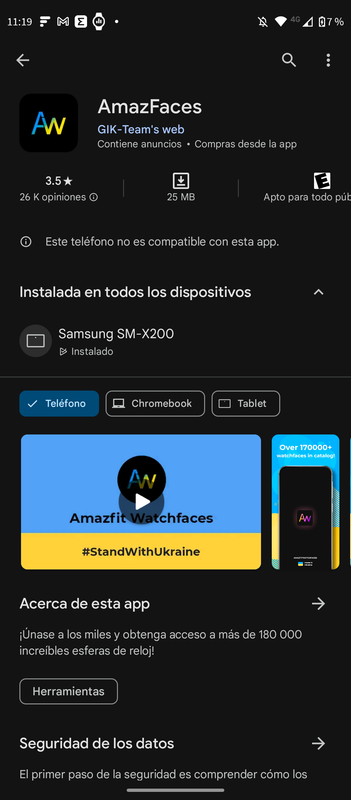
(Everything that could go wrong, went wrong xD)
Thank you for the suggestion! I'll give Facemaker a try. It sounds like it has all the resources I need to get started, plus the tutorials on YouTube will definitely help! Hopefully, this app works better for me than the AmazFaces one. By the way, I came across a handy qr codetaw_bip wrote: 03 Aug 2024, 20:06Another option is the Facemaker application. It has a library that can get you started with different hands, backgrounds, etc. It also has a vector drawing tool. The author has several tutorials on YouTube:
https://www.youtube.com/@FacemakerNunoBessa/videos
recently that might be useful for customizing some watchfaces. I'll check out Facemaker right away!

-
u6gljnuj4l
- WF maker
- Posts: 10
- Joined: 02 Jul 2019, 01:16
- Location: unknown
- Contact:
Hello,
I’ve had similar problems with customizing watchfaces. You can use tools like Photoshop or free editors to design icons for time and weather. If AmazFaces doesn’t work, Facemaker is a good option with helpful tutorials. You can also try extracting resources from existing watchfaces using mmk.pw/font_extract. Hope this helps,
I’ve had similar problems with customizing watchfaces. You can use tools like Photoshop or free editors to design icons for time and weather. If AmazFaces doesn’t work, Facemaker is a good option with helpful tutorials. You can also try extracting resources from existing watchfaces using mmk.pw/font_extract. Hope this helps,
Who is online
Users browsing this forum: No registered users and 2 guests