• Administrator
  •  
    Support Ukraine
    If you experience any problems with the forum (it is not visible, there is no way to post messages, or some functionality does not work), please let us know. If you have problems with registration or you did not receive confirmation letter, let us know and we will activate your account manually.
    If you get an "The submitted form was invalid. Try submitting again" error, delete cookies, then try again.
     

Mi Band 5 & 6 WatchFace Editor GUI

This forum is designed to discuss and develop tools creating watch faces.

Moderators: asoo, lvpokka, Internal error, Watchmens

Forum rules
All communication in this branch should only be in English.
To discuss tools that are not in this section, use the “Watchfaces tools (discussion)” forum.
User avatar
Johnson070
WF maker
Posts: 12
Joined: 02 Jan 2021, 16:22
Location: Москва
Has thanked: 5 times
Been thanked: 13 times
Contact:

Mi Band 5 & 6 WatchFace Editor GUI

Post by Johnson070 »

Author
Johnson070

Thank you very much for your help in creating the project
lvpokka

Tool description
  • All widgets support
  • Easy creation of watchfaces
  • Unpacking .bin
  • Create or modyfing watchfaces
  • Support Mi Band 5
  • Support Mi Band 6
How to
1. Unzip Mi Band WatchFace Editor.zip
2. Open MiBandWatchFaces.exe
3. Create watchface or click File => Open
4. Save file File => Save
5. Choose .bin(.json will also be saved in the directory) or .json file save
6. Copy the newly generated bin file to the corresponding directory of the mobile phone, and the synchronization will be completed. (This step is not very clear, you can refer to the original tutorial) above, you're done!
Changelog
1.0.1.8 (2021-06-09)

- Fixed Circle Scale bug

- Fixed alarm on/off add image

- Fixed oneline date

- Fixed bug number size 0

- Fixed ImageSufficCN2 to ImageSuffixCN2 (lol)

1.0.1.2 (2021-04-22)

- Bug fixes

- Add full support MiBand 6(With building a bin file yet)

- Add simple select images(Hold down the left mouse button to select, and to delete with shift)

- Animation preview(use carefully, the program uses more than 100 MB of RAM)

- (FIXED) If you have a problem with the image, try changing the scale of windows to 100%

- (FIXED) Month/Date add

- (FIXED) Add wind error and today separate temperature

1.0.1.0 (2021-03-14)

Bug fixes

Add convert GIF to PNG frames

Animation preview(use carefully, the program uses more than 100 MB of RAM)

(Maybe solved) If you have a problem with the image, try changing the scale of windows to 100%

Thank you for downloading the program.

If you find a bug, please write to github or telegram: @vveber

1.0.0.7 (2021-03-14)
  • Bug fixes
  • Bug fix time form, when add minutes tens(ERROR)
  • Add download zip file update

1.0.0.6 (2021-03-13)
  • Bug fix images form(Use image removal with care)
  • Bug fixes
  • Add json manual editor(Advanced user) RobCraftStudio for you)
  • Add culture(Add in github excel file with translations)
  • Add delete button in properties forms

1.0.0.5 (2021-03-12)
  • Bug fix images form(Use image removal with care)
  • Bug fix steps progress form
  • Fix circle scale form
  • Add delete button in properties forms
  • Start work for languages

1.0.0.4 (2021-03-10)
  • Bug fix images form(Use image removal with care)
  • Add open .bin file and decompile

1.0.0.3 (2021-03-10)
  • Bug fix status simple form
  • Bug fix images form(Use image removal with care)

1.0.0.2 (2021-03-10)
  • Bug fix status simple form

1.0.0.1 (2021-03-09)
  • First release!
Screenshots
Preview.png
Preview.png (122.77 KiB) Viewed 183853 times
Support
https://paypal.me/j0hnson070

Download:
https://github.com/Johnson070/MiBand-5- ... r/releases

Click Assets

GitHub: https://github.com/Johnson070/MiBand-5-watchface-editor
Last edited by Johnson070 on 21 May 2021, 17:35, edited 6 times in total.
itaketapps
Posts: 11
Joined: 01 Aug 2022, 09:30
Location: Україна
Has thanked: 9 times
Been thanked: 1 time
Contact:

Post by itaketapps »

brcisneros wrote: 17 Jul 2022, 01:04
Hey I need some help. I'm trying to make a face for the MiBand 6 from scratch and everything seems to be working ok on the editor, but when I install the face through Notify it doesn't show the day and date.

Any idea on why is this happening? I'll leave the code below and a link to the .bin file just in case.
Spoiler
{
"Background": {
"BackgroundColor": "0xF5F5F5"
},
"Time": {
"Hours": {
"Tens": {
"X": 15,
"Y": 80,
"ImageIndex": 0,
"ImagesCount": 10
},
"Ones": {
"X": 80,
"Y": 80,
"ImageIndex": 0,
"ImagesCount": 10
}
},
"Minutes": {
"Tens": {
"X": 15,
"Y": 140,
"ImageIndex": 10,
"ImagesCount": 10
},
"Ones": {
"X": 80,
"Y": 140,
"ImageIndex": 10,
"ImagesCount": 10
}
},
"UnknownV11": 0
},
"Date": {
"MonthAndDayAndYear": {
"OneLine": {
"NumberEN": {
"TopLeftX": 69,
"TopLeftY": 200,
"BottomRightX": 70,
"BottomRightY": 201,
"Alignment": "TopLeft",
"SpacingX": 1,
"SpacingY": 0,
"ImageIndex": 37,
"ImagesCount": 10
},
"DelimiterImageIndex": 47
},
"TwoDigitsMonth": false,
"TwoDigitsDay": false
},
"ENWeekDays": {
"X": 15,
"Y": 200,
"ImageIndex": 48,
"ImagesCount": 7
}
},
"Battery": {
"BatteryIcon": {
"X": 0,
"Y": 0,
"ImageIndex": 20,
"ImagesCount": 7
}
},
"Other": {
"Animation": [
{
"AnimationImages": {
"X": 0,
"Y": 236,
"ImageIndex": 27,
"ImagesCount": 10
},
"Speed": 100,
"RepeatCount": 10,
"UnknownTF4": 1
}
]
}
}
If you mean the absence of a day indicator, I recommend that you try to change "Number EN" to "Number" in the date input field.
Everything will be Ukraine
itaketapps
Posts: 11
Joined: 01 Aug 2022, 09:30
Location: Україна
Has thanked: 9 times
Been thanked: 1 time
Contact:

Post by itaketapps »

I have a problem with the analog clock. After creating the .bin file, the arrows disappear, although everything was displayed fine in the program at the time of creation. And that's not all. When I open third-party watch faces with working hands and save under a new name, they also disappear. (program version 1.0.1.18)

Code: Select all

{
  "Background": {
    "Image": {
      "X": 0,
      "Y": 0,
      "ImageIndex": 0
    },
    "Preview1": {
      "X": 21,
      "Y": 30,
      "ImageIndex": 8
    },
    "Preview2": {
      "X": 21,
      "Y": 30,
      "ImageIndex": 8
    },
    "Preview3": {
      "X": 21,
      "Y": 30,
      "ImageIndex": 8
    }
  },
  "Time": {
    "Hours": {
      "Tens": {
        "X": 3,
        "Y": 3,
        "ImageIndex": 9,
        "ImagesCount": 10
      },
      "Ones": {
        "X": 15,
        "Y": 3,
        "ImageIndex": 9,
        "ImagesCount": 10
      }
    },
    "Minutes": {
      "Tens": {
        "X": 123,
        "Y": 2,
        "ImageIndex": 9,
        "ImagesCount": 10
      },
      "Ones": {
        "X": 135,
        "Y": 2,
        "ImageIndex": 9,
        "ImagesCount": 10
      }
    },
    "UnknownV11": 0
  },
  "Date": {
    "MonthAndDayAndYear": {
      "OneLine": {
        "Number": {
          "TopLeftX": 5,
          "TopLeftY": 308,
          "BottomRightX": 50,
          "BottomRightY": 324,
          "Alignment": "TopLeft",
          "SpacingX": 1,
          "SpacingY": 0,
          "ImageIndex": 9,
          "ImagesCount": 10
        },
        "DelimiterImageIndex": 19
      },
      "TwoDigitsMonth": true,
      "TwoDigitsDay": true
    },
    "ENWeekDays": {
      "X": 0,
      "Y": 20,
      "ImageIndex": 1,
      "ImagesCount": 7
    }
  },
  "AnalogDialFace": {
    "Hours": {
      "OnlyBorder": false,
      "Color": "0x004000",
      "Center": {
        "X": 77,
        "Y": 190
      },
      "Shape": [
        {
          "X": 13,
          "Y": 4
        },
        {
          "X": 31,
          "Y": 4
        },
        {
          "X": 36,
          "Y": 0
        },
        {
          "X": 31,
          "Y": -4
        },
        {
          "X": 13,
          "Y": -4
        },
        {
          "X": 13,
          "Y": 4
        },
        {
          "X": 16,
          "Y": 1
        },
        {
          "X": 31,
          "Y": 1
        },
        {
          "X": 33,
          "Y": 0
        },
        {
          "X": 31,
          "Y": -1
        },
        {
          "X": 16,
          "Y": -1
        },
        {
          "X": 16,
          "Y": 1
        }
      ]
    },
    "Minutes": {
      "OnlyBorder": false,
      "Color": "0x800000",
      "Center": {
        "X": 77,
        "Y": 190
      },
      "Shape": [
        {
          "X": 17,
          "Y": 3
        },
        {
          "X": 49,
          "Y": 3
        },
        {
          "X": 53,
          "Y": 0
        },
        {
          "X": 49,
          "Y": -3
        },
        {
          "X": 17,
          "Y": -3
        },
        {
          "X": 17,
          "Y": 3
        },
        {
          "X": 20,
          "Y": 1
        },
        {
          "X": 45,
          "Y": 1
        },
        {
          "X": 47,
          "Y": 0
        },
        {
          "X": 45,
          "Y": -1
        },
        {
          "X": 20,
          "Y": -1
        },
        {
          "X": 20,
          "Y": 1
        }
      ]
    }
  }
}
At the same time, the log does not give any errors and the program gives the message "Success".
Everything will be Ukraine
User avatar
SantiNW
Posts: 7
Joined: 21 Feb 2023, 19:16
Location: Ciudad Autónoma de Buenos Aires
Has thanked: 4 times
Contact:

Post by SantiNW »

Johnson070 wrote: 29 Mar 2021, 20:25
danyvas7 wrote: 26 Mar 2021, 22:08
Hi, i have a problem with the bin file, i save the project as bin, but the bin file is not created.
Bin file creates in directory where created json and images
No, it doesn't, it just drops the images and the .json but not the .bin
User avatar
SantiNW
Posts: 7
Joined: 21 Feb 2023, 19:16
Location: Ciudad Autónoma de Buenos Aires
Has thanked: 4 times
Contact:

Post by SantiNW »

raejin wrote: 13 Jul 2021, 21:02
update: I've managed to create a .bin by using 'pallette mode' and it writes okay. The only problem is now I can't install it to my Mi Band :? Using the Notify app I get update failed, im guessing the bin is faulty somehow
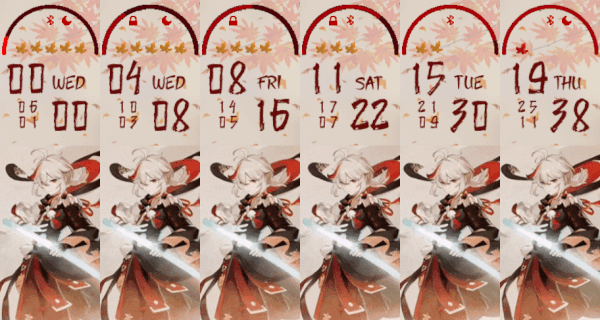
I'm really at a loss as to what to do now. Dropping a link here with the files if anyone could create a .bin and/or tell me how I'd be grateful ~
https://drive.google.com/drive/folders/ ... sp=sharing
Spoiler
Image


Thank you so much for the pallette mode tip
User avatar
SantiNW
Posts: 7
Joined: 21 Feb 2023, 19:16
Location: Ciudad Autónoma de Buenos Aires
Has thanked: 4 times
Contact:

Post by SantiNW »

danyvas7 wrote: 26 Mar 2021, 22:08
Hi, i have a problem with the bin file, i save the project as bin, but the bin file is not created.
Use the pallette mode. Go to "Open settings" > Enable "Use Pallette Mode(low space)" > Click "Save" and done, you should now be able to get the .bin
user_harry
Posts: 2
Joined: 30 Jan 2023, 21:51
Location: Chandigarh
Has thanked: 1 time
Been thanked: 1 time
Contact:

Post by user_harry »

Hey Johnson070, I am facing a problem that when adding wind or uv index the temperature goes blank, can you help me with that?
itaketapps
Posts: 11
Joined: 01 Aug 2022, 09:30
Location: Україна
Has thanked: 9 times
Been thanked: 1 time
Contact:

Post by itaketapps »

brcisneros wrote: 17 Jul 2022, 01:04
Hey I need some help. I'm trying to make a face for the MiBand 6 from scratch and everything seems to be working ok on the editor, but when I install the face through Notify it doesn't show the day and date.

Any idea on why is this happening? I'll leave the code below and a link to the .bin file just in case.
Spoiler
{
"Background": {
"BackgroundColor": "0xF5F5F5"
},
"Time": {
"Hours": {
"Tens": {
"X": 15,
"Y": 80,
"ImageIndex": 0,
"ImagesCount": 10
},
"Ones": {
"X": 80,
"Y": 80,
"ImageIndex": 0,
"ImagesCount": 10
}
},
"Minutes": {
"Tens": {
"X": 15,
"Y": 140,
"ImageIndex": 10,
"ImagesCount": 10
},
"Ones": {
"X": 80,
"Y": 140,
"ImageIndex": 10,
"ImagesCount": 10
}
},
"UnknownV11": 0
},
"Date": {
"MonthAndDayAndYear": {
"OneLine": {
"Number": { !!! This line should read "Number" and not "NumberEN" !!!
"TopLeftX": 69,
"TopLeftY": 200,
"BottomRightX": 70,
"BottomRightY": 201,
"Alignment": "TopLeft",
"SpacingX": 1,
"SpacingY": 0,
"ImageIndex": 37,
"ImagesCount": 10
},
"DelimiterImageIndex": 47
},
"TwoDigitsMonth": false,
"TwoDigitsDay": false
},
"ENWeekDays": {
"X": 15,
"Y": 200,
"ImageIndex": 48,
"ImagesCount": 7
}
},
"Battery": {
"BatteryIcon": {
"X": 0,
"Y": 0,
"ImageIndex": 20,
"ImagesCount": 7
}
},
"Other": {
"Animation": [
{
"AnimationImages": {
"X": 0,
"Y": 236,
"ImageIndex": 27,
"ImagesCount": 10
},
"Speed": 100,
"RepeatCount": 10,
"UnknownTF4": 1
}
]
}
}
It is necessary to correct "Number" and not "NumberEN" in the line of choosing numbers to display the date. Such a problem occurs when selecting the "OneLine" display.
Everything will be Ukraine
xojo
Posts: 1
Joined: 16 Dec 2021, 03:36
Location: N. Am
Been thanked: 1 time
Contact:

Post by xojo »

itaketapps wrote: 07 Aug 2022, 22:24
I have a problem with the analog clock. After creating the .bin file, the arrows disappear, although everything was displayed fine in the program at the time of creation. And that's not all. When I open third-party watch faces with working hands and save under a new name, they also disappear. (program version 1.0.1.18)

Code: Select all

{
  "Background": {
    "Image": {
      "X": 0,
      "Y": 0,
      "ImageIndex": 0
    },
    "Preview1": {
      "X": 21,
      "Y": 30,
      "ImageIndex": 8
    },
    "Preview2": {
      "X": 21,
      "Y": 30,
      "ImageIndex": 8
    },
    "Preview3": {
      "X": 21,
      "Y": 30,
      "ImageIndex": 8
    }
  },
  "Time": {
    "Hours": {
      "Tens": {
        "X": 3,
        "Y": 3,
        "ImageIndex": 9,
        "ImagesCount": 10
      },
      "Ones": {
        "X": 15,
        "Y": 3,
        "ImageIndex": 9,
        "ImagesCount": 10
      }
    },
    "Minutes": {
      "Tens": {
        "X": 123,
        "Y": 2,
        "ImageIndex": 9,
        "ImagesCount": 10
      },
      "Ones": {
        "X": 135,
        "Y": 2,
        "ImageIndex": 9,
        "ImagesCount": 10
      }
    },
    "UnknownV11": 0
  },
  "Date": {
    "MonthAndDayAndYear": {
      "OneLine": {
        "Number": {
          "TopLeftX": 5,
          "TopLeftY": 308,
          "BottomRightX": 50,
          "BottomRightY": 324,
          "Alignment": "TopLeft",
          "SpacingX": 1,
          "SpacingY": 0,
          "ImageIndex": 9,
          "ImagesCount": 10
        },
        "DelimiterImageIndex": 19
      },
      "TwoDigitsMonth": true,
      "TwoDigitsDay": true
    },
    "ENWeekDays": {
      "X": 0,
      "Y": 20,
      "ImageIndex": 1,
      "ImagesCount": 7
    }
  },
  "AnalogDialFace": {
    "Hours": {
      "OnlyBorder": false,
      "Color": "0x004000",
      "Center": {
        "X": 77,
        "Y": 190
      },
      "Shape": [
        {
          "X": 13,
          "Y": 4
        },
        {
          "X": 31,
          "Y": 4
        },
        {
          "X": 36,
          "Y": 0
        },
        {
          "X": 31,
          "Y": -4
        },
        {
          "X": 13,
          "Y": -4
        },
        {
          "X": 13,
          "Y": 4
        },
        {
          "X": 16,
          "Y": 1
        },
        {
          "X": 31,
          "Y": 1
        },
        {
          "X": 33,
          "Y": 0
        },
        {
          "X": 31,
          "Y": -1
        },
        {
          "X": 16,
          "Y": -1
        },
        {
          "X": 16,
          "Y": 1
        }
      ]
    },
    "Minutes": {
      "OnlyBorder": false,
      "Color": "0x800000",
      "Center": {
        "X": 77,
        "Y": 190
      },
      "Shape": [
        {
          "X": 17,
          "Y": 3
        },
        {
          "X": 49,
          "Y": 3
        },
        {
          "X": 53,
          "Y": 0
        },
        {
          "X": 49,
          "Y": -3
        },
        {
          "X": 17,
          "Y": -3
        },
        {
          "X": 17,
          "Y": 3
        },
        {
          "X": 20,
          "Y": 1
        },
        {
          "X": 45,
          "Y": 1
        },
        {
          "X": 47,
          "Y": 0
        },
        {
          "X": 45,
          "Y": -1
        },
        {
          "X": 20,
          "Y": -1
        },
        {
          "X": 20,
          "Y": 1
        }
      ]
    }
  }
}
At the same time, the log does not give any errors and the program gives the message "Success".
I read this topic months ago and came back today wondering if there was a fix for this yet. I assume you've already solved this or given up on it - but when I was trying to do this months ago I concluded that the X & Y coords of the clock hands couldn't be negative numbers. Once I shifted everything to be >=0 values the hands showed up. Of course they no longer pointed accurately though.... I think the compiler doesn't process negative values in XY coords properly.
itaketapps
Posts: 11
Joined: 01 Aug 2022, 09:30
Location: Україна
Has thanked: 9 times
Been thanked: 1 time
Contact:

Post by itaketapps »

Thank you for your answer.
Your assumption is not entirely correct. The fact is that since writing this question I have experimented many times. In the course of my research, it turned out that the program allows negative values on the "Y" axis, but not on the "X" axis. The reason for the disappearance of the arrows is the number of points used for their construction. I have a great sample dial with 3 hands (hour, minute and second) https://amazfitwatchfaces.com/mi-band-6/view/3905 that works great with "simple" hands. Therefore, for now, I decided not to use complex shapes in the design of arrows, only triangles, quadrilaterals and pentagons.
Thanks again for your reply.
I hope that something from what I have described above will help you in creating great watch faces.
Everything will be Ukraine
omavel
Posts: 2
Joined: 18 May 2023, 17:12
Location: Armenia
Contact:

Post by omavel »

Guys, are there any forks that are not triggering virus alerts?
DiMinuto
Posts: 1
Joined: 23 Nov 2023, 14:11
Location: Brasil
Contact:

Post by DiMinuto »

Hey there, is there a way to move the layers so the battery icon is not on top of the time?
Post Reply

Return to “Watchfaces tools”

Who is online

Users browsing this forum: Mawel and 6 guests