Where is the best place to get help with advanced watch face creation? I'm particularly interested in learning how to use the images that seem to have multiple images in the same PNG file. My hope is to use something like that to create a colored icon for pulse rate instead of numbers. My goal is to make a heart on a black background and the color of the heart changes based on the pulse range with the background changing if pulse goes above 100. I want to ignore the digits and go with an image for the 10's and anything over 100. So anything over 80 would be one color, anything over 90 a different color, anything over 100 would change the background of the image, and so forth.
Anyone seen anything like this before? Anyone know if it is possible or how?
If you experience any problems with the forum (it is not visible, there is no way to post messages, or some functionality does not work), please let us know.
If you have problems with registration or you did not receive confirmation letter, let us know and we will activate your account manually.
If you get an "The submitted form was invalid. Try submitting again" error, delete cookies, then try again.
If you have problems with registration or you did not receive confirmation letter, let us know and we will activate your account manually.
If you get an "The submitted form was invalid. Try submitting again" error, delete cookies, then try again.
Is it possible to have heart rate icons?
Moderators: Internal error, Watchmens
Yes you can. Check my watchface for help, delete numbers and put heart instead of chrono.
I can't link the watchface. Search for " Samsung gear sport edit "
I can't link the watchface. Search for " Samsung gear sport edit "
-
asoo
- Posts: 2222
- Joined: 03 Jan 2019, 01:48
- Location: ͼͽ Thailand ͼͽ
- Has thanked: 437 times
- Been thanked: 2141 times
- Contact:

ORG. https://amazfitwatchfaces.com/bip/view/22240

MOD.
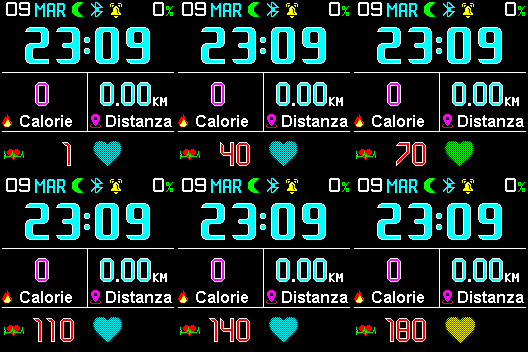
MOD.
 heart_packed.zip
- (4.64 KiB) Downloaded 296 times
ͼͽ To request please use the interrelated forum in action ͼͽ
Please do not PM to me for requests ported watchface.
Please do not PM to me for requests ported watchface.
What I don't understand is images like 00022.png in your zip file and the -482 spacing in the json file. I haven't found any information on these graphics that have multiple pieces in them. What I'd ultimately like to do is have no numbers at all, just the icon, and have icons for under 70, the 70s, 80s, 90s, 100s, 110s, 120s, and so forth up to 160s. So ten different graphics minimum, and 12 if I figure out how. If not, just triggering off of the "tens" number would likely work. But since I don't understand these images that appear indexed or something, I'm not sure exactly how to proceed.
-
asoo
- Posts: 2222
- Joined: 03 Jan 2019, 01:48
- Location: ͼͽ Thailand ͼͽ
- Has thanked: 437 times
- Been thanked: 2141 times
- Contact:
That watch face is not mine, I just solved the picture according to my understand.
However, what I understand is as follows. ( Please see the picture below )
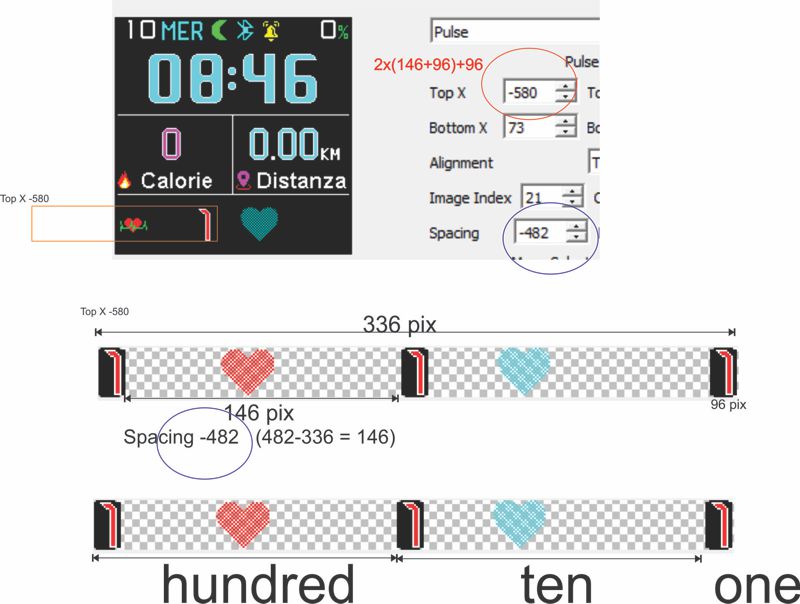
It's just my understanding. I'm not sure if it's 100% accurate or not.
However, what I understand is as follows. ( Please see the picture below )
It's just my understanding. I'm not sure if it's 100% accurate or not.
ͼͽ To request please use the interrelated forum in action ͼͽ
Please do not PM to me for requests ported watchface.
Please do not PM to me for requests ported watchface.
Thanks. I'm going to study that and see if I can't figure it out!  Sure wish Amazfit would put out a comprehensive guide to this kind of stuff. Or, better yet, give us "ones", "tens" and "hundreds" capabilities for all of the numbers and not just hours and minutes.
Sure wish Amazfit would put out a comprehensive guide to this kind of stuff. Or, better yet, give us "ones", "tens" and "hundreds" capabilities for all of the numbers and not just hours and minutes.BTW, what editor are you using that is displaying the spacing information in the image above? I've been using that online tool, and it doesn't look like that. Since you are the watch face expert, are you using a better/different tool?
-
asoo
- Posts: 2222
- Joined: 03 Jan 2019, 01:48
- Location: ͼͽ Thailand ͼͽ
- Has thanked: 437 times
- Been thanked: 2141 times
- Contact:
Bip WF Editor by ilGruppoTesterdjeaton wrote: 10 Apr 2019, 12:15BTW, what editor are you using that is displaying the spacing information in the image above? I've been using that online tool, and it doesn't look like that. Since you are the watch face expert, are you using a better/different tool?
https://www.mediafire.com/folder/3o37ts ... r_-_Stable
AmazfitBipTools
https://bitbucket.org/valeronm/amazfitb ... downloads/
ͼͽ To request please use the interrelated forum in action ͼͽ
Please do not PM to me for requests ported watchface.
Please do not PM to me for requests ported watchface.
-
TXK

- Posts: 302
- Joined: 10 Apr 2018, 05:15
- Location: china
- Has thanked: 150 times
- Been thanked: 99 times
- Contact:
Unable to decompress after downloading. The compressed package file is damaged. My question??asoo wrote: 10 Apr 2019, 14:27Bip WF Editor by ilGruppoTesterdjeaton wrote: 10 Apr 2019, 12:15BTW, what editor are you using that is displaying the spacing information in the image above? I've been using that online tool, and it doesn't look like that. Since you are the watch face expert, are you using a better/different tool?
https://www.mediafire.com/folder/3o37ts ... r_-_Stable
AmazfitBipTools
https://bitbucket.org/valeronm/amazfitb ... downloads/
Is there anyone who will help me?
-
asoo
- Posts: 2222
- Joined: 03 Jan 2019, 01:48
- Location: ͼͽ Thailand ͼͽ
- Has thanked: 437 times
- Been thanked: 2141 times
- Contact:
Which file do you have issue about decompress?TXK wrote: 12 Apr 2019, 11:20Unable to decompress after downloading. The compressed package file is damaged. My question??Spoiler
asoo wrote: 10 Apr 2019, 14:27Bip WF Editor by ilGruppoTesterdjeaton wrote: 10 Apr 2019, 12:15BTW, what editor are you using that is displaying the spacing information in the image above? I've been using that online tool, and it doesn't look like that. Since you are the watch face expert, are you using a better/different tool?
https://www.mediafire.com/folder/3o37ts ... r_-_Stable
AmazfitBipTools
https://bitbucket.org/valeronm/amazfitb ... downloads/
Is there anyone who will help me?
Bip WF Editor by ilGruppoTester ?
AmazfitBipTools ?
But I downloaded all and test decompress . it's can do 100% no error
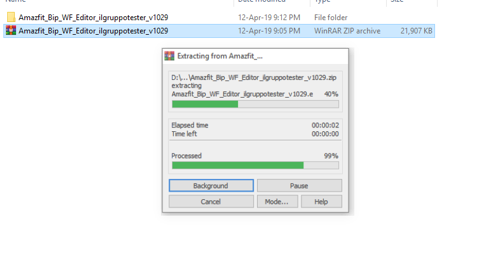
Bip WF Editor by ilGruppoTester
AmazfitBipTools
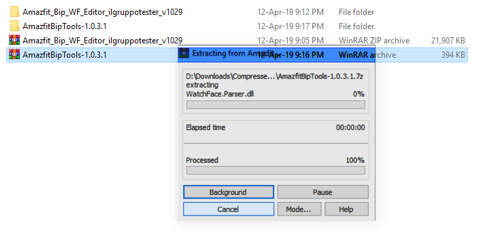
ps. Decompress with winrar 5.70
ͼͽ To request please use the interrelated forum in action ͼͽ
Please do not PM to me for requests ported watchface.
Please do not PM to me for requests ported watchface.
-
TXK
- Posts: 302
- Joined: 10 Apr 2018, 05:15
- Location: china
- Has thanked: 150 times
- Been thanked: 99 times
- Contact:
I get it. my winrar is 4.11. so......asoo wrote: 12 Apr 2019, 14:26Which file do you have issue about decompress?TXK wrote: 12 Apr 2019, 11:20Unable to decompress after downloading. The compressed package file is damaged. My question??Spoiler
asoo wrote: 10 Apr 2019, 14:27
Bip WF Editor by ilGruppoTester
https://www.mediafire.com/folder/3o37ts ... r_-_Stable
AmazfitBipTools
https://bitbucket.org/valeronm/amazfitb ... downloads/
Is there anyone who will help me?
Bip WF Editor by ilGruppoTester ?
AmazfitBipTools ?
But I downloaded all and test decompress . it's can do 100% no error
Bip WF Editor by ilGruppoTester
AmazfitBipTools
ps. Decompress with winrar 5.70
thank you
Who is online
Users browsing this forum: No registered users and 1 guest