• Administrator
  •  
    Support Ukraine
    If you experience any problems with the forum (it is not visible, there is no way to post messages, or some functionality does not work), please let us know. If you have problems with registration or you did not receive confirmation letter, let us know and we will activate your account manually.
    If you get an "The submitted form was invalid. Try submitting again" error, delete cookies, then try again.
     

NOW_Tha_PHLASH GTR3 Pro for GTR2

Topics for the request of watch faces development.

Moderators: asoo, Watchmens

Forum rules
When adding a new topic, use the template: Topic title [device name]
For example: Requesting creation of watch face [GTR 3 Pro]
All communication in this branch should only be in English.
Post Reply
SleepyHollow
Posts: 49
Joined: 07 May 2022, 14:10
Location: Europe
Has thanked: 13 times
Been thanked: 2 times
Contact:

NOW_Tha_PHLASH GTR3 Pro for GTR2

Post by SleepyHollow »

Good morning to forum, can anyone who has knowledge help me to convert this watchface for GTR2 exactly as it is. I already take permission from wax and i want thank him and of course all creators who help us a lot. Thank you and have a nice weekend.
https://amazfitwatchfaces.com/gtr/view/27073
Spoiler
Image
User avatar
asoo
Posts: 2120
Joined: 03 Jan 2019, 01:48
Location: ͼͽ Thailand ͼͽ
Has thanked: 409 times
Been thanked: 2037 times

Post by asoo »

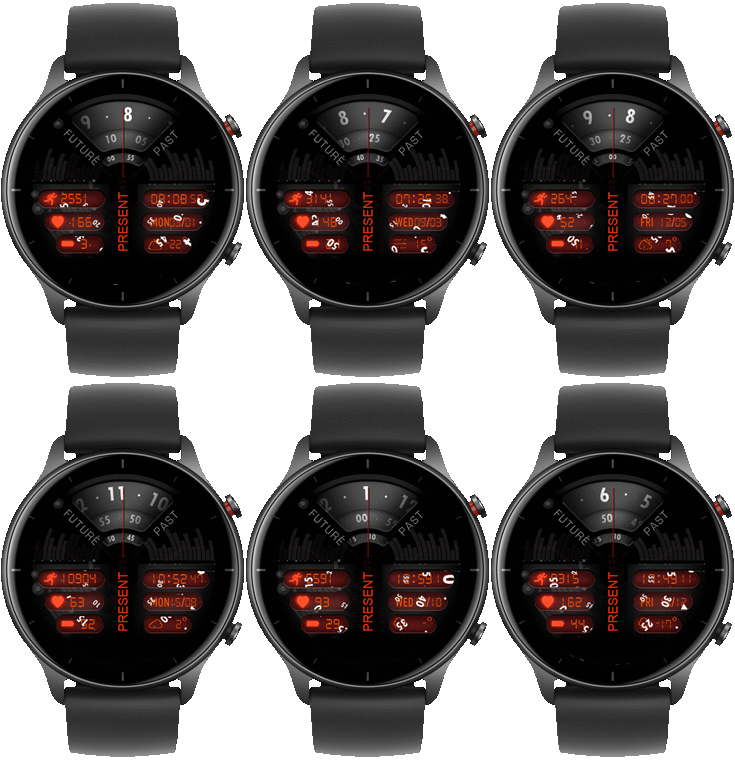
Based on my opinion, I think the watch face you requested. This is unlikely to be possible on the GTR2 as GTR2 is unable to switch element layers.
The key point of the dial is that "analog hands" must be at the lowest layer.
It's must be switched to the last of the layer.
But in GTR2 "analog hands" are always set to the top of the layer.
Then I think it can not do for GTR2

What can be done is what is shown in the picture.
Spoiler
Image
This watch face file will be displayed as shown in the image above.
which I think is unlikely to be suitable for use.
Phlash_V1_packed.bin
(1.04 MiB) Downloaded 79 times
ͼͽ To request please use the interrelated forum in action ͼͽ
Please do not PM to me for requests ported watchface.
SleepyHollow
Posts: 49
Joined: 07 May 2022, 14:10
Location: Europe
Has thanked: 13 times
Been thanked: 2 times
Contact:

Post by SleepyHollow »

Thank you very much for the effort and for help, I see that it cannot be implemented as it is. Can I suggest something? If the time and minutes are not entered, but only the seconds, can it be implemented? Or take off completely analog hour, minute and seconds and it's place put weather icon. I think that the GTR2 has many limitions even more than GTR1. Thank you again for the help.
User avatar
asoo
Posts: 2120
Joined: 03 Jan 2019, 01:48
Location: ͼͽ Thailand ͼͽ
Has thanked: 409 times
Been thanked: 2037 times

Post by asoo »

SleepyHollow wrote: 05 Sep 2022, 08:22
Thank you very much for the effort and for help, I see that it cannot be implemented as it is. Can I suggest something? If the time and minutes are not entered, but only the seconds, can it be implemented? Or take off completely analog hour, minute and seconds and it's place put weather icon. I think that the GTR2 has many limitions even more than GTR1. Thank you again for the help.
" If the time and minutes are not entered, but only the seconds "
- can't do because the problem lies in the layer

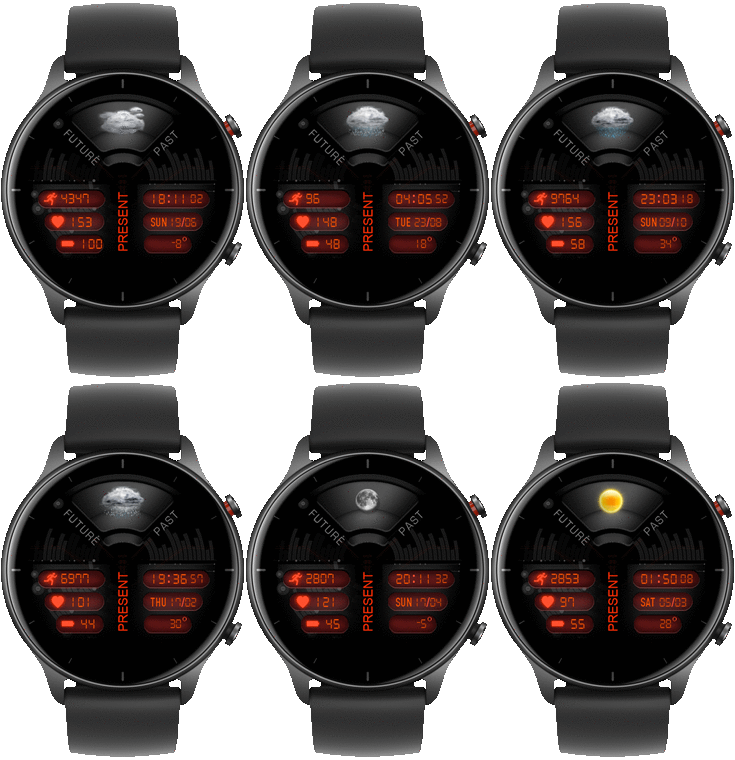
"Or take off completely analog hour, minute and seconds and it's place put weather icon"
- Yes, you can edit the this "watchface" by yourself by selecting the weather icon of your choice.
ͼͽ To request please use the interrelated forum in action ͼͽ
Please do not PM to me for requests ported watchface.
SleepyHollow
Posts: 49
Joined: 07 May 2022, 14:10
Location: Europe
Has thanked: 13 times
Been thanked: 2 times
Contact:

Post by SleepyHollow »

asoo wrote: 05 Sep 2022, 09:53
SleepyHollow wrote: 05 Sep 2022, 08:22
Thank you very much for the effort and for help, I see that it cannot be implemented as it is. Can I suggest something? If the time and minutes are not entered, but only the seconds, can it be implemented? Or take off completely analog hour, minute and seconds and it's place put weather icon. I think that the GTR2 has many limitions even more than GTR1. Thank you again for the help.
" If the time and minutes are not entered, but only the seconds "
- can't do because the problem lies in the layer

"Or take off completely analog hour, minute and seconds and it's place put weather icon"
- Yes, you can edit the this "watchface" by yourself by selecting the weather icon of your choice.
ΟK friend, thank you again. Much appriciated.
User avatar
asoo
Posts: 2120
Joined: 03 Jan 2019, 01:48
Location: ͼͽ Thailand ͼͽ
Has thanked: 409 times
Been thanked: 2037 times

Post by asoo »

SleepyHollow wrote: 05 Sep 2022, 10:31
ΟK friend, thank you again. Much appriciated.
Sample file for those who will edit it.
Spoiler
Image
Phlash_V2_1_packed.bin
(1.52 MiB) Downloaded 50 times
ͼͽ To request please use the interrelated forum in action ͼͽ
Please do not PM to me for requests ported watchface.
SleepyHollow
Posts: 49
Joined: 07 May 2022, 14:10
Location: Europe
Has thanked: 13 times
Been thanked: 2 times
Contact:

Post by SleepyHollow »

asoo wrote: 05 Sep 2022, 10:48

Spoiler
Sample file for those who will edit it.
Image
Phlash_V2_packed.bin
Thank you for v2. It's amazing.
SleepyHollow
Posts: 49
Joined: 07 May 2022, 14:10
Location: Europe
Has thanked: 13 times
Been thanked: 2 times
Contact:

Post by SleepyHollow »

The date and the month don't appear only day of week. Only MON appear but since it cannot be implemented like GTR3 Pro version, don't get tired unnecessarily. Thank you.
Post Reply

Return to “Watchfaces creation (order table)”

Who is online

Users browsing this forum: No registered users and 0 guests