SupportUkraine
If you experience any problems with the forum (it is not visible, there is no way to post messages, or some functionality does not work), please let us know. If you have problems with registration or you did not receive confirmation letter, let us know and we will activate your account manually.
If you get an "The submitted form was invalid. Try submitting again" error, delete cookies, then try again.
Ad blocker detected: Our website is made possible by displaying online advertisements to our visitors. Please consider supporting us by disabling your ad blocker on our website.
App version: 2.0.111 Stable
Watch model: GTR
Phone model: Samsung S10
OS version: Android 10

Not able to sync watch faces to zepp
Messages that does not meet these requirements will not be considered.
All information is transmitted to the developer, even if you do not receive a response in this thread.
"sometimes it's scary but it's still just you and me” — Leaving Laurel
App version: android 3622Stable
Watch model: mi band 6
Phone model: Samsung a12
OS version: Android 11
Zepp life
Not able to sync watch faces to miband 6
Message on watch : impossible to synchonized
The wath is connected
The faces of store runs
Thanks
App version: android 3622Stable
Watch model: mi band 6
Phone model: Samsung a12
OS version: Android 11
Zepp life
Not able to sync watch faces to miband 6
Message on watch : impossible to synchonized
The wath is connected
The faces of store runs
Thanks
Installing dials for miband6 at the moment only through copying to a folder will be available in the next update.
Hello am I the only one with latest release of the Android App (GTS2 Mini)?
I can't install any watchface anymore: the reason being that the app tries to install the same watchface in an infinite loop. As soon as it is over, it starts a new upload and I'm not fast enough to stop it at the right time.
Hello am I the only one with latest release of the Android App (GTS2 Mini)?
I can't install any watchface anymore: the reason being that the app tries to install the same watchface in an infinite loop. As soon as it is over, it starts a new upload and I'm not fast enough to stop it at the right time.
App version (Stable or Beta) 3.6 (220)
Watch model GTS 2 MINI Old version
Phone model Redmi Note 5 Pro
OS version Android 12L API level 32
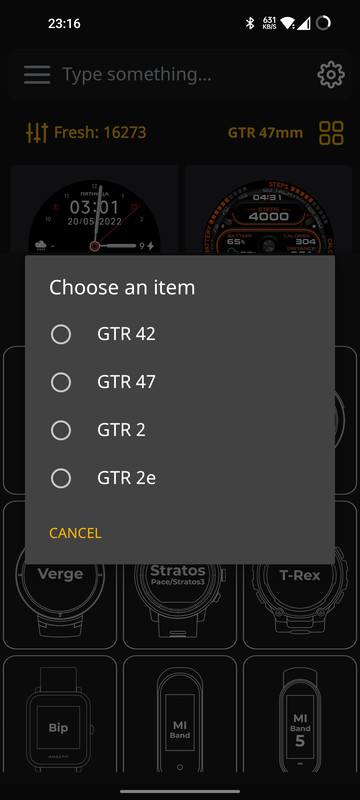
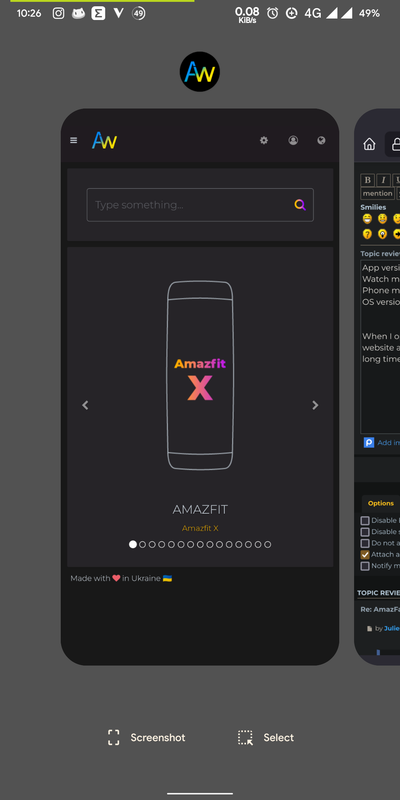
When I open the app it opens the webapp to the amazfitfaces website and not the actual app, i have been on API level 32 for a long time but this problem is only from the last week
Spoiler
When I open the app it opens the webapp to the amazfitfaces website and not the actual app, i have been on API level 32 for a long time but this problem is only from the last week
Hi. What exactly is the problem? What doesn't work for you or you just don't like something?
"sometimes it's scary but it's still just you and me” — Leaving Laurel
When I open the app it opens the webapp to the amazfitfaces website and not the actual app, i have been on API level 32 for a long time but this problem is only from the last week
Hi. What exactly is the problem? What doesn't work for you or you just don't like something?
Sorry I didn't reply early enough but take a look at the screenshot, i can't access the app and install watchfaces, when I open the app it opens up a website version of the app which can only download watchfaces and such.
When I open the app it opens the webapp to the amazfitfaces website and not the actual app, i have been on API level 32 for a long time but this problem is only from the last week
Hi. What exactly is the problem? What doesn't work for you or you just don't like something?
Sorry I didn't reply early enough but take a look at the screenshot, i can't access the app and install watchfaces, when I open the app it opens up a website version of the app which can only download watchfaces and such.
Hello! You didn't attach a screenshot and didn't fill out the template in the first post.
"sometimes it's scary but it's still just you and me” — Leaving Laurel
Hi. What exactly is the problem? What doesn't work for you or you just don't like something?
Sorry I didn't reply early enough but take a look at the screenshot, i can't access the app and install watchfaces, when I open the app it opens up a website version of the app which can only download watchfaces and such.
Hello! You didn't attach a screenshot and didn't fill out the template in the first post.
Sorry I didn't reply early enough but take a look at the screenshot, i can't access the app and install watchfaces, when I open the app it opens up a website version of the app which can only download watchfaces and such.
Hello! You didn't attach a screenshot and didn't fill out the template in the first post.
Idk how to exactly explain it, like we have two different UIs that have two different functions. UI 1 is the website, where we can browse watchfaces and download the bin files. Then there is UI 2 the mobile app UI, where it looks different and we can directly install watchfaces for some watches like the GTS 2 and such. UI 1 doesn't have that functionality as it is just a webapp. While UI 2 is the actual app.
The problem is I can only access the UI 1 when opening the app while it is supposed to open UI 2.
Edit:- I am very sorry I have been such a pain in the a** to deal with.
Idk how to exactly explain it, like we have two different UIs that have two different functions. UI 1 is the website, where we can browse watchfaces and download the bin files. Then there is UI 2 the mobile app UI, where it looks different and we can directly install watchfaces for some watches like the GTS 2 and such. UI 1 doesn't have that functionality as it is just a webapp. While UI 2 is the actual app.
The problem is I can only access the UI 1 when opening the app while it is supposed to open UI 2.
Edit:- I am very sorry I have been such a pain in the a** to deal with.
We abandoned the first version of the application and switched to a web application, which is currently being actively developed and will soon have a direct installation of dials. We abandoned the old version of the application because we decided to bring its functionality closer to the functionality of the site.
"sometimes it's scary but it's still just you and me” — Leaving Laurel
Idk how to exactly explain it, like we have two different UIs that have two different functions. UI 1 is the website, where we can browse watchfaces and download the bin files. Then there is UI 2 the mobile app UI, where it looks different and we can directly install watchfaces for some watches like the GTS 2 and such. UI 1 doesn't have that functionality as it is just a webapp. While UI 2 is the actual app.
The problem is I can only access the UI 1 when opening the app while it is supposed to open UI 2.
Edit:- I am very sorry I have been such a pain in the a** to deal with.
We abandoned the first version of the application and switched to a web application, which is currently being actively developed and will soon have a direct installation of dials. We abandoned the old version of the application because we decided to bring its functionality closer to the functionality of the site.
Hello am I the only one with latest release of the Android App (GTS2 Mini)?
I can't install any watchface anymore: the reason being that the app tries to install the same watchface in an infinite loop. As soon as it is over, it starts a new upload and I'm not fast enough to stop it at the right time.
Hello am I the only one with latest release of the Android App (GTS2 Mini)?
I can't install any watchface anymore: the reason being that the app tries to install the same watchface in an infinite loop. As soon as it is over, it starts a new upload and I'm not fast enough to stop it at the right time.
SashaCX75 showed me an alternative program and on it the synchronization of the selected watch face with my smartwatch works correctly, so I do not know why there is a problem with AmazFaces.
Description of the problem:
I run the AmazFaces program on the Samsung Galaxy S20 Ultra 5G smartphone.
I choose GTR (GTR2 / GTR3), then choose (check) GTR 3.
Then I select the watch face that interests me by scrolling vertically.
I choose Download and then choose the file with the shield.
I check if my smartwatch model, i.e. the Amazfit GTR inscription, appears above the image of the dial.
Then I choose Connect, then "Continue", then "Set on watch" and then "Continue" and so on alternately, because the dial does not upload to the watch.
Zepp sees my watch correctly and is syncing correctly.
I don't know what I'm doing wrong.
SashaCX75 showed me an alternative program and on it the synchronization of the selected watch face with my smartwatch functions correctly, so I do not know why there is a problem with AmazFaces.
Users browsing this forum: No registered users and 1 guest
Cookie Consent
This website uses cookie or similar technologies, to enhance your browsing experience and provide personalised recommendations. By continuing to use our website, you agree to our Privacy Policy