• Адміністратор
  •  
    Support Ukraine
    If you experience any problems with the forum (it is not visible, there is no way to post messages, or some functionality does not work), please let us know. If you have problems with registration or you did not receive confirmation letter, let us know and we will activate your account manually.
    If you get an "The submitted form was invalid. Try submitting again" error, delete cookies, then try again.
     

BLUE Color 0000FF gives error in BIP watch face making however ..

Archive closed topics

Модератори: Internal error, Watchmens

Закрито
asadulhuq
WF maker
Повідомлень: 24
З нами з: 06 червня 2018, 16:40
Звідки: Dhaka
Контактна інформація:

BLUE Color 0000FF gives error in BIP watch face making however ..

Повідомлення asadulhuq »

If I apply Blue color (0000FF) to the numerical digits, warning message comes while the .bin file is being made. The warning is as follows -
Trace|Loading image 2...
Trace|Image was loaded from file C:\Users\Asadul Huq\Desktop\MyBIPFace\10\10\0402.png
Warn|Dithering applied for an image. Resource in watch face will use only supported colors. You can't get back original image by unpacking watch face.
Trace|Loading image 3...
....
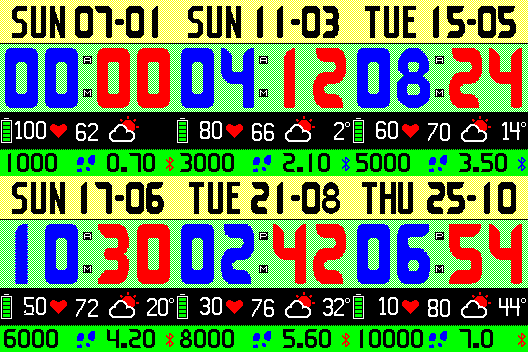
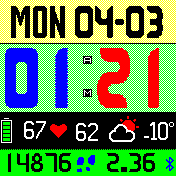
However, the actual image file shows the color correctly and the bip watch itself displays 0000FF (BLUE) color correctly. Then why that Warning message? See the following images-
Зображення

Зображення
Аватар користувача
TXK
Повідомлень: 299
З нами з: 10 квітня 2018, 05:15
Звідки: china
Has thanked: 149 times
Been thanked: 97 times
Контактна інформація:

Повідомлення TXK »

asadulhuq писав: 03 березня 2019, 19:32
If I apply Blue color (0000FF) to the numerical digits, warning message comes while the .bin file is being made. The warning is as follows -
Trace|Loading image 2...
Trace|Image was loaded from file C:\Users\Asadul Huq\Desktop\MyBIPFace\10\10\0402.png
Warn|Dithering applied for an image. Resource in watch face will use only supported colors. You can't get back original image by unpacking watch face.
Trace|Loading image 3...
....
However, the actual image file shows the color correctly and the bip watch itself displays 0000FF (BLUE) color correctly. Then why that Warning message? See the following images-

Зображення

Зображення

In image software,
disable (image anti-aliasing function)/disable (smoothing edge function) 。
Enable Pixelization function
Закрито

Повернутись до “Closed topics”

Хто зараз онлайн

Зараз переглядають цей форум: Немає зареєстрованих користувачів і 2 гостей