• Administrator
  •  
    Support Ukraine
    If you experience any problems with the forum (it is not visible, there is no way to post messages, or some functionality does not work), please let us know. If you have problems with registration or you did not receive confirmation letter, let us know and we will activate your account manually.
    If you get an "The submitted form was invalid. Try submitting again" error, delete cookies, then try again.
     

BLUE Color 0000FF gives error in BIP watch face making however ..

Archive closed topics

Moderators: Internal error, Watchmens

Locked
asadulhuq
WF maker
Posts: 24
Joined: 06 Jun 2018, 16:40
Location: Dhaka
Contact:

BLUE Color 0000FF gives error in BIP watch face making however ..

Post by asadulhuq »

If I apply Blue color (0000FF) to the numerical digits, warning message comes while the .bin file is being made. The warning is as follows -
Trace|Loading image 2...
Trace|Image was loaded from file C:\Users\Asadul Huq\Desktop\MyBIPFace\10\10\0402.png
Warn|Dithering applied for an image. Resource in watch face will use only supported colors. You can't get back original image by unpacking watch face.
Trace|Loading image 3...
....
However, the actual image file shows the color correctly and the bip watch itself displays 0000FF (BLUE) color correctly. Then why that Warning message? See the following images-
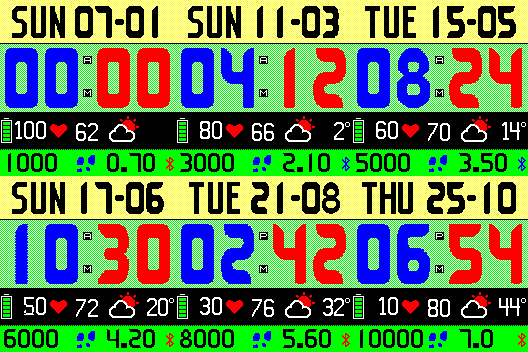
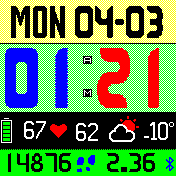
Image

Image
User avatar
TXK
Posts: 299
Joined: 10 Apr 2018, 05:15
Location: china
Has thanked: 149 times
Been thanked: 97 times
Contact:

Post by TXK »

asadulhuq wrote: 03 Mar 2019, 19:32
If I apply Blue color (0000FF) to the numerical digits, warning message comes while the .bin file is being made. The warning is as follows -
Trace|Loading image 2...
Trace|Image was loaded from file C:\Users\Asadul Huq\Desktop\MyBIPFace\10\10\0402.png
Warn|Dithering applied for an image. Resource in watch face will use only supported colors. You can't get back original image by unpacking watch face.
Trace|Loading image 3...
....
However, the actual image file shows the color correctly and the bip watch itself displays 0000FF (BLUE) color correctly. Then why that Warning message? See the following images-

Image

Image

In image software,
disable (image anti-aliasing function)/disable (smoothing edge function) 。
Enable Pixelization function
asadulhuq
WF maker
Posts: 24
Joined: 06 Jun 2018, 16:40
Location: Dhaka
Contact:

Post by asadulhuq »

Thanks.
Locked

Return to “Closed topics”

Who is online

Users browsing this forum: No registered users and 2 guests