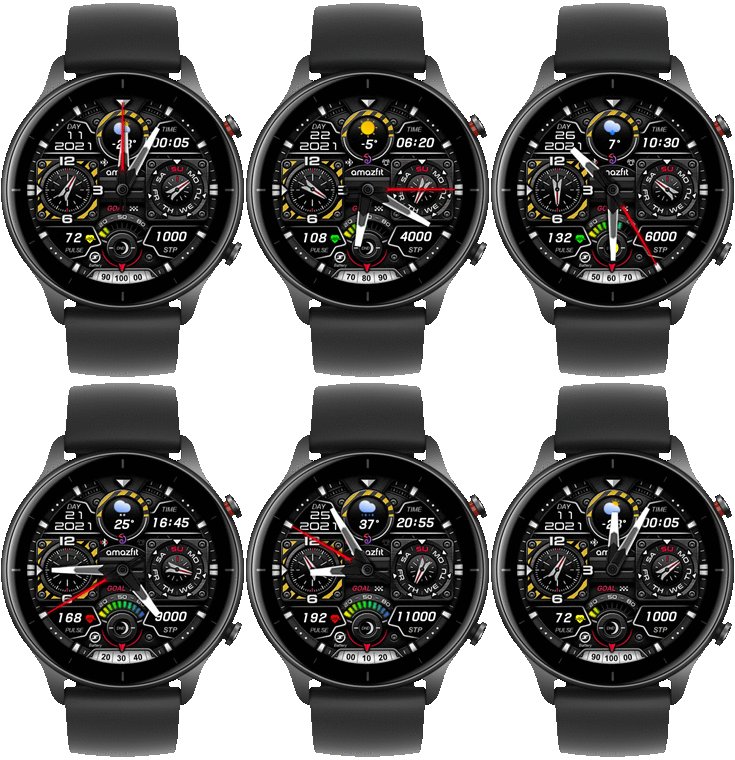
Hello to community, can anyone from creators port this amazing watchaface exactly the same, only change PAI with pulse for GTR2? I post this because asoo stop make watchfaces for GTR2. Thank you very much to all creators and to asoo for his work.
https://amazfitwatchfaces.com/gtr/view/19920
If you experience any problems with the forum (it is not visible, there is no way to post messages, or some functionality does not work), please let us know.
If you have problems with registration or you did not receive confirmation letter, let us know and we will activate your account manually.
If you get an "The submitted form was invalid. Try submitting again" error, delete cookies, then try again.
If you have problems with registration or you did not receive confirmation letter, let us know and we will activate your account manually.
If you get an "The submitted form was invalid. Try submitting again" error, delete cookies, then try again.
G284 (GTR3) asoo for GTR2
Forum rules
When adding a new topic, use the template: Topic title [device name]
For example: Requesting creation of watch face [GTR 3 Pro]
All communication in this branch should only be in English.
When adding a new topic, use the template: Topic title [device name]
For example: Requesting creation of watch face [GTR 3 Pro]
All communication in this branch should only be in English.
-
alexstam78
- Posts: 331
- Joined: 02 Aug 2020, 08:39
- Location: Greece
- Has thanked: 173 times
- Been thanked: 1 time
-
asoo
- Posts: 2226
- Joined: 03 Jan 2019, 01:48
- Location: ͼͽ Thailand ͼͽ
- Has thanked: 441 times
- Been thanked: 2142 times
- Contact:

OK, probably no one does.
Let's just say, I will made it, but it might not be tested on a real device.
If the watch face there are any issue or want to change something , I ask that , please try to fix or modify it by yourself.
Let's just say, I will made it, but it might not be tested on a real device.
If the watch face there are any issue or want to change something , I ask that , please try to fix or modify it by yourself.
ͼͽ To request please use the interrelated forum in action ͼͽ
Please do not PM to me for requests ported watchface.
Please do not PM to me for requests ported watchface.
-
alexstam78
- Posts: 331
- Joined: 02 Aug 2020, 08:39
- Location: Greece
- Has thanked: 173 times
- Been thanked: 1 time
Thank you so much, asoo, I test it, everything works fine. Thank you again, Merry Christmas and happy New year.
-
alexstam78
- Posts: 331
- Joined: 02 Aug 2020, 08:39
- Location: Greece
- Has thanked: 173 times
- Been thanked: 1 time
I find one error, i have 39% battery and watchaface shows 50, please fix it because i don't have the skills to do it, thank you so much.
-
asoo
- Posts: 2226
- Joined: 03 Jan 2019, 01:48
- Location: ͼͽ Thailand ͼͽ
- Has thanked: 441 times
- Been thanked: 2142 times
- Contact:
May be happened but i am not sure I can not test because i do not have it.alexstam78 wrote: 17 Dec 2021, 07:25I find one error, i have 39% battery and watchaface shows 50, please fix it because i don't have the skills to do it, thank you so much.
Because using 10 images to show the approximate battery values as follows
This is an approximate value, it may be higher or lower. -+3-5%
1-10 = 10% 51-60 = 60%
11-20 = 20% 61-70 = 70%
21-30 = 30% 71-80 = 80%
31-40 = 40% 81-90 = 90%
41-50 = 50% 91-100 = 100%
I have already stated in the description.
ͼͽ To request please use the interrelated forum in action ͼͽ
Please do not PM to me for requests ported watchface.
Please do not PM to me for requests ported watchface.
-
alexstam78
- Posts: 331
- Joined: 02 Aug 2020, 08:39
- Location: Greece
- Has thanked: 173 times
- Been thanked: 1 time
Yes of course i see the description that's why I say this, because according to your description of the battery rates since I have a 39% battery it should say 40% and not 50%. You may have missed something between 30% and 40%, it you can see it and find something error you can repair it and upload here to test it.
-
asoo
- Posts: 2226
- Joined: 03 Jan 2019, 01:48
- Location: ͼͽ Thailand ͼͽ
- Has thanked: 441 times
- Been thanked: 2142 times
- Contact:
This is an approximate value, it may be higher or lower. -+3-5%alexstam78 wrote: 17 Dec 2021, 09:34Yes of course i see the description that's why I say this, because according to your description of the battery rates since I have a 39% battery it should say 40% and not 50%
I have checked everything.
Using 10 images to display 100 levels and not knowing exactly how the watch is calculated. I thought I can only do like this.
The GTR3 doesn't display properly too. Most will be used only as a color bar in the show.
In the editor, it doesn't show same in clock too. So I can only do this.
ͼͽ To request please use the interrelated forum in action ͼͽ
Please do not PM to me for requests ported watchface.
Please do not PM to me for requests ported watchface.
-
alexstam78
- Posts: 331
- Joined: 02 Aug 2020, 08:39
- Location: Greece
- Has thanked: 173 times
- Been thanked: 1 time
Ok then probably you are right because now i have 38% and now shows 40 which is right and within the margins of error you mentioned. Thank you very much for the info, sorry and have a good day.
Who is online
Users browsing this forum: No registered users and 1 guest