
So I've been trying to make a modification to my "Dotted Clock" watchface (https://amazfitwatchfaces.com/bip/view/43990) where the choosen color gets applied to the AOD too. I have tried to add an IMG widget only showed in AOD and changing its source together with the BG for the normal watchface.
The problem seems to be the image isn't getting updated. Tried asking to some AI (lol) how to address this but it didn't help at all, so hoping a pro could help me with this. Also I'm leaving attatched the current state of the project, with the changes I made already. Thank you in advance for whoever get to read this and help.
If you experience any problems with the forum (it is not visible, there is no way to post messages, or some functionality does not work), please let us know.
If you have problems with registration or you did not receive confirmation letter, let us know and we will activate your account manually.
If you get an "The submitted form was invalid. Try submitting again" error, delete cookies, then try again.
If you have problems with registration or you did not receive confirmation letter, let us know and we will activate your account manually.
If you get an "The submitted form was invalid. Try submitting again" error, delete cookies, then try again.
Trying to get color in AOD
Forum rules
When adding a new topic, use the template: Topic title [device name]
For example: How to create watch face [Bip U]
All communication in this branch should only be in English.
When adding a new topic, use the template: Topic title [device name]
For example: How to create watch face [Bip U]
All communication in this branch should only be in English.
-
frankh93
- Posts: 39
- Joined: 20 Jun 2025, 00:32
- Location: CDMX
- Has thanked: 27 times
- Been thanked: 3 times
- Contact:
Trying to get color in AOD
- Attachments
-
 Dotted Clock.zip
- (608.42 KiB) Downloaded 88 times
you should be doing something productive instead of reading this caption 
-
asoo
- Posts: 2224
- Joined: 03 Jan 2019, 01:48
- Location: ͼͽ Thailand ͼͽ
- Has thanked: 438 times
- Been thanked: 2142 times
- Contact:

Switching between Normal and AOD modes will cause the variables you get from the buttons to disappear. Therefore, you must store the values in the System property instead, which isfrankh93 wrote: 20 Nov 2025, 18:47So I've been trying to make a modification to my "Dotted Clock" watchface (https://amazfitwatchfaces.com/bip/view/43990) where the choosen color gets applied to the AOD too. I have tried to add an IMG widget only showed in AOD and changing its source together with the BG for the normal watchface.
The problem seems to be the image isn't getting updated. Tried asking to some AI (lol) how to address this but it didn't help at all, so hoping a pro could help me with this. Also I'm leaving attatched the current state of the project, with the changes I made already. Thank you in advance for whoever get to read this and help.
"SysProSetInt" "SysProGetInt" .
I haven't created a watch face that affects AOD selections, so I can't provide accurate recommendations.
This is all I can help you.. I hope this helps.
You can find more information at the link below.
search.php?keywords=SysProSetInt
PS.
The more you manage widget colors in normal mode, the more complex it becomes to store values for use in AOD.
ͼͽ To request please use the interrelated forum in action ͼͽ
Please do not PM to me for requests ported watchface.
Please do not PM to me for requests ported watchface.
-
frankh93
- Posts: 39
- Joined: 20 Jun 2025, 00:32
- Location: CDMX
- Has thanked: 27 times
- Been thanked: 3 times
- Contact:
Thank you for answering, I've tried this but doesnt seem to be working either. Used this in the updateWatchface function:asoo wrote: 21 Nov 2025, 00:44Switching between Normal and AOD modes will cause the variables you get from the buttons to disappear. Therefore, you must store the values in the System property instead, which isfrankh93 wrote: 20 Nov 2025, 18:47So I've been trying to make a modification to my "Dotted Clock" watchface (https://amazfitwatchfaces.com/bip/view/43990) where the choosen color gets applied to the AOD too. I have tried to add an IMG widget only showed in AOD and changing its source together with the BG for the normal watchface.
The problem seems to be the image isn't getting updated. Tried asking to some AI (lol) how to address this but it didn't help at all, so hoping a pro could help me with this. Also I'm leaving attatched the current state of the project, with the changes I made already. Thank you in advance for whoever get to read this and help.
"SysProSetInt" "SysProGetInt" .
I haven't created a watch face that affects AOD selections, so I can't provide accurate recommendations.
This is all I can help you.. I hope this helps.
You can find more information at the link below.
search.php?keywords=SysProSetInt
PS.
The more you manage widget colors in normal mode, the more complex it becomes to store values for use in AOD.
Code: Select all
let colorIndexAOD = colorIndex + 1
hmFS.SysProSetInt('currColorAOD', colorIndexAOD)Code: Select all
bgColorWatchfaceAOD.setProperty(hmUI.prop.SRC, "bg_colors/aod/COLOR_" + hmFS.SysProGetInt('currColorAOD') + ".png");you should be doing something productive instead of reading this caption
-
asoo
- Posts: 2224
- Joined: 03 Jan 2019, 01:48
- Location: ͼͽ Thailand ͼͽ
- Has thanked: 438 times
- Been thanked: 2142 times
- Contact:
I'm not sure about the script you mentioned., but judging from your script, it seems quite confusing. I'm not sure what some of the functions you created were for, however I haven't investigated them. However, I've created an example from your watch face you posted earlier, I removing some function that I think it unnecessary elements by using // and /* */ to prevent that script from running.frankh93 wrote: 21 Nov 2025, 18:06Thank you for answering, I've tried this but doesnt seem to be working either. Used this in the updateWatchface function:asoo wrote: 21 Nov 2025, 00:44Switching between Normal and AOD modes will cause the variables you get from the buttons to disappear. Therefore, you must store the values in the System property instead, which isfrankh93 wrote: 20 Nov 2025, 18:47So I've been trying to make a modification to my "Dotted Clock" watchface (https://amazfitwatchfaces.com/bip/view/43990) where the choosen color gets applied to the AOD too. I have tried to add an IMG widget only showed in AOD and changing its source together with the BG for the normal watchface.
The problem seems to be the image isn't getting updated. Tried asking to some AI (lol) how to address this but it didn't help at all, so hoping a pro could help me with this. Also I'm leaving attatched the current state of the project, with the changes I made already. Thank you in advance for whoever get to read this and help.
"SysProSetInt" "SysProGetInt" .
I haven't created a watch face that affects AOD selections, so I can't provide accurate recommendations.
This is all I can help you.. I hope this helps.
You can find more information at the link below.
search.php?keywords=SysProSetInt
PS.
The more you manage widget colors in normal mode, the more complex it becomes to store values for use in AOD.and then this in pause_call.jsCode: Select all
let colorIndexAOD = colorIndex + 1 hmFS.SysProSetInt('currColorAOD', colorIndexAOD)but no look, the image isn't getting changed. Am I missing something? Thank you againCode: Select all
bgColorWatchfaceAOD.setProperty(hmUI.prop.SRC, "bg_colors/aod/COLOR_" + hmFS.SysProGetInt('currColorAOD') + ".png");
As far as I've tested, it can change the elements in the AOD.
There's a slight issue: when you reset the clock, the home screen returns to the first color, but the AOD remains the last color you selected. This shouldn't be a problem, as when you choose a new color, the AOD changes to reflect the home screen, so I haven't done anything further with this part.
As I mentioned, I don't make watch faces whose AOD changes elements based on the home screen, so I'm only working on what I understand.
Download
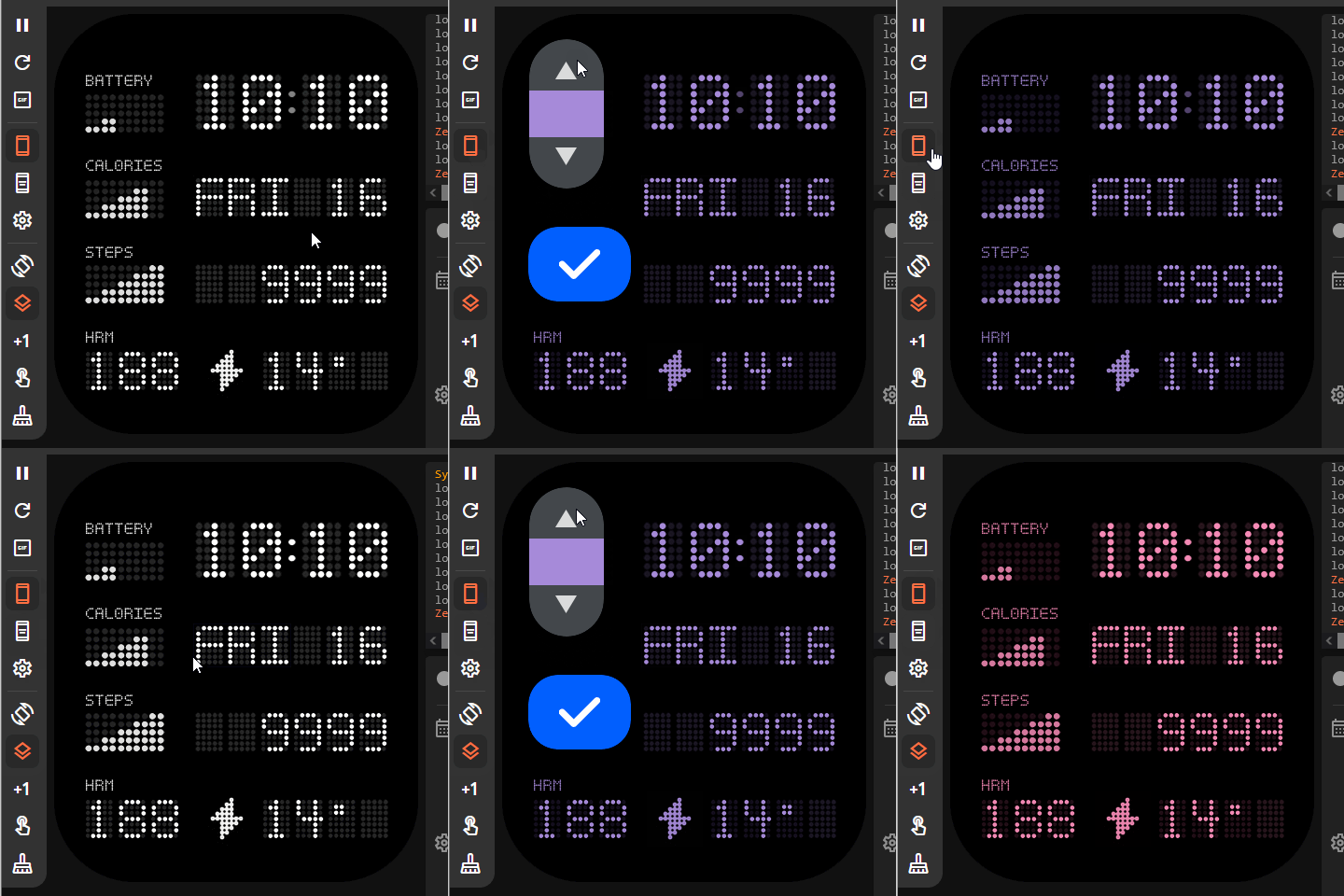
- Dotted-Clock_Switch_ON_AOD.zip
- (534.92 KiB) Downloaded 77 times
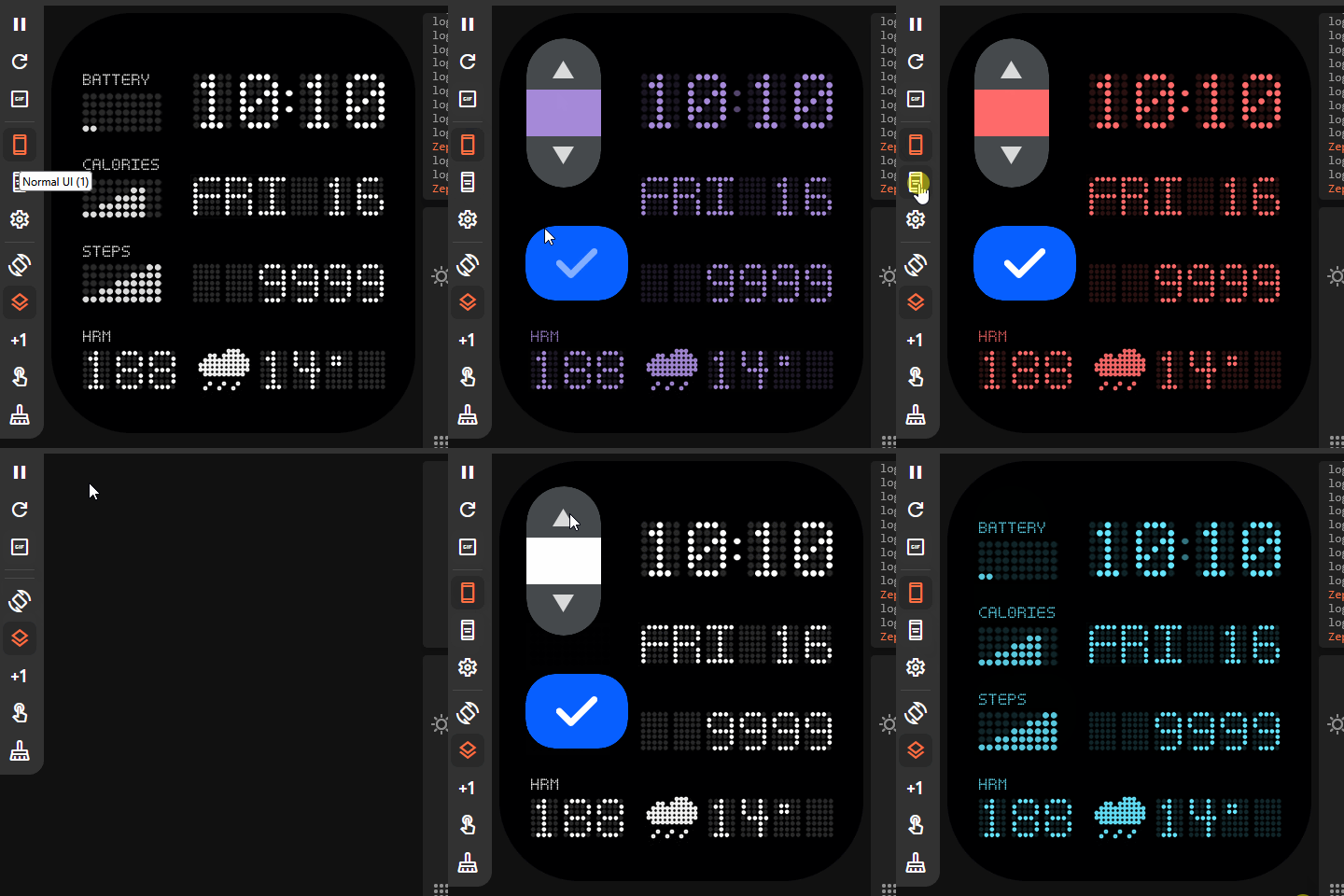
V.3 Fixed and added widgets in the AOD section to make it display as complete as possible.
- Dotted-Clock_v3.zip
- (574.43 KiB) Downloaded 86 times
In AOD, at certain times, the screen will move by about 1-2 pixels to maintain the screen. This causes some widgets to display out of sync.
This can cause the background to move from a specified point, resulting in the overall image having errors such as the text frame having the background color displayed.(this cannot be changed due to system requirements). If you want to fix this, you'll have to completely redesign the display, which I won't do, so I'm letting you know here.
ͼͽ To request please use the interrelated forum in action ͼͽ
Please do not PM to me for requests ported watchface.
Please do not PM to me for requests ported watchface.
Who is online
Users browsing this forum: No registered users and 1 guest