• 管理员
  •  
    Support Ukraine
    If you experience any problems with the forum (it is not visible, there is no way to post messages, or some functionality does not work), please let us know. If you have problems with registration or you did not receive confirmation letter, let us know and we will activate your account manually.
    If you get an "The submitted form was invalid. Try submitting again" error, delete cookies, then try again.
     

AmazFit WatchFace editor for Windows by SashaCX75

This forum is designed to discuss and develop tools creating watch faces.

版主: asoolvpokkaInternal errorWatchmens

版面规则
All communication in this branch should only be in English.
To discuss tools that are not in this section, use the “Watchfaces tools (discussion)” forum.
头像
SashaCX75
帖子: 818
注册时间: 26 10月 2019, 15:18
来自: Ukraine
Has thanked: 13 time
Been thanked: 1028 time
联系:

AmazFit WatchFace editor for Windows by SashaCX75

帖子 SashaCX75 »

Graphics editor for working with dials Amazfit
The editor supports watch faces from GTR 47, GTR 42, GTS, T-Rex, Verge Lite.
Screenshot
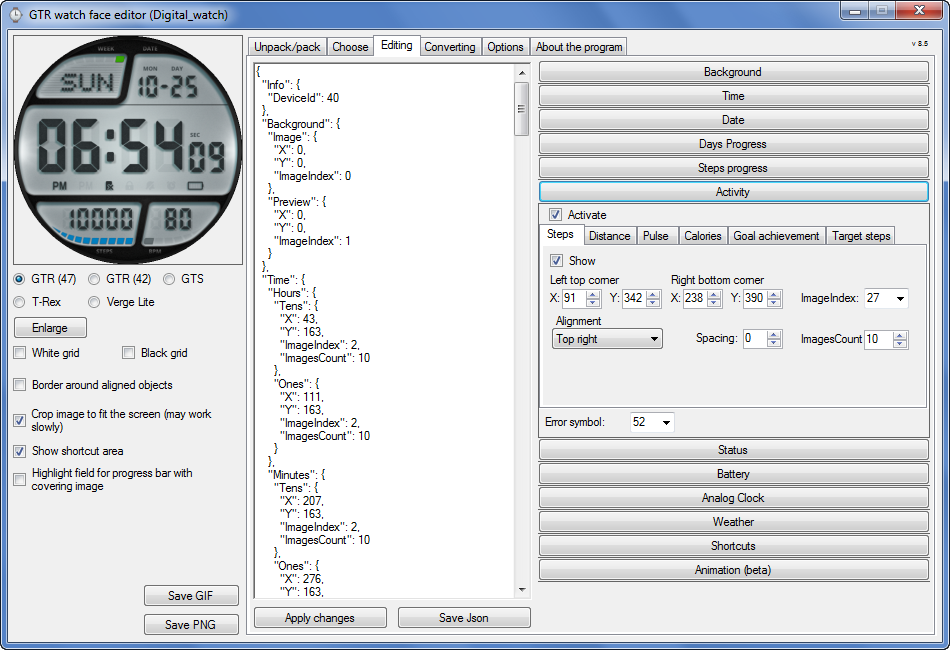
图片
Note: the path to the program should not contain spaces, it is advisable to unpack it to the root of the disk.
Not all dials can be unpacked.
You can reduce the size of the bin file only by reducing the size of the images (height * width) or by reducing the number of images.

The drawing order of elements cannot be changed. The only exception is if you move the second hand from the center, it will be drawn under the hour and minute hands.

If the .bin file is not created, then you need to look for errors in the .log file. Most often this happens when images have the wrong format.

If the bin file is not created, and the log file contains the entry “bad transparency mask”, this means that the format of one or more images is incorrect (most often it occurs if you save the image in Photoshop without transparent pixels). You can fix it as follows:
- in Photoshop - add at least one transparent pixel
- in GIMP exported to PNG 16 bit RGBA
- in XnView - Image -> 32 bits

Version 10.0
List of changes
Added the ability to display the distance traveled in kilometers and miles.
Updated translation.
v 9.0
Fixed display of date if pictures have different sizes (often pictures for "1" are narrower than others)
Added new warnings about possible errors.
Fixed the order of displaying items.
Added a button to refresh the preview image.
Fixed bugs when converting watch faces.
Updated Chinese and Italian translations.
v 8.5
Fixed work with Verge Lite
v 8.4
Fixed Italian translation.
Added Chinese manual.
v 8.3
Bugs fixed.
Added a manual in English.
v 8.2
Added the display of the target steps (StepsGoal)
Added preliminary calculation of the size of the .bin file.
v 8.1
Fixed work on monitors with high resolution.
Updated translation (French, Italian, Chinese, Spanish).
v 8.0
Added the ability to convert dials between different watch models (GTR / T-Rex / Verge Lite).
v 7.1
Italian language added.
Minor fixes.
v 7.0
Added animation support
Verge Lite Support Added
Added the ability to quickly save the project (Ctrl + S)
Added support for languages (French, Chinese).
v 6.1
Added support for T-Rex.
Added the ability to auto-correct image files (error "bad transparency mask").
Added a reminder to save the project when it is closed.
v 6.0
Added support for shortcuts.
Added background image support for circular indicator.
Added display of a set of icons (segments) for the progress of steps.
Added display of a set of icons (segments) for the battery.
Added display of a set of icons (segments) for the pulse.
Added display of an indicator (arrow) for a pulse.
Added display of indicator (arrows) for calories.
Added display of a circular indicator for the pulse.
Added display of a circular indicator for calories.
Added the ability to crop the image to fit the screen.
Added support for languages ​​(Portuguese, Czech, Slovak, Hungarian).
v 5.2
Added support for a set of icons (icons and a set of coordinates for them) for the progress of steps and battery.
Added the ability to crop the preview according to the shape of the screen.
Bugs fixed in the English version.
v 5.1
Fixed incorrect display of the distance traveled.
Added the ability to adjust the speed of gif animation.
Added the ability to work with compressed bin files.
Updated bin file packer.
Added display of the year.
Added display of a charge indicator (arrow).
Added display of indicator (arrow) of steps.
Added display of the indicator (arrow) of the date.
Added display of indicator (arrow) of the day of the week.
Added display of indicator (arrow) of the month.
Added the ability to paste copied coordinates into offset fields from the center (for arrows).
English support added.
Old versions
If you want to supplement the missing translation, write to the PM.

Beta version of the editor with support for Amazfit X

AmazFit WatchFace editor 2 with support for GTR 2, GTS 2, T-Rex Pro

My editor doesn't work with GTR2 (GTS2) watch faces and I have no plans to add support for these models anytime soon. I don't know any other programs that can work with these dials. I have no information if anyone is working in this direction.

Because I bought a GTR 2e, the program will no longer be updated.

Donate to the author
PayPal: [email protected].

上次由 SashaCX75 在 01 6月 2022, 07:20,总共编辑 25 次。
头像
SashaCX75
帖子: 818
注册时间: 26 10月 2019, 15:18
来自: Ukraine
Has thanked: 13 time
Been thanked: 1028 time
联系:

帖子 SashaCX75 »

If a dialog box pops up with an error, then it is better to attach a screenshot of this window with an error so that it is clear what is at stake. You can try resetting the program.
If the bin file is simply not created, but there is a log file, then you need to look in it.
shirumitsu
WF maker
帖子: 15
注册时间: 07 7月 2019, 01:48
来自: Brazil
Has thanked: 2 time
Been thanked: 1 time
联系:

帖子 shirumitsu »

SashaCX75 写了: 26 2月 2020, 16:58
If a dialog box pops up with an error, then it is better to attach a screenshot of this window with an error so that it is clear what is at stake. You can try resetting the program.
If the bin file is simply not created, but there is a log file, then you need to look in it.
please see the image, language portuguese, i can unpack a bin but i cant save my wf to .bin
图片
shirumitsu
WF maker
帖子: 15
注册时间: 07 7月 2019, 01:48
来自: Brazil
Has thanked: 2 time
Been thanked: 1 time
联系:

帖子 shirumitsu »

2020-02-26 20:00:51,882 - root - DEBUG - Generating states done...
2020-02-26 20:00:51,898 - root - CRITICAL - bad transparency mask
Traceback (most recent call last):
File "program.py", line 71, in writeWatchFace
File "program.py", line 181, in generatePreviews
File "watchFaceParser\previewGenerator.py", line 16, in createImage
File "watchFaceParser\previewGenerator.py", line 25, in createFrame
File "watchFaceParser\models\elements\basic\containerElement.py", line 12, in draw3
File "watchFaceParser\models\elements\common\imageElement.py", line 22, in draw3
File "watchFaceParser\models\elements\common\imageElement.py", line 30, in draw2
File "site-packages\PIL\Image.py", line 1524, in paste
ValueError: bad transparency mask
2020-02-26 20:00:51,914 - root - ERROR - [WinError 2] O sistema não pode encontrar o arquivo especificado: 'D:\\GTR_Watch_face_(without_Python)\\Watch_face\\Nova\\sonic_packed.bin'
Traceback (most recent call last):
File "program.py", line 71, in writeWatchFace
File "program.py", line 181, in generatePreviews
File "watchFaceParser\previewGenerator.py", line 16, in createImage
File "watchFaceParser\previewGenerator.py", line 25, in createFrame
File "watchFaceParser\models\elements\basic\containerElement.py", line 12, in draw3
File "watchFaceParser\models\elements\common\imageElement.py", line 22, in draw3
File "watchFaceParser\models\elements\common\imageElement.py", line 30, in draw2
File "site-packages\PIL\Image.py", line 1524, in paste
ValueError: bad transparency mask

During handling of the above exception, another exception occurred:

Traceback (most recent call last):
File "program.py", line 116, in packWatchFace
File "program.py", line 80, in writeWatchFace
FileNotFoundError: [WinError 2] O sistema não pode encontrar o arquivo especificado: 'D:\\GTR_Watch_face_(without_Python)\\Watch_face\\Nova\\sonic_packed.bin'

During handling of the above exception, another exception occurred:

Traceback (most recent call last):
File "main.py", line 39, in <module>
File "program.py", line 118, in packWatchFace
FileNotFoundError: [WinError 2] O sistema não pode encontrar o arquivo especificado: 'D:\\GTR_Watch_face_(without_Python)\\Watch_face\\Nova\\sonic_packed.bin'
rubiales41
WF maker
帖子: 8
注册时间: 08 12月 2019, 08:03
Has thanked: 5 time
联系:

帖子 rubiales41 »

hello, can someone tell me, what to do to put the hands of the clock, when the clock is on one side of the dial, I do not get it, when I keep to see the result, the needles walk around the dial
头像
SashaCX75
帖子: 818
注册时间: 26 10月 2019, 15:18
来自: Ukraine
Has thanked: 13 time
Been thanked: 1028 time
联系:

帖子 SashaCX75 »

[mention]shirumitsu[/mention]
The main message that indicates an error
ValueError: bad transparency mask
The solutions are listed here.
头像
SashaCX75
帖子: 818
注册时间: 26 10月 2019, 15:18
来自: Ukraine
Has thanked: 13 time
Been thanked: 1028 time
联系:

帖子 SashaCX75 »

[mention]rubiales41[/mention]
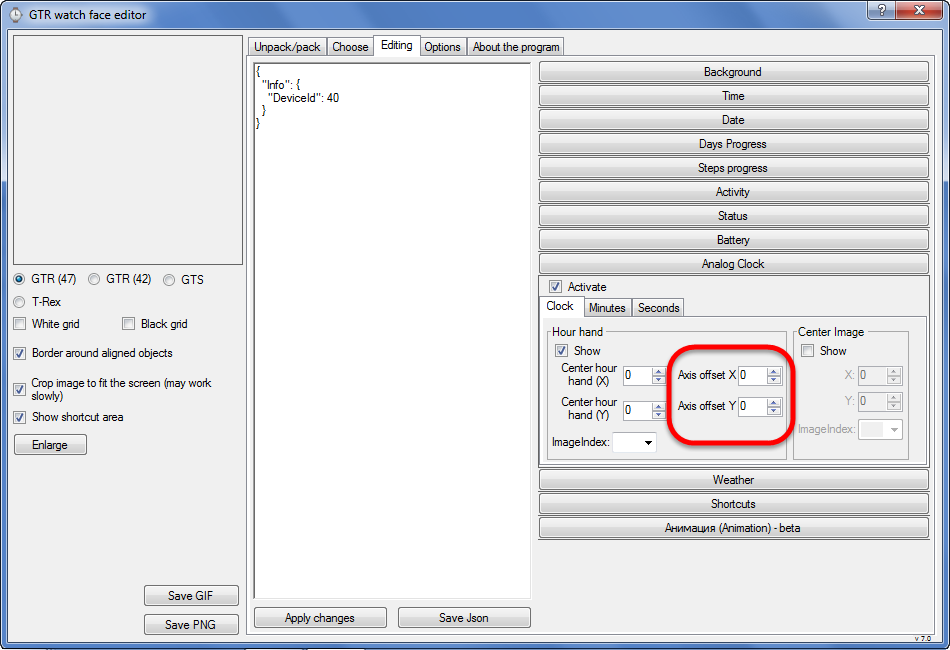
If I understand correctly, you need to move the clock hands from the center of the dial.
For this there is a parameter "Axis offset"
图片
头像
Lordalpine
WF maker
帖子: 62
注册时间: 09 10月 2019, 22:09
来自: Santo Tirso
Has thanked: 6 time
Been thanked: 35 time
联系:

帖子 Lordalpine »

[mention]rubiales41[/mention]


图片
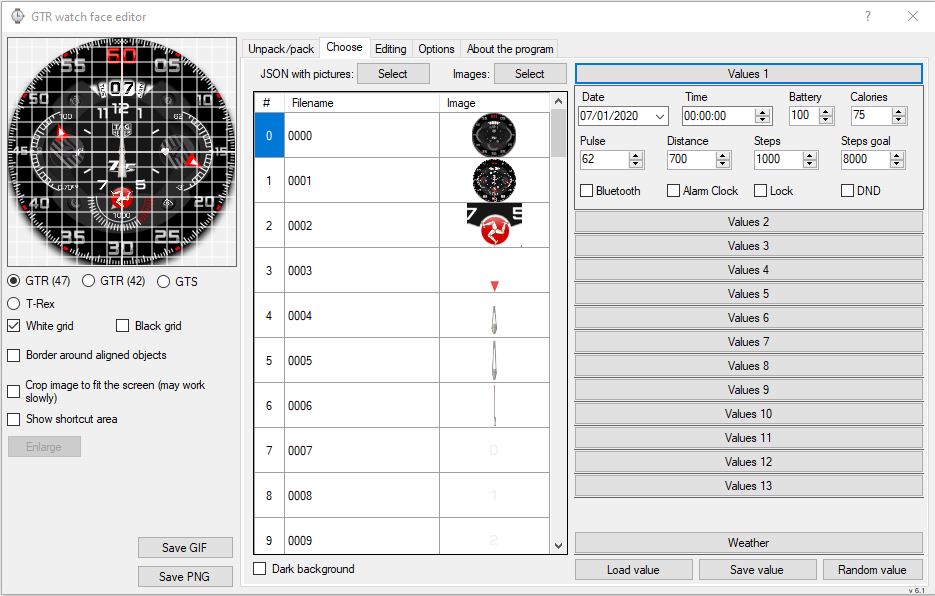
Put time at Midnight / 00:00
-> Easiest position to adjust [ For other hand like battery // heartrate it work the same ]

Select White Grid or black grid [ It's a nice help to make perfect Hand turn ]

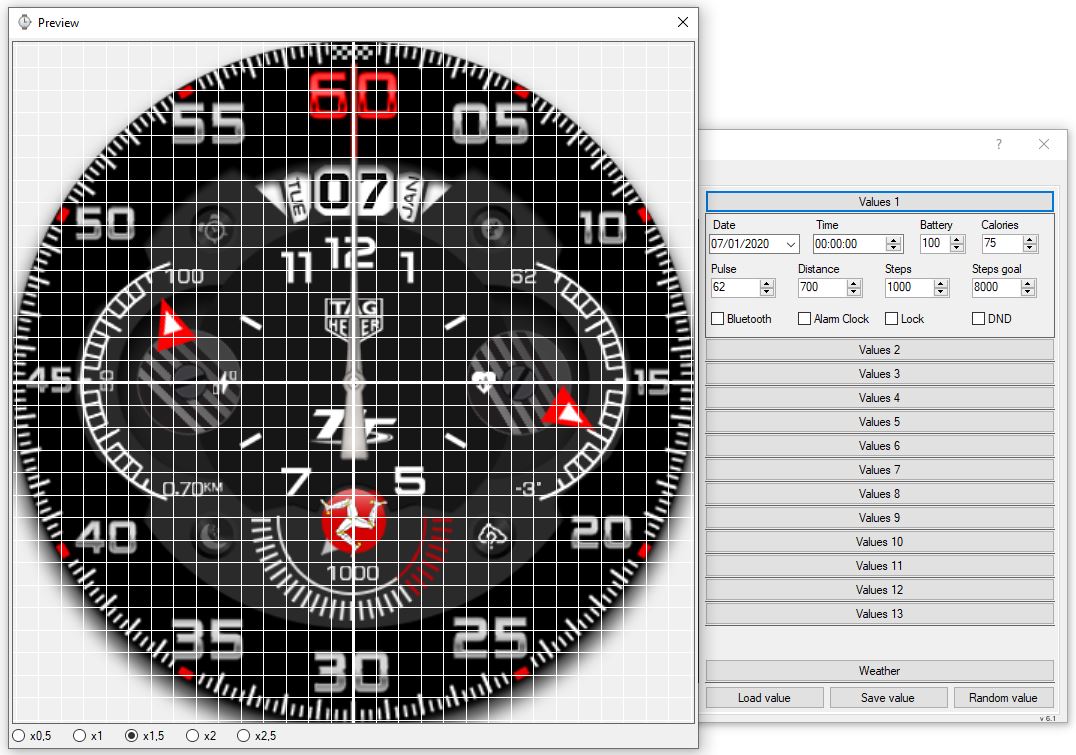
图片
Center of the Hand perfectly centered

图片
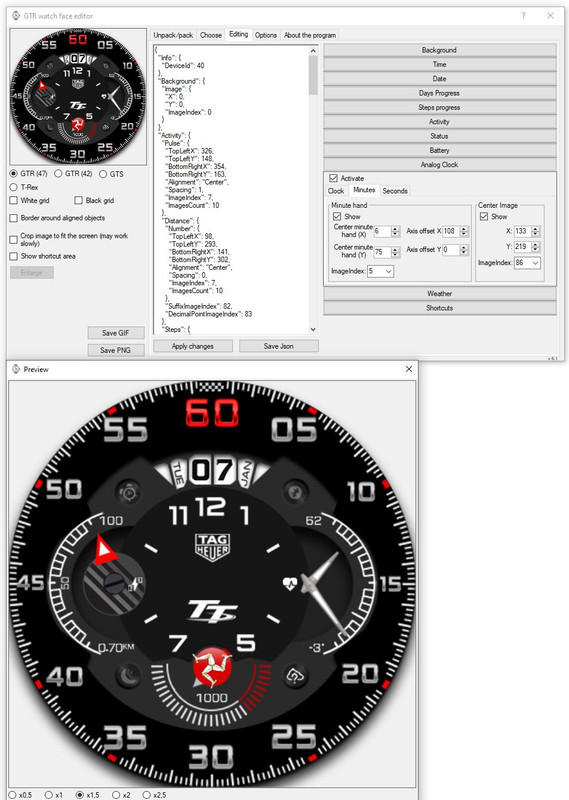
Center Minute Hand [ X horizontal // Y Vertical ]
Axis Offset is where you want to put the hand [ Hour and Minute Here : X 133 // Y 219.... so my hour and minute hand are placed on the right ]

图片
Some advice : Look how much pixel is your center of hand...
Here It's a 3 pixel created from scratch[ So It's easy^^ ]


-> Center of background is 227 [ 454*454 background right ? ]
-> Put a pixel horizontal size with paired number [ 20 // 22 // 24 // 26 etc... ] and put the hand one pixel on the left on your PNG
or
-> Put a pixel horizontal size with unpaired number [ 21 // 23 // 25 // 27 etc ] and center the hand on your PNG

Just writing this because, when you want to make a face already existing for other device... the hand are not scaled, and when you resize them...
Center Hand pixel and all the pixel are splitted on two [ Then It's Harder to edit for colour variant for exemple ]
4/6/8/10 pixel Horizontal hand size will be 1 pixel on the left or 1 pixel on the right.... [ It will make you mad^^ ]

Or the Hand are not really really 100% centered when they turn...

The advice is to get Pixel align [ and not splitted in two on PNG ] and perfect align on face
[ and sometimes you loose time because you forget this ]
shirumitsu
WF maker
帖子: 15
注册时间: 07 7月 2019, 01:48
来自: Brazil
Has thanked: 2 time
Been thanked: 1 time
联系:

帖子 shirumitsu »

SashaCX75 写了: 27 2月 2020, 14:56
@shirumitsu
The main message that indicates an error
ValueError: bad transparency mask
The solutions are listed here.
great! work here, but how create a animation? i have 4 frames
头像
SashaCX75
帖子: 818
注册时间: 26 10月 2019, 15:18
来自: Ukraine
Has thanked: 13 time
Been thanked: 1028 time
联系:

帖子 SashaCX75 »

shirumitsu 写了: 28 2月 2020, 10:33
great! work here, but how create a animation? i have 4 frames
The editor does not currently support animation.
Animation can be added manually by editing the json file. What the animation section should look like here.
rubiales41
WF maker
帖子: 8
注册时间: 08 12月 2019, 08:03
Has thanked: 5 time
联系:

帖子 rubiales41 »

hello, how is it done, or where can I find the time points and minutes to make analog clocks ?, thank you very much
头像
Lordalpine
WF maker
帖子: 62
注册时间: 09 10月 2019, 22:09
来自: Santo Tirso
Has thanked: 6 time
Been thanked: 35 time
联系:

帖子 Lordalpine »

rubiales41 写了: 29 2月 2020, 19:48
hello, how is it done, or where can I find the time points and minutes to make analog clocks ?, thank you very much
- Picking up some element : viewtopic.php?f=41&t=980
- Searching for faces on google by Key Word : Faces, Watch faces, Clean Dial
- Cutting out elements on site that sell Watch or repair watch or Aliexpress [ for Bezel, No I'm not kinding ]
- Unpack faces for android wear, GTR, [ All system :D ]
- Do the Hour Ring // Tachys // Minute ring [ everything you need ] on Watchmaker app for android on your smatphone or Android Emulator, screenshot, retrieve and edit in Photoshop [ Again I'm serious ]
- The Best solution :
Spoiler
do it yourself on Photoshop, Gimp, Illustrator, Autocad [ The best solution IMO ]
图片
头像
albertowd
WF maker
帖子: 2
注册时间: 26 9月 2019, 01:01
来自: Brazil
Has thanked: 4 time
Been thanked: 1 time
联系:

帖子 albertowd »

A quick tip for Photoshop users when saving PNG-24 preset:

When saving a solid PNG (with no transparent pixel, ex.: a full background picture), the exporter does not includes the alpha channel on the final file, leaving it with a true 24-bit PNG file.

The tool will use the same mask for all image files, so if the background image is solid but all other images are transparent, it will save as a 32-bit PNG file and it will crash the bin packer.

Solution: when using transparent and solid images, save solid ones with the normal "Save As ..." option so it will not be optimized into a different bit mask.
[email protected]
WF maker
帖子: 4
注册时间: 10 1月 2020, 14:12
来自: 邯郸
Has thanked: 1 time
联系:

帖子 [email protected] »

我说一句,哥们们,我作为一个中国人,看英文都困难,你们让我去一个俄罗斯网站下载东西,还要求注册一个账户……我下下来一个一看,俄文,你们说郁闷不?谁能给我这个中国朋友提供一个中文版本的下载地址,而且能直接下载的,谢谢大家了……
Let me say, man, as a Chinese, it's difficult to read English. You asked me to go to a Russian website to download things and register an account I'll take a look next time. Russian, do you think it's depressing? Who can provide a Chinese version download address for my Chinese friend, and can download it directly? Thank you
头像
SashaCX75
帖子: 818
注册时间: 26 10月 2019, 15:18
来自: Ukraine
Has thanked: 13 time
Been thanked: 1028 time
联系:

帖子 SashaCX75 »

[email protected] 写了: 10 3月 2020, 00:05
Who can provide a Chinese version download address for my Chinese friend, and can download it directly? Thank you
Download v6.2 here.

Or v7.0 beta with Chinese.
[email protected]
WF maker
帖子: 4
注册时间: 10 1月 2020, 14:12
来自: 邯郸
Has thanked: 1 time
联系:

帖子 [email protected] »

感谢兄弟,这个我需要翻墙……中国对翻墙软件管理很严,有咱们论坛直接下载的就好了……
Thank you brother, I need to climb over the wall China is very strict in the management of wall climbing software. It's good to have those downloaded directly from our forum
[email protected]
WF maker
帖子: 4
注册时间: 10 1月 2020, 14:12
来自: 邯郸
Has thanked: 1 time
联系:

帖子 [email protected] »

我已经翻墙下下来了,但是在表盘制作好以后不知道如何保存成手表能用的文件,谁能告诉我保存文件的步骤呢?麻烦了
I've come down the wall, but I don't know how to save the watch file after the dial is made. Who can tell me the steps to save the file? Sorry for the inconvenience
头像
Maikeldevil
帖子: 64
注册时间: 17 8月 2019, 12:05
来自: unknown
Has thanked: 3 time
Been thanked: 44 time
联系:

帖子 Maikeldevil »

Hi people, im a bit struggeling with a thing.. So i made this watch face to copy it like the original one:

https://amazfitwatchfaces.com/gtr/view/1160

But my problem is that the hand for step progress is going underneat the digital time. Is there any way to make sure this yellow hand is going over the digital times and status icons instead of under them? Is there any way to difine a dominant order? If there is we could do way more great things, just by changing orders..

Hope someone could reply to me!

(I use the sasha tool together with python)
头像
Pucci14
帖子: 3
注册时间: 08 3月 2020, 16:42
来自: Roma
联系:

帖子 Pucci14 »

Is there any Manual (in any language) wich I could then translate with Google?
Thanks
taw_bip
WF maker
帖子: 130
注册时间: 12 4月 2018, 16:29
Has thanked: 127 time
Been thanked: 19 time
联系:

帖子 taw_bip »

SashaCX75 写了: 10 3月 2020, 17:04
[email protected] 写了: 10 3月 2020, 00:05
Who can provide a Chinese version download address for my Chinese friend, and can download it directly? Thank you
Download v6.2 here.

Or v7.0 beta with Chinese.
Thank you for adding Verge Lite to the app!
头像
SashaCX75
帖子: 818
注册时间: 26 10月 2019, 15:18
来自: Ukraine
Has thanked: 13 time
Been thanked: 1028 time
联系:

帖子 SashaCX75 »

Maikeldevil 写了: 12 3月 2020, 07:31
But my problem is that the hand for step progress is going underneat the digital time. Is there any way to make sure this yellow hand is going over the digital times and status icons instead of under them? Is there any way to difine a dominant order? If there is we could do way more great things, just by changing orders..
Hand for step progress is going under digital time and over status icons.
The order cannot be changed.
The best way to check is to install on the watch and see.

Pucci14 写了: 12 3月 2020, 12:58
Is there any Manual (in any language) wich I could then translate with Google?
Thanks
Help is in the program (a question mark beside to the button to close the window or a link on the "About" tab). I have not seen a more detailed help anywhere. Maybe someone will do the best help.

taw_bip 写了: 12 3月 2020, 13:40
Thank you for adding Verge Lite to the app!
Verge Lite support in beta may not work properly.
After the release of the stable version, I recommend updating to it.
头像
SashaCX75
帖子: 818
注册时间: 26 10月 2019, 15:18
来自: Ukraine
Has thanked: 13 time
Been thanked: 1028 time
联系:

帖子 SashaCX75 »

[email protected] 写了: 12 3月 2020, 04:44
我已经翻墙下下来了,但是在表盘制作好以后不知道如何保存成手表能用的文件,谁能告诉我保存文件的步骤呢?麻烦了
I've come down the wall, but I don't know how to save the watch file after the dial is made. Who can tell me the steps to save the file? Sorry for the inconvenience
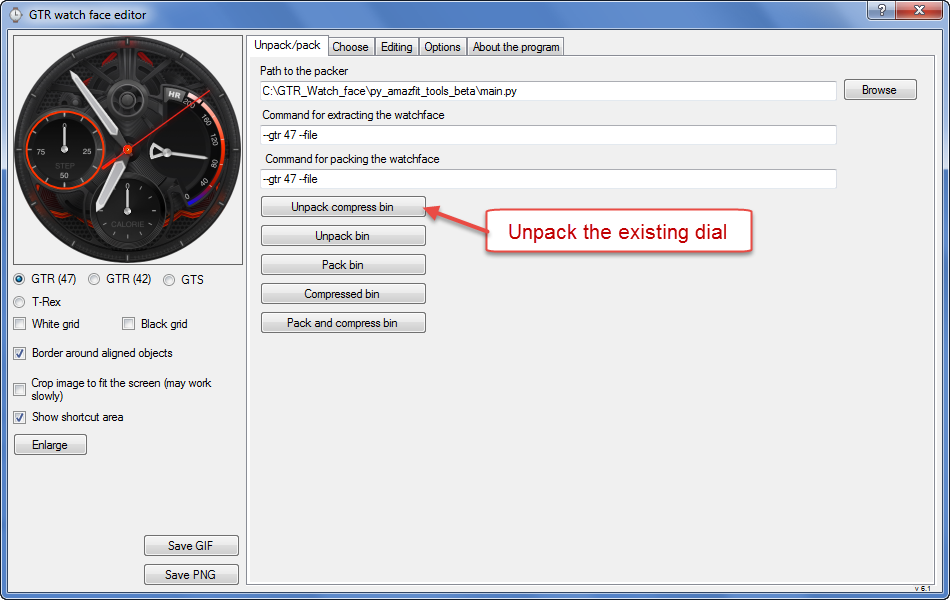
0. Unpack the existing dial or create a new one.
图片

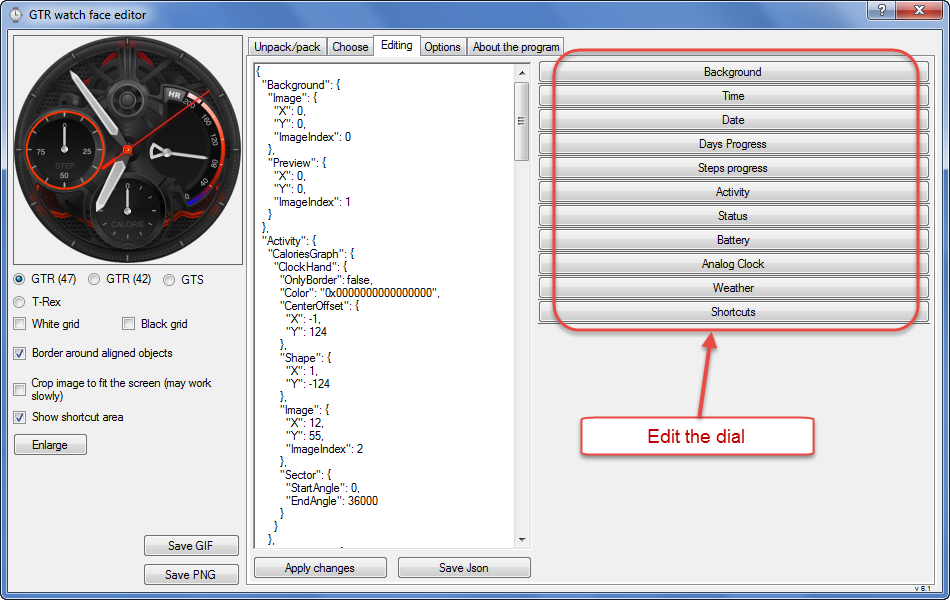
1. Edit the dial.
图片

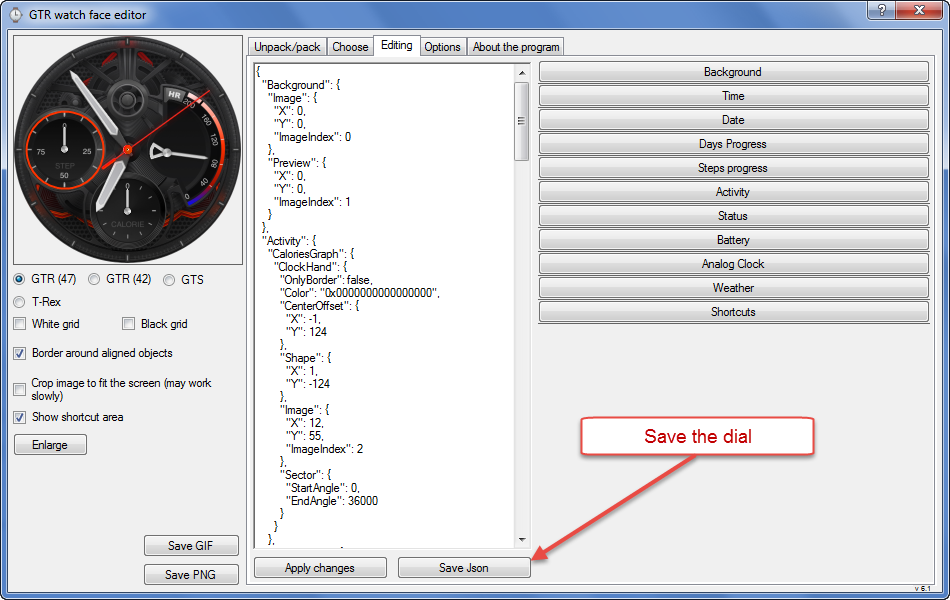
2. Save the dial.
图片

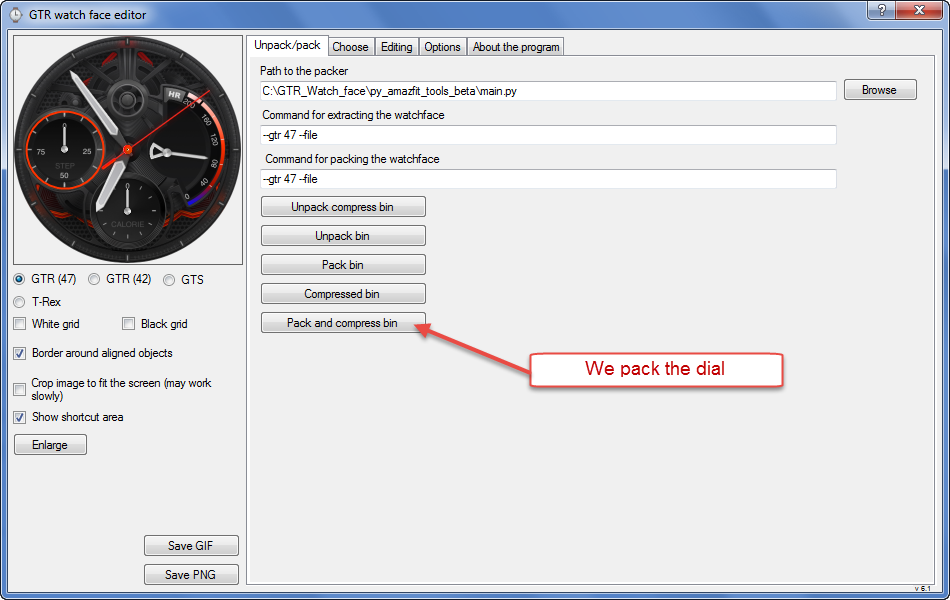
3. We pack the dial.
图片
头像
Pucci14
帖子: 3
注册时间: 08 3月 2020, 16:42
来自: Roma
联系:

帖子 Pucci14 »

Thanks SashaCX75!
[email protected]
WF maker
帖子: 4
注册时间: 10 1月 2020, 14:12
来自: 邯郸
Has thanked: 1 time
联系:

帖子 [email protected] »

兄弟,谢谢了,我已经自己研究出怎样保存了,还是感谢你的帮助,谢谢。
Brother, thank you. I have worked out how to save it. Thank you for your help. Thank you.
头像
Pucci14
帖子: 3
注册时间: 08 3月 2020, 16:42
来自: Roma
联系:

帖子 Pucci14 »

First of all I apologize if this question was alredy posted but I have just managed to create a file *packed_zip.bin.
This is a modification of an existing one.
I would also be ready to publish it but, to be sure of the result, I need to see it on my whatch,

Now the question: how can I load into my Watch?

Sorry again for a possible double posst.
It is enough the link to the correct post.

Thanks
shirumitsu
WF maker
帖子: 15
注册时间: 07 7月 2019, 01:48
来自: Brazil
Has thanked: 2 time
Been thanked: 1 time
联系:

帖子 shirumitsu »

Version 7.0 suport animation? if not, please make it!
SashaCX75 写了: 10 3月 2020, 17:04
[email protected] 写了: 10 3月 2020, 00:05
Who can provide a Chinese version download address for my Chinese friend, and can download it directly? Thank you
Download v6.2 here.

Or v7.0 beta with Chinese.
回复

回到 “Watchfaces tools”

在线用户

正浏览此版面之用户: 没有注册用户 和 1 访客