FenixG

T-Rex 3 Click here for details.
multilingual, de, en, es, fr, it, ja, pl, pt, ru, th, zh
Please note that all watch faces available on this site are creative works by our users and are not affiliated with official brands or trademarks. They are created by fans for fans, inspired by popular cultural phenomena, games, movies, or series.
Our goal is to provide a platform for creativity and exchange, but we also strive to respect intellectual rights. If you hold copyright to any content that you believe infringes your rights on this site, please contact us for appropriate action.

Description
Welcome to the Fenix - Gray watchface! Experience a highly customizable, feature-rich design. Enjoy 80% of the core features completely for FREE during your trial!
Visit My Website: watch.homecmf.com
Highlights & Smart Features
• 12 Auto-Languages: Automatically syncs with your system language without any manual setup!
• 6 Gradient Styles: 1-tap switch between 6 distinct gradient background effects.
• Massive Data: 6 dynamic blocks + Top & Side ARC progress bars.
• Gestures & Shortcuts: Tap for app shortcuts, double-tap the Air Pressure metric to switch display units (hPa/mmHg), and long-press to swap metrics instantly.
• Sensor Control & Moon Phase: Hide the seconds hand or compass to pause the compass sensor and display the moon phase instead.
• On-Watch Profiles: Save and load up to 3 of your favorite layout combinations directly on the watch.
• Smart Toggles & Status: Features 2 distinct AOD styles featuring moon phases, Quiet Mode (screen flash instead of vibration), and Bluetooth disconnect warnings.
Deep Customization & 27 Full Metrics
• 27 Full Data Metrics: Track everything you need! Choose from a massive library of 27 metrics including Heart Rate, Battery, Steps, Weather, SpO2, Sleep, Altitude, Air Pressure, BioCharge, VO2 Max, Recovery Time, Floors, Wind, Next Sun, and much more.
• Deep On-Watch Settings: Long-press the "DATE" area to open the main menu. Customize 6 gradient styles, global text/time colors, physical seconds hands, compass styles, and background lines. Want a cleaner look? Tap an active style again to completely hide elements like progress bars or bezels.
Trial Rules (1-Day Free Trial)
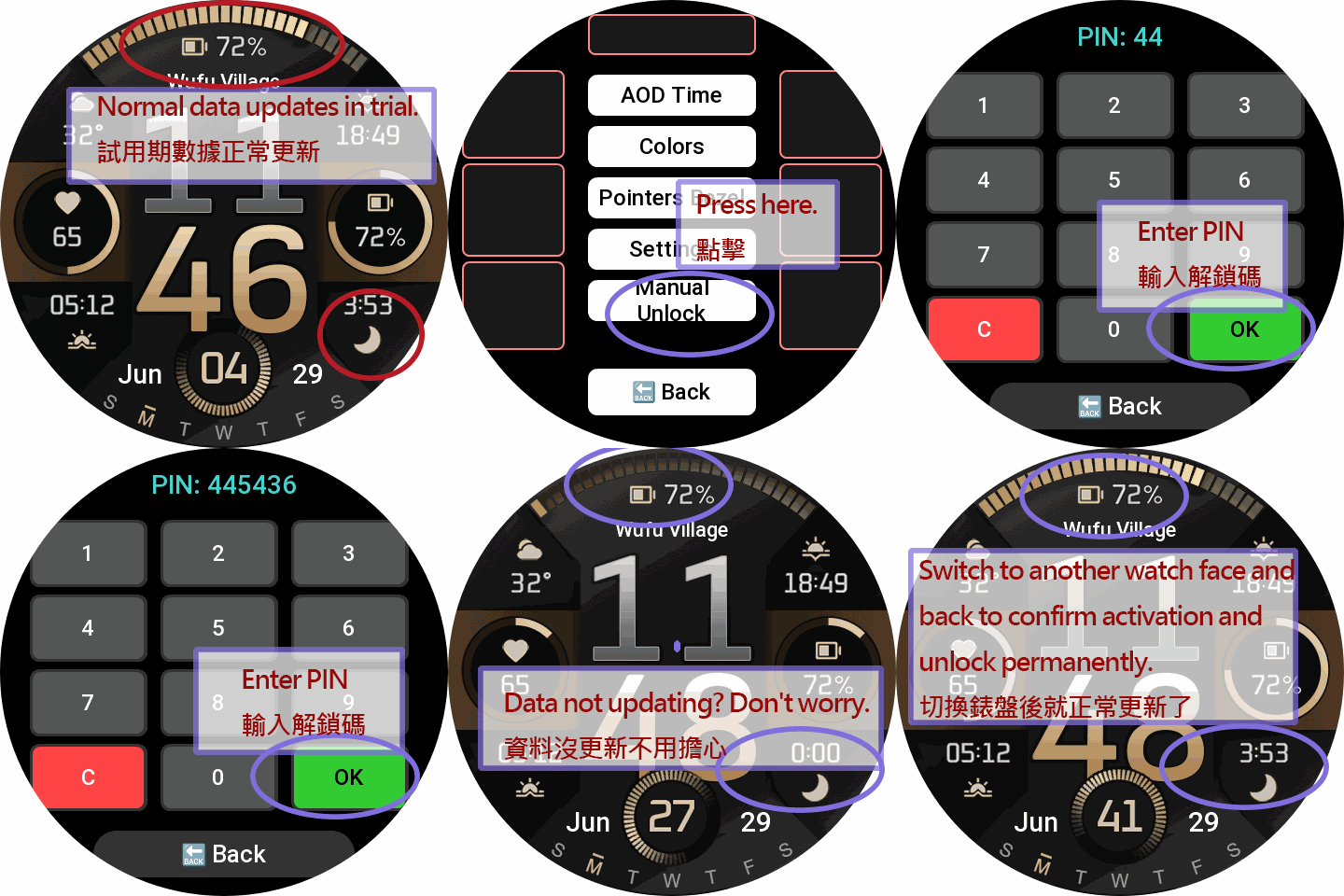
• During Trial: The settings menu is fully accessible for 24 hours. Blocks can swap between 10 base metrics.
• Post-Trial Lock: After 24 hours, customization is disabled. The watchface locks to display only basic Time, Date, and essential items.
PRO Unlock (Permanent Full Access)
Sponsoring permanently unlocks the ultimate experience:
• All 27 Metrics Unlocked: Gain full access to the 10 base + 17 advanced PRO metrics.
• Full Area Swapping: Unrestricted metric swapping is permanently unlocked for ALL dynamic blocks and ARC progress bars!
• Complete Settings Access: Permanently restore all trial features, layouts, and customizations.
How to Unlock Permanently:
1. Visit watch.homecmf.com (or scan the QR Code in the watch settings menu).
2. Make a small coffee donation to support the development.
3. Check your email! Follow the instructions provided to retrieve your unique 6-digit Unlock PIN.
4. Enter the PIN on your watch to permanently unlock all features!
Tags
Share this face
Comments


You need to be logged in to post or reply to comments.
Recent community discussions
Request watchface for T-Rex 3 pro 44mm
It does work very well on my device, the shortcuts work, also the size of some numbers are bit out of the box, it's not much noticeable. I've already mentioned that "This ...
T Rex 3 Watch face request PLEASE! [T-REX 3]
Hey, i just moved over from a huawei. i had this watch face there which i cannot find here at all. i got it from a huawei watch group on telegram. I have the HWT file of it a...
T-Rex 3 pro
Ok 😃 AOD 👍...
Incoming Call Alert does not display answer button [Trex 3 pro]
Wunderbar!! Thank you so much! I must have ignorantly switched it from Bluetooth to incoming calls. I should have read the "fine print" which clearly states only Bluetooth gives you answer and hangup....
Help with recreating Epix watchface [Trex 3 pro 44mm]
This took far more time than I care to admit but I've tried to adjust the watchface to my liking but some parameters I just ...
system text labels of watchface data (like 'steps') disappear [T-Rex 3 Pro]
OK. I did mean the display in preview box in the app editor. Got it. Thanks very much. I had never looked at the settings page before....
Creation / Duplication of Watchface, willing to pay [T-Rex 3 Pro 48mm]
I'm not sure if this is what you're looking for. If it's still not what you need, please try modifying it yourself. This watchface can be edited with the SashaCX75 's editor. https://amazfitwatchfaces.com/forum/viewtopic.php?p=22130#p22130 ...





