-
- Administrator
-
-
Support Ukraine
If you experience any problems with the forum (it is not visible, there is no way to post messages, or some functionality does not work), please let us know. If you have problems with registration or you did not receive confirmation letter, let us know and we will activate your account manually.
If you get an "The submitted form was invalid. Try submitting again" error, delete cookies, then try again.
Disappearing Watch Face Items
Moderators: Internal error, Watchmens
-
SharkEmperor
- WF maker
- Posts: 5
- Joined: 01 Jan 2019, 03:01
- Contact:
Disappearing Watch Face Items
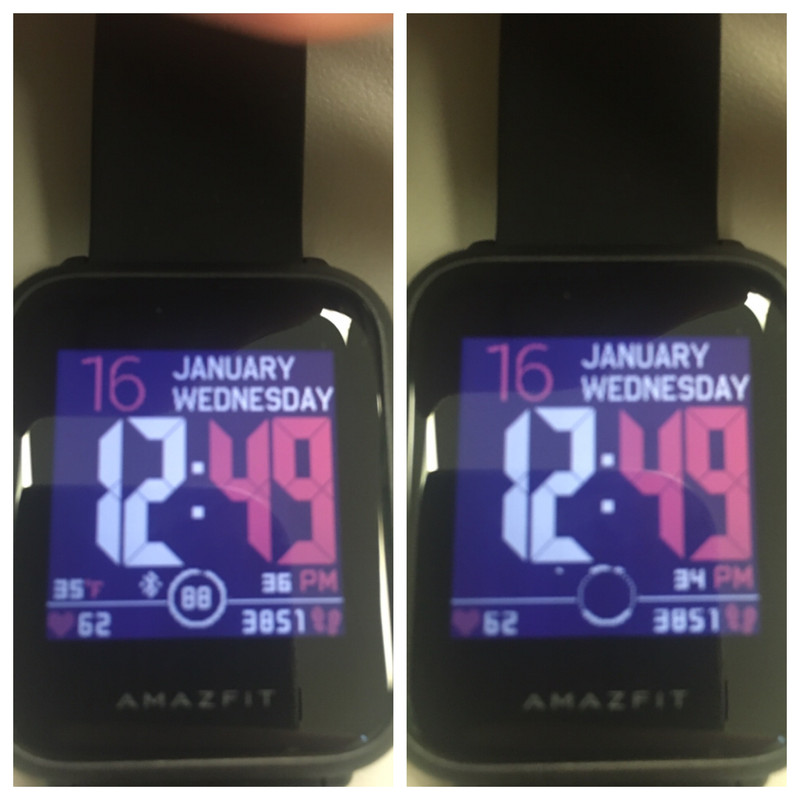
So I have been trying my hand at making and editing custom watch faces. So far I have had a few times when items like battery text, battery icon, etc will look fine on the watch editor but after the bin is created and uploaded to the watch, they will appear for a second then disappear behind a plain block. When you wake the watch up by pushing the button on the side, they will reappear for a moment and then disappear again. Any help is appreciated!
Last edited by SharkEmperor on 16 Jan 2019, 17:56, edited 1 time in total.
-
SharkEmperor
- WF maker
- Posts: 5
- Joined: 01 Jan 2019, 03:01
- Contact:
-
TXK

- Posts: 302
- Joined: 10 Apr 2018, 05:15
- Location: china
- Has thanked: 150 times
- Been thanked: 99 times
- Contact:
【seconds】 function is very special:
1. The digital height in seconds should not exceed 22 pixels (also seems to be 24)
2. In the line where the seconds number is located, all the elements except the time number and the background image will be forced to be emptied...
3.This is a watch firmware BUG
-
SharkEmperor
- WF maker
- Posts: 5
- Joined: 01 Jan 2019, 03:01
- Contact:
Thank you so much! I really appreciate it. That explains it perfectly.
-
technoloZEN
- WF maker
- Posts: 13
- Joined: 14 Jan 2019, 17:58
- Contact:
SharkEmporer, I just bought my Bip and have also been trying to create faces for it, but I can’t figure out how to create the bin file and the animated png after I save the final json file. Someone told me to run it through the watchface.exe but when I do, it does nothing. Can you give me any advise on how to do that?SharkEmperor wrote: 15 Jan 2019, 23:48So I have been trying my hand at making and editing custom watch faces. So far I have had a few times when items like battery text, battery icon, etc will look fine on the watch editor but after the bin is created and uploaded to the watch, they will appear for a second then disappear behind a plain block. When you wake the watch up by pushing the button on the side, they will reappear for a moment and then disappear again. Any help is appreciated!
-
SharkEmperor
- WF maker
- Posts: 5
- Joined: 01 Jan 2019, 03:01
- Contact:
All of your png picture files and the json file all need to be in the same folder. Then drag the json file onto the Watchface Application. The packed bin file and the watch face previews should appear in the same folder as the json and picture files.
-
TXK
- Posts: 302
- Joined: 10 Apr 2018, 05:15
- Location: china
- Has thanked: 150 times
- Been thanked: 99 times
- Contact:
Https://amazfitwatchfaces.com/bip/view/21915
Sorry, the number in seconds is still not supported to be higher than 24 pixels.
However, you can use the second hand to refresh the large number of seconds.
Sorry, the number in seconds is still not supported to be higher than 24 pixels.
However, you can use the second hand to refresh the large number of seconds.
Who is online
Users browsing this forum: No registered users and 1 guest