• Administrator
  •  
    Support Ukraine
    If you experience any problems with the forum (it is not visible, there is no way to post messages, or some functionality does not work), please let us know. If you have problems with registration or you did not receive confirmation letter, let us know and we will activate your account manually.
    If you get an "The submitted form was invalid. Try submitting again" error, delete cookies, then try again.
     

AmazFaces for Android [Support]

AmazFaces application for Android & iOS.

Moderators: asoo, Internal error, Watchmens

User avatar
GIK-Team
root
Posts: 1014
Joined: 22 Mar 2018, 10:00
Location: Ukraine
Has thanked: 1105 times
Been thanked: 266 times
Contact:

AmazFaces for Android [Support]

Post by GIK-Team »

In this topic, you may report a problem with our AmazFaces app for Android.
To do this, please, provide the following information:

App version (Stable or Beta)
Watch model
Phone model
OS version

Description of your problem

Filling example:

Code: Select all

App version: 2.0.111 Stable
Watch model: GTR
Phone model: Samsung S10
OS version: Android 10

Not able to sync watch faces to zepp
Messages that does not meet these requirements will not be considered.
All information is transmitted to the developer, even if you do not receive a response in this thread.
"sometimes it's scary but it's still just you and me” — Leaving Laurel
PVa__
Posts: 17
Joined: 25 Oct 2020, 17:24
Location: Paris
Been thanked: 3 times
Contact:

Post by PVa__ »

Hi Community,
Since today (Amazfaces app updated in Android), I have an issue with the app.
When wanting to install a new watch face, and when clicking on the arrow next to the download button, the 'Notify for Amazfit' does not open by default anymore... Instead, the is a list of App proposed witht he SHARE action.
Are you also meeting this issue ? How to enable the default opening of the 'Notify for Amazfit' app when clicking this arrow in the 'Amazfaces' app ?
Thank you for your hint,
PVa
User avatar
GIK-Team
root
Posts: 1014
Joined: 22 Mar 2018, 10:00
Location: Ukraine
Has thanked: 1105 times
Been thanked: 266 times
Contact:

Post by GIK-Team »

PVa__ wrote: 01 Mar 2021, 13:11
Hi Community,
Since today (Amazfaces app updated in Android), I have an issue with the app.
When wanting to install a new watch face, and when clicking on the arrow next to the download button, the 'Notify for Amazfit' does not open by default anymore... Instead, the is a list of App proposed witht he SHARE action.
Are you also meeting this issue ? How to enable the default opening of the 'Notify for Amazfit' app when clicking this arrow in the 'Amazfaces' app ?
Thank you for your hint,
PVa
There is a possibility that the authors of Notify for Amazfit have disabled this feature in their application. Or maybe the problem is in our application. Transferred information to our developer.
"sometimes it's scary but it's still just you and me” — Leaving Laurel
PVa__
Posts: 17
Joined: 25 Oct 2020, 17:24
Location: Paris
Been thanked: 3 times
Contact:

Post by PVa__ »

OK, thanks. Please let me know. In the meantime, is there any other easy way to install a watch face from the 'Amazfaces' app to the GTR2 then ?
PVa
User avatar
GIK-Team
root
Posts: 1014
Joined: 22 Mar 2018, 10:00
Location: Ukraine
Has thanked: 1105 times
Been thanked: 266 times
Contact:

Post by GIK-Team »

PVa__ wrote: 01 Mar 2021, 14:46
OK, thanks. Please let me know. In the meantime, is there any other easy way to install a watch face from the 'Amazfaces' app to the GTR2 then ?
PVa
About Notify for Amazfit: yes, they have disabled this feature in their application.
https://amazfitwatchfaces.com/external/22 - in v 131 should work.
"sometimes it's scary but it's still just you and me” — Leaving Laurel
Rcappa
WF maker
Posts: 40
Joined: 14 Oct 2019, 04:57
Has thanked: 1 time
Been thanked: 4 times

Post by Rcappa »

Hello GK-Team,
I have joined your beta and installed the Beta version 2.1 dated February 28, 2021. I have a Google Pixel 4XL and GTR 2 watch and I can't still install watch faces. When I select a GTR 2 watch face, it starts to install then once it gets to 100% install, I get "failed to sync watch face". Anything I am doing wrong?

Thanks in advance!
PVa__
Posts: 17
Joined: 25 Oct 2020, 17:24
Location: Paris
Been thanked: 3 times
Contact:

Post by PVa__ »

Hello GIK-Team,
My AmazFaces version is 2.3.131
And the automatic OPEN of the 'Notify for Amazfit' app does not work when clicking on the arrow next to the download button of the watch face I would like to install on my GTR2. Instead, it opens Share...
PVa
PVa__
Posts: 17
Joined: 25 Oct 2020, 17:24
Location: Paris
Been thanked: 3 times
Contact:

Post by PVa__ »

Hello GIK-Team,
My AmazFaces version is 2.3.131
And the automatic OPEN of the 'Notify for Amazfit' app does not work when clicking on the arrow next to the download button of the watch face I would like to install on my GTR2. Instead, next step is SHARE instead of OPEN WITH (where I normally click on 'Notify for Amazfit').
I joined as a Tester but I do not see where I can get another AmazFaces version than the one on the GooglePlay which is now version 2.3.131.
Could you please guide me ? I would really need to install new watch faces again in the exact same way as I have been doing in the past.
Thank you for your help,
PVa
User avatar
GIK-Team
root
Posts: 1014
Joined: 22 Mar 2018, 10:00
Location: Ukraine
Has thanked: 1105 times
Been thanked: 266 times
Contact:

Post by GIK-Team »

PVa__ wrote: 01 Mar 2021, 19:12
Hello GIK-Team,
My AmazFaces version is 2.3.131
And the automatic OPEN of the 'Notify for Amazfit' app does not work when clicking on the arrow next to the download button of the watch face I would like to install on my GTR2. Instead, next step is SHARE instead of OPEN WITH (where I normally click on 'Notify for Amazfit').
I joined as a Tester but I do not see where I can get another AmazFaces version than the one on the GooglePlay which is now version 2.3.131.
Could you please guide me ? I would really need to install new watch faces again in the exact same way as I have been doing in the past.
Thank you for your help,
PVa
Authors of Notify for Amazfit have disabled this feature in their application. Therefore, as it was no longer working :(
"sometimes it's scary but it's still just you and me” — Leaving Laurel
PVa__
Posts: 17
Joined: 25 Oct 2020, 17:24
Location: Paris
Been thanked: 3 times
Contact:

Post by PVa__ »

Hello GIK-Team,
Please ignore my last message. I managed to download a new watch face to my GTR2 using directly the 'Custom watchface' option of the 'Notify for Amazfit' app and selecting the AmazFaces website to find the watch faces to download.
PVa
Jacquestorres
Posts: 3
Joined: 04 Apr 2020, 02:28
Location: Piracicaba
Contact:

Post by Jacquestorres »

I can't log in to the mobile app, android 10,
I already cleared the cache, uninstalled and installed again, it's updated by the play store
and when I add my login and password, the application says: password
or bad login.

Through the website in the notebook browser, I log in
normally and access my account, how can I adjust this in the android
application, it's been 2 weeks since I can't login by cell phone.
thanks for help.
Jacquestorres
Posts: 3
Joined: 04 Apr 2020, 02:28
Location: Piracicaba
Contact:

Post by Jacquestorres »

Hi, good evening

amazaface version is 2.4 stable
Xiaomi GTR 47 mm
Android phone is Realme X2 Pro
Android 10
Alexking10
Posts: 4
Joined: 26 Feb 2020, 19:01
Location: Napoli
Has thanked: 1 time
Contact:

Post by Alexking10 »

App version: 2.3
Watch model: GTR
Phone model: Xiaomi Redmi note 7
OS version: Android 10

Can't install watchfaces via bluetooth or via zepp
User avatar
Stas
Posts: 184
Joined: 22 Jan 2019, 21:18
Location: Ukraine
Has thanked: 4 times
Been thanked: 34 times
Contact:

Post by Stas »

Update the beta to version 2.4.142 and check the installation
Alexking10 wrote: 23 Mar 2021, 11:31
App version: 2.3
Watch model: GTR
Phone model: Xiaomi Redmi note 7
OS version: Android 10

Can't install watchfaces via bluetooth or via zepp
80446268
Posts: 1
Joined: 24 Mar 2021, 01:37
Location: zhongguo
Contact:

Post by 80446268 »

thanks for u
Alexking10
Posts: 4
Joined: 26 Feb 2020, 19:01
Location: Napoli
Has thanked: 1 time
Contact:

Post by Alexking10 »

Stas wrote: 23 Mar 2021, 17:42
Update the beta to version 2.4.142 and check the installation
Alexking10 wrote: 23 Mar 2021, 11:31
App version: 2.3
Watch model: GTR
Phone model: Xiaomi Redmi note 7
OS version: Android 10

Can't install watchfaces via bluetooth or via zepp
Solved. Thanks
bobenhaus
Posts: 1
Joined: 05 Apr 2021, 23:53
Location: USA
Contact:

Post by bobenhaus »

How can I login to the Android WatchFaces app ? When I try to login it wipes out all the my setting and I have to start over again. basically I cant save my favorites, settings etc.. because the app is not letting me login . Thanks in advance. :)
Rcappa
WF maker
Posts: 40
Joined: 14 Oct 2019, 04:57
Has thanked: 1 time
Been thanked: 4 times

Post by Rcappa »

Latest version April 7th Beta, working well on GTR 2!
araikl
Posts: 1
Joined: 08 Mar 2021, 17:43
Location: Kuala lumpur
Contact:

Post by araikl »

Phone: Huawei Nova 7SE
OS: Android 10

Crash when trying to download facewatch.
contempt
Posts: 1
Joined: 03 Dec 2020, 06:01
Location: Poland
Contact:

Post by contempt »

Image
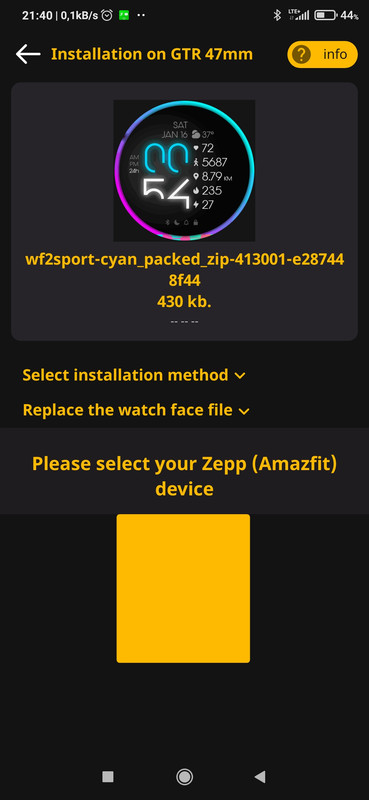
newest version of app can't select replece method and select watch
User avatar
Stas
Posts: 184
Joined: 22 Jan 2019, 21:18
Location: Ukraine
Has thanked: 4 times
Been thanked: 34 times
Contact:

Post by Stas »

Thanks for the message, we'll fix it in the next update
contempt wrote: 24 Jun 2021, 19:44
Image
newest version of app can't select replece method and select watch
Pumpk1in
WF maker
Posts: 3
Joined: 08 May 2021, 00:07
Location: France
Has thanked: 1 time
Contact:

Post by Pumpk1in »

Hi,

The newest app version can't sync properly on GTR2.
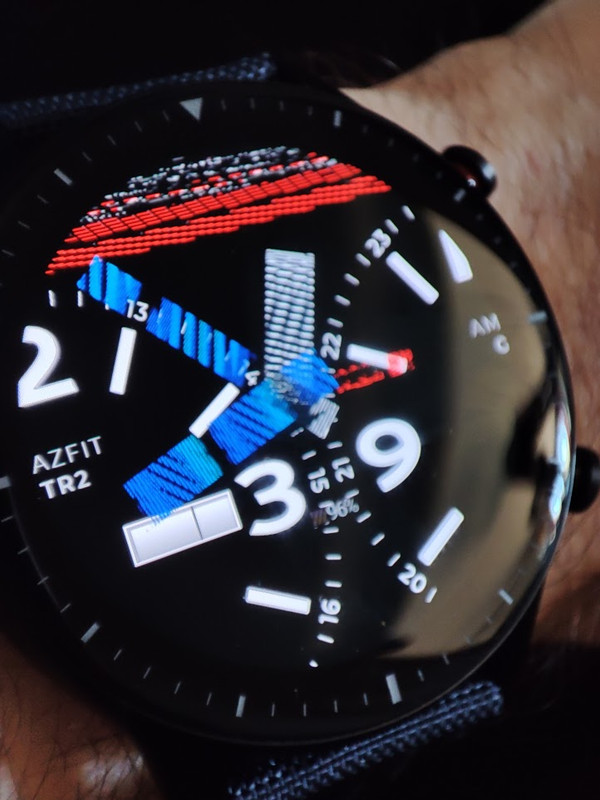
The watchface is corrupted during sync, and will not work. Same problem with every watchfaces.

Some times it will freeze the watch at 99% and I'll have to soft reset it.
Some others it will show sync error. And the reste of the time the display will be fully corrupted...

Could you fix it please ?

Thanks

Example of watchface corrupted :
Image
User avatar
Stas
Posts: 184
Joined: 22 Jan 2019, 21:18
Location: Ukraine
Has thanked: 4 times
Been thanked: 34 times
Contact:

Post by Stas »

Thanks for the message, we have already downloaded the beta version 178 with fixes, it will be available in Google Play within a few hours
Pumpk1in wrote: 25 Jun 2021, 09:11
Hi,

The newest app version can't sync properly on GTR2.
The watchface is corrupted during sync, and will not work. Same problem with every watchfaces.

Some times it will freeze the watch at 99% and I'll have to soft reset it.
Some others it will show sync error. And the reste of the time the display will be fully corrupted...

Could you fix it please ?

Thanks
Pumpk1in
WF maker
Posts: 3
Joined: 08 May 2021, 00:07
Location: France
Has thanked: 1 time
Contact:

Post by Pumpk1in »

Stas wrote: 25 Jun 2021, 16:32
Thanks for the message, we have already downloaded the beta version 178 with fixes, it will be available in Google Play within a few hours
Thank you :)
100% working since update :mrgreen:
BragGlitter
Posts: 1
Joined: 29 Dec 2020, 17:08
Location: Mexico
Contact:

Post by BragGlitter »

App version: 2.9 Stable
Watch model: MiBand 5
Phone model: Poco x3 Pro
OS version: Android 11

Can't install watch faces. I had a Redmi Note 8 pro a few weeks ago and there was no problem but in this phone I can't install new watchfaces
User avatar
Stas
Posts: 184
Joined: 22 Jan 2019, 21:18
Location: Ukraine
Has thanked: 4 times
Been thanked: 34 times
Contact:

Post by Stas »

At what stage do you have difficulties finding a device or an error during installation?
BragGlitter wrote: 12 Jul 2021, 20:07
App version: 2.9 Stable
Watch model: MiBand 5
Phone model: Poco x3 Pro
OS version: Android 11

Can't install watch faces. I had a Redmi Note 8 pro a few weeks ago and there was no problem but in this phone I can't install new watchfaces
Post Reply

Return to “AmazFaces app”

Who is online

Users browsing this forum: No registered users and 1 guest