Hi guys.
I'm new to the materia and I need your help. I just bought a smart watch amazfit bip and I want to "edit" a customized watchface with a picture. I installed AmazfitBipTools-1.0.3.1.7z in a folder, I downloaded the .bin file and executed watchface.exe file with name.bin (dragging the bin file on the executable) in theory I would have to get a folder with all the information and images originals of the bin file to be able to edit them and change them, but the folder is not generated. Can anybody help me? .
Thanks in advance. Best regards
-
- Administrator
-
-
Support Ukraine
If you experience any problems with the forum (it is not visible, there is no way to post messages, or some functionality does not work), please let us know. If you have problems with registration or you did not receive confirmation letter, let us know and we will activate your account manually.
If you get an "The submitted form was invalid. Try submitting again" error, delete cookies, then try again.
No folder is generated to edit .bin file
Moderators: Internal error, Watchmens
-
Julio Martinez
- WF maker
- Posts: 2
- Joined: 25 Nov 2018, 13:06
- Contact:
Launching the exe like
WatchFace.exe ..\..\..\faces\5bf5a59a1185a_21112018.bin
will produce a log where you can find a line like
Exporting resources to '..\..\..\faces\5bf5a59a1185a_21112018'
this is the folder created.
WatchFace.exe ..\..\..\faces\5bf5a59a1185a_21112018.bin
will produce a log where you can find a line like
Exporting resources to '..\..\..\faces\5bf5a59a1185a_21112018'
this is the folder created.
-
Julio Martinez
- WF maker
- Posts: 2
- Joined: 25 Nov 2018, 13:06
- Contact:
Hi [mention]sfarkas[/mention].
Wonderfull tip, thanks, now I have solucionated it. For anyone who has this problem, I recommend doing the following:
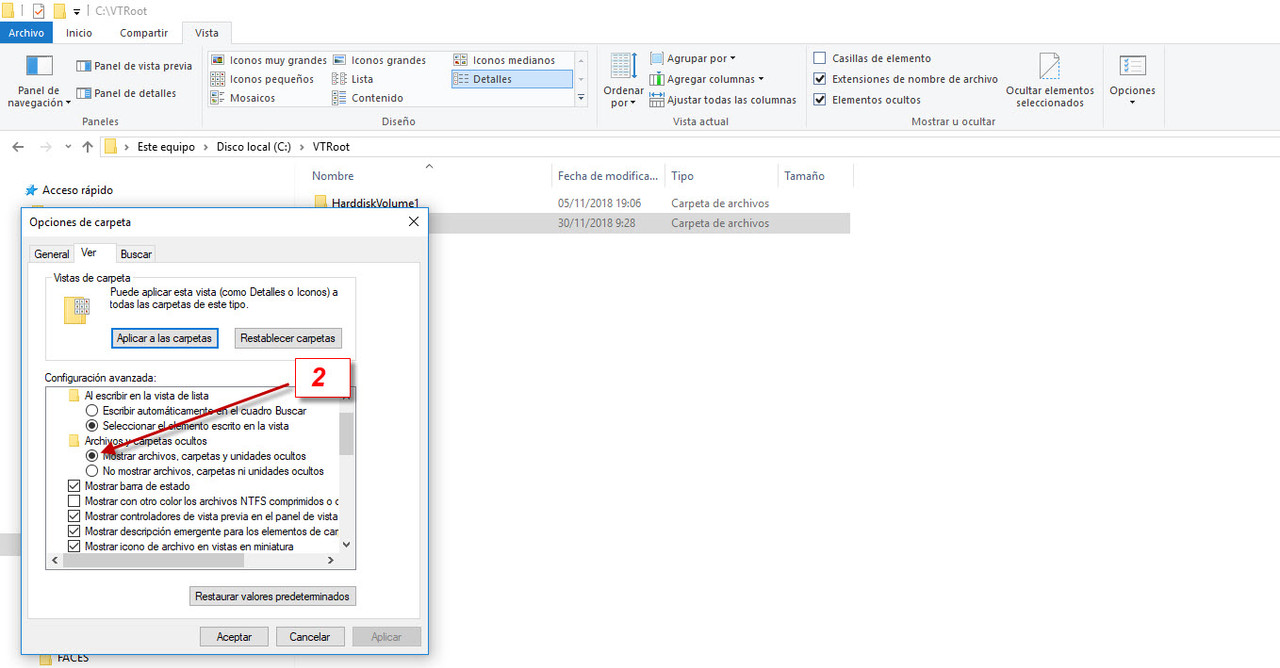
Wonderfull tip, thanks, now I have solucionated it. For anyone who has this problem, I recommend doing the following:
- Make visible the hidden files of the system. (I attached images)
- Create folder with the AmazfitBipTools and copy in it the .bin file to edit
- Drag the .bin file on top the WatchFace executable
- Two folders will be generated in the directory C: \ VTRoot (HarddiskVolume1 and HarddiskVolume4). this folder is hidden if you have not done step one
- In the folder HarddiskVolume4 you will find the folder where the file is.
Attached images
-
Rush2112
Can someone tell where to insert the bin on a cell phone because I did download here a bin after did install in the folder ( int storage/Amazfit_WF/insert the bin.. refresh...click on Mifit can't see the watch...help where to put the bin ??
Who is online
Users browsing this forum: No registered users and 2 guests