• Amministratore
  •  
    Support Ukraine
    If you experience any problems with the forum (it is not visible, there is no way to post messages, or some functionality does not work), please let us know. If you have problems with registration or you did not receive confirmation letter, let us know and we will activate your account manually.
    If you get an "The submitted form was invalid. Try submitting again" error, delete cookies, then try again.
     

AmazFit WatchFace editor for Windows by SashaCX75

This forum is designed to discuss and develop tools creating watch faces.

Moderatori: asoo, lvpokka, Internal error, Watchmens

Regole del forum
All communication in this branch should only be in English.
To discuss tools that are not in this section, use the “Watchfaces tools (discussion)” forum.
Avatar utente
SashaCX75
Messaggi: 820
Iscritto il: 26 ott 2019, 15:18
Località: Ukraine
Has thanked: 13 times
Been thanked: 1029 times
Contatta:

AmazFit WatchFace editor for Windows by SashaCX75

Messaggio da SashaCX75 »

Graphics editor for working with dials Amazfit
The editor supports watch faces from GTR 47, GTR 42, GTS, T-Rex, Verge Lite.
Screenshot
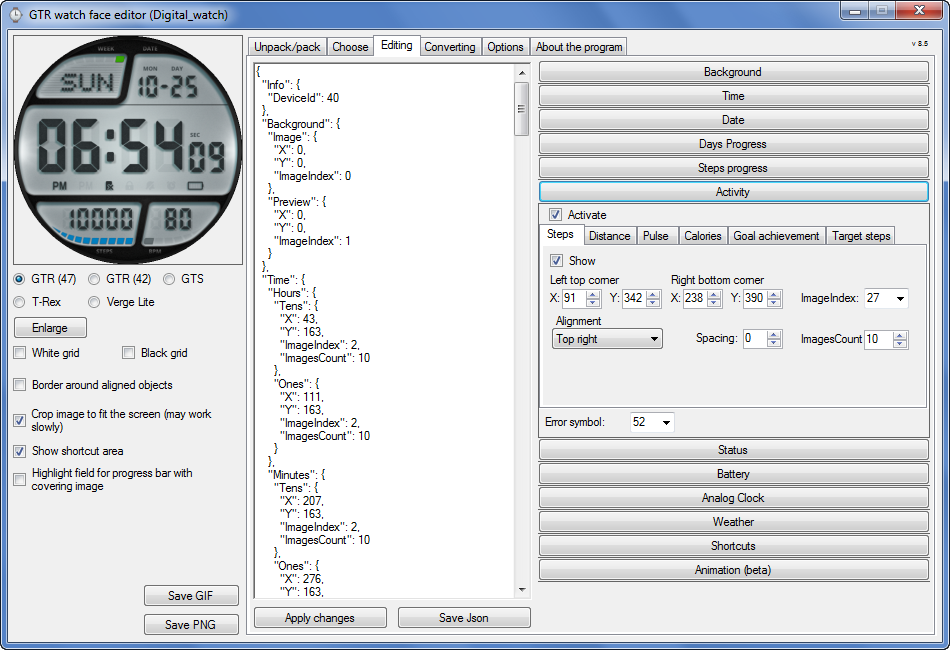
Immagine
Note: the path to the program should not contain spaces, it is advisable to unpack it to the root of the disk.
Not all dials can be unpacked.
You can reduce the size of the bin file only by reducing the size of the images (height * width) or by reducing the number of images.

The drawing order of elements cannot be changed. The only exception is if you move the second hand from the center, it will be drawn under the hour and minute hands.

If the .bin file is not created, then you need to look for errors in the .log file. Most often this happens when images have the wrong format.

If the bin file is not created, and the log file contains the entry “bad transparency mask”, this means that the format of one or more images is incorrect (most often it occurs if you save the image in Photoshop without transparent pixels). You can fix it as follows:
- in Photoshop - add at least one transparent pixel
- in GIMP exported to PNG 16 bit RGBA
- in XnView - Image -> 32 bits

Version 10.0
List of changes
Added the ability to display the distance traveled in kilometers and miles.
Updated translation.
v 9.0
Fixed display of date if pictures have different sizes (often pictures for "1" are narrower than others)
Added new warnings about possible errors.
Fixed the order of displaying items.
Added a button to refresh the preview image.
Fixed bugs when converting watch faces.
Updated Chinese and Italian translations.
v 8.5
Fixed work with Verge Lite
v 8.4
Fixed Italian translation.
Added Chinese manual.
v 8.3
Bugs fixed.
Added a manual in English.
v 8.2
Added the display of the target steps (StepsGoal)
Added preliminary calculation of the size of the .bin file.
v 8.1
Fixed work on monitors with high resolution.
Updated translation (French, Italian, Chinese, Spanish).
v 8.0
Added the ability to convert dials between different watch models (GTR / T-Rex / Verge Lite).
v 7.1
Italian language added.
Minor fixes.
v 7.0
Added animation support
Verge Lite Support Added
Added the ability to quickly save the project (Ctrl + S)
Added support for languages (French, Chinese).
v 6.1
Added support for T-Rex.
Added the ability to auto-correct image files (error "bad transparency mask").
Added a reminder to save the project when it is closed.
v 6.0
Added support for shortcuts.
Added background image support for circular indicator.
Added display of a set of icons (segments) for the progress of steps.
Added display of a set of icons (segments) for the battery.
Added display of a set of icons (segments) for the pulse.
Added display of an indicator (arrow) for a pulse.
Added display of indicator (arrows) for calories.
Added display of a circular indicator for the pulse.
Added display of a circular indicator for calories.
Added the ability to crop the image to fit the screen.
Added support for languages ​​(Portuguese, Czech, Slovak, Hungarian).
v 5.2
Added support for a set of icons (icons and a set of coordinates for them) for the progress of steps and battery.
Added the ability to crop the preview according to the shape of the screen.
Bugs fixed in the English version.
v 5.1
Fixed incorrect display of the distance traveled.
Added the ability to adjust the speed of gif animation.
Added the ability to work with compressed bin files.
Updated bin file packer.
Added display of the year.
Added display of a charge indicator (arrow).
Added display of indicator (arrow) of steps.
Added display of the indicator (arrow) of the date.
Added display of indicator (arrow) of the day of the week.
Added display of indicator (arrow) of the month.
Added the ability to paste copied coordinates into offset fields from the center (for arrows).
English support added.
Old versions
If you want to supplement the missing translation, write to the PM.

Beta version of the editor with support for Amazfit X

AmazFit WatchFace editor 2 with support for GTR 2, GTS 2, T-Rex Pro

My editor doesn't work with GTR2 (GTS2) watch faces and I have no plans to add support for these models anytime soon. I don't know any other programs that can work with these dials. I have no information if anyone is working in this direction.

Because I bought a GTR 2e, the program will no longer be updated.

Donate to the author
PayPal: [email protected].
Ultima modifica di SashaCX75 il 01 giu 2022, 07:20, modificato 25 volte in totale.
murigny64
WF maker
Messaggi: 11
Iscritto il: 03 nov 2019, 17:12
Been thanked: 4 times
Contatta:

Messaggio da murigny64 »

Here is new GTR_Watchface editor 6.0 by SashaCX75

Great app ! :) thx to SashaCX75 ;)

Immagine

Download here:
https://drive.google.com/file/d/1UvfCIP ... sp=sharing
Avatar utente
osmat
Admin
Messaggi: 278
Iscritto il: 22 mar 2018, 10:09
Località: Ukraine
Has thanked: 35 times
Been thanked: 73 times
Contatta:

Messaggio da osmat »

Version: 6.1
Short Description: Graphic editor for working with Amazfit GTR / GTS / T-Rex dials

The version (without puthon) differs from the regular version only in the utility for unpacking bin files that comes bundled and does not require python installation (it may not work on 32-bit systems).

Note: the path to the program should not contain Russian letters, it is advisable to unpack it to the root of the disk.
Not all dials can be unpacked.

If the bin file is not created, and the log file has the entry "bad transparency mask", this means that the format of one or more images is incorrect. You can fix it as follows:
- in Photoshop - Save for web -> Preset PNG-24
- in GIMP exported to PNG 16 bit RGBA
- in XnView - Image -> 32 bits

https://cutt.ly/QrNUVvF
Avatar utente
pv_sa
WF maker
Messaggi: 5
Iscritto il: 02 feb 2020, 20:25
Località: Europe/Belgium
Has thanked: 7 times
Been thanked: 2 times
Contatta:

Messaggio da pv_sa »

Hi all,

[mention]osmat[/mention] Thank you for the version 6.1, with this one I could edit a WF this morning and was super easy.

I ask a little help regarding the compression/packing. I edited a existing WF, adding other elements, like Calories and distance, etc.
It worked fined the virst version, but as I kept adding the features (steps, heart rate) and from other WF I got the weather icons.
Butduring the packing process, 2 lines appear in the console. "Unknown Watchface 16", wrote two times, see image 1.
After that I get the message "Uncompressed file size exceeds 1.95MB. Dial may not work", see image 2.

My package is 2.44MB, the compressed is 220 kB.

Is there something I could do? I tried removing each feature I was adding but couldn't get it working properly again.

Also attached are the previews for the watchface.
Any help is appreciated, thanks a lot in advance.
Allegati
Preview.gif
Preview.gif (84.37 KiB) Visto 77891 volte
Preview.png
Preview.png (25.32 KiB) Visto 77891 volte
2.PNG
2.PNG (4.46 KiB) Visto 77891 volte
1.PNG
1.PNG (12.26 KiB) Visto 77891 volte
Avatar utente
SashaCX75
Messaggi: 820
Iscritto il: 26 ott 2019, 15:18
Località: Ukraine
Has thanked: 13 times
Been thanked: 1029 times
Contatta:

Messaggio da SashaCX75 »

The message "Unknown Watchface 16" appears when there are shortcuts in the project - do not pay attention.
You can reduce the project by reducing the number of pictures or out of the size in pixels. Disabling individual functions has virtually no effect on size.
Avatar utente
pv_sa
WF maker
Messaggi: 5
Iscritto il: 02 feb 2020, 20:25
Località: Europe/Belgium
Has thanked: 7 times
Been thanked: 2 times
Contatta:

Messaggio da pv_sa »

[mention]SashaCX75[/mention] Thanks a lot for the explanation! I'm right now trying to reduce it.
I noticed that there were a lot of copies of the days of the week (Monday, Tuesday, etc) I deleted those and I'll try to reduce the size of the status icons also.
Is there any other tips you suggest to reduce it?

Obs. I could "Install" the oversized version, but I can only see the hours and the icons of the background, nothing more, and afte around 30min, the watch started vibrating continuously and them restarted. After some tries I could restart it and put a official watch face, but maybe this can indicate something. Just reporting, might help in some way.

Again, thanks a lot for the help!
Avatar utente
SashaCX75
Messaggi: 820
Iscritto il: 26 ott 2019, 15:18
Località: Ukraine
Has thanked: 13 times
Been thanked: 1029 times
Contatta:

Messaggio da SashaCX75 »

pv_sa ha scritto: 19 feb 2020, 17:08
Is there any other tips you suggest to reduce it?
The number of pictures to display the day of the week can be reduced to 7 (sometimes there are 21).
In addition to reducing the number of images and their size in pixels, I do not know other ways to reduce the file size. Trying to optimize PNG files does not make sense. When saving to a bin file, they are still converted to another format.
Avatar utente
pv_sa
WF maker
Messaggi: 5
Iscritto il: 02 feb 2020, 20:25
Località: Europe/Belgium
Has thanked: 7 times
Been thanked: 2 times
Contatta:

Messaggio da pv_sa »

Thank a lot [mention]SashaCX75[/mention].

While trying to reduce the size some minues ago. It started bootlooping, going only until the log, give a little sinal of vibration, then the screen turns black. I read in the link bellow that you can hard reset the watch to the QR code by pressing the two buttons, but its not working.

https://forum.xda-developers.com/smartw ... p-t3963953

Do you have any idea what could have happened or a suggestion on how to fix this?

Should have let the pros handle this watch face stuff... sh!t... I'm only 2 weeks with the watch.

Again, thanks for the help
Avatar utente
pv_sa
WF maker
Messaggi: 5
Iscritto il: 02 feb 2020, 20:25
Località: Europe/Belgium
Has thanked: 7 times
Been thanked: 2 times
Contatta:

Messaggio da pv_sa »

Found the fix for the bootloop!

https://forum.xda-developers.com/smartw ... p-t4016561
its fixed. for fix it, put to charge. go to amazfit app and change the watchface for one of the app and it fixed itself. use this if someone have this problem
This solved my problem! Hope it help others!
Avatar utente
Lordalpine
WF maker
Messaggi: 62
Iscritto il: 09 ott 2019, 22:09
Località: Santo Tirso
Has thanked: 6 times
Been thanked: 35 times
Contatta:

Messaggio da Lordalpine »

pv_sa ha scritto: 19 feb 2020, 18:31
Reduce the size....
You can just totally kill the preview PNG, if it's not already done.
Put a 1pixel X 1Pixel picture and name it 0001. [ if you want to make it later and to pack with 0001 inside the package ]
or don't use it [ It's allowed by the Gui tool so why not^^.... ]

User will understand if you explain on the description why there's no preview [ Gain space ]
chazey2
Messaggi: 3
Iscritto il: 21 dic 2019, 08:04
Località: UK
Has thanked: 1 time
Contatta:

Messaggio da chazey2 »

Hi guys, I'm messing around to try just adapting a pre made face just for my own use only. I've added shortcuts and copied and pasted the shortcut part of Json from another pre made face with shortcuts. I can see when adjust my shortcut placement the Json file adjusts to the new placements I make (x,y)
When pack I get two files 1 .bin file and one _packed.bin I've tried loading both on the watch it either goes to pre made face without my changes or the original amazfit that I over wrote the bin file in.
Any pointers please.
As I say not trying to copy others hard work would just like adapt my favourite face (Focused smoke v2 by nightwatch) as I have poor eyesight without my glasses and I can see the time etc without glasses.
Thanks
Avatar utente
SashaCX75
Messaggi: 820
Iscritto il: 26 ott 2019, 15:18
Località: Ukraine
Has thanked: 13 times
Been thanked: 1029 times
Contatta:

Messaggio da SashaCX75 »

chazey2 ha scritto: 24 feb 2020, 18:20
Any pointers please.
1. Unpack the dial
2. In the section "Shortcuts" include the necessary
3. Save the json file
4. Pack the dial
5. In the folder with the unpacked dial you find the file name_packed_zip.bin or name_packed.bin and install it on the watch
chazey2
Messaggi: 3
Iscritto il: 21 dic 2019, 08:04
Località: UK
Has thanked: 1 time
Contatta:

Messaggio da chazey2 »

Thanks Sasha will give it a go again.
Avatar utente
pv_sa
WF maker
Messaggi: 5
Iscritto il: 02 feb 2020, 20:25
Località: Europe/Belgium
Has thanked: 7 times
Been thanked: 2 times
Contatta:

Messaggio da pv_sa »

Lordalpine ha scritto: 23 feb 2020, 22:06
pv_sa ha scritto: 19 feb 2020, 18:31
Reduce the size....
You can just totally kill the preview PNG, if it's not already done.
Put a 1pixel X 1Pixel picture and name it 0001. [ if you want to make it later and to pack with 0001 inside the package ]
or don't use it [ It's allowed by the Gui tool so why not^^.... ]

User will understand if you explain on the description why there's no preview [ Gain space ]
Thanks a lot for the tip [mention]Lordalpine[/mention], this for sure will save a lot of space in my next WF, great tip!
chazey2
Messaggi: 3
Iscritto il: 21 dic 2019, 08:04
Località: UK
Has thanked: 1 time
Contatta:

Messaggio da chazey2 »

SashaCX75 ha scritto: 24 feb 2020, 19:07
chazey2 ha scritto: 24 feb 2020, 18:20
Any pointers please.
1. Unpack the dial
2. In the section "Shortcuts" include the necessary
3. Save the json file
4. Pack the dial
5. In the folder with the unpacked dial you find the file name_packed_zip.bin or name_packed.bin and install it on the watch
Many thanks got it working :D
shirumitsu
WF maker
Messaggi: 15
Iscritto il: 07 lug 2019, 01:48
Località: Brazil
Has thanked: 2 times
Been thanked: 1 time
Contatta:

Messaggio da shirumitsu »

Hello, when I try to create the watchface .bin file I created this error appears, what can it be? the editor's folder from Sasha is in the root folder D:, already installed python, use win10


[fatal] [WinError 2] the system cant find arquive...
Avatar utente
SashaCX75
Messaggi: 820
Iscritto il: 26 ott 2019, 15:18
Località: Ukraine
Has thanked: 13 times
Been thanked: 1029 times
Contatta:

Messaggio da SashaCX75 »

If a dialog box pops up with an error, then it is better to attach a screenshot of this window with an error so that it is clear what is at stake. You can try resetting the program.
If the bin file is simply not created, but there is a log file, then you need to look in it.
shirumitsu
WF maker
Messaggi: 15
Iscritto il: 07 lug 2019, 01:48
Località: Brazil
Has thanked: 2 times
Been thanked: 1 time
Contatta:

Messaggio da shirumitsu »

SashaCX75 ha scritto: 26 feb 2020, 16:58
If a dialog box pops up with an error, then it is better to attach a screenshot of this window with an error so that it is clear what is at stake. You can try resetting the program.
If the bin file is simply not created, but there is a log file, then you need to look in it.
please see the image, language portuguese, i can unpack a bin but i cant save my wf to .bin
Immagine
shirumitsu
WF maker
Messaggi: 15
Iscritto il: 07 lug 2019, 01:48
Località: Brazil
Has thanked: 2 times
Been thanked: 1 time
Contatta:

Messaggio da shirumitsu »

2020-02-26 20:00:51,882 - root - DEBUG - Generating states done...
2020-02-26 20:00:51,898 - root - CRITICAL - bad transparency mask
Traceback (most recent call last):
File "program.py", line 71, in writeWatchFace
File "program.py", line 181, in generatePreviews
File "watchFaceParser\previewGenerator.py", line 16, in createImage
File "watchFaceParser\previewGenerator.py", line 25, in createFrame
File "watchFaceParser\models\elements\basic\containerElement.py", line 12, in draw3
File "watchFaceParser\models\elements\common\imageElement.py", line 22, in draw3
File "watchFaceParser\models\elements\common\imageElement.py", line 30, in draw2
File "site-packages\PIL\Image.py", line 1524, in paste
ValueError: bad transparency mask
2020-02-26 20:00:51,914 - root - ERROR - [WinError 2] O sistema não pode encontrar o arquivo especificado: 'D:\\GTR_Watch_face_(without_Python)\\Watch_face\\Nova\\sonic_packed.bin'
Traceback (most recent call last):
File "program.py", line 71, in writeWatchFace
File "program.py", line 181, in generatePreviews
File "watchFaceParser\previewGenerator.py", line 16, in createImage
File "watchFaceParser\previewGenerator.py", line 25, in createFrame
File "watchFaceParser\models\elements\basic\containerElement.py", line 12, in draw3
File "watchFaceParser\models\elements\common\imageElement.py", line 22, in draw3
File "watchFaceParser\models\elements\common\imageElement.py", line 30, in draw2
File "site-packages\PIL\Image.py", line 1524, in paste
ValueError: bad transparency mask

During handling of the above exception, another exception occurred:

Traceback (most recent call last):
File "program.py", line 116, in packWatchFace
File "program.py", line 80, in writeWatchFace
FileNotFoundError: [WinError 2] O sistema não pode encontrar o arquivo especificado: 'D:\\GTR_Watch_face_(without_Python)\\Watch_face\\Nova\\sonic_packed.bin'

During handling of the above exception, another exception occurred:

Traceback (most recent call last):
File "main.py", line 39, in <module>
File "program.py", line 118, in packWatchFace
FileNotFoundError: [WinError 2] O sistema não pode encontrar o arquivo especificado: 'D:\\GTR_Watch_face_(without_Python)\\Watch_face\\Nova\\sonic_packed.bin'
rubiales41
WF maker
Messaggi: 8
Iscritto il: 08 dic 2019, 08:03
Has thanked: 5 times
Contatta:

Messaggio da rubiales41 »

hello, can someone tell me, what to do to put the hands of the clock, when the clock is on one side of the dial, I do not get it, when I keep to see the result, the needles walk around the dial
Avatar utente
SashaCX75
Messaggi: 820
Iscritto il: 26 ott 2019, 15:18
Località: Ukraine
Has thanked: 13 times
Been thanked: 1029 times
Contatta:

Messaggio da SashaCX75 »

[mention]shirumitsu[/mention]
The main message that indicates an error
ValueError: bad transparency mask
The solutions are listed here.
Avatar utente
SashaCX75
Messaggi: 820
Iscritto il: 26 ott 2019, 15:18
Località: Ukraine
Has thanked: 13 times
Been thanked: 1029 times
Contatta:

Messaggio da SashaCX75 »

[mention]rubiales41[/mention]
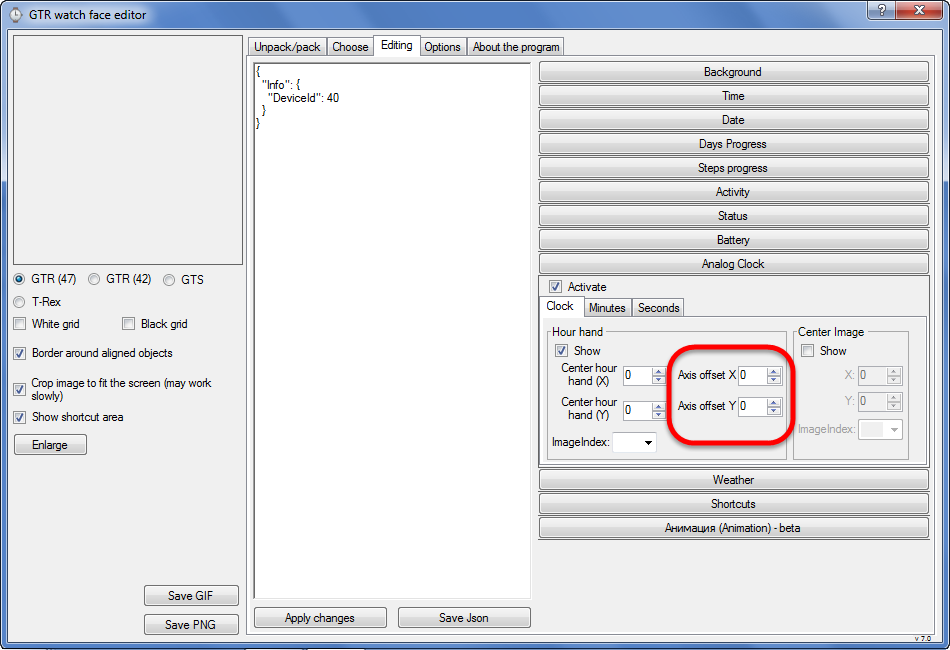
If I understand correctly, you need to move the clock hands from the center of the dial.
For this there is a parameter "Axis offset"
Immagine
Avatar utente
Lordalpine
WF maker
Messaggi: 62
Iscritto il: 09 ott 2019, 22:09
Località: Santo Tirso
Has thanked: 6 times
Been thanked: 35 times
Contatta:

Messaggio da Lordalpine »

[mention]rubiales41[/mention]


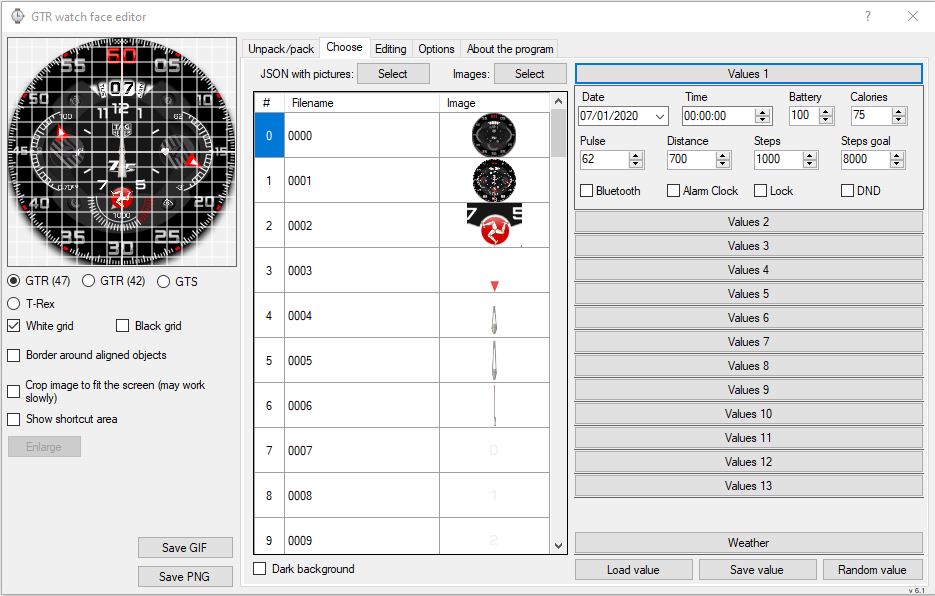
Immagine
Put time at Midnight / 00:00
-> Easiest position to adjust [ For other hand like battery // heartrate it work the same ]

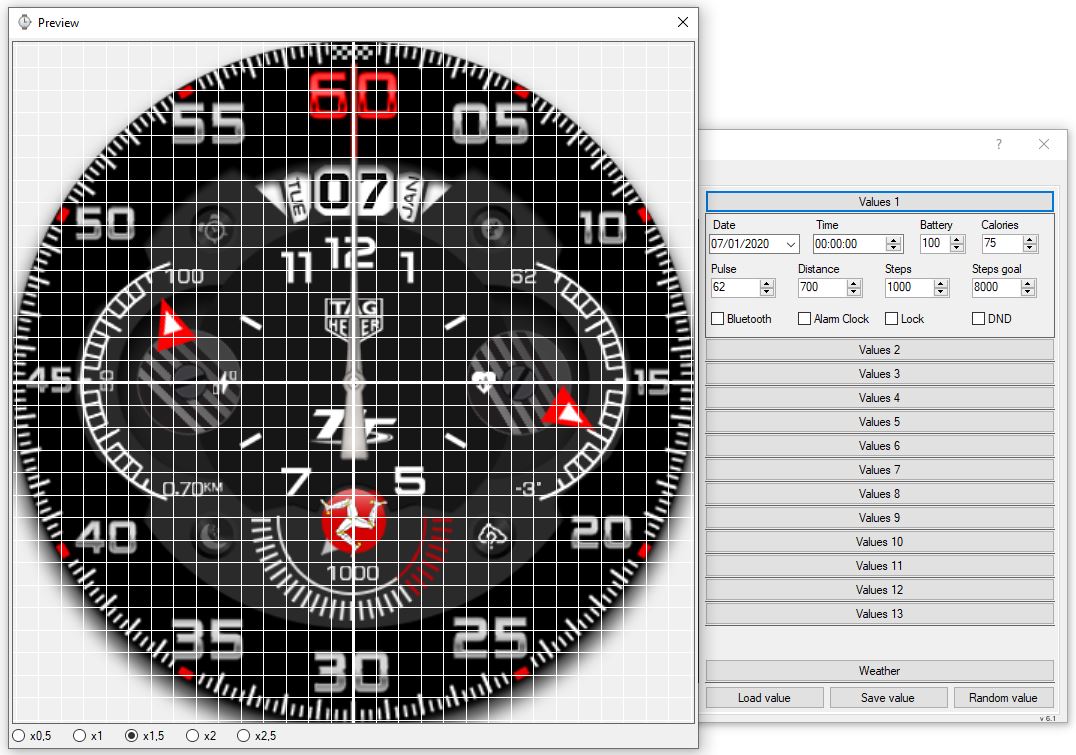
Select White Grid or black grid [ It's a nice help to make perfect Hand turn ]

Immagine
Center of the Hand perfectly centered

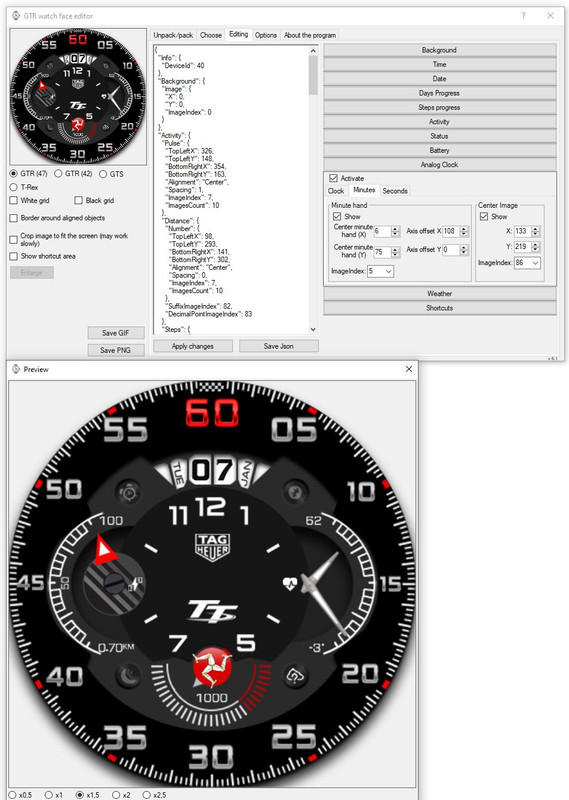
Immagine
Center Minute Hand [ X horizontal // Y Vertical ]
Axis Offset is where you want to put the hand [ Hour and Minute Here : X 133 // Y 219.... so my hour and minute hand are placed on the right ]

Immagine
Some advice : Look how much pixel is your center of hand...
Here It's a 3 pixel created from scratch[ So It's easy^^ ]


-> Center of background is 227 [ 454*454 background right ? ]
-> Put a pixel horizontal size with paired number [ 20 // 22 // 24 // 26 etc... ] and put the hand one pixel on the left on your PNG
or
-> Put a pixel horizontal size with unpaired number [ 21 // 23 // 25 // 27 etc ] and center the hand on your PNG

Just writing this because, when you want to make a face already existing for other device... the hand are not scaled, and when you resize them...
Center Hand pixel and all the pixel are splitted on two [ Then It's Harder to edit for colour variant for exemple ]
4/6/8/10 pixel Horizontal hand size will be 1 pixel on the left or 1 pixel on the right.... [ It will make you mad^^ ]

Or the Hand are not really really 100% centered when they turn...

The advice is to get Pixel align [ and not splitted in two on PNG ] and perfect align on face
[ and sometimes you loose time because you forget this ]
shirumitsu
WF maker
Messaggi: 15
Iscritto il: 07 lug 2019, 01:48
Località: Brazil
Has thanked: 2 times
Been thanked: 1 time
Contatta:

Messaggio da shirumitsu »

SashaCX75 ha scritto: 27 feb 2020, 14:56
@shirumitsu
The main message that indicates an error
ValueError: bad transparency mask
The solutions are listed here.
great! work here, but how create a animation? i have 4 frames
Avatar utente
SashaCX75
Messaggi: 820
Iscritto il: 26 ott 2019, 15:18
Località: Ukraine
Has thanked: 13 times
Been thanked: 1029 times
Contatta:

Messaggio da SashaCX75 »

shirumitsu ha scritto: 28 feb 2020, 10:33
great! work here, but how create a animation? i have 4 frames
The editor does not currently support animation.
Animation can be added manually by editing the json file. What the animation section should look like here.
rubiales41
WF maker
Messaggi: 8
Iscritto il: 08 dic 2019, 08:03
Has thanked: 5 times
Contatta:

Messaggio da rubiales41 »

hello, how is it done, or where can I find the time points and minutes to make analog clocks ?, thank you very much
Rispondi

Torna a “Watchfaces tools”

Chi c’è in linea

Visitano il forum: Nessuno e 2 ospiti