I have created a watchface for my AmazFit Bip that displays hours, minutes, and seconds in large digits.
Unfortunately, when I sync this watchface to my watch, only the top half of the digits for the seconds field update!
I've tried using the same size digits that are used for the hours and the minutes, and I'm now using reduced-size digits (80%). The same effect happens with both sizes.
Can anybody diagnose the problem, or suggest a fix?
-
- Administrator
-
-
Support Ukraine
If you experience any problems with the forum (it is not visible, there is no way to post messages, or some functionality does not work), please let us know. If you have problems with registration or you did not receive confirmation letter, let us know and we will activate your account manually.
If you get an "The submitted form was invalid. Try submitting again" error, delete cookies, then try again.
Seconds don't update completely
Moderators: Internal error, Watchmens
-
MikeMJ
Seconds don't update completely
- Attachments
-
- EN_MIKE_packed_static.png (4.36 KiB) Viewed 13960 times
-
- EN_MIKE_packed.bin
- (36.97 KiB) Downloaded 63 times
-
asoo
- Posts: 2217
- Joined: 03 Jan 2019, 01:48
- Location: ͼͽ Thailand ͼͽ
- Has thanked: 436 times
- Been thanked: 2137 times
- Contact:

if you use seconds image higher than 24x24 pix you must to use seconds hand to refresh the screen. Seconds image will show correctlyMikeMJ wrote: 18 Sep 2019, 22:19I have created a watchface for my AmazFit Bip that displays hours, minutes, and seconds in large digits.
Unfortunately, when I sync this watchface to my watch, only the top half of the digits for the seconds field update!
I've tried using the same size digits that are used for the hours and the minutes, and I'm now using reduced-size digits (80%). The same effect happens with both sizes.
Can anybody diagnose the problem, or suggest a fix?
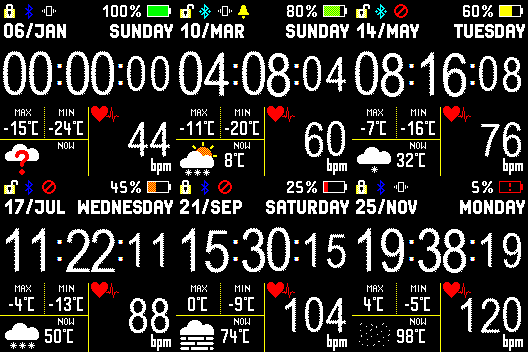 - Add seconds hand ( analog seconds )
 - change a little layout
------------------------------------------------------------------------------------------------------------------------------
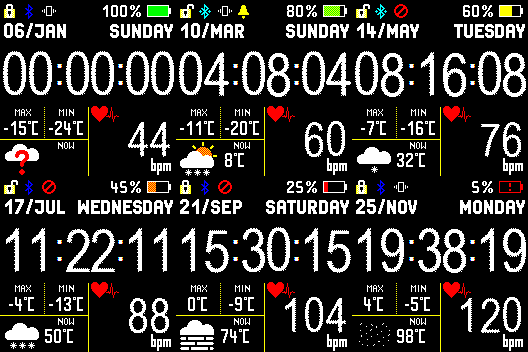 - Add seconds hand ( analog seconds )
 - change a little layout
- change size seconds same as hour / minute
ͼͽ To request please use the interrelated forum in action ͼͽ
Please do not PM to me for requests ported watchface.
Please do not PM to me for requests ported watchface.
Hello asoo
I have this problem when I the seconds tens and ones vertically.
Do you say I have to add this code (seconds hand) to fix it ???
"AnalogDialFace": {
"Seconds": {
"OnlyBorder": false,
"Color": "0xFF0000",
"Center": {
"X": 126,
"Y": 35
},
"Shape": [
{
"X": 1,
"Y": 1
},
{
"X": 1,
"Y": 1
},
{
"X": 1,
"Y": 1
},
{
"X": 1,
"Y": 1
}
]
}
}
Do you know where I can find an amazfit bit manual to create watchfaces, or a document with
all the parameters I can use in the json code ?
I'm reading different unpacket .bin watchfaces to see how it works, but maybe there is a manual
or something similar.
Thanks !
I have this problem when I the seconds tens and ones vertically.
Do you say I have to add this code (seconds hand) to fix it ???
"AnalogDialFace": {
"Seconds": {
"OnlyBorder": false,
"Color": "0xFF0000",
"Center": {
"X": 126,
"Y": 35
},
"Shape": [
{
"X": 1,
"Y": 1
},
{
"X": 1,
"Y": 1
},
{
"X": 1,
"Y": 1
},
{
"X": 1,
"Y": 1
}
]
}
}
Do you know where I can find an amazfit bit manual to create watchfaces, or a document with
all the parameters I can use in the json code ?
I'm reading different unpacket .bin watchfaces to see how it works, but maybe there is a manual
or something similar.
Thanks !
-
asoo
- Posts: 2217
- Joined: 03 Jan 2019, 01:48
- Location: ͼͽ Thailand ͼͽ
- Has thanked: 436 times
- Been thanked: 2137 times
- Contact:
1. If your seconds image do not higher than 24x24 you can use it with out "seconds hand" but seconds image higher than 24x24 pix you must to use " seconds hand " to refresh you screen .ev3c wrote: 19 Sep 2019, 20:45Hello asoo
1. I have this problem when I the seconds tens and ones vertically.
Do you say I have to add this code (seconds hand) to fix it ???
2. Do you know where I can find an amazfit bit manual to create watchfaces, or a document with
all the parameters I can use in the json code ?
I'm reading different unpacket .bin watchfaces to see how it works, but maybe there is a manual
or something similar.
Thanks !
2. I do not have a manual either. I learned the "Jason" command set from trial and error. I searched most of the information on this website for trial and error.
ͼͽ To request please use the interrelated forum in action ͼͽ
Please do not PM to me for requests ported watchface.
Please do not PM to me for requests ported watchface.
-
MikeMJ
]asoo,
Thank you very much for your help! I now have exactly the watch face I wanted.
Thank you very much for your help! I now have exactly the watch face I wanted.
Hi asoo.
I've the problem with small images 11x23 but vertically.
Then I've write the seconds hand in my json and now it works fine.
https://amazfitwatchfaces.com/search/bip/author/ev3c
tx!
I've the problem with small images 11x23 but vertically.
Then I've write the seconds hand in my json and now it works fine.
https://amazfitwatchfaces.com/search/bip/author/ev3c
tx!
Who is online
Users browsing this forum: No registered users and 3 guests