SupportUkraine
If you experience any problems with the forum (it is not visible, there is no way to post messages, or some functionality does not work), please let us know. If you have problems with registration or you did not receive confirmation letter, let us know and we will activate your account manually.
If you get an "The submitted form was invalid. Try submitting again" error, delete cookies, then try again.
Ad blocker detected: Our website is made possible by displaying online advertisements to our visitors. Please consider supporting us by disabling your ad blocker on our website.
Forum rules
When adding a new topic, use the template: Topic title [device name]
For example: Screen timeout question [Falcon]
All communication in this branch should only be in English.
Hi, I just got an Amazfit Balance 2, and enabled Developer Mode in Zepp.
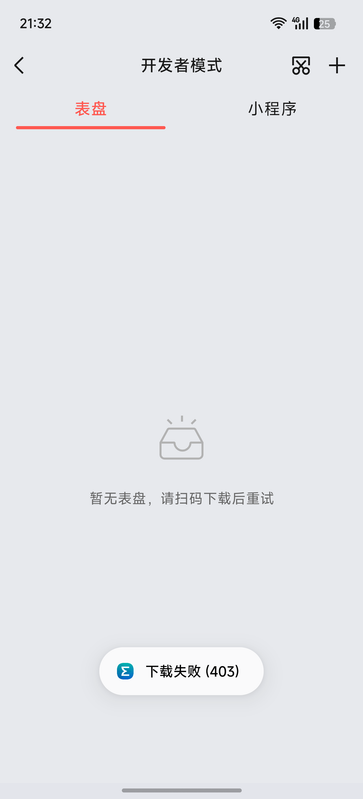
When I scanned the QR code from my phone's gallery, the Zepp app always shows “下载错误(403)” (Download failed (403)).
I tried several Balance 2 watch faces, and all have the same problem. Official watch faces download normally.
Is anyone else experiencing this? Any idea how to fix it?
Thanks!
Spoiler
I'm not sure which part "the QR code from my phone's gallery" that you said.
If you mean that you saved the QR code image from this website and planned to use it later,
and then encountered a problem installing it, that's because QR codes generated from the web have an expiration date. Once generated, you must scan and install it immediately; you cannot save it for later use.
I'm not sure which part "the QR code from my phone's gallery" that you said.
If you mean that you saved the QR code image from this website and planned to use it later,
and then encountered a problem installing it, that's because QR codes generated from the web have an expiration date. Once generated, you must scan and install it immediately; you cannot save it for later use.
Yeah, I did save the QR code image from the website, but I scanned it in the Zepp app almost immediately—it wasn't even sitting in my gallery for more than 30 seconds.
I'm not sure which part "the QR code from my phone's gallery" that you said.
If you mean that you saved the QR code image from this website and planned to use it later,
and then encountered a problem installing it, that's because QR codes generated from the web have an expiration date. Once generated, you must scan and install it immediately; you cannot save it for later use.
Yeah, I did save the QR code image from the website, but I scanned it in the Zepp app almost immediately—it wasn't even sitting in my gallery for more than 30 seconds.
Such a bummer.
If you scan the image you saved immediately, it should install successfully.
But as mentioned, saved images are not permanently valid, so scanning directly is recommended for best results.
I tried saving the QR code and scanning the image immediately. I was able to install on BipMAX without any problems, but after a while, the QR code became unusable for installation.
So if you can't install it, I'm not sure why either.
ͼͽ To request please use the interrelated forum in action ͼͽ
Please do not PM to me for requests ported watchface.
Users browsing this forum: No registered users and 1 guest
Cookie Consent
This website uses cookie or similar technologies, to enhance your browsing experience and provide personalised recommendations. By continuing to use our website, you agree to our Privacy Policy