• Amministratore
  •  
    Support Ukraine
    If you experience any problems with the forum (it is not visible, there is no way to post messages, or some functionality does not work), please let us know. If you have problems with registration or you did not receive confirmation letter, let us know and we will activate your account manually.
    If you get an "The submitted form was invalid. Try submitting again" error, delete cookies, then try again.
     

Amazfit watch face generator v3

This forum is designed to discuss and develop tools creating watch faces.

Moderatori: asoo, lvpokka, Internal error, Watchmens

Regole del forum
All communication in this branch should only be in English.
To discuss tools that are not in this section, use the “Watchfaces tools (discussion)” forum.
Rispondi
Avatar utente
TRK88PL
Messaggi: 116
Iscritto il: 17 gen 2023, 08:23
Località: Poland
Has thanked: 67 times
Been thanked: 40 times
Contatta:

Amazfit watch face generator v3

Messaggio da TRK88PL »

Hello guys,
this thread is a continuation of the previously created one – viewtopic.php?t=4649 – however, I wanted to highlight the information about the new version of the generator a bit more clearly.

-------
Amazfit Watch Face Generator v3

This update is quite significant... Here's the list of changes:

New themes:
In this version, I’ve added three new selectable color themes: black-orange, navy blue, and light red. For fans of visual flair and background animations, I’ve also added a star animation for the darker themes.

Configuration files:
You can save and load configuration files when using the analog hands and background sections. This way, you won’t have to recreate everything from scratch when making small adjustments or continuing your work later.

Analog hands:
You can now create simple analog watch hands, which can be customized to your liking using several available styles.

More background patterns and more:
Discover new creative customization options for your watch faces. You can now use many new patterns, background gradients, and even create backgrounds for analog hands – including minute and hour markers (you can also show numbers) arranged in a circle.

Buttons always in one place:
From now on, the buttons for saving files, refreshing the preview, and saving/loading configuration files are always located in the same place — on the left side within the current section preview — so you’ll always know where to find them.

Text around a circle:
You can now create text arranged along a circle, either clockwise or counterclockwise, in a variety of styles with adjustable spacing. In this version, I also improved the speed of angled text generation.

Improved performance:
The generator is now faster, more responsive, and easier to use than ever before. I’ve implemented many UI/UX improvements - new footer and much more.
New version it's already available at:

https://amazfitwatchfaces.com/gen/


The first time you visit the page, a window with the list of changes will pop up. Don’t worry – it will only appear once and you can easily close it.

If you like this version and truly appreciate the amount of time put into improving this generator, don’t forget about the link in the footer – you have the option to buy me a coffee. I sincerely thank you for any support!

Best regards,
Robert

Avatar utente
SashaCX75
Messaggi: 812
Iscritto il: 26 ott 2019, 15:18
Località: Ukraine
Has thanked: 13 times
Been thanked: 1007 times
Contatta:

Messaggio da SashaCX75 »

I thought you said you weren't planning to change the editor anymore. I'm glad that you continue to develop your project.
I would replace the linear angle slider in the circle text section with a circular slider (as it sets the angle for the shadow). And add the ability to change the background in the preview window (at least change dark / light).
But even without that the generator works well.
Avatar utente
TRK88PL
Messaggi: 116
Iscritto il: 17 gen 2023, 08:23
Località: Poland
Has thanked: 67 times
Been thanked: 40 times
Contatta:

Messaggio da TRK88PL »

That was my plan — to stop at version v2 — but when you start dreaming about code in your sleep, it probably means something is still missing…
Thanks for the tips! For me, the preview on a gray background is the most universal, though maybe I’ll change it someday.
As for the changes to the slider, I’ll try not to forget about them and include your suggestions in the future.
Right now, I really need to take a break… though I said the same thing last time too 😂
Avatar utente
rush2112
Messaggi: 91
Iscritto il: 02 apr 2022, 10:53
Località: Montreal, QC, Canada
Has thanked: 116 times
Been thanked: 10 times

Messaggio da rush2112 »

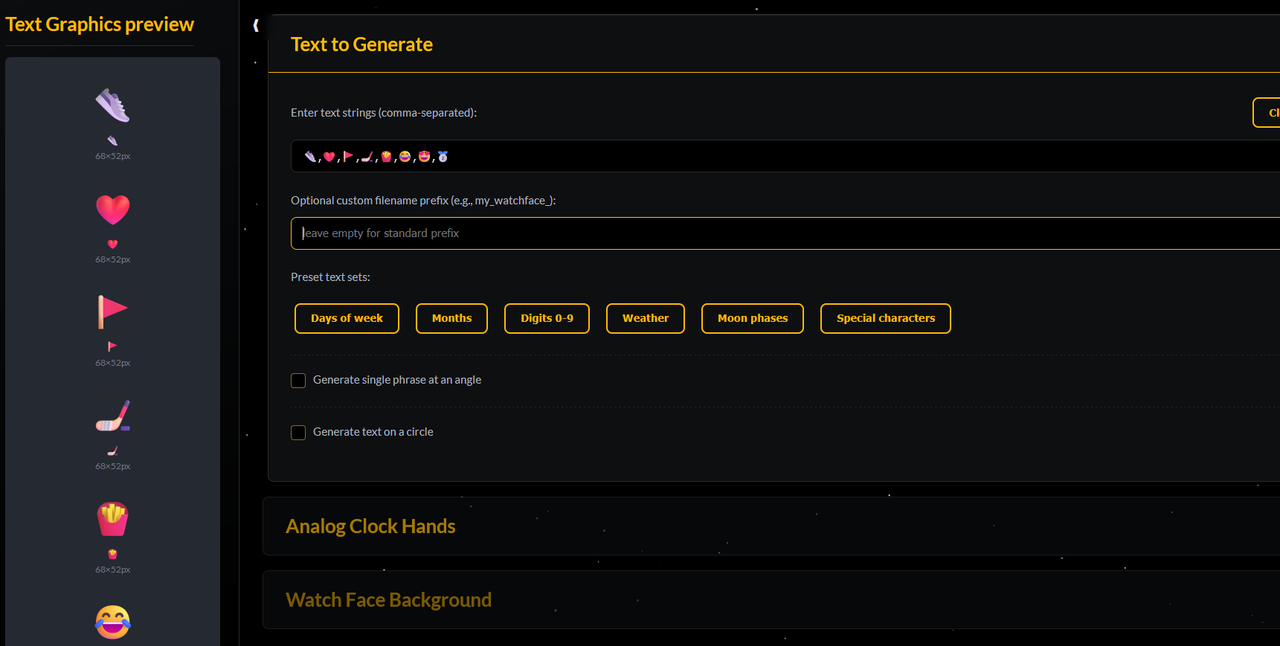
Here's a quick tip: When creating icons on the Amazfit Watch Face Generator v3, simply click here and enter your text strings separated by commas after pressing Win + (dot) on your keyboard. Voilà! :)
Immagine
Avatar utente
TRK88PL
Messaggi: 116
Iscritto il: 17 gen 2023, 08:23
Località: Poland
Has thanked: 67 times
Been thanked: 40 times
Contatta:

Messaggio da TRK88PL »

This is exactly the difference between my generator and some older solutions... Here, you can type anything and it will be generated. From what I’ve tested, Unicode should work too :) Either way, it's nice to see you're still checking what this generator can do and that someone is actually using it. I was afraid I made it for literally just two people — but turns out, that's not the case... :)
crelkin
Messaggi: 1
Iscritto il: 06 ott 2025, 22:59
Località: Minneapolis, MN USA
Contatta:

Messaggio da crelkin »

I'm new to this forum. What's the best way to start creating a watch face for my Active 2 (round)?
Avatar utente
SashaCX75
Messaggi: 812
Iscritto il: 26 ott 2019, 15:18
Località: Ukraine
Has thanked: 13 times
Been thanked: 1007 times
Contatta:

Messaggio da SashaCX75 »

Rispondi

Torna a “Watchfaces tools”

Chi c’è in linea

Visitano il forum: Nessuno e 1 ospite