Hi, this is my first time making a watch face
I made an edit to this watch face: https://amazfitwatchfaces.com/t-rex/view/14153
using this editor: viewtopic.php?t=2743
and when I uploaded it onto the app and tried to download it onto my watch, it just shows a completely black screen but provides the correct preview in the settings of the watch
Does anybody know how to fix this? All I did was edit one of the background images keeping the same name and everything, literally changed nothing apart from one image
And I've confirmed that the original watch face works
Help would be really appreciated!
-
- Administrator
-
-
Support Ukraine
If you experience any problems with the forum (it is not visible, there is no way to post messages, or some functionality does not work), please let us know. If you have problems with registration or you did not receive confirmation letter, let us know and we will activate your account manually.
If you get an "The submitted form was invalid. Try submitting again" error, delete cookies, then try again.
Watch face shows just black [T-rex ultra]
Forum rules
When adding a new topic, use the template: Topic title [device name]
For example: How to create watch face [T-Rex Pro]
All communication in this branch should only be in English.
When adding a new topic, use the template: Topic title [device name]
For example: How to create watch face [T-Rex Pro]
All communication in this branch should only be in English.
-
asoo
- Posts: 2179
- Joined: 03 Jan 2019, 01:48
- Location: ͼͽ Thailand ͼͽ
- Has thanked: 419 times
- Been thanked: 2104 times

I suggest you send the file you edited and have the problem so that the person who wants to help you can check it. You should get the right answer.Azrizzy wrote: 23 Feb 2025, 23:08Hi, this is my first time making a watch face
I made an edit to this watch face: https://amazfitwatchfaces.com/t-rex/view/14153
using this editor: viewtopic.php?t=2743
and when I uploaded it onto the app and tried to download it onto my watch, it just shows a completely black screen but provides the correct preview in the settings of the watch
Does anybody know how to fix this? All I did was edit one of the background images keeping the same name and everything, literally changed nothing apart from one image
And I've confirmed that the original watch face works
Help would be really appreciated!
I can only guess your problem as follows (because there is no file to check)
I am not sure if you edited the image and packed it with sasha's editor or you put it directly into the zip without going through the editor to pack it.
If you did not pack it with the editor and you want to put the edited image directly into the zip, the image must be converted to png in zeppOS format first.
viewtopic.php?p=19042#p19042
This is the only problem that I can guess about the problem that you have.
ͼͽ To request please use the interrelated forum in action ͼͽ
Please do not PM to me for requests ported watchface.
Please do not PM to me for requests ported watchface.
Ty for the response
I used Sasha's editor to unpack and repack it after editing it and it all seemed to work fine there
I did the convert image to ZeppOS format and tried putting that in there instead but it didn't seem to work
Heres the file after packing:
https://www.dropbox.com/scl/fi/l7yge36n ... e2bpq&dl=0
And here's the folder before packing:
https://www.dropbox.com/scl/fo/zn4kj153 ... gldgg&dl=0
I used Sasha's editor to unpack and repack it after editing it and it all seemed to work fine there
I did the convert image to ZeppOS format and tried putting that in there instead but it didn't seem to work
Heres the file after packing:
https://www.dropbox.com/scl/fi/l7yge36n ... e2bpq&dl=0
And here's the folder before packing:
https://www.dropbox.com/scl/fo/zn4kj153 ... gldgg&dl=0
-
asoo
- Posts: 2179
- Joined: 03 Jan 2019, 01:48
- Location: ͼͽ Thailand ͼͽ
- Has thanked: 419 times
- Been thanked: 2104 times
There are two problems that I found from the file you attached:Azrizzy wrote: 26 Feb 2025, 22:13Spoiler
Ty for the response
I used Sasha's editor to unpack and repack it after editing it and it all seemed to work fine there
I did the convert image to ZeppOS format and tried putting that in there instead but it didn't seem to work
Heres the file after packing:
https://www.dropbox.com/scl/fi/l7yge36n ... e2bpq&dl=0
And here's the folder before packing:
https://www.dropbox.com/scl/fo/zn4kj153 ... gldgg&dl=0
Spoiler
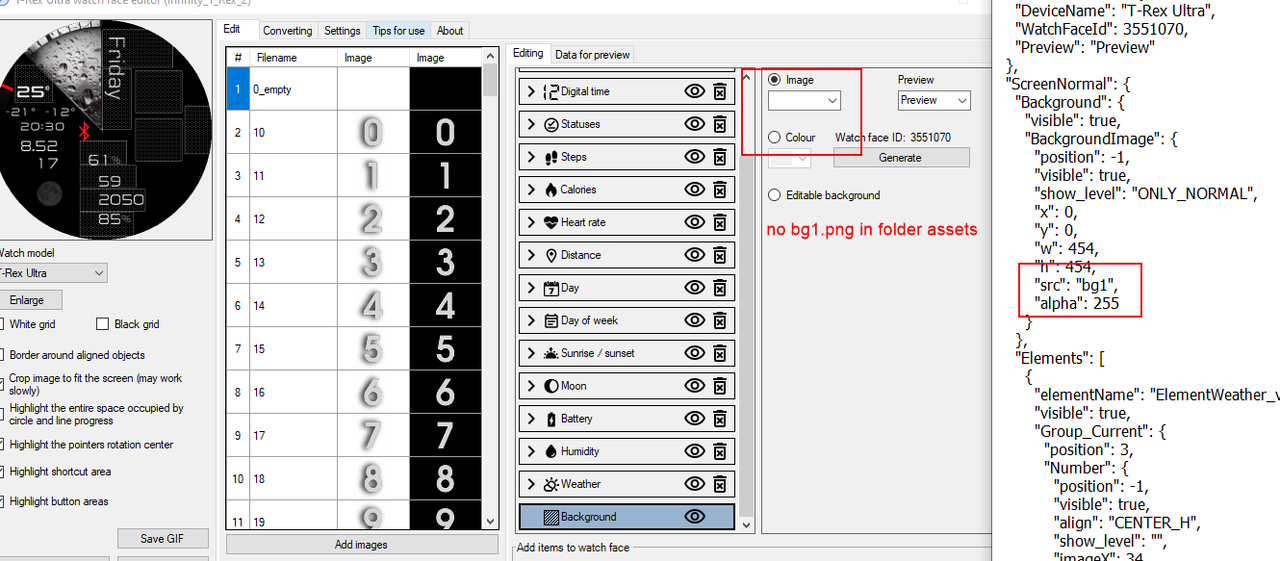
This section may cause the screen not to display or to display black. Other elements can still work, which I think is not the problem that causes the screen as you mentioned.
Spoiler
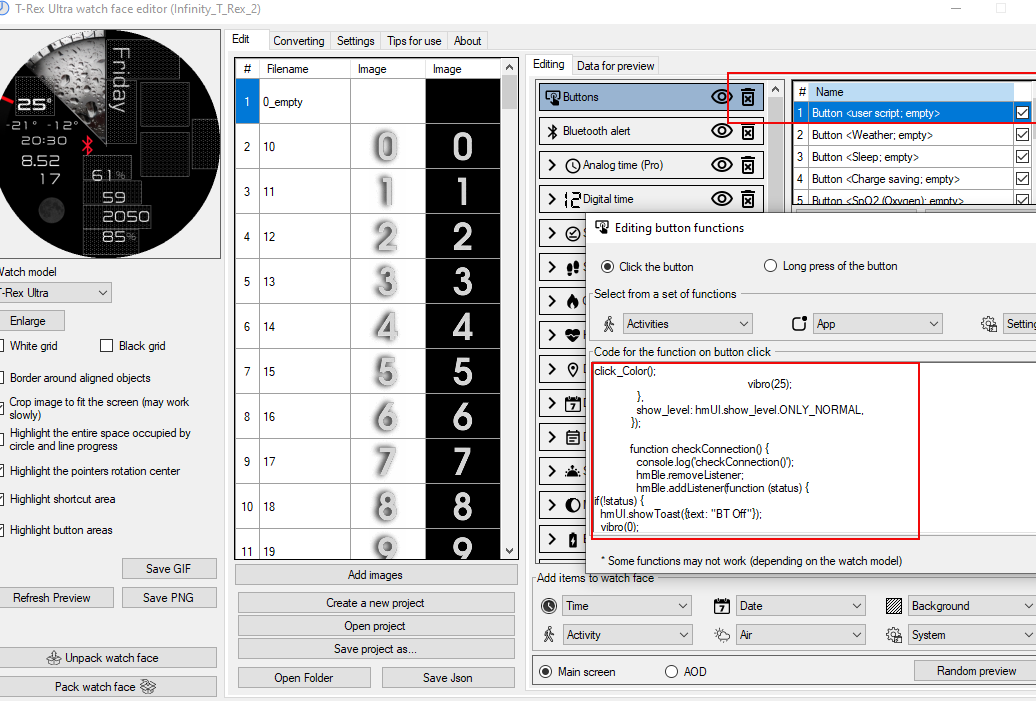
How to solve the problem
1. Select the correct image file for Blackground
2. Delete "button 1" because from what I see, those functions are unlikely to work properly. However, in this section, I will not check the script in button 1.
PS.
The problem is probably caused by unpacking the original file. I have checked it, and found owner uses "user script" and "user function" to create the watchface.
The owner added these scripts to index.js but they are not in the standard syntax on editor. Therefore, when unpacking, the "user script" and "user function" are lost after unpacking, Or it may cause the script after unpacking to be confused or not in the correct format.
Which may cause problems with the unpacked file.
This is the file that I have adjusted the syntax to meet the editor's standards and added the BG. sunset image from your dial. However, I have not edited or checked the script. it will be same original. If there is a problem with the script, please do it yourself.
Download
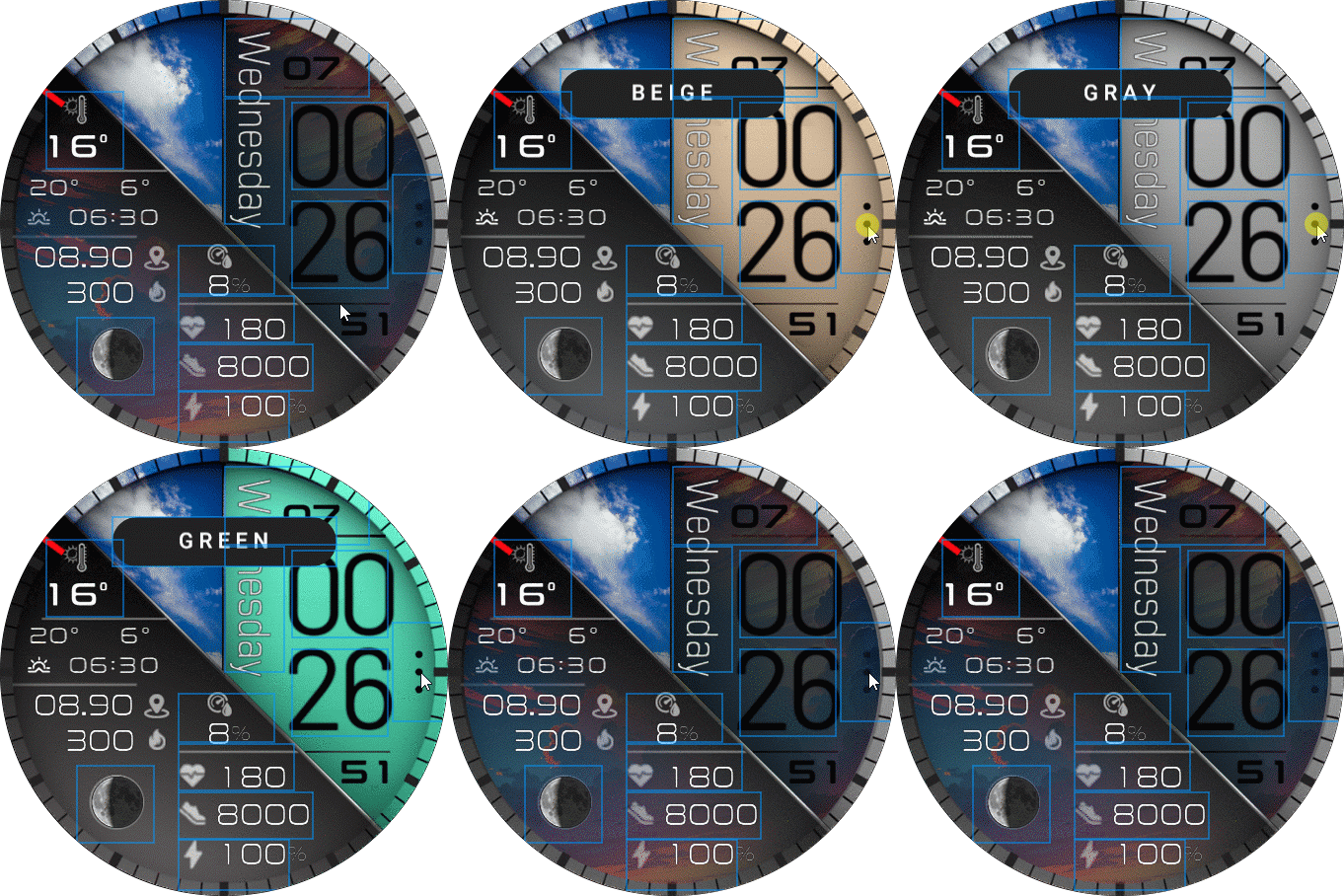
 Infinity_T_rex_ultra.zip
- (1.23 MiB) Downloaded 72 times
ͼͽ To request please use the interrelated forum in action ͼͽ
Please do not PM to me for requests ported watchface.
Please do not PM to me for requests ported watchface.
Who is online
Users browsing this forum: No registered users and 1 guest