• Administrator
  •  
    Support Ukraine
    If you experience any problems with the forum (it is not visible, there is no way to post messages, or some functionality does not work), please let us know. If you have problems with registration or you did not receive confirmation letter, let us know and we will activate your account manually.
    If you get an "The submitted form was invalid. Try submitting again" error, delete cookies, then try again.
     

Can you make it work my pointer with the color ?

This forum is designed to discuss existing tools for creating watch faces.

Moderators: asoo, lvpokka, Internal error, Watchmens

Forum rules
All communication in this branch should only be in English.
Post Reply
User avatar
rush2112
Posts: 91
Joined: 02 Apr 2022, 10:53
Location: Montreal, QC, Canada
Has thanked: 117 times
Been thanked: 10 times

Can you make it work my pointer with the color ?

Post by rush2112 »

Hello @asoo ,

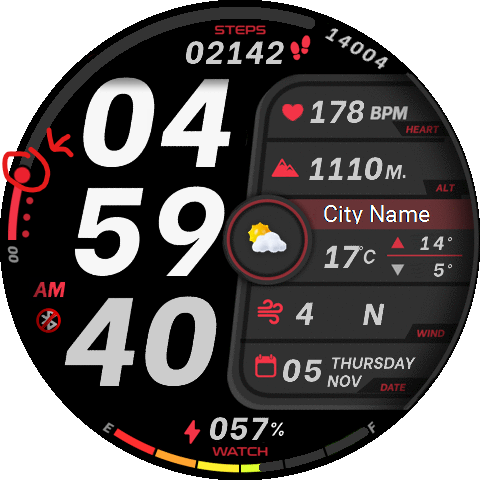
I'm having difficulty getting the color to work properly on my GTR3 Pro. The issue seems to be that the pointer is not aligning with the selected color. No matter what color I choose, the pointer does not change accordingly. Can you provide guidance on how to resolve this issue?
Thank you!
Spoiler
Image
ss_infometer_vi-642201-c0755c7ae6.zip
(407.61 KiB) Downloaded 74 times
User avatar
asoo
Posts: 2116
Joined: 03 Jan 2019, 01:48
Location: ͼͽ Thailand ͼͽ
Has thanked: 408 times
Been thanked: 2034 times

Post by asoo »

rush2112 wrote: 12 Feb 2025, 10:00
Hello @asoo ,

I'm having difficulty getting the color to work properly on my GTR3 Pro. The issue seems to be that the pointer is not aligning with the selected color. No matter what color I choose, the pointer does not change accordingly. Can you provide guidance on how to resolve this issue?
Thank you!
Spoiler
Image
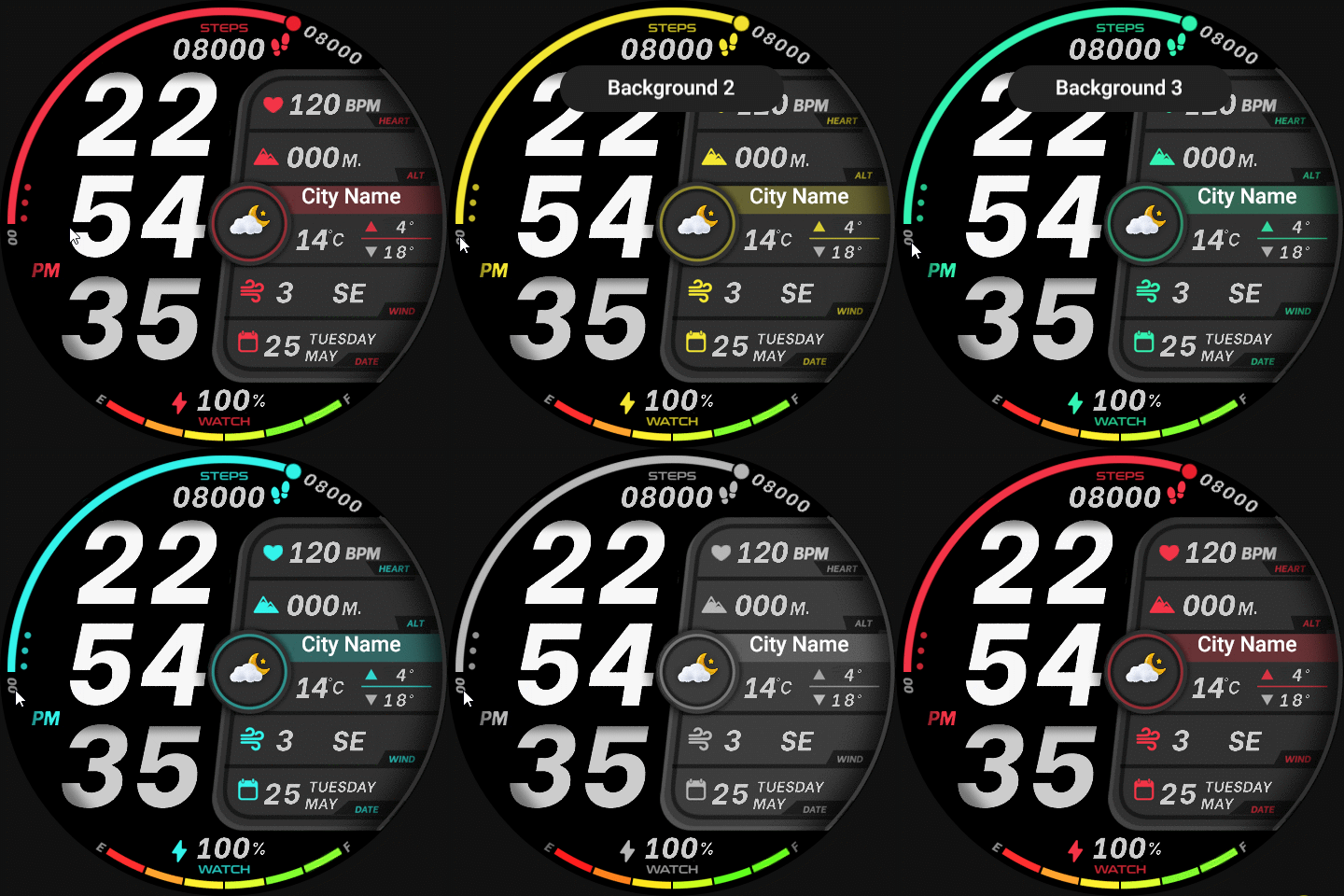
From checking, it seems that you did not use the script I did to create the dial, but you used the ability to click to change the Backgorund in the editor to create it. If that's the case, you would not be able to manage in the step pointer element change section, because the editor does not have that section.
So if you want to change the color of the step pointer, you can do it in 2 ways:
1. Use a custom script to manage it.
2. Insert the script in the original script that the editor created. ( in index.js )

In this case, I will do the second way to give you an example.
By inserting a script to toggle the step pointer, using the variable "backgroundindex" in the Change background section as the handler to change the color order of step pointer.

Code: Select all

normal_step_pointer_progress_img_pointer.setProperty(hmUI.prop.MORE, {
src: "Pointer" + parseInt(backgroundIndex + 1) + ".png",
center_x: 240,
center_y: 240,
x: 10,
y: 238,
start_angle: 270,
end_angle: 379,
invalid_visible: false,
type: hmUI.data_type.STEP,
show_level: hmUI.show_level.ONLY_NORMAL,
});
Insert this script into the
- switchBackground() function
- //SwitchBackground
in index.js that created by the editor.

This is an example of a watch face that does the insert script to change the step pointer color.
Image
ss_infometer_vi-GTR3PRO.zip
(407.66 KiB) Downloaded 71 times
ͼͽ To request please use the interrelated forum in action ͼͽ
Please do not PM to me for requests ported watchface.
User avatar
rush2112
Posts: 91
Joined: 02 Apr 2022, 10:53
Location: Montreal, QC, Canada
Has thanked: 117 times
Been thanked: 10 times

Post by rush2112 »

Thank you so much for generously sharing your time with me. I truly appreciate it! I look forward to delving into this more deeply over the weekend.

Marc ( Rush 2112 )
Post Reply

Return to “Watchfaces tools (discussion)”

Who is online

Users browsing this forum: No registered users and 0 guests