Hi!
I have problem. I have had this watch for a few days. I have already done 3 trainings. However, when the watch syncs to Strava, I can't see the map. I also did this procedure https://support.strava.com/hc/en-us/art ... and-Strava but no success. What else do I have to do so that the training map is visible in strava? Thank you for help and answer!
Greetings!
-
- Administrator
-
-
Support Ukraine
If you experience any problems with the forum (it is not visible, there is no way to post messages, or some functionality does not work), please let us know. If you have problems with registration or you did not receive confirmation letter, let us know and we will activate your account manually.
If you get an "The submitted form was invalid. Try submitting again" error, delete cookies, then try again.
I can't see the map in Strava [Amazfit T-Rex 2]
Forum rules
When adding a new topic, use the template: Topic title [device name]
For example: Screen timeout question [T-Rex Pro]
All communication in this branch should only be in English.
When adding a new topic, use the template: Topic title [device name]
For example: Screen timeout question [T-Rex Pro]
All communication in this branch should only be in English.
-
taw_bip
- WF maker
- Posts: 134
- Joined: 12 Apr 2018, 16:29
- Has thanked: 132 times
- Been thanked: 21 times
- Contact:
I've seen a lot of reports about problems with the connection between Zepp and Strava on Reddit. This might not apply to your case but it's worth a shot to try a manual import.
1. Go to the workout history in Zepp. Open the specific activity.
2. Press the ... menu in the top right corner and select export track
3. Choose GPX format.
4. Upload the file to strava.com/upload/select
1. Go to the workout history in Zepp. Open the specific activity.
2. Press the ... menu in the top right corner and select export track
3. Choose GPX format.
4. Upload the file to strava.com/upload/select
Também estou com o mesmo problema.
No primeiro exercício que fiz e sincronizei com o Strava, conseguia visualizar o mapa, porém havia erros, então tive que baixar o arquivo GPX para upar no Strava. Em diante, os envios nunca consigo ver os mapas, ja mandei email para o suporte da AMAZFIT, estou aguardando um retorno.
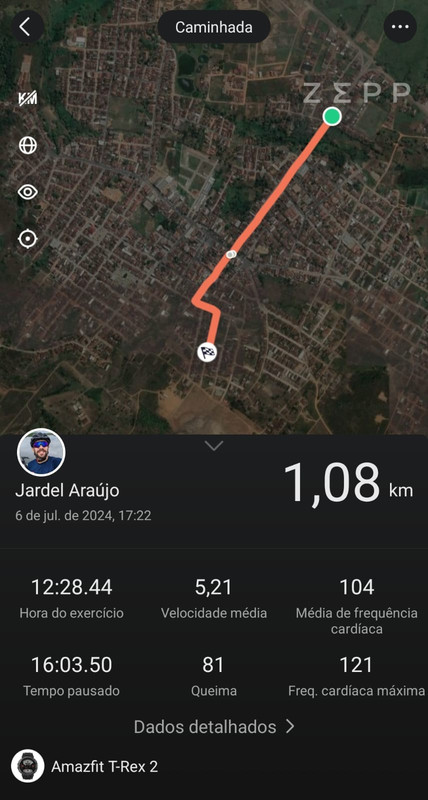
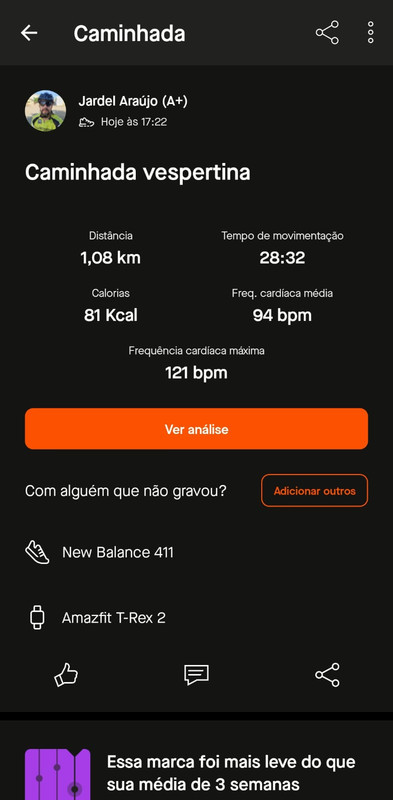
No primeiro exercício que fiz e sincronizei com o Strava, conseguia visualizar o mapa, porém havia erros, então tive que baixar o arquivo GPX para upar no Strava. Em diante, os envios nunca consigo ver os mapas, ja mandei email para o suporte da AMAZFIT, estou aguardando um retorno.
Spoiler
-
Cicero_Junior_
- Posts: 1
- Joined: 05 Sep 2024, 00:38
- Location: Rio de Janeiro
- Has thanked: 1 time
- Contact:
I spent the whole day trying to figure out the problem. I have a T-rex Ultra, and I discovered that the T-rex Ultra map file format is not compatible with Strava. For the map to appear on Strava, you must save the ZEEP activity in GPX format and go to Strava and manually add that activity. Only then will it appear on Strava. Because the T-rex map is in KML format, Strava does not recognize it. I was only able to solve it by doing this process.
Who is online
Users browsing this forum: No registered users and 1 guest